npm package discovery and stats viewer.

Discover Tips

  • General search

    [free text search, go nuts!]

  • Package details

    pkg:[package-name]

  • User packages

    @[username]

Sponsor

Optimize Toolset

I’ve always been into building performant and accessible sites, but lately I’ve been taking it extremely seriously. So much so that I’ve been building a tool to help me optimize and monitor the sites that I build to make sure that I’m making an attempt to offer the best experience to those who visit them. If you’re into performant, accessible and SEO friendly sites, you might like it too! You can check it out at Optimize Toolset.

About

Hi, 👋, I’m Ryan Hefner  and I built this site for me, and you! The goal of this site was to provide an easy way for me to check the stats on my npm packages, both for prioritizing issues and updates, and to give me a little kick in the pants to keep up on stuff.

As I was building it, I realized that I was actually using the tool to build the tool, and figured I might as well put this out there and hopefully others will find it to be a fast and useful way to search and browse npm packages as I have.

If you’re interested in other things I’m working on, follow me on Twitter or check out the open source projects I’ve been publishing on GitHub.

I am also working on a Twitter bot for this site to tweet the most popular, newest, random packages from npm. Please follow that account now and it will start sending out packages soon–ish.

Open Software & Tools

This site wouldn’t be possible without the immense generosity and tireless efforts from the people who make contributions to the world and share their work via open source initiatives. Thank you 🙏

© 2026 – Pkg Stats / Ryan Hefner

@firstpick/pi-extension-stats

v0.2.7

Published

Token and cost usage analytics command for Pi session history.

Readme

pi-extension-stats

Token and cost analytics for Pi session history.

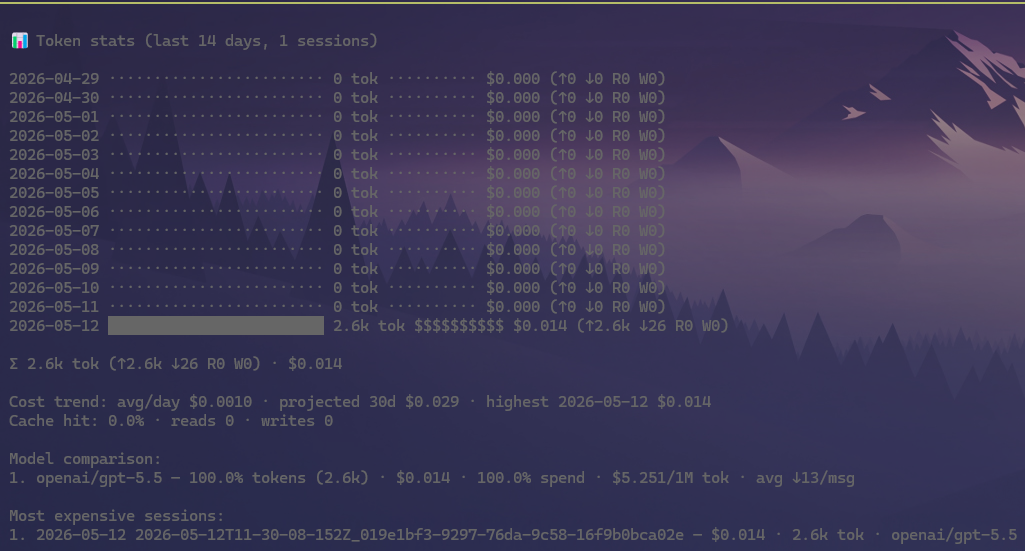
Token stats dashboard

What it does

  • Parses local Pi session .jsonl files for the current workspace.
  • Aggregates usage by UTC day.
  • Displays compact daily token bars and cost bars with totals.
  • Shows input/output/cache breakdown, estimated initial prompt input (PI: X tok) with source split-up, cache hit rate, estimated cache savings, cost burn rate, and top model usage.
  • Highlights highest-cost day, projected 30-day cost, most expensive sessions, and model cost efficiency.

Install

pi install npm:@firstpick/pi-extension-stats

Configuration

No required configuration.

Commands

  • /stats [days|all] — show token usage dashboard (default: last 14 days).
  • /stats tokens — show current context token breakdown by source/type.
  • /stats-pi — show export-backed estimated initial prompt input token breakdown. It creates a temporary Pi HTML export, decodes its embedded session data, then counts Pi's system prompt text, active provider-level tool schemas, framing overhead, and optional historical calibration (falling back to live context data if export is unavailable).
  • /stats-pi detailed — add a concise detail view of the exported initial prompt snapshot: active tool schemas, available-tool prompt entries, skills, context files, metadata, and estimate components.
  • /calibrate — start an isolated calibration session with a fixed probe prompt, then update /stats-pi and the footer PI: X tok estimate from the first assistant response usage. /calibrate current reuses the current branch if it already has a suitable first-turn usage sample.
  • /stats-last [days|all] — show non-zero daily usage graph.
  • /stats-most-expense [days|all] — show most expensive sessions.
  • /stats-model-compare [days|all] — show model token/cost comparison.
  • /stats-cost-trend [days|all] — show cost trend and projections.
  • /stats-cache [days|all] — show cache efficiency and token mix.

Prompt input estimate

/stats-pi and the PI: ~X tok value in /stats estimate the full initial model input, not just raw prompt text. /stats-pi prefers Pi's own HTML export data for the exact exported system prompt and active tool definitions; it falls back to live context data when a temporary export cannot be produced, so it can still be run before any LLM prompt in a fresh session.

The token calculation is intentionally provider-agnostic:

promptTextTokens = weighted text estimate of the system prompt (from exported session data when available)
toolSchemaTokens = weighted text estimate of active tool definitions JSON (from exported session data when available)
framingTokens = conservative message/request framing allowance
baseEstimate = promptTextTokens + toolSchemaTokens + framingTokens
estimatedInitialInput = baseEstimate × historicalCalibrationMultiplier

The historical multiplier is learned opportunistically from future sessions by comparing the pre-call estimate with the provider-reported first assistant usage.input + usage.cacheRead + usage.cacheWrite after subtracting the first user prompt estimate. /calibrate performs the same calculation on demand by opening an isolated session and sending a fixed probe prompt; /calibrate current can reuse the current branch once its first assistant response has usage data. Without samples, /stats-pi reports an uncalibrated estimate and a conservative range. Provider-reported usage in Pi session JSONL remains the authoritative post-call value.

Tools

None.

Example view

/stats 7
Token usage — last 7 days

May 06  in 18k  out 4k   $0.11  ████
May 07  in 42k  out 9k   $0.29  █████████
May 08  in 12k  out 2k   $0.06  ██

Total: 72k input, 15k output, $0.46
Cache hit rate: 38%

Use it to understand which days, sessions, and models are driving token volume and cost.