
@firstpick/pi-extension-todo-progress
v0.2.8
Published
Aggressive automatic todo progress widget for multi-goal prompts in Pi.

Maintainers
 firstpick
Readme
@firstpick/pi-extension-todo-progress
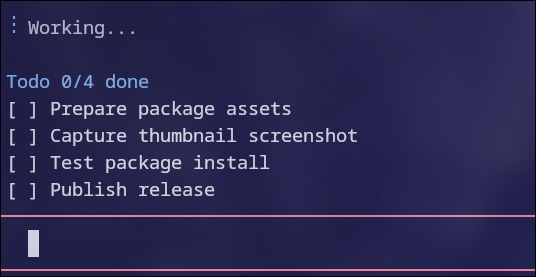
Auto todo/progress tracking for multi-step Pi agent work.
What it does
- Requires the agent to formulate a separate one-line
Goal: ...before creating the first todo list or starting work. - Instructs the agent to create concise, agent-authored todos for multi-step work.
- Instructs the agent to emit the current checklist before each execution step/tool call so the widget is updated ahead of the step.
- Tracks checklist markers from assistant messages instead of copying raw user prompt lines.
- Accepts markdown checklist lines exactly like
- [ ] item,- [-] item, or- [x] item. - Also accepts bare markers like
[ ] itemas a fallback for robustness. - Strips matched checklist lines from assistant messages after mirroring them into the widget, keeping the widget as the canonical todo view.
- Injects the current goal/list back into model context before follow-up steps, so stripped lists are still available to the agent.
- Resets goal/list state when a user message is actually delivered, so queued follow-ups cannot leak into the active run as steering context.
- Keeps a completed list visible long enough for the agent to check whether the goal is reached.
- If the goal is reached, the agent should produce final output; if not, it should create a new short checklist before continuing.
- Supports multiple todo lists during one agent run; each new list replaces the previous widget list.
- Clears the widget automatically after a normal final assistant response, so stale partial lists do not remain visible after successful runs.
- Shows up to 5 rows and supports manual scrolling/hiding.
Install
pi install npm:@firstpick/pi-extension-todo-progressConfiguration
No required configuration.
Commands
/todo-progress-status— show whether the widget is loaded, visible, and tracking a goal/list.
Shortcuts
Ctrl+Alt+X— hide current list.Ctrl+Alt+J/Ctrl+Alt+K— scroll todo list down/up.
Tools
None.
Example flow
Goal: Update the README and verify the package still loads.
Todo 1/3 done, 1 partial
[x] Inspect package structure
[-] Update README behavior notes
[ ] Run focused checks
When all items are done, the widget title changes to a goal-check state:
Goal: Update the README and verify the package still loads.
Todo 3/3 done · check goal
[x] Inspect package structure
[x] Update README behavior notes
[x] Run focused checks
At that point the agent should either produce the final answer or create the next short checklist if the goal is not yet reached.
Active widget state is persisted in the Pi session, so interrupted/failed/tool-use runs can survive terminal redraws, tab switches, reloads, and resumes until a normal final assistant response, a newly delivered user prompt, or Ctrl+Alt+X clears it.