
@fluendo/vue
v1.3.0
Published
Fluendo utils vue + typescript


Readme


Introduccion
To use this library it is recommended to work with a project using Vue Cli 3 with TypeScript:
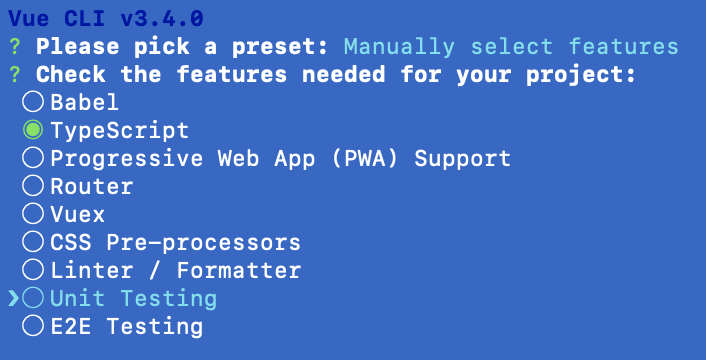
When the project has been installed we will install:
npm install @fluendo/vue -DAnd set VueFluendo in your project:
import Vue from 'vue';
import VueFluendo from '@fluendo/vue';

Vue.use(VueFluendo);
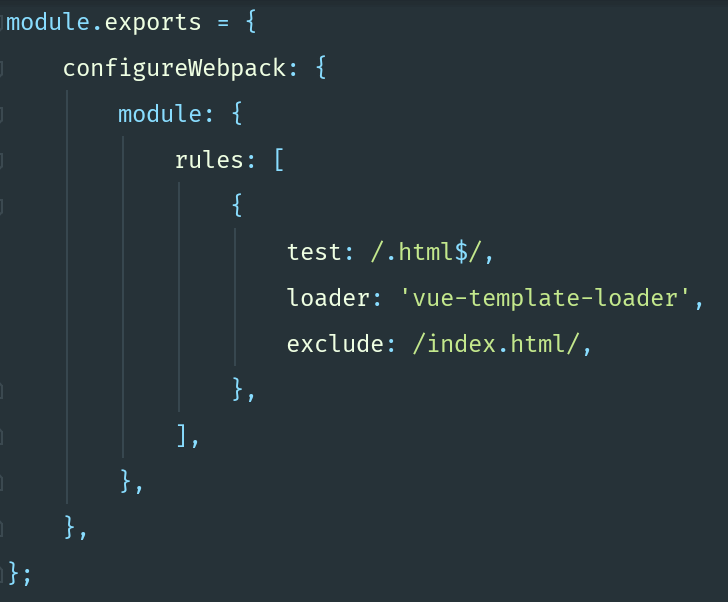
We will create the file vue.config.js in the root and add the configuration to compile the html files.
Usage
With this library we have tried to offer certain utilities to projects that work with Vue + TypeScript.
Components
@FluendoComponent() It is an extension @Component of vue-property-decorator, but in this case will allow us to create an html tag for our component so we can call our component from any html without having to put the name of the class. In this decorator we will have several configuration options:
| attribute | descripcion |
|---|---|
|selector| This is the html tag that we can use later to call the component|
|withRender| Here we will put the relative path of our files *.html,*.scss from the folder src |
|declarations| The classes of the directives, pipes, components that we want to use in our component |
|Injector| The classes that we want to inject into our component |
Create hello.component.ts:
import { FluendoComponent } from '@fluendo/vue';

@FluendoComponent({
    selector: 'flu-hello',
    withRender: '@/hello.component',
})

export class HelloComponent {}
And we can use this component in this way:
import { FluendoComponent } from '@fluendo/vue';

import { HelloComponent } from './hello.component';

@FluendoComponent({
    withRender: '@/home.component',
    declarations: [
        HelloComponent,
    ],
})

export class HomeComponent {}
And in the html:
<div>
    <h1>Home</h1>
    <flu-hello />
</div>
Injectors
@FluendoInjector() is the decorator that will allow us to use our provider in any of our components where it is initialized.
In the file hello.service.ts we will create our injector:
import { FluendoInjector } from '@fluend/vue';

@FluendoInjector({
  name: 'service'
})

export class HelloService {
    public say() {
        console.info('hello world');
    }
}
After having initialized said injector we will have to use it in a component
import { FluendoComponent } from '@fluendo/vue';

import { HelloService } from './hello.service';

@FluendoComponent({
    selector: 'flu-hello',
    withRender: '@/hello.component',
    providers: [
        HelloService,
    ],
})

export class HelloComponent {
    constructor(private readonly service: HelloService) {}

    public mounted(): void {
        this.service.say(); // hello world
    }
}
It is important to use the correct name with the decorator @Provide, if the name of the class is HelloService the name of the provide is helloService.
Pipes
@FluendoPipe() is the decorator that will allow us to create vue filters.
In the file capitalize.pipe.ts you create our filter:
import { FluendoPipe, IFluendoPipe } from '@fluendo/vue';

@FluendoPipe({
    name: 'capitalize',
})

export class CapitalizePipe implements IFluendoPipe {
    public action(word: string): string {
        // ...
    }
}
And to use this filter should be defined in the decorator @FluendoComponent(), in such a way:
import { FluendoComponent } from '@fluendo/vue';

import { CapitalizePipe } from './capitealize.pipe';

@FluendoComponent({
    selector: 'flu-hello',
    withRender: '@/hello.component',
    declarations: [
        CapitalizePipe,
    ],
})

export class HelloComponent {}
And in the Html:
<div>
    <span>{{ 'hello' | capitalize }}</span>
</div>
Directives
@FluendoDirective() is the decorator that will allow us to create attributes with certain concrete action.
In the file hello.directive.ts:
import { FluendoDirective, IFluendoDirective } from '@fluendo/vue';

@FluendoDirective({
    selector: 'hello',
})

export class HelloDirective implement IFluendoDirective {
    public inserted(el: HTMLElement, node: any): void {
        // ...
    }
}
And we will use it in such a way:
import { FluendoComponent } from '@fluendo/vue';

import { HelloDirective } from './hello.directive';

@FluendoComponent({
    selector: 'flu-hello',
    withRender: '@/hello.component',
    declarations: [
        HelloDirective,
    ],
})

export class HelloComponent {}
And in the Html:
<div>
    <span v-hello>hello</span>
</div>