
@focus-reactive/payload-plugin-audit-log
v1.0.1
Published
Audit log for Payload CMS: document, global and auth changes, with API keys and AI agents (MCP) as actors, and CSV / NDJSON export


Readme
@focus-reactive/payload-plugin-audit-log
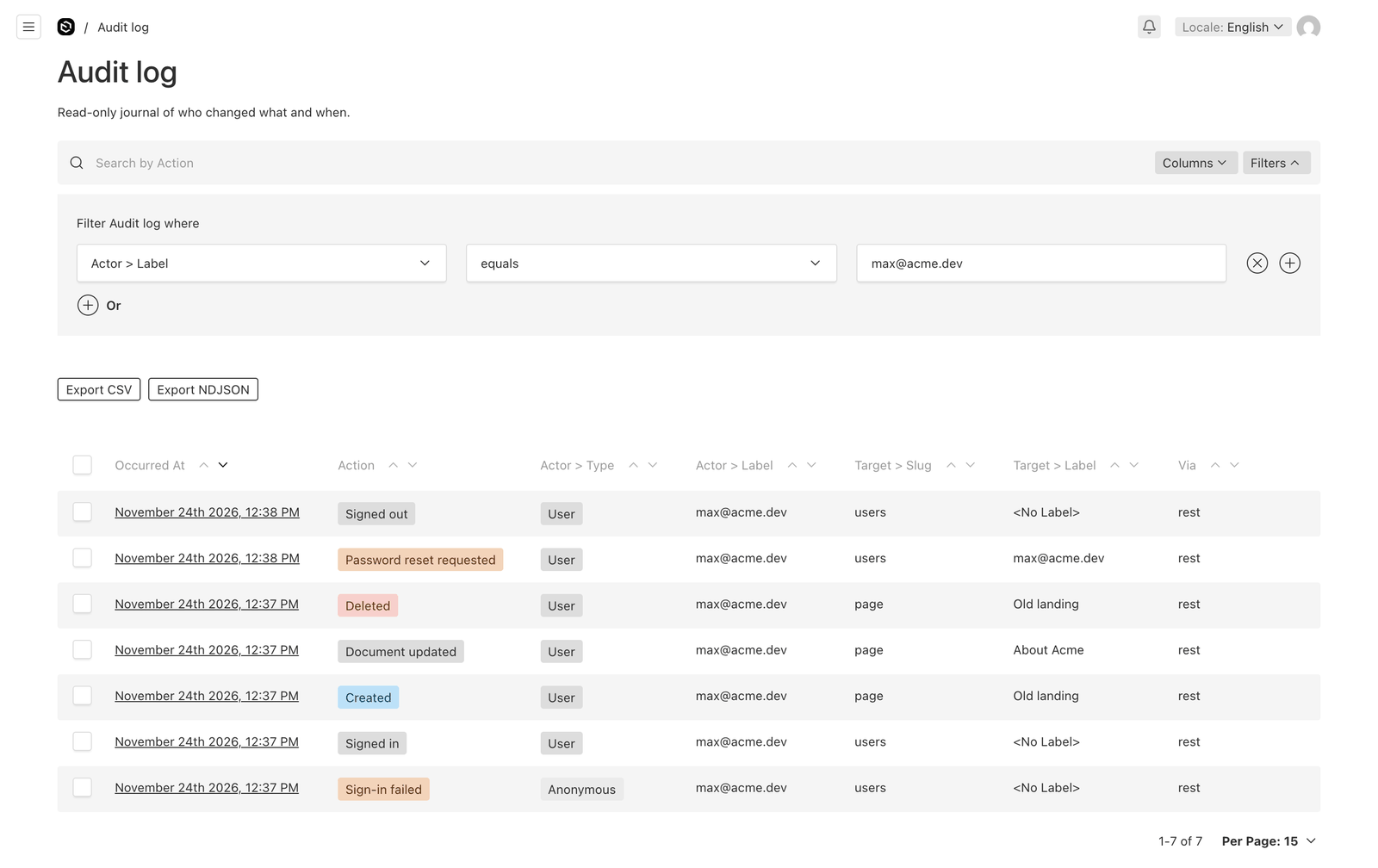
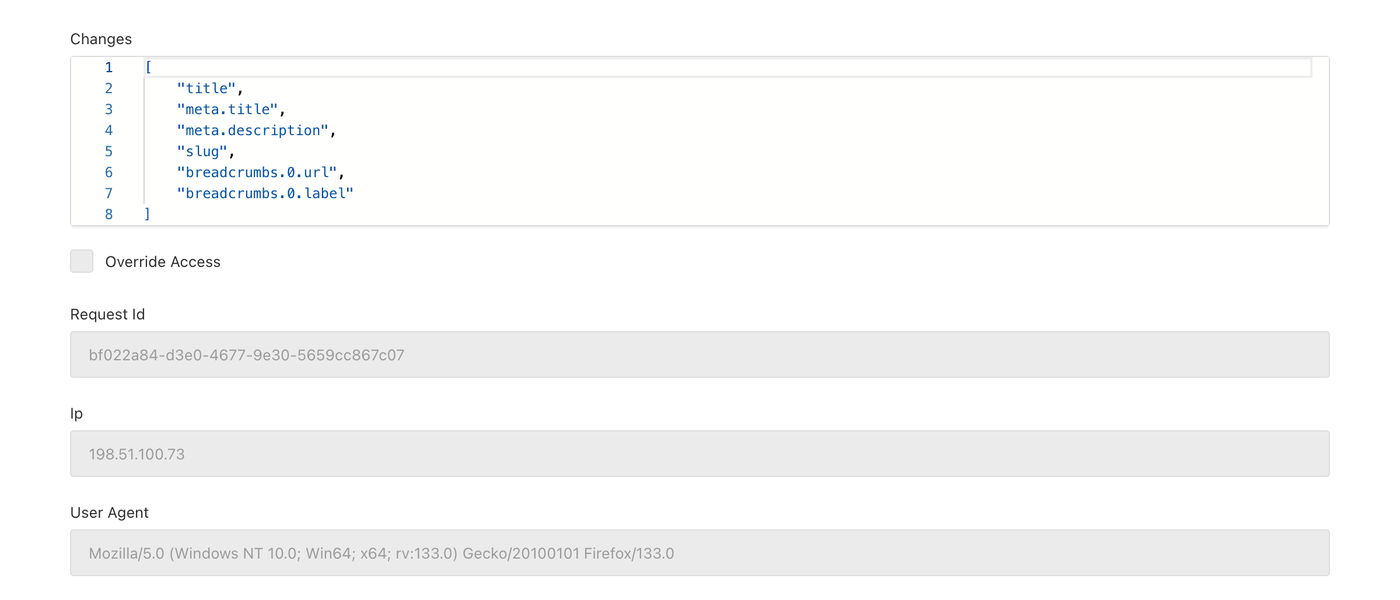
Audit log for Payload CMS v3: a read-only collection of who changed which document or global and when, plus sign-ins, API keys and AI agents, with CSV / NDJSON export. Only the paths of changed fields are stored, never their values.
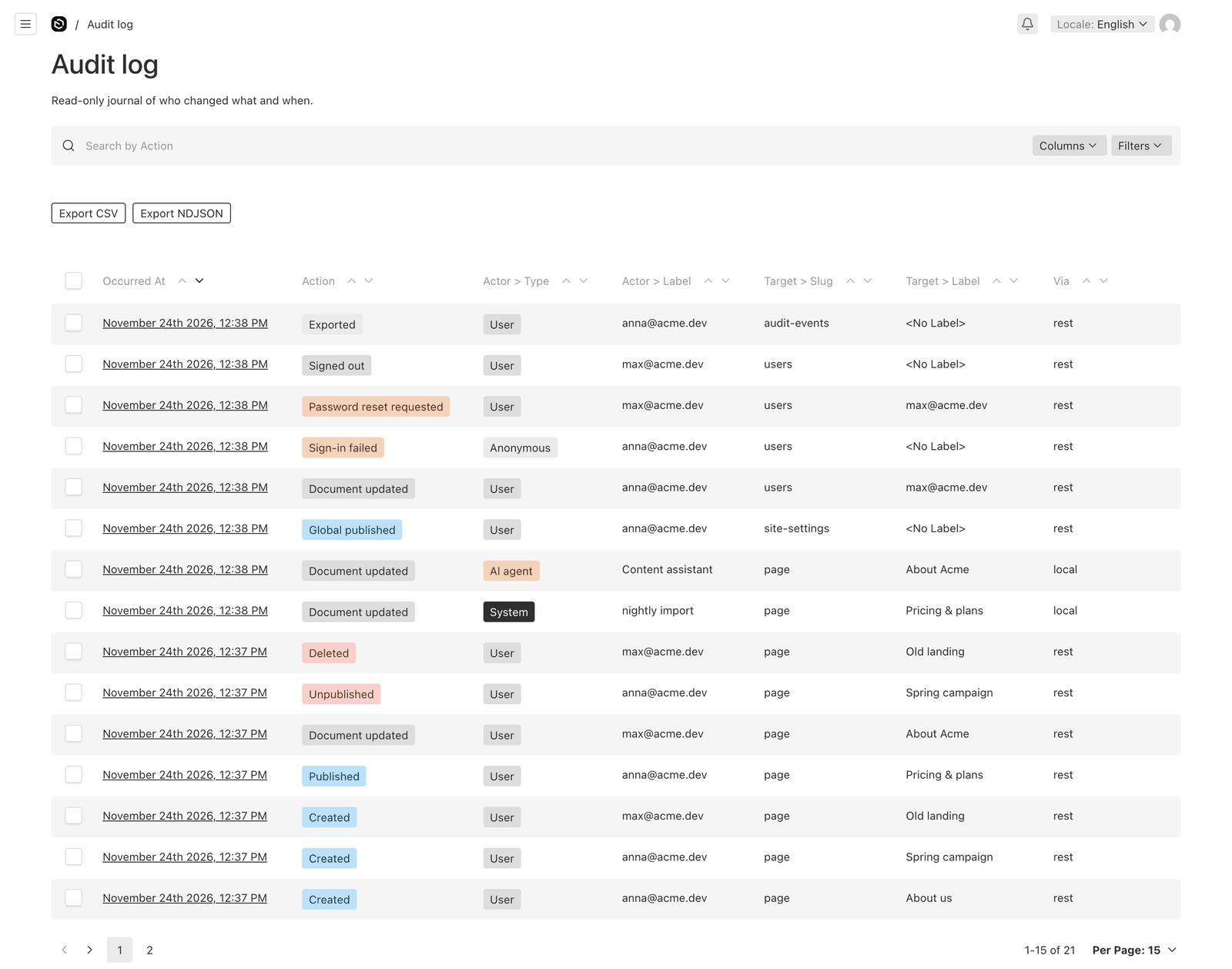
| Filter by actor, action or target | Changed field paths, IP and User-Agent |
| --- | --- |
|  |
 |
AI Integration Prompt
Copy and paste this prompt into your AI assistant (Cursor, Claude, etc.) to integrate the plugin into an existing Payload project.
Add an audit log to my Payload CMS v3 project with @focus-reactive/payload-plugin-audit-log.

What it does: adds a read-only collection "audit-events" (admin group "Settings") that records document and
global changes (create, update, delete, publish, unpublish, version restore), sign-ins, sign-outs, failed
sign-ins and password resets. Each event stores the actor (user, API key, MCP agent, system, anonymous), the
target, the paths of changed fields (never values), IP and User-Agent. Nobody can edit or delete events.

1. Install: bun add @focus-reactive/payload-plugin-audit-log
   (payload and @payloadcms/ui 3.90+, react 19; Postgres, SQLite or MongoDB)

2. In payload.config.ts, add it after plugins that create collections or globals:

   import { auditLogPlugin } from '@focus-reactive/payload-plugin-audit-log'

   auditLogPlugin({
     access: { read: ({ req }) => Boolean(req.user) }, // who can read and export; restrict to admins
     retention: { days: 365 },                          // optional, default: keep forever
   })

   With @payloadcms/plugin-mcp (order: 10), set a higher order so MCP keys and agents are audited:
   Object.assign(auditLogPlugin({ ... }), { order: 11 })

3. Run: payload generate:importmap
   On Postgres / SQLite also: payload migrate:create add_audit_log && payload migrate

4. Scripts and agents: wrap Local API calls to name the actor, otherwise they are logged as "system":

   import { withAuditActor } from '@focus-reactive/payload-plugin-audit-log'
   await withAuditActor({ type: 'system', label: 'nightly import' }, () => payload.update({ ... }))

5. With retention, make sure jobs run (jobs.autoRun, or a cron calling payload.jobs.run()).

Check: edit and publish a document, sign in with a wrong password, then open Settings → Audit log and
export CSV. Custom events (for example SSO logins): see logAuditEvent in the plugin README.
Install
bun add @focus-reactive/payload-plugin-audit-logimport { buildConfig } from "payload";
import { auditLogPlugin } from "@focus-reactive/payload-plugin-audit-log";
export default buildConfig({
plugins: [auditLogPlugin({ retention: { days: 365 } })],
});- Requires
payloadand@payloadcms/ui3.90+,react19. - Databases: Postgres, SQLite, MongoDB. On Postgres / SQLite run
payload migrate:createandpayload migrateafter installing and after upgrades that change select options. - Run
payload generate:importmapfor the export buttons. - Place the plugin after plugins that add collections or globals.
@payloadcms/plugin-mcphasorder: 10, so give the audit plugin a higherorderto audit its API keys.
Events
| Action | When |
| --- | --- |
| doc.create | A document is created or duplicated |
| doc.update | A document is changed, moved to trash or restored from trash |
| doc.delete | A document is deleted permanently |
| doc.publish / doc.unpublish | A document's status changes to / from published |
| doc.restore | A version is restored |
| global.update / global.publish / global.unpublish | A global is changed, published or unpublished |
| auth.login / auth.logout | Login or logout through Payload |
| auth.login_failed | Failed REST or GraphQL login (metadata.reason: invalid_credentials or locked) |
| auth.password_reset_requested / auth.password_reset | Forgot-password and reset-password |
| audit.export / audit.retention_purge | The log was exported or purged |
- Only Payload operations and hooks are recorded. Raw
payload.dbcalls and SQL get no events; seeds and migrations get none of their own. Local API calls without a user are recorded with thesystemactor. - Role changes and API key changes are plain
doc.update/doc.create/doc.deleteevents of the user or key collection. - Autosave draft saves are not logged.
changeslists changed field paths. Array and block rows are matched by id: an edited row givesitems.2.title, an added rowitems.2, a removed or reordered rowitems. JSON and rich text fields are reported by their own path.- Event fields:
occurredAt,action,status,actor,onBehalfOf,agent,via,target(kind,slug,docId,label,locale),changes,overrideAccess,requestId,ip,userAgent,metadata.
Actors
user: a signed-in user.api_key: a request authenticated with a Payload API key.agent: an MCP request, or code that sets the actor toagent.system: a Local API call without a user.anonymous: a request without a user.
withAuditActor labels every Local API call inside the callback. req.context.auditActor (CTX_ACTOR) sets the actor for one request.
import { withAuditActor } from "@focus-reactive/payload-plugin-audit-log";

await withAuditActor({ type: "system", label: "initial content" }, async () => {
  await payload.create({ collection: "pages", data: { title: "Home" } });
});
logAuditEvent(payload, { action, target, status?, changes?, overrideAccess?, metadata?, actorOverride?, req?, headers? }) writes a custom event, such as an SSO login. It does nothing when the plugin is not installed or disabled.
Options
| Option | Default | Meaning |
| --- | --- | --- |
| enabled | true | false leaves the config untouched |
| slug | "audit-events" | Slug of the log collection |
| excludeCollections | [] | Collections not to log; the log itself is always excluded |
| excludeGlobals | [] | Globals not to log |
| retention | not set | { days, queue?, cron? }: delete events older than days (1–36500) |
| access.read | users of the admin user collection | Who can read and export the log |
| recordIpAndUserAgent | true | Store ip and userAgent from request headers |
| maxChangedPaths | 200 | Maximum entries in changes; a longer list ends with … |
Invalid retention.days or maxChangedPaths throws when the config is built.
Access
Only access.read controls reading and export. Events cannot be created, updated or deleted through REST, GraphQL, the admin panel or the Local API, even with overrideAccess.
Export
GET /api/<slug>/export?format=csv|ndjson, with the RESTwherefilter andsearch.- Export CSV and Export NDJSON buttons in the admin list view keep the current filter and search.
- At most 100,000 rows per request. Each export writes an
audit.exportevent.
Retention
retention.days registers a job that runs daily at 03:00 on queue default (override with cron / queue). It requires a jobs runner: jobs.autoRun or an external call to payload.jobs.handleSchedules() and payload.jobs.run(). Without retention events are kept forever.
Performance
- Reads (
find,findByID,findGlobal, REST GET) are unaffected. - On Postgres a write takes 0.6–2 ms longer; bulk updates about 1.25 ms per document.
- Two saves read the stored document once more (about 4.5 ms):
- a publish by id over a draft in an autosave collection;
- a save by id that is neither a draft save nor a publish while the latest version is a draft.
- Each event takes 0.5–0.6 KB including indexes. The admin list count and search box scan the table, so set
retention.days.
Limitations
- Writes outside Payload operations (raw SQL,
payload.db, direct database access) are not audited, by design. - No hash chain: rows can be changed by anyone with database access.
- Without a transaction, a failed save keeps what it already wrote: a change may have no event, or an event may remain for a failed save.
- On MongoDB, events are written after commit; if the process stops in between, the change has no event.
- Agents outside MCP are recorded as agents only if they set the actor.
- Fields cleared by the database (
ON DELETE SET NULL) are not recorded. - Failed logins through the Local API and aliased GraphQL login mutations are not recorded.
ipanduserAgentcome from client headers; trustiponly behind a proxy that setsx-forwarded-for.jobinviais never detected; label task handlers to get it.
License
MIT