
@folkol/criterion
v0.0.27
Published
Micro-benchmarking tool inspired by Criterion.rs


Readme
Criterion.js
Criterion.js is a micro-benchmarking tool (heavily!) inspired by Criterion.rs which is inspired by Criterion.hs which was inspired by an unnamed benchmarking framework introduced in a series of blog posts by Brent Boyer. (The blog posts were published on IBM's developerWorks which has since been decommissioned, but copies of the posts can still be found in the Internet Archive.)
What does it do?
For each of your benchmarks, it does something like this:
- runs your benched function in a loop for some time in order to get the system up-to-speed (JIT compilation, various system caches, CPU P-states, etc.)
- runs your code a few times more in order to measure its performance (awaiting the result of each invocation if the return value is 'thenable')
- calculates some statistics for these measurements
- (generates HTML report)
Caveats
Micro-benchmarking is what it is, if your production code isn't executed in a tight loop isolated from the outside world the results from these test might not apply to the real world.
Do not run on untrusted input
There is some rudimentary input validation in place to mitigate programming errors and similar mistakes, but this package is not safe for use on untrusted input. (For example: The plot generator will include the group and function names into Gnuplot scripts before executing them.)
Gnuplot
Gnuplot is needed for report generation. (gnuplot 5.4 patchlevel 8 on macOS seems to work.)
Unstable API
The code changes a lot, if you run into 'weird problems' -- try removing any test outputs created by an older version of Criterion.
How do I get it?
$ npm install (--save-dev) @folkol/criterionHow do I use it?
- Create a Criterion instance
- Create a benchmark group
- Bench a number of functions
- [optionally] Generate the report
import {Criterion} from '@folkol/criterion';
import {f, g} from "./my-module";

let criterion = new Criterion({
//    measurementTime: 0.1,
//    nResamples: 10,
//    warmUpTime: 0.1,
});

let group = criterion.group("f vs g");

group.bench("f", f);
group.bench("g", g);
How do I run it?
$ node path/to/my/benchmark.js
$ npx criterion-report ./criterion/
CRITERION_ENV
If you want to compare your functions in different runtime environments, you can set the CRITERION_ENV environment variable -- and you will get synthetic tests with the env name appended:
$ node path/to/my/benchmark.js
$ CRITERION_ENV=bun bun path/to/my/benchmark.js
$ npx criterion-report ./criterion/
How do I interpret the regression plots?
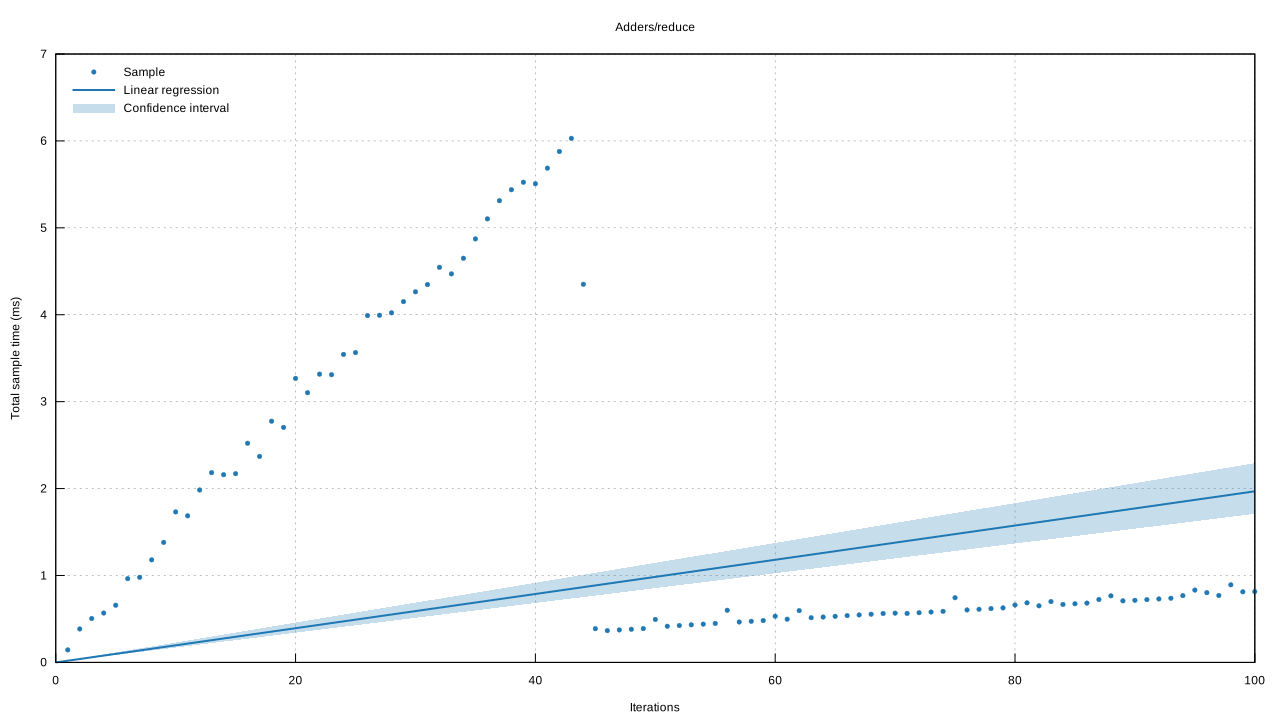
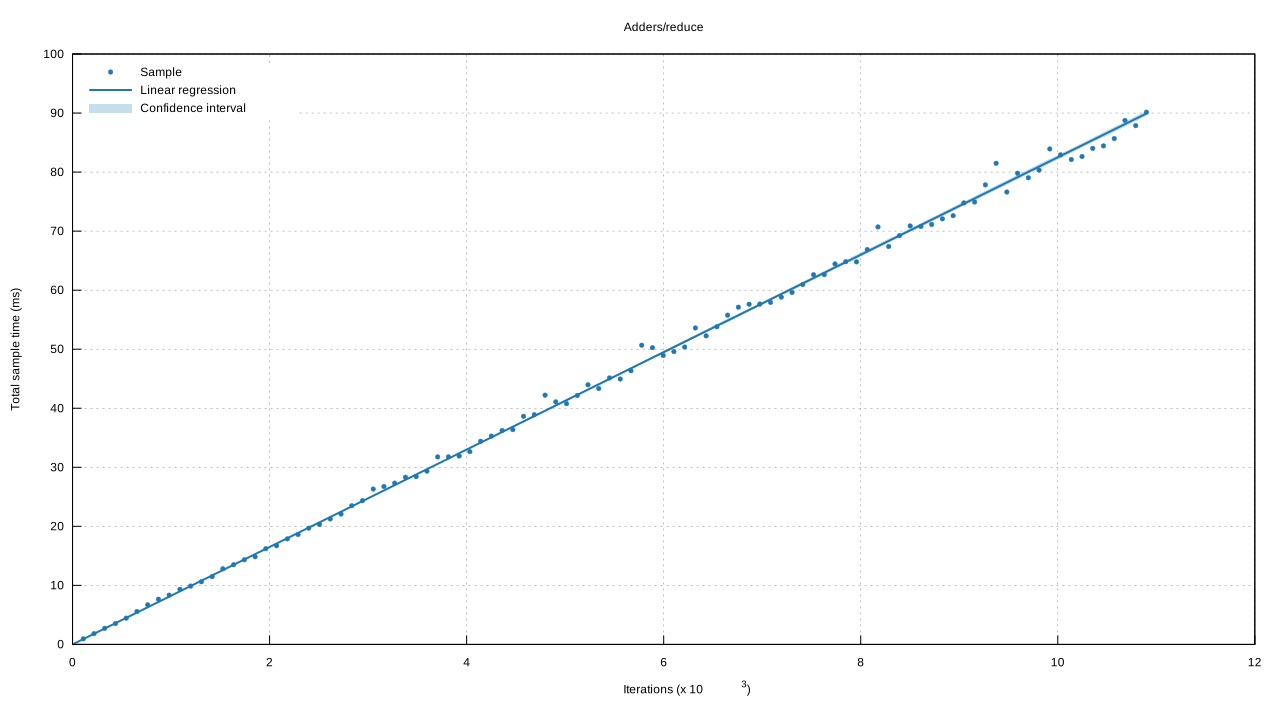
The Regression plot can be used to judge the quality of the sample. Each measurement will use increasingly higher iteration counts -- and the expectation is that the time for each sample goes up as the number of iterations increases. If this is not the case, the samples might not be independent -- or something happened that changed time per iteration (garbage collection pauses, optimizing compilation, something hogged the CPU, the laptop switched to battery power?). In any case, if the dots on the regression plot aren't close to the line, be careful when interpreting the results.
Here is an example where 'something' happened during the test. My guess is that the routine got optimized half-way through, and that we should re-run the test with a longer warmup time.
Unhealthy
Healthy
TODO
- More plots!
- Port more bench functions from Criterion.rs (Parameterized tests, tests of functions that consume their input, etc.)
- Separate report generation into its own package?