
@freespace8/dsh-at-file
v0.2.3
Published
Codex-style @ path mentions for the DeepSeek Harness Web GUI: type @ to pick a workspace file/folder and reference its path; the host validates and marks it on send without reading file contents. Codex 风格 @ 路径引用。

Maintainers
 freespace8
Readme
@freespace8/dsh-at-file

Codex 风格的 @ 路径引用插件(DeepSeek Harness Web GUI)。在输入框输入 @ 会弹出当前工作区文件/文件夹选择器,选中后把可读的 @路径 token 落进草稿;发送前 host 只在 agent/pre-step 校验所选路径确实存在于工作区,并向模型注入一条仅存在性引用:
<workspace-reference path="docs/spec.pdf" kind="file" />插件只传递路径,不读取文件内容,也不展开目录后代——是否、如何检查引用由 agent 用当前会话的既有工具决定。
English · 简体中文
目录
功能
@触发选择器:目录导航模型——查询按最后一个/拆成「所在目录 + 过滤关键字」,例如输入plugins/d只列出plugins目录下名字含d的直接子项(不再全工作区模糊匹配);目录在前、文件在后,各自按字母排序。- 键盘导航:高亮是目录时按 Enter 就进入该目录(菜单立即刷新为它的直接子项,如
@目录/),可一路深入;高亮是文件时按 Enter 走正常选择流程。按 Tab 则直接确定选择——不管是文件还是文件夹都插入@路径收尾(目录不会进入下级),所以要原样选中某个目录(不进入它),高亮后按 Tab 即可。鼠标点击直接选中(插入@路径)。 - 真实文本、零状态:草稿里就是可读的
@路径,pill 只是测量 mirror 后画的装饰层——可变宽、不截断、不重叠、上下左右都留出边距(不超过所在行);选中作用于普通文本。 - 整体删除:确认选择(菜单已关闭)后,caret 在某个
@路径内、紧贴它、或停在它后面的分隔空格上时,按一次退格/Delete 就整体删掉整个引用(选完路径后按一次退格即删,无需按两次),且不会弹出@选择列表;其余位置照常逐字符编辑。@菜单还开着(正在输入过滤词、未回车确认)时,退格/Delete 不拦截,逐字符删减过滤词,菜单实时刷新。 - 发送时 host 校验:校验路径存在性并把引用标记进模型可见输入;提交文本与草稿逐字一致。
- 设置页(设置 → 文件提及):启用开关、全局文件过滤规则(Exact / Regex,可独立大小写)。
- 内置忽略列表:常见版本控制、IDE 元数据、依赖树、缓存与构建产物目录;全部可在配置里覆盖。
预览
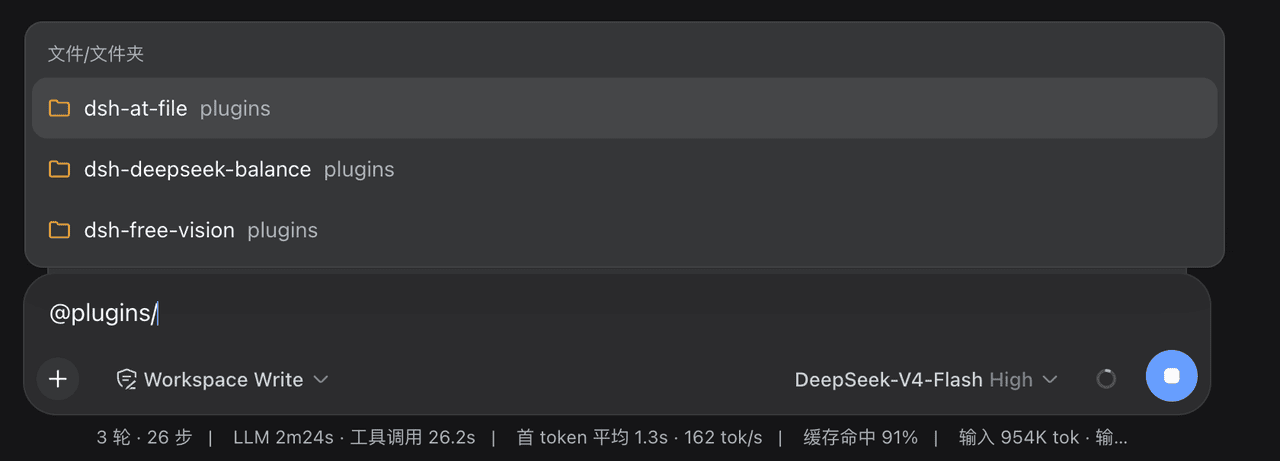
插件运行时的效果(输入框输入 @ 弹出的工作区文件/文件夹选择器):
安装
已发布到 npm,一条命令安装(目标 profile 为 web):
dsh plugin --profile web add @freespace8/dsh-at-file安装后重启 dsh web(host 与浏览器 client 同时加载)。卸载:
dsh plugin --profile web remove @freespace8/dsh-at-file使用
在会话输入框输入 @:菜单候选单行展示,弹窗宽度与输入框一致,文件名完整显示不截断,目录路径紧跟其后(同名文件靠目录区分);目录在前、文件在后,各自按字母排序。查询按最后一个 / 拆成「所在目录 + 关键字」:输入 @plugins/d 只显示 plugins 目录下名字含 d 的直接子项,@plugins/ 显示 plugins 的全部直接子项;菜单开着时退格/Delete 逐字符编辑过滤词。
键盘导航:高亮是目录时按 Enter 进入该目录(菜单刷新为它的子项,可一路深入,如 @plugins/dsh-at-file/lib/);高亮是文件时按 Enter 走正常选择流程。按 Tab 则直接确定选择——不管是文件还是文件夹都插入 @路径 ,目录不进入下级,所以要原样选中某个目录(不进入它),高亮后按 Tab 即可。鼠标点击直接选中当前条目。
选择一条结果:它变成带背景的 pill(宽度贴合完整 @相对路径 并留出至少 2px 边距,上下也各留 2~3px、不超出所在行),多个 pill 以自然空格分隔、互不重叠,长路径完整显示不截断;确认选择后(菜单关闭),caret 在某个 pill 内、紧贴它或停在它的分隔空格上时,按一次退格/Delete 就整体删除它(不弹 @ 列表),其余位置照常逐字符编辑。
配置
覆盖任意字段只需在 profile 的 cordis.patch.yml 里按 id 覆盖 config:
- id: dsh-at-file
  config:
    maxIndexedFiles: 10000   # 每个工作区索引条目上限(默认 5000)
    ignoreDirs: []           # 索引遍历整体跳过的目录 basename(默认见 src/defaults.js)
设置 → 文件提及 里的开关与过滤规则是实时生效的持久设置,不需要重启。
项目结构
plugins/dsh-at-file/
├── src/
│   ├── index.js      # host 入口:atFile Remote 服务、Typert manifest、设置命名空间、pre-step 边界
│   ├── contract.js   # zod 线契约 + 调用描述符(host/client 共享同一套)
│   ├── defaults.js   # 默认忽略目录/文件 + 过滤规则归一化
│   ├── files.js      # 工作区流式目录索引(不跟随符号链接、有界截断)
│   └── mention.js    # @path 扫描、校验、<workspace-reference> 注入
├── lib/client.js     # client 半体(免构建 bundle):@ 触发源、PillOverlay 覆盖层(mirror 测量 + 可变宽 pill)、设置 section、locale
├── cordis.patch.yml  # bundle patch 行
└── tests/            # check.mjs 产物门 + unit.mjs 纯逻辑单测
依赖说明
- host 额外依赖
zod(Typert 注册表/网关要求 zod 风格 schema,schemastery 没有.parse())与@deepseek-ai/dsh-llm(构造用户消息)。两者都能从 harness 根node_modules解析,本机 file: 安装无需在插件目录里pnpm install;打包分发时dependencies.zod会让 npm/pnpm 自动装上。 - client 零外部 import:
require只能命中平台 seed 模块(react),所以线契约、搜索、图标、样式全部内联在lib/client.js里(最小 zod 兼容 codec 只有.parse(),ClientRemote 只需要它)。
验证
npm run check # 产物门 + 纯逻辑单测已在真实 GUI(dsh web,装进 web profile)肉眼验证过 client 面:@ 根级列表(目录在前、文件在后)、@plugins/d 目录内关键字过滤、Enter/Tab 目录导航进入、文件接受选择、鼠标点击直接选中、pill 与整体删除均正常。host 面(pre-step 校验与 <workspace-reference> 注入)未在真实组合重跑(本次 host 代码无改动,单测覆盖)。
许可证
MIT,见 LICENSE。本包为 dsh-at-file
(MIT)思路的独立实现;上游版权声明保留在 LICENSE 中,此处致谢其概念。