
@freespace8/dsh-sidebar-helper
v0.1.0
Published
Right-click context menus for the DeepSeek Harness Web GUI sidebar: the workspace row's “⋯” menu carries Copy Path (next to Rename); conversation rows reuse the built-in menu unchanged. 左侧工作区行级右键菜单 + 复制路径。

Maintainers
 freespace8
Readme
@freespace8/dsh-sidebar-helper

为 DeepSeek Harness Web GUI 左侧工作区增加行级右键菜单——通过复用内置「⋯」行菜单实现,而不是另 维护一套菜单:
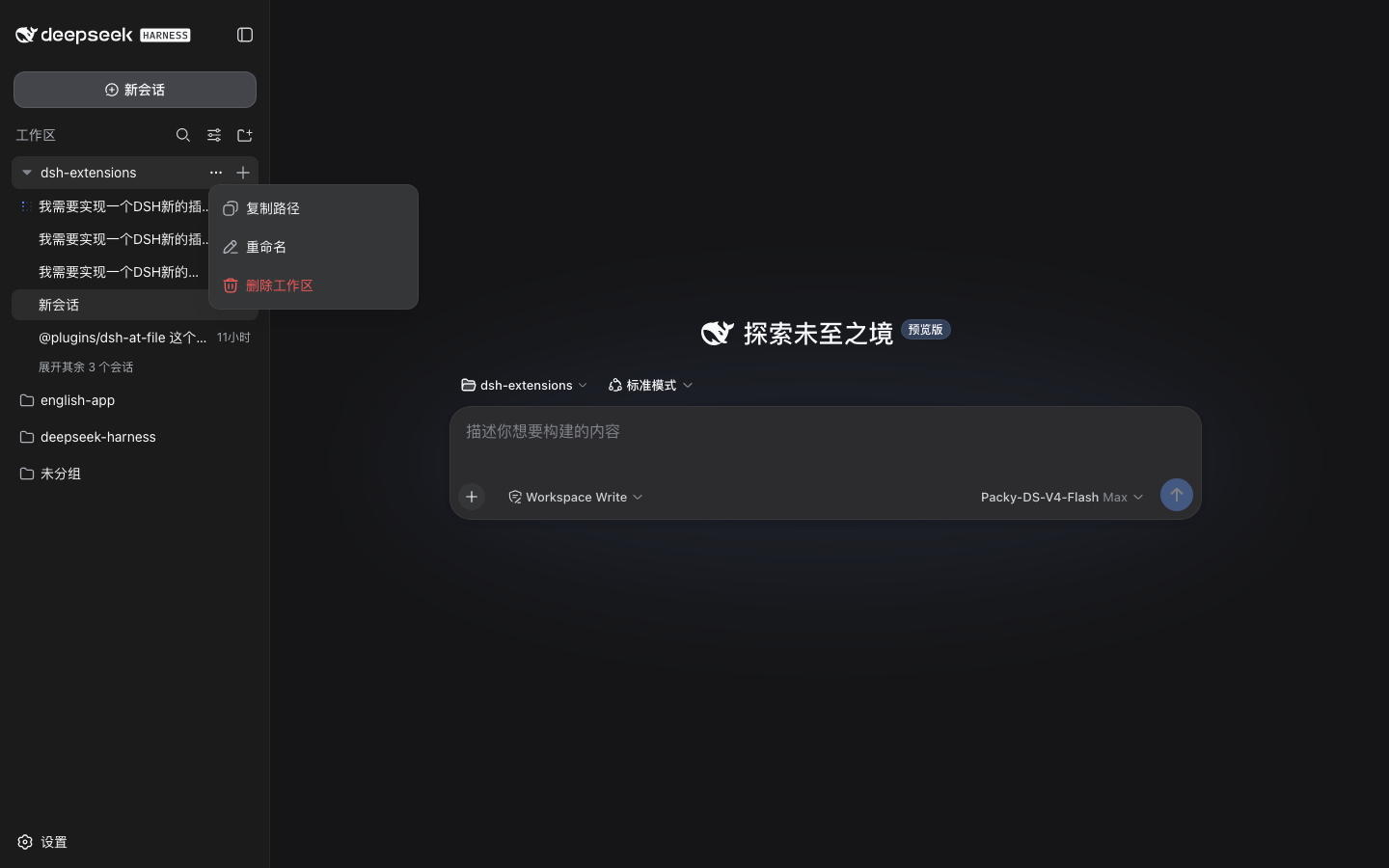
- 工作区(项目)行 — 该行自己的「⋯」菜单带 复制路径(Copy Path), 作为第一项、紧邻重命名。无论左键点「⋯」、右键点行、还是键盘打开都生效, 点击即把工作区目录写进剪贴板。
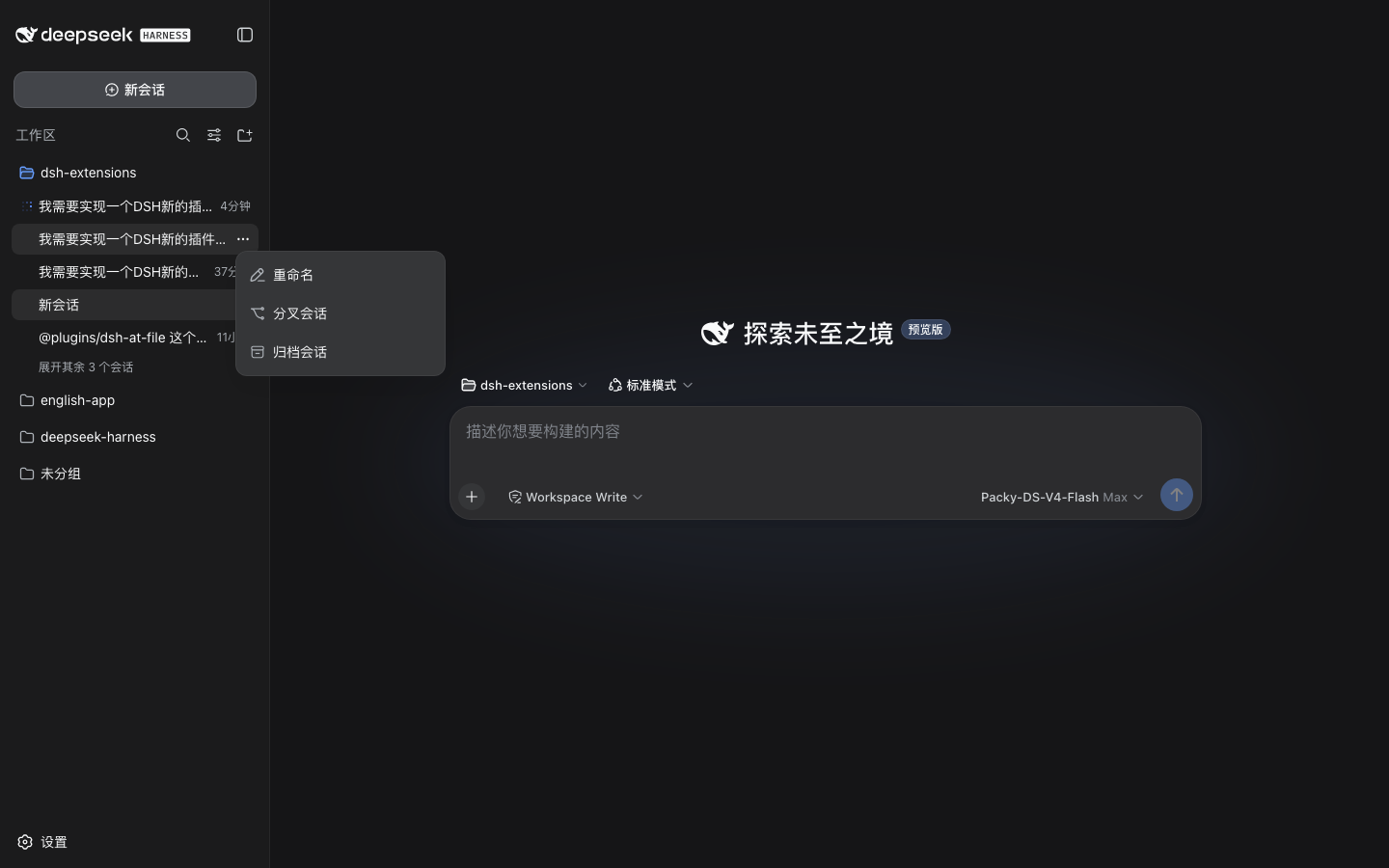
- 对话(会话)行 — 左键或右键弹出与该行三个点完全一样的菜单(重命名 / 分叉会话 / 归档会话)。插件只负责触发它,不维护菜单内容,也不注入任何项。
English · 简体中文
目录
功能
- 工作区「⋯」菜单本身就带复制路径:无论左键点「⋯」、右键点行、还是键盘 打开,弹出的都是内置菜单,且含 复制路径 / 重命名 / 删除工作区(复制 路径注入为第一项,紧邻重命名)。
- 对话行保持原样:左键或右键对话行,弹出与「⋯」按钮逐字一致的内置菜单 (重命名 / 分叉会话 / 归档会话),不注入任何项。
- 复制路径把工作区目录写进剪贴板,菜单项短暂显示「已复制 / Copied」后 自动收起。
- 没有需要维护的重复菜单:弹的是内置菜单——应用升级改菜单项,本插件 自动跟随,只有注入的那一项属于插件。
- 抗 React 重渲染:注入项用
MutationObserver在菜单每次重渲染 (hover 换态、重定位)后钉回原位;菜单关闭或插件卸载时干净移除。 - 不耦合 DOM 样式:行身份靠稳定语义信号(
role="treeitem"+aria-expanded/aria-selected),绝不依赖哈希 class;同名工作区按行顺序 消歧。 - Config 总开关:
config.enabled经一条小型 host 路由下发给 client;关掉 即可整体禁用右键菜单,无需卸载。
预览
工作区行的「⋯」菜单——复制路径为第一项(紧邻重命名),此处以左键点三个 点打开:
对话行的「⋯」菜单——与内置菜单完全一致(无注入项):
安装
发布在 npm 上,一条命令安装(目标 profile 为 web):
dsh plugin --profile web add @freespace8/dsh-sidebar-helper安装后重启 dsh web(host 与浏览器 client 一起加载)。卸载:
dsh plugin --profile web remove @freespace8/dsh-sidebar-helper使用
打开一个会话,让左侧工作区显示出项目与对话,然后左键点行的「⋯」按钮或右键 点行本身打开菜单:
- 工作区(项目)行 — 复制路径 / 重命名 / 删除工作区;
- 对话(会话)行 — 重命名 / 分叉会话 / 归档会话(与「⋯」按钮相同)。
右键空白「新会话」行或「未分组」桶不做任何事——与内置菜单一致(那里本来就 没有操作项)。
配置
在 profile 的 cordis.patch.yml 里按 id 覆盖(config 整块替换):
- id: sidebar-helper
  config:
    enabled: false   # 不卸载也能整体关闭右键菜单
| 字段 | 类型 | 默认 | 说明 |
|---|---|---|---|
| enabled | boolean | true | 总开关;经插件设置路由下发给浏览器 client。 |
实现原理
- Host 半体(
src/index.js)刻意保持小:一个Config字段(enabled) 加一条 HTTP 路由/plugins/dsh-sidebar-helper/settings。client 没有配置 通道,开关只能这样过线(路由懒注册以应对webServer晚绑定)。 - Client 半体(
lib/client.js)监听contextmenu(捕获阶段),只处理 工作区浏览器树内的行——即文档里第一棵[role="tree"](侧栏先于对话区 渲染)。其它树(JSON 工具结果、子代理目录)一概不动。行上右键会吞掉浏览器 原生菜单,改为按下该行的「⋯」按钮。 - 触发内置菜单:每行的「⋯」按钮是该行内第一个
<button>(会话行只有一 个;工作区行省略号在前、新建会话加号在后)。程序化button.click()走的是 与真实点击同一个 ReactonClick(setMenuOpen(!open)),弹出的就是该行 自己的菜单——内容、位置、键盘行为全部与手点一致。插件只是替用户按下了 那个按钮。 - 注入复制路径:内置菜单 items 是硬编码的,插件用一个全局
MutationObserver监听任何一行菜单打开(左键「⋯」/ 右键 / 键盘),识别该 菜单属于哪个工作区行(最近点过省略号的那行,再用锚点位置校验),往其 viewport 里插一个原生button[role=menuitem],用应用自己的--dsw-*token 复刻原生样式;另一个MutationObserver在 React 每次重渲染后把 它钉回第一项、菜单关闭时移除。点击后复制工作区路径、标签切为「已复制」、 再派发 Escape 让内置菜单自行收起。 - 身份解析是纯函数且带单测:项目行(
aria-expanded)按标题与ctx.workspaces快照匹配;同名工作区(不同目录同名 basename)按 DOM 顺序消歧。
目录结构
plugins/dsh-sidebar-helper/
├── src/index.js      # host 半体:Config + 设置路由
├── lib/client.js     # 浏览器 bundle(免构建、零依赖)
├── cordis.patch.yml  # bundle patch 行
├── tests/check.mjs   # 产物门 + 解析逻辑单测
└── README.md / README.zh-CN.md
依赖
- Host:仅
@deepseek-ai/schemastery(Config schema);其余都走ctx服务,因此file:安装后无需在插件目录里pnpm install。 - Client:零依赖——纯 DOM,不 import React / primitives。剪贴板用
navigator.clipboard,失败退回execCommand。
验证
在插件目录执行:
npm run check校验语法、exports/files 一致性、patch 行、host 形状、client bundle id、 零依赖规则、注入项使用应用设计 token,以及行解析逻辑单测(按标题查工作区、 同名消歧、剪贴板兜底)。