
@fsodano/svelte-devtools-mcp
v0.2.2
Published
MCP tools for inspecting and editing live Svelte applications through Svelte DevTools

Maintainers
 fsodano
Readme
Svelte DevTools MCP
Inspect Svelte 5 applications from an MCP client. The server provides eight read-only tools and one acknowledged state-edit tool over stdio. It uses the authenticated DevTools HTTP API as its data transport.
Connect to your running app
Install Svelte DevTools in your Svelte application. In that application's directory, start its development script with a local API token:
export SVELTE_DEVTOOLS_TOKEN=your-local-token
npm run dev
Open the app, authorize the Vite dock, and keep the Svelte panel open. Configure your MCP client:
{
  "mcpServers": {
    "svelte-devtools": {
      "command": "npx",
      "args": ["-y", "@fsodano/[email protected]"],
      "env": {
        "SVELTE_DEVTOOLS_URL": "http://localhost:5173",
        "SVELTE_DEVTOOLS_TOKEN": "your-local-token"
      }
    }
  }
}
Replace the URL and token. Dock authorization uses a separate six-digit code. Do not commit real tokens. For source development, build the root workspaces and replace the npx command with node /absolute/path/to/packages/mcp/dist/cli.js.
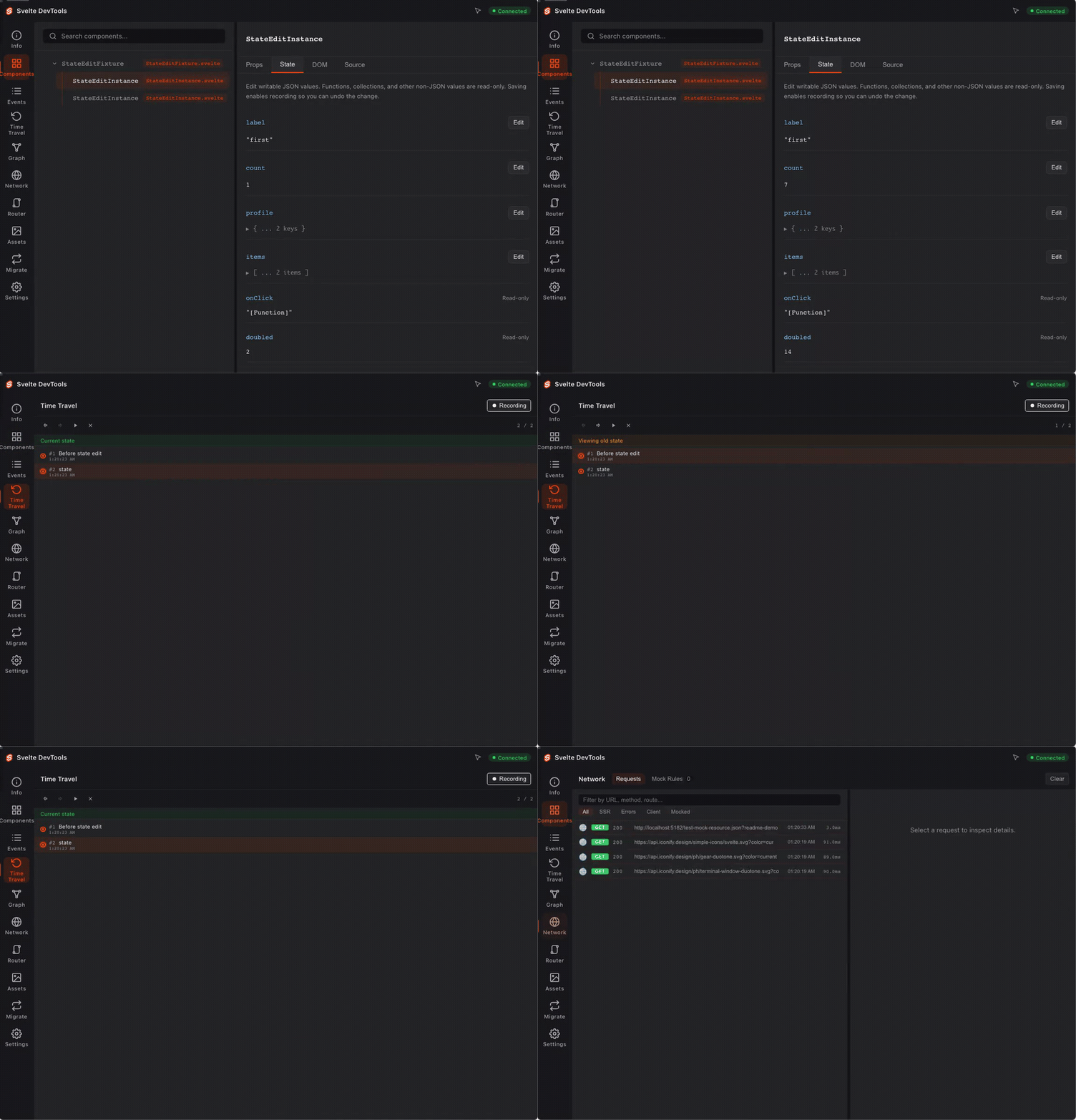
Workflow
- Call
svelte_statusto discover capabilities and sync readiness. - Open the app. Authorize the Vite dock with the separate code or token shown by the installed host. Open the Svelte panel.
- Choose a session from
svelte_status→capabilities.sessions. Callsvelte_componentswith thatsessionIdandincludeState: falsefor metadata discovery. Then request props and state for a specific component ID. PasssessionIdto timeline and snapshot reads too when multiple panels are open. - Use
svelte_sourcefor a source excerpt. Usesvelte_server_eventsto follow server requests. - To edit writable state, choose a session from
svelte_status→capabilities.sessions. Callsvelte_set_statewithsessionId,componentId,key, and a JSONvalue. - Success acknowledges the live setter and active recording. Snapshot capture occurs asynchronously through runtime events. Wait for a new panel sync and inspect again. If delivery returns
OUTCOME_UNKNOWN, inspect live state before retrying.
| Tool | Purpose |
|---|---|
| svelte_status | Server discovery, supported operations, sync metadata |
| svelte_components | Filtered, paginated component state and props |
| svelte_timeline | Filtered, paginated cached events |
| svelte_snapshots | Snapshot and branch metadata; no restore |
| svelte_routes | Route inventory from the resolved SvelteKit routes directory |
| svelte_migration | Migration analysis of transformed files |
| svelte_server_events | Correlated HTTP and SQLite spans, optionally after an event ID |
| svelte_source | Source excerpts within the Vite project root |
| svelte_set_state | Live state edit in an explicit panel session |
Runtime tools reject data that has never synced or is older than maxAgeMs (default 10 seconds). This is a read-time freshness check. It does not change capture behavior. Successful reads include cache age and timestamp. A recent panel sync does not prove that the inspected app is still connected.
Current limits
- Instrumentation covers component
.sveltesource. Standalone rune modules and precompiled libraries are not instrumented. - Keep the panel open. Headless, panel-independent collection is not implemented.
- Component IDs identify mounted instances. After remounting, an ID can change. Snapshot remapping rejects ambiguous repeated instances.
- State mutation requires an explicit live panel session. Remote snapshot restore is not implemented.
- Route scanning uses SvelteKit plugin configuration when available. Otherwise it falls back to
src/routes. Parameter templates are not concrete URLs. - Components, timeline, and snapshots use server-side filtering and pagination.
includeState: falsereturns component metadata without state or props. Older APIs may still return full caches. - HTTP responses are limited to 4 MiB (4,194,304 bytes). Larger bodies are canceled before JSON parsing and return
HTTP_RESPONSE_TOO_LARGE. - Serialized MCP results, including text and structured content, are limited to 512 KiB (524,288 bytes).
RESULT_TOO_LARGEasks you to reduce the page or use metadata discovery. Inspect an individual oversized value in the browser panel. If a mutation response exceeds a limit, inspect state before retrying because the command may have succeeded. - HTTP requests time out after 10 seconds. Redirects are rejected to avoid forwarding credentials to a different server.
- App content is returned as data. Treat source, state, and response bodies as untrusted content.
An in-memory SDK test with a mocked paginated API used 1,000 components with 64 KiB of state each. A 100-component metadata page transferred 6,277 HTTP bytes and produced 13,962 result bytes. This checks bounded output, not live-app performance.
The implementation uses the official MCP TypeScript SDK.
SQLite spans come from explicit synchronous instrumentation, not automatic database discovery. They carry the same IDs as Network and HTTP. Use last between 1 and 500, then follow traceId and parentSpanId. State time travel does not roll back database writes.
See the MCP guide and sample applications. Independent community project; early development. MIT.