
@fsodano/vite-plugin-svelte-devtools
v0.2.2
Published
Svelte 5 and SvelteKit DevTools for Vite: component inspection, state replay, fetch mocks, server and SQLite traces, and MCP support
Downloads
394

Maintainers
 fsodano
Readme
Svelte DevTools
See what your Svelte app is doing. Give your agent the same view.
Inspect live component instances, edit state, replay snapshots, and follow requests into SQLite. Svelte DevTools runs in the Vite DevTools dock during development, with no browser extension to install.
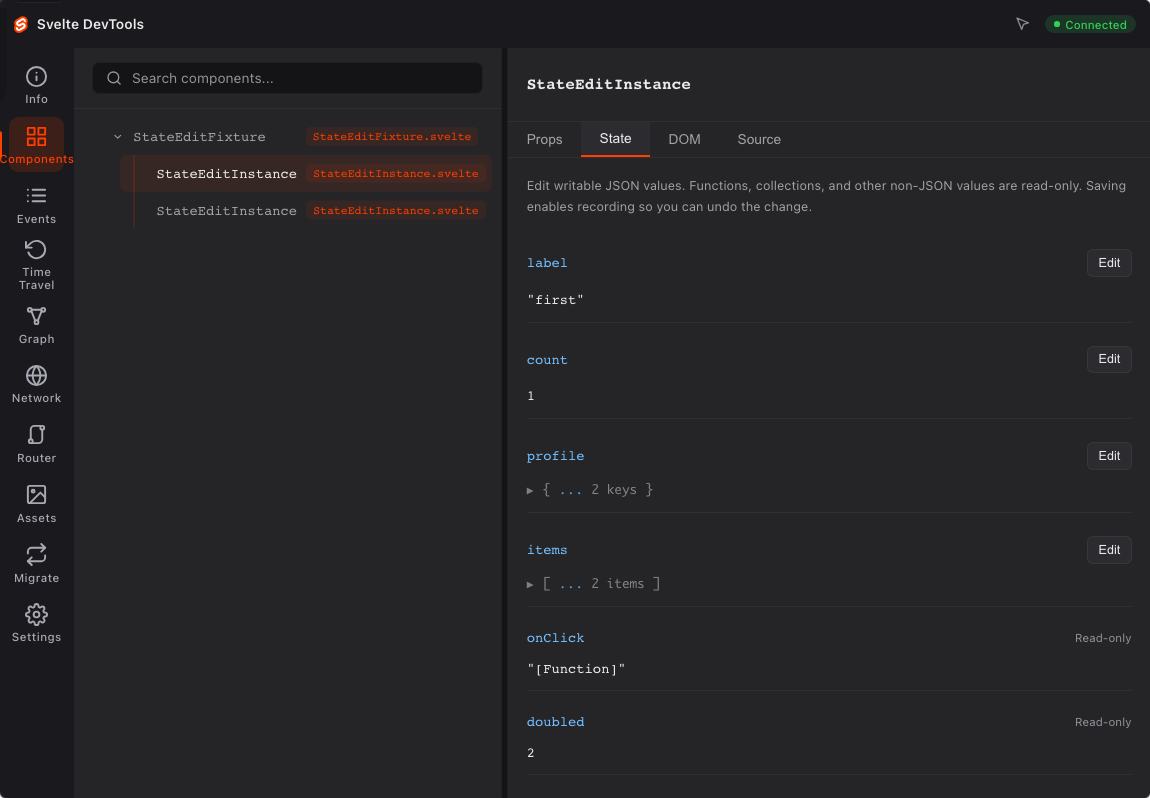
- Inspect individual component instances, props, state, and parent relationships. Open the selected source in your editor.
- Edit writable JSON state and undo or redo recorded changes.
- Create browser fetch mock rules from captured requests.
- Follow SvelteKit request, fetch, and explicit SQLite spans with measured durations and parent relationships.
- Connect an agent through nine MCP tools, including acknowledged state edits in a selected live session.
- Resize detail panes and choose theme, text size, and motion settings.
Independent community project. Early development; APIs may change. Requires Svelte 5.20+, Vite 8, and a supported Node.js release. Use Node.js 22.12+ for the documented workflow. The tested Vite DevTools host is 0.4.8; Chromium is the tested browser.
Install
For an existing Vite + Svelte project:
npm install -D @fsodano/[email protected] @vitejs/[email protected]
npx svelte-devtools init
npm run dev
Run these commands in your application directory. The setup command adds the host and plugin to your Vite configuration. For SvelteKit, it also creates a development-only server hook. It preserves existing adapter and compiler options, including those generated by the current Svelte CLI. You do not need to build the DevTools packages.
Use npx svelte-devtools init --dry-run to preview the edits. Repeating setup does not duplicate them. If your config is dynamic or your server hook already contains application logic, the command leaves the files unchanged and points to the manual instructions.
Manual configuration
Skip this section if you ran npx svelte-devtools init. The project also needs its normal Svelte compiler integration. For plain Vite, use @sveltejs/vite-plugin-svelte@^7 with Svelte 5 and Vite 8. SvelteKit projects use their existing sveltekit() integration.
// vite.config.ts
import { defineConfig } from 'vite';
import { svelte } from '@sveltejs/vite-plugin-svelte';
import { DevTools } from '@vitejs/devtools';
import { svelteDevTools } from '@fsodano/vite-plugin-svelte-devtools';

export default defineConfig({
  plugins: [DevTools(), svelte(), svelteDevTools()]
});
Start the application, open the Vite dock, enter the terminal's six-digit devframe authorization code, and select Svelte.
SvelteKit
Keep the generated sveltekit(...) call and all its options. Add DevTools() before it and svelteDevTools() after it. Import those two functions as shown above. Add the development hook:
// src/hooks.server.ts
import { dev } from '$app/environment';
import type { Handle } from '@sveltejs/kit';
import { svelteDevToolsHandle, noopHandle } from '@fsodano/vite-plugin-svelte-devtools/sveltekit';

export const handle: Handle = dev ? svelteDevToolsHandle() : noopHandle();
If you already have a handle, compose it with SvelteKit's sequence helper. Keep the development guard. See server integration.
Connect an agent
Start your app with a local API token:
export SVELTE_DEVTOOLS_TOKEN=replace-with-your-local-token
npm run dev
Keep the authorized Svelte panel open. Configure an MCP-compatible client with the same token and the actual app URL:
{
  "mcpServers": {
    "svelte-devtools": {
      "command": "npx",
      "args": ["-y", "@fsodano/[email protected]"],
      "env": {
        "SVELTE_DEVTOOLS_URL": "http://localhost:5173",
        "SVELTE_DEVTOOLS_TOKEN": "replace-with-your-local-token"
      }
    }
  }
}
Ask your agent to call svelte_status, select a live session, discover component IDs with svelte_components, and inspect the target instance before editing it with svelte_set_state. The other tools expose timeline events, snapshot metadata, routes, migration analysis, source, and server events.
Runtime reads reject missing or stale caches. State edits require a specific live session and acknowledge the actual setter. If an edit reports OUTCOME_UNKNOWN, inspect before retrying. The API token is separate from dock authorization. Do not commit real tokens. See MCP setup and limits.
Trace a SQLite operation
Wrap an actual synchronous call in server code:
import { dev } from '$app/environment';
import { traceSqliteQuery } from '@fsodano/vite-plugin-svelte-devtools/sqlite';

const statement = db.prepare('SELECT * FROM todos WHERE id = @id');
const todo = traceSqliteQuery({
  enabled: dev,
  database: 'todos',
  operation: 'get',
  statement: statement.source,
  captureStatement: true
}, () => statement.get({ id }));
Inspect the resulting span in Network's SQL filter, through HTTP, or with svelte_server_events. The native return value or error passes through unchanged. Statement capture is opt-in and limited to 4,096 characters. Bindings and result rows are omitted. Use safe templates: literal SQL can still contain sensitive values.
The wrapper requires an active traced request and measures synchronous execution. It does not automatically trace transactions, lazy iterators, or asynchronous database calls. State time travel does not roll back database writes. Browser fetch mocks do not affect SQL, server fetch, or XMLHttpRequest.
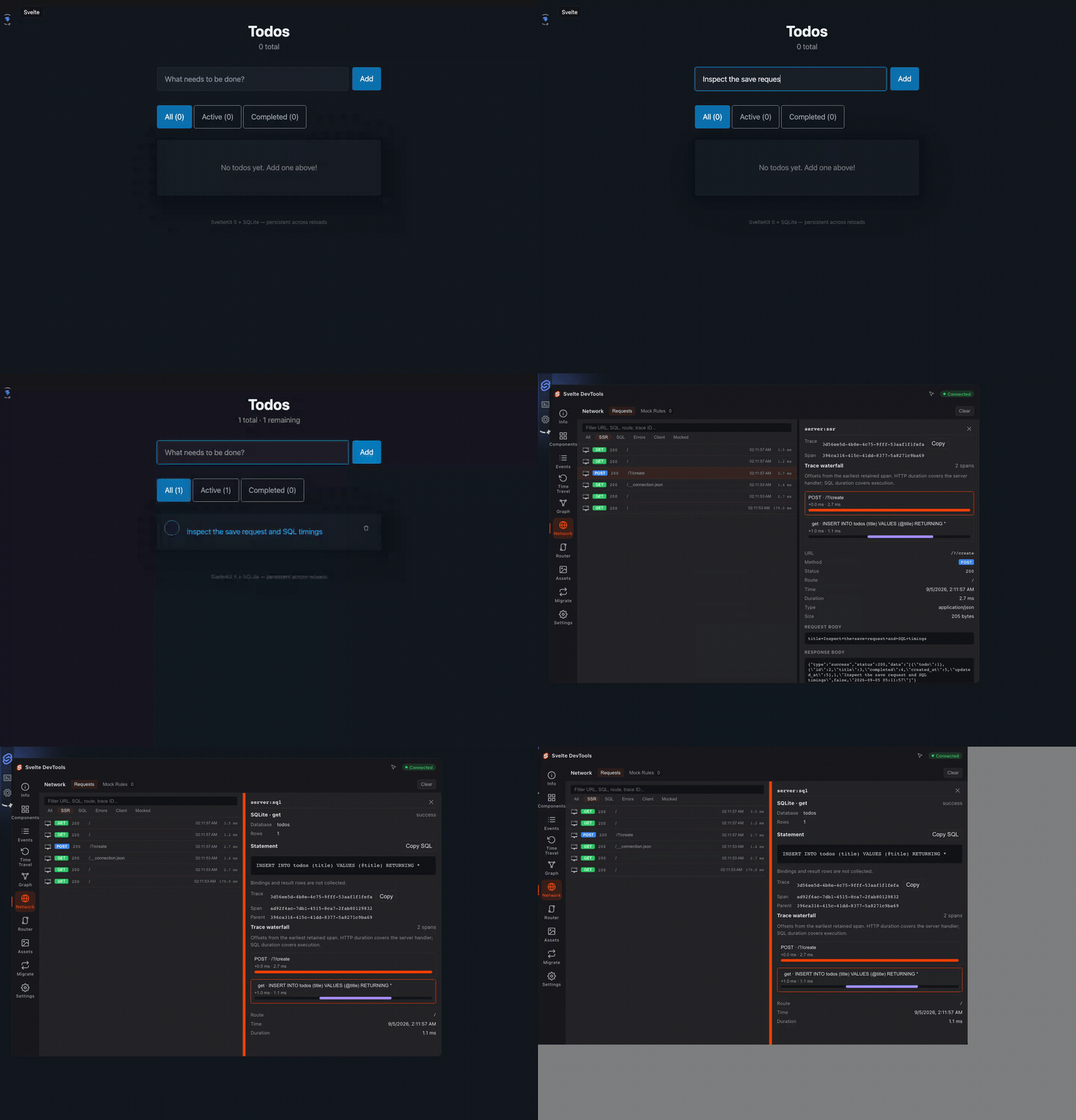
Actual Todo save, SSR POST request, executed INSERT, and measured per-span timings. Detailed screenshot.
Examples and contribution
The repository ships plain Svelte, SvelteKit, a SQLite todo app, and a Pokédex.
See the project README, developer guide, and agent workflows. The panel is served from built assets; contributors must rebuild it after source edits.