
@furinalu/unocss-preset-weapp
v0.6.31
Published
the unocss preset for wechat miniprogram (uniapp, taro)

Maintainers
 furinalu
Readme
unocss-preset-weapp
UnoCSS 小程序预设 unocss-preset-weapp
内置 transformer 用于兼容小程序
- transformerClass 转换转义类名,解决小程序不支持
\\,\:,\[,\$,\.等转义类名,保持原子化css的规范去书写class - transformerAttributify,用于支持 attributify mode
uniapp-vue3 demo 在线地址 demo github
使用
uniapp-vue2
uniapp-vue3
taro for react vue2 vue3
原生微信小程序 wxml
PresetWeappOptions
export interface PresetWeappOptions extends PresetOptions {
  /**
   * 是否转换微信class
   *
   * @default true
   */
  transform?: boolean

  /**
   * 平台
   * @default 'uniapp'
   */
  platform?: 'taro' | 'uniapp'

  /**
   * taro h5 rem 换算尺寸标准
   * @default 750
   * @link https://taro-docs.jd.com/taro/docs/size
   */
  designWidth?: number

  /**
   * taro 设计稿尺寸换算规则
   * @default { 640: 2.34 / 2, 750: 1, 828: 1.81 / 2}
   * @link https://taro-docs.jd.com/taro/docs/size
   */
  deviceRatio?: Record<number, number>

  /**
   * taro webpack 版本
   * taro webpack4 和 webpack5 h5根字体大小,导致不同版本 rem 不一致
   * 见下面issues
   * @link https://github.com/NervJS/taro/issues/12361
   * @default webpack4
   */
  taroWebpack?: 'webpack4' | 'webpack5'

  /**
   * 是否为h5
   * @default false
   */
  isH5?: boolean

  /**
   * 自定义转换规则
   * @default https://github.com/MellowCo/unplugin-transform-class#options
   */
  transformRules?: Record<string, string>

  /**
   * wh 是否使用 rpx 为默认单位
   * @example
   * ```
   * whRpx: true
   * w-10 -> width: 10rpx
   * h-10 -> height: 10rpx
   * ```
   *
   * @example
   * ```
   * whRpx: false
   * w-10 -> width: 80rpx
   * h-10 -> height: 80rpx
   * ```
   * @default true
   */
  whRpx?: boolean
}
其他
修改 w h 默认单位
unocss-preset-weapp,wh默认单位
rpx,例如
.text-20 {
  font-size: 20rpx;
}

.h-10 {
  height: 10rpx;
}

.top-10 {
  top: 10rpx;
}
设置
whRpx为false,修改默认单位,按rem规则递增
- unocss.config.ts
import presetWeapp from 'unocss-preset-weapp'
export default defineConfig({
  presets: [
    presetWeapp({
      whRpx: false,
    }),
  ],
})
.text-20 {
font-size: 160rpx;
}
.h-10 {
height: 80rpx;
}
.top-10 {
top: 80rpx;
}自定义转换规则
如需更改默认的转换规则,可通过
transformRules进行修改
- unocss.config.js
import presetWeapp from 'unocss-preset-weapp'
import { defaultAttributes, defaultIgnoreNonValuedAttributes, transformerAttributify, transformerClass } from 'unocss-preset-weapp/transformer'
import { defineConfig } from 'unocss'

const transformRules = {
  '.': '-d111-',
  '/': '-s111-',
  ':': '-c111-',
  '%': '-p111-',
  '!': '-e111-',
  '#': '-w111-',
  '(': '-b111l-',
  ')': '-b111r-',
  '[': '-f111l-',
  ']': '-f111r-',
  '$': '-r111-',
  ',': '-r222-',
}

export default defineConfig({
  presets: [
    // https://github.com/MellowCo/unocss-preset-weapp
    presetWeapp({
      transformRules,
    }),
  ],
  transformers: [
    // options 见https://github.com/MellowCo/unocss-preset-weapp/tree/main/src/transformer/transformerAttributify
    transformerAttributify({
      transformRules,
    }),

    // options 见https://github.com/MellowCo/unocss-preset-weapp/tree/main/src/transformer/transformerClass
    transformerClass({
      transformRules,
    }),
  ],
})
原子化 css 冲突问题
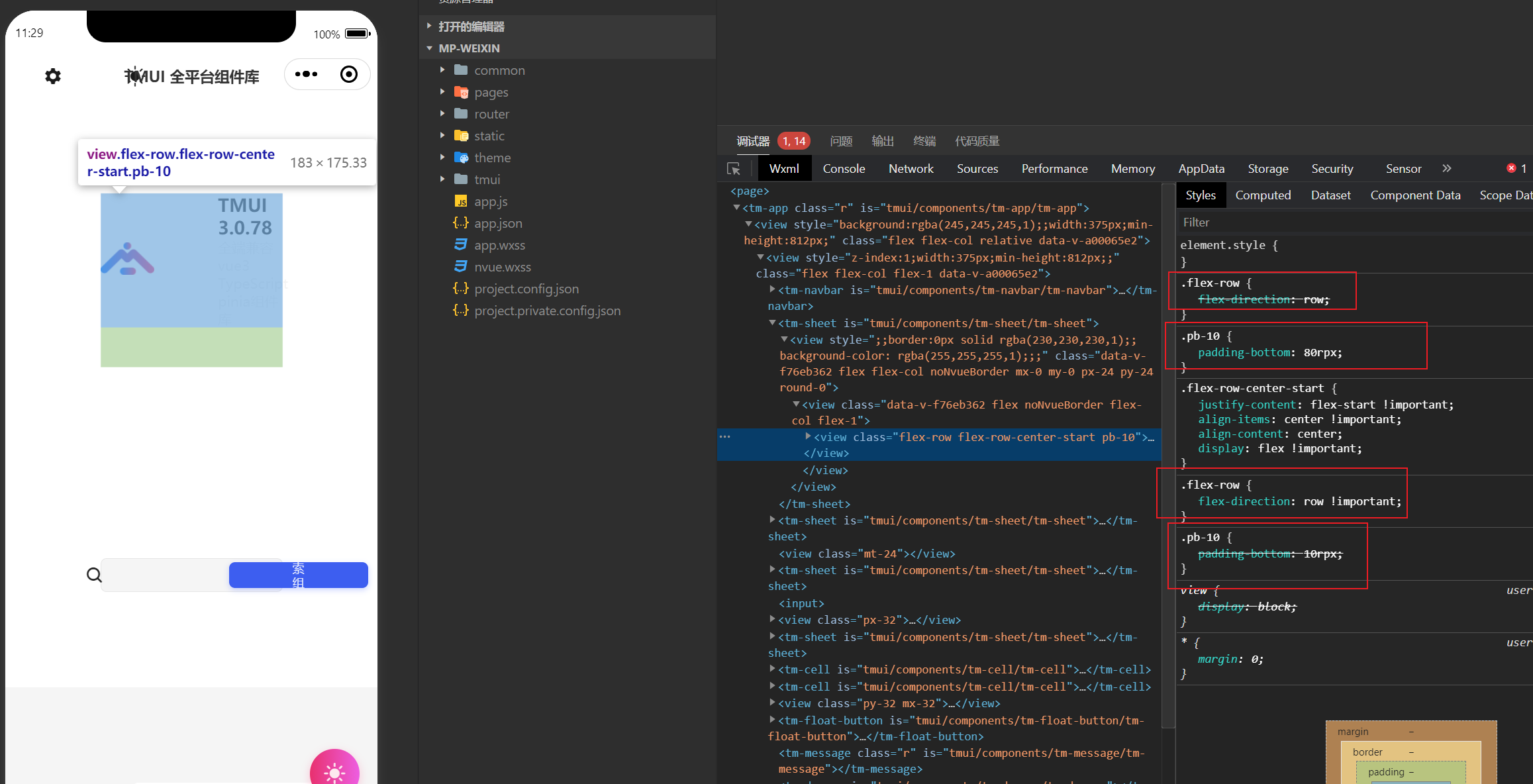
- unocss.config.ts
presetWeapp配置prefix,transformerAttributify配置classPrefix
export default defineConfig({
  presets: [
    // https://github.com/MellowCo/unocss-preset-weapp
    presetWeapp({
      prefix: 'li-',
    }),
  ],
  transformers: [
    // options 见https://github.com/MellowCo/unocss-preset-weapp/tree/main/src/transformer/transformerAttributify
    transformerAttributify({
      classPrefix: 'li-'
    }),

    // options 见https://github.com/MellowCo/unocss-preset-weapp/tree/main/src/transformer/transformerClass
    transformerClass(),
  ],
})
这样冲突问题就解决了
<view bg="#333" p="x-6 y-10" w100 h200 class="li-bg-red">
  this is a unocss
</view>
transform
<view class="li-bg-red li-bg-#333 li-p-x-6 li-p-y-10 li-w100 li-200">
  this is a unocss
</view>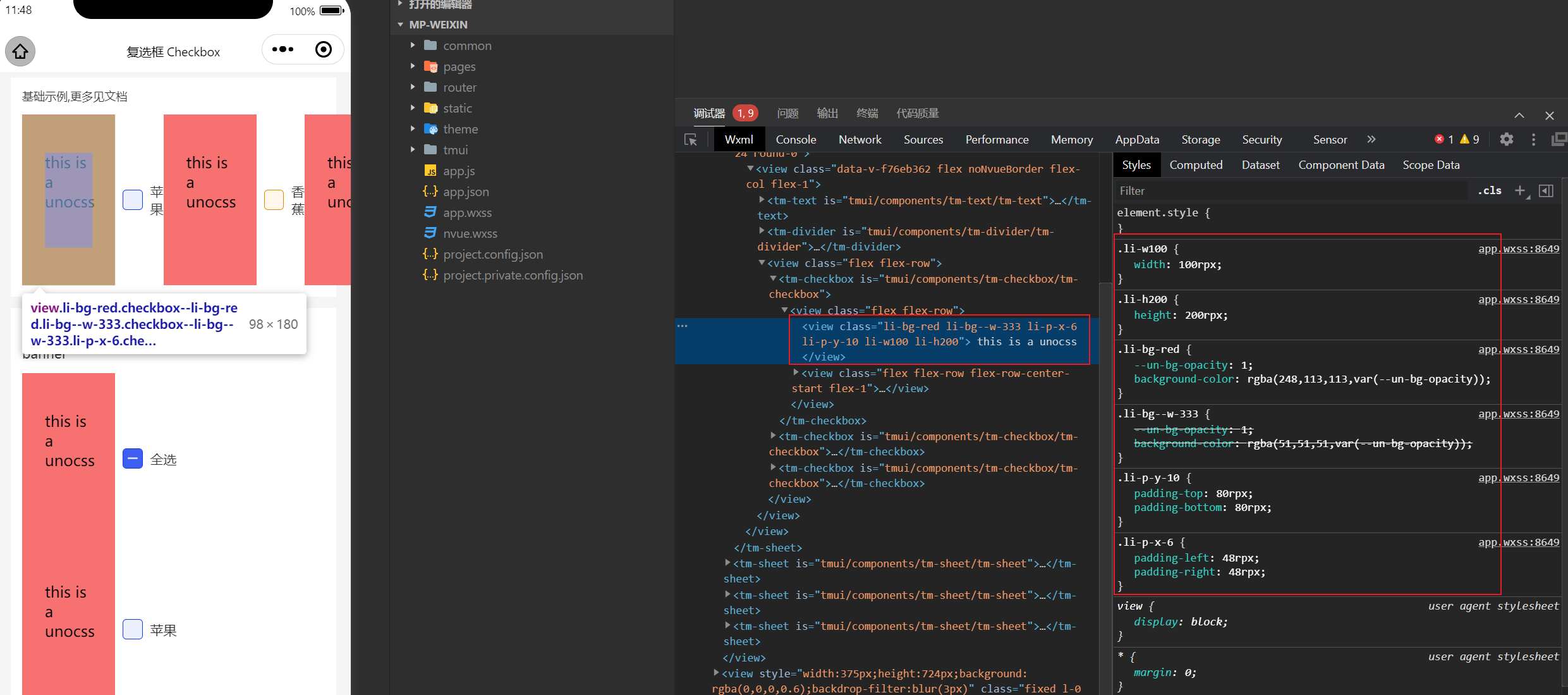
开发时,微信等浏览器白屏问题
因为浏览器的兼容问题,不支持 TopLevelAwait 导致白屏
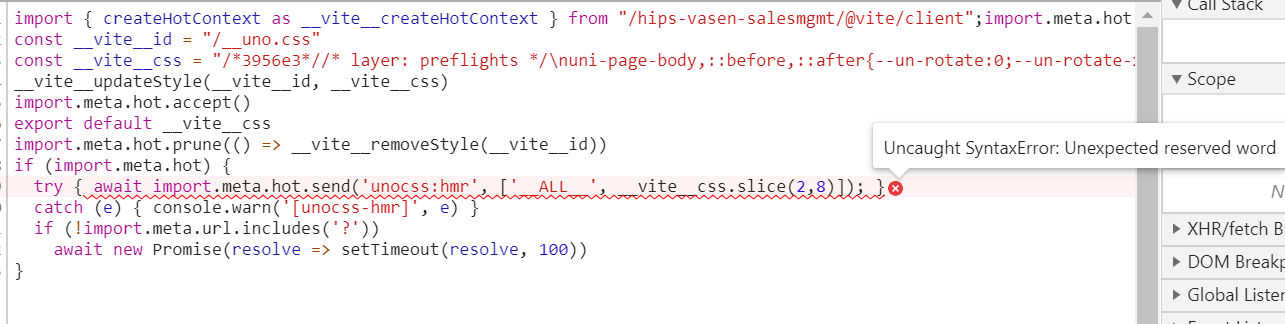
目前 [email protected] 版本新增
hmrTopLevelAwait选项,可关闭TopLevelAwait以支持某些浏览器
// https://github.com/antfu/unocss
Unocss({
  hmrTopLevelAwait: false,
})
css预设
默认单位
rpx,w-100 => w-100rpx
渐变背景 (v0.1.12)
<view class="bg-gradient-to-t from-#f39c12/60 via-#2ecc71:80 to-#9b59b6_70"></view>animation (v0.1.9)
参考 windicss-animation @windicss/plugin-animations
相关动画网站 animate.css animista.net
- unocss.config.js 自定义动画
import presetWeapp from 'unocss-preset-weapp'
import { defineConfig } from 'unocss'

export default defineConfig({
  presets: [
    // https://github.com/MellowCo/unocss-preset-weapp
    presetWeapp(),
  ],
  theme: {
    // v0.1.9 加入动画预设
    // https://github.com/MellowCo/unocss-preset-weapp#animation-v019
    // 设置自定义动画
    animation: {
      keyframes: {
        'my-animation': '{0% {letter-spacing: -0.5em;transform: translateZ(-700px);opacity: 0;}40% {opacity: 0.6;}100% {transform: translateZ(0);opacity: 1;}}',
      },
      durations: {
        'my-animation': '0.8s',
      },
      counts: {
        'my-animation': 'infinite',
      },
      timingFns: {
        'my-animation': 'cubic-bezier(0.215, 0.610, 0.355, 1.000)',
      },
    },
  },
})
<view class="animate-pulse"></view>
<view class="animate-back-in-down animate-iteration-infinite"></view>
<view class="animate-[4s_linear_0s_infinite_alternate_bounce]"></view>
.animate--fl-4s_linear_0s_infinite_alternate_bounce-fr- {
-webkit-animation: 4s linear 0s infinite alternate bounce;
animation: 4s linear 0s infinite alternate bounce;
}safe-area (v0.1.6)
| class | Properties | | ----------------------- | ---------------- | | p-safe | padding: env(safe-area-inset-top) env(safe-area-inset-right) env(safe-area-inset-bottom) env(safe-area-inset-left) | | pt-safe | padding-top: env(safe-area-inset-top) | | pb-safe | padding-bottom: env(safe-area-inset-bottom) | | pl-safe | padding-left: env(safe-area-inset-left) | | pr-safe | padding-right: env(safe-area-inset-right) |
width and height
| class | Properties | | -------------------------- | ---------------- | | h-1_2h-1/2h-half | height: 50% | | w-1_3w-1/3 | width: 33.33333% | | h-full | height: 100% | | w-20 | width: 20rpx | | h-xs | height: 180rpx |
预设
export const baseSize = {
  'xs': '180rpx',
  'sm': '220rpx',
  'md': '260rpx',
  'lg': '300rpx',
  'xl': '340rpx',
  '2xl': '390rpx',
  '3xl': '440rpx',
  '4xl': '490rpx',
  '5xl': '540rpx',
  '6xl': '590rpx',
  '7xl': '640rpx',
  '8xl': '690rpx',
  '9xl': '740rpx',
  'full': '100%',
  'half': '50%',
}
border
| class | Properties | | ------------------------------------------ | ------------------------------------- | | border-2 | border-width:2rpx;border-style:solid; | | b-2 | border-width:2rpx;border-style:solid; | | border-dashed | border-style:dashed | | rounded-1_2rounded-1/2rounded-half | border-radius:50% | | rounded-md | border-radius:12rpx |
预设
export const borderRadius = {
  'DEFAULT': '8rpx',
  'none': '0',
  'sm': '4rpx',
  'md': '12rpx',
  'lg': '16rpx',
  'xl': '24rpx',
  '2xl': '32rpx',
  '3xl': '48rpx',
  'half': '50%',
  'full': '9999px',
}
border-color
| class | Properties | | ------------------------------------------------------- | ------------------------------------------------------------ | | border-red-100border-red-1 | --un-border-opacity:1; border-color:rgba(254,226,226,var(--un-border-opacity)) | | border-opacity-20border-op-20 | --un-border-opacity:0.2 | | border-black_10border-black/10border-black:10 | border-color:rgba(0,0,0,0.1) |
color
| class | Properties | | ------------------------------------------------------------ | ------------------------------------------------------------ | | op-10opacity-10 | opacity:0.1 | | color-hex-157c-hex-157c-[#157] | --un-text-opacity:1;color:rgba(17,85,119,var(--un-text-opacity)) | | c-hex-157_10c-hex-157/10c-[#157]/10c-[#157]:10c-[#157]_10 | color:rgba(17,85,119,0.1) | | color-blue,color-blue-400,c-blue | --un-text-opacity:1;color:rgba(96,165,250,var(--un-text-opacity)) | | text-red-100text-red100text-red1 | --un-text-opacity:1;color:rgba(254,226,226,var(--un-text-opacity)) | | text-red-100_20text-red-100/20text-red-100:20 | color:rgba(254,226,226,0.2) |
bg
| class | Properties | | ------------------------------------------------------------ | ------------------------------------------------------------ | | bg-hex-452233_40bg-[#452233]_40bg-[#452233]/40bg-[#452233]:40 | background-color:rgba(69,34,51,0.4) | | bg-red-100bg-red1bg-red100 | --un-bg-opacity:1;background-color:rgba(254,226,226,var(--un-bg-opacity)) | | bg-teal-100_55bg-teal-100/55bg-teal-100:55 | background-color:rgba(204,251,241,0.55) | | bg-opacity-45 | --un-bg-opacity:0.45 |
typography
| class | Properties | | ---------------------------------------- | ------------------------------------------------------------ | | text-base | font-size:32rpx;line-height:48rpx | | text-100text-size-100 | font-size:100rpx | | text-2em | font-size:2em | | font-900,font-blackfw-900 | font-weight:900 | | font-leading-2 leading-2 | line-height:16rpx | | indent | text-indent:48rpx | | indent-2 | text-indent:16rpx | | indent-1_2indent-1/2indent-1:2 | text-indent:50% | | indent-lg | text-indent:64rpx | | text-shadow-lg | --un-text-shadow:6rpx 6rpx 12rpx var(--un-text-shadow-color, rgba(0,0,0,0.26)),0 0 10rpx var(--un-text-shadow-color, rgba(15,3,86,0.22));text-shadow:var(--un-text-shadow) | | word-spacing-2 | word-spacing:16rpx | | tracking-2 | letter-spacing:16rpx |
fontSize预设
text-base
export const fontSize: Theme['fontSize'] = {
  'xs': ['24rpx', '32rpx'],
  'sm': ['28rpx', '40rpx'],
  'base': ['32rpx', '48rpx'],
  'lg': ['36rpx', '56rpx'],
  'xl': ['40rpx', '56rpx'],
  '2xl': ['48rpx', '64rpx'],
  '3xl': ['60rpx', '72rpx'],
  '4xl': ['72rpx', '80rpx'],
  '5xl': ['96rpx', '1'],
  '6xl': ['120rpx', '1'],
  '7xl': ['144rpx', '1'],
  '8xl': ['192rpx', '1'],
  '9xl': ['256rpx', '1'],
}
text-100 => font-size:100rpxtextIndent 预设
indent-lg
export const textIndent: Theme['textIndent'] = {
  'DEFAULT': '48rpx',
  'xs': '16rpx',
  'sm': '32rpx',
  'md': '48rpx',
  'lg': '64rpx',
  'xl': '80rpx',
  '2xl': '96rpx',
  '3xl': '128rpx',
}
leadingstrackingword-spacingindent计算方式
indent-2 原为 text-indent: 0.5rem 等于 8px ,
小程序使用 750rpx 的基准是 2倍px 等于 16rpx ,
所以计算为 2*0.5*1rem = 2*0.5*16px = 16rpx
indent-2
text-indent: 0.5rem
text-indent: 16rpx

tracking-2
letter-spacing: 0.5rem
letter-spacing:16rpx

word-spacing-2
word-spacing: 0.5rem
word-spacing:16rpx

leadings-2
line-height: 0.5rem
line-height:16rpx
spacing
| class | Properties | | ------- | ------------------------------------ | | p-2,p2 | padding:16rpx | | mx-2 | margin-left:16rpx;margin-right:16rpx | | -m-lg | margin:-36rpx | | pl-10px | padding-left:10px | | m-10rpx | margin:10rpx |
预设
export const spacing = {
  'DEFAULT': '32rpx',
  'none': '0',
  'xs': '24rpx',
  'sm': '28rpx',
  'md': '36rpx',
  'lg': '40rpx',
  'xl': '48rpx',
  '2xl': '60rpx',
  '3xl': '72rpx',
  '4xl': '96rpx',
  '5xl': '120rpx',
  '6xl': '144rpx',
  '7xl': '192rpx',
  '8xl': '256rpx',
}
box-shadow
预设
export const boxShadow = {
  'DEFAULT': ['var(--un-shadow-inset) 0 1px 3px 0 rgba(0,0,0,0.1)', 'var(--un-shadow-inset) 0 1px 2px -1px rgba(0,0,0,0.1)'],
  'none': '0 0 rgba(0,0,0,0)',
  'sm': 'var(--un-shadow-inset) 0 1px 2px 0 rgba(0,0,0,0.05)',
  'md': ['var(--un-shadow-inset) 0 4px 6px -1px rgba(0,0,0,0.1)', 'var(--un-shadow-inset) 0 2px 4px -2px rgba(0,0,0,0.1)'],
  'lg': ['var(--un-shadow-inset) 0 10px 15px -3px rgba(0,0,0,0.1)', 'var(--un-shadow-inset) 0 4px 6px -4px rgba(0,0,0,0.1)'],
  'xl': ['var(--un-shadow-inset) 0 20px 25px -5px rgba(0,0,0,0.1)', 'var(--un-shadow-inset) 0 8px 10px -6px rgba(0,0,0,0.1)'],
  '2xl': 'var(--un-shadow-inset) 0 25px 50px -12px rgba(0,0,0,0.25)',
  'inner': 'inset 0 2px 4px 0 rgba(0,0,0,0.05)',
}
连体写法
<view class="shadow-[0px_4px_4px_0px_rgba(237,_0,_0,_1)]"></view>flex gap
| class | Properties | | -------------- | --------------------------------------- | | flex-basis-1_2 | flex-basis:50% | | flex-basis-2 | flex-basis:16rpx | | gap-4 | grid-gap:32rpx;gap:32rpx | | gap-x-2 | grid-column-gap:16rpx;column-gap:16rpx; |