npm package discovery and stats viewer.

Discover Tips

  • General search

    [free text search, go nuts!]

  • Package details

    pkg:[package-name]

  • User packages

    @[username]

Sponsor

Optimize Toolset

I’ve always been into building performant and accessible sites, but lately I’ve been taking it extremely seriously. So much so that I’ve been building a tool to help me optimize and monitor the sites that I build to make sure that I’m making an attempt to offer the best experience to those who visit them. If you’re into performant, accessible and SEO friendly sites, you might like it too! You can check it out at Optimize Toolset.

About

Hi, 👋, I’m Ryan Hefner  and I built this site for me, and you! The goal of this site was to provide an easy way for me to check the stats on my npm packages, both for prioritizing issues and updates, and to give me a little kick in the pants to keep up on stuff.

As I was building it, I realized that I was actually using the tool to build the tool, and figured I might as well put this out there and hopefully others will find it to be a fast and useful way to search and browse npm packages as I have.

If you’re interested in other things I’m working on, follow me on Twitter or check out the open source projects I’ve been publishing on GitHub.

I am also working on a Twitter bot for this site to tweet the most popular, newest, random packages from npm. Please follow that account now and it will start sending out packages soon–ish.

Open Software & Tools

This site wouldn’t be possible without the immense generosity and tireless efforts from the people who make contributions to the world and share their work via open source initiatives. Thank you 🙏

© 2026 – Pkg Stats / Ryan Hefner

@fuxi-ailabs/hmbot

v0.1.0

Published

HMBot 0.1.5 migration and HarmonyOS development pack for DeepSeek Harness

Readme

HMBot for DeepSeek Harness

输入安卓源码路径,在 DSH 中完成鸿蒙迁移。内置 HMBot 0.1.5 流程、Dynamic Workflow、鸿蒙知识库与 deveco-cli 技能;原生侧栏展示并行任务、知识查询和设备效果。

安装

Bundle 0.1.0,内置 HMBot 0.1.5。

在 DSH 插件 → 添加插件 中填写:

@fuxi-ailabs/[email protected]

安装后启用 HMBot · 鸿蒙迁移。打开插件详情,点击顶部 检查环境,按提示准备 devecocli、HarmonyOS SDK 和设备。在 DSH 设置中配置可用模型。

命令行版 DSH 可执行:

dsh plugin --profile web add --save-exact @fuxi-ailabs/[email protected]

桌面版使用插件管理器;本地 .tgz 安装仍需填写完整绝对路径。

npm install -g @deveco/deveco-cli@stable

CLI 与 SDK 复用本机安装;更新工具或环境变量后重启 DSH。插件预构建包无需编译,设备投屏无需额外安装 Java 或其他投屏插件。

使用

打开同时容纳安卓源码与鸿蒙输出工程的工作区,在主会话输入:

/hmbot ./Cofi

将 ./Cofi 换成安卓源码路径,其余迁移指令已内置。默认输出为源目录同级的 Cofi_Harmony。

点击会话顶部 ◈ HMBot:

  • Workflow:查看连续调度批次、子任务进度,展开任务或进入子会话。
  • 知识库:查看迁移过程中实际查询的文档与片段。
  • 设备:选择模拟器或真机,连接后观看画面或开启手动操作。同一设备同时由一个窗口连接。

工具详情在 DSH「轨迹」中,迁移记录在工程的 spec/migration.md。对于可信工程,可在输入框旁选择 完全访问 / Full access,减少构建、装机与调试审批。并发数量沿用 DSH 的子智能体设置。

界面预览

并发探索与连续 Workflow:
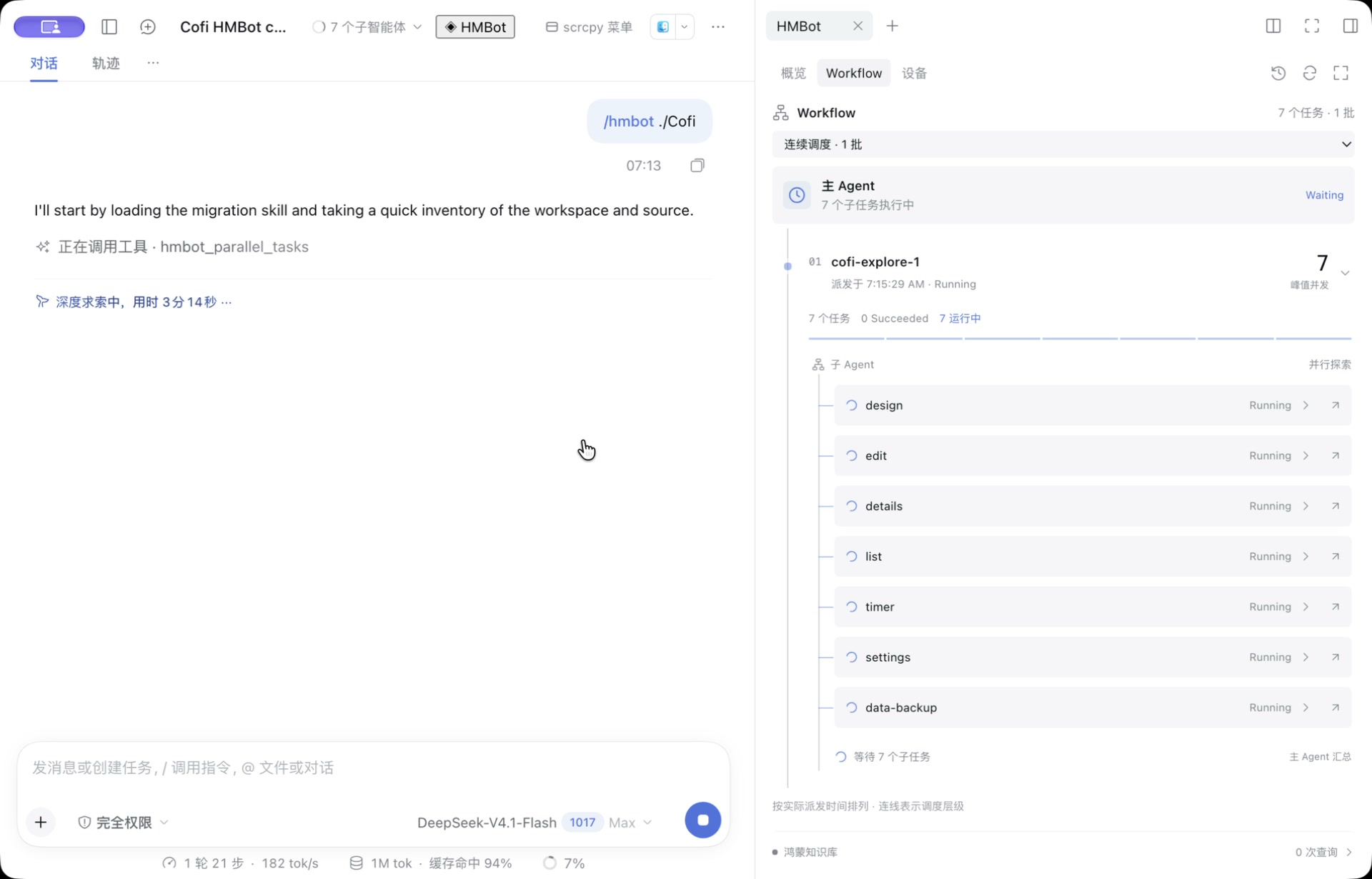
主会话与 Workflow 并行任务

迁移结果与侧栏设备操作:

Cofi 鸿蒙迁移结果与模拟器侧栏

以上为 Cofi 迁移的真实界面截图,由 Fuxi 市场介绍页托管,不随插件安装。

版本

兼容 DSH 0.2.1(rc.2 起)和 0.2.2;实际安装包已通过 0.2.1-rc.2、0.2.2-rc.1 的原生接入检查。HMBot 0.1.5 核心文件保持原样。

支持 Windows、macOS Apple Silicon / Intel 和 Linux 的工具路径。设备接口要求 API 12+ 与 UiTest 扩展,已在 macOS + API 24 / UiTest 6.0.2.3 模拟器验证;设备侧 aarch64 / x86_64 组件随包提供。

更多

安装与配置 · 设备通道 · 开发与同步 · Bundle 内容

发行包名:@fuxi-ailabs/hmbot。来源见 PROVENANCE,许可见 第三方声明。