
@fuxishi/vanilla-jsoneditor
v1.0.3
Published
一个基于web的工具, 用于查看、编辑、格式化、转换和验证JSON, 将原本的svelte-jsoneditor项目进行汉化


Readme
vanilla-jsoneditor
一个基于Web的工具,用于查看、编辑、格式化、转换和验证JSON。
在线体验:https://jsoneditoronline.org
这是 svelte-jsoneditor 的原生变体,可以在原生JavaScript或SolidJS、React、Vue、Angular等框架中使用。
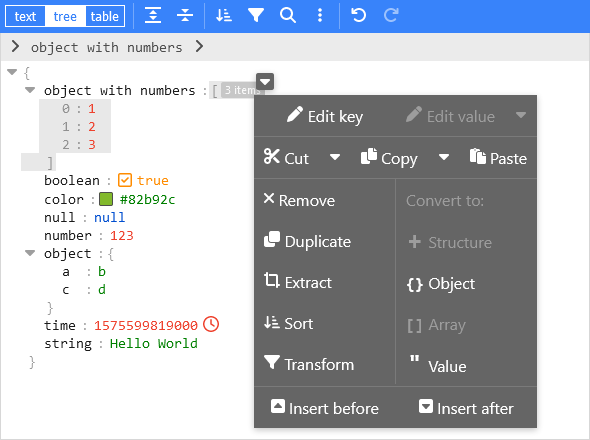
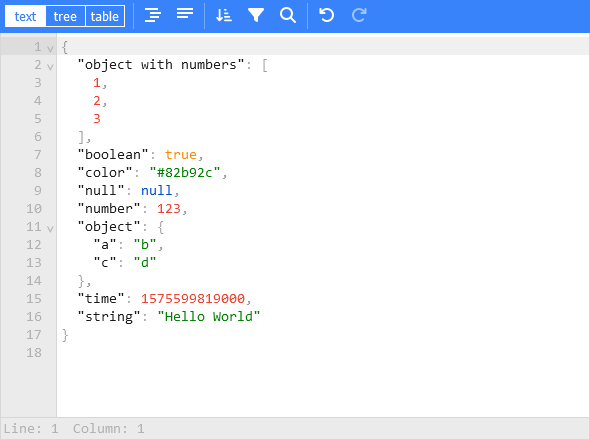
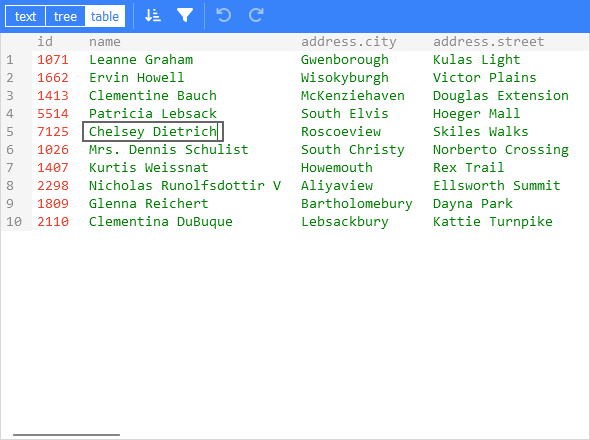
特性
- 查看和编辑JSON
- 提供底层文本编辑器和高级树形视图及表格视图
- 格式化(美化)和压缩JSON
- 对JSON进行排序、查询、过滤和转换
- 修复JSON
- 支持JSON Schema验证和可插拔的自定义验证
- 语法高亮、撤销/重做、搜索和替换
- 提供颜色选择器和时间戳标签等实用工具
- 可处理最大达512MB的大型JSON文档
安装
使用npm安装:
npm install vanilla-jsoneditor备注:在Svelte项目中使用时,请安装并使用 svelte-jsoneditor 而不是 vanilla-jsoneditor。
使用
如果您的项目使用了打包工具(如Vite、Rollup或Webpack),建议使用默认的ES导入方式:
// 在React、Vue或Angular项目中使用
import { createJSONEditor } from "vanilla-jsoneditor"
如果想直接在浏览器中使用该库,请使用提供的独立ES包:
// 直接在浏览器中使用
import { createJSONEditor } from "vanilla-jsoneditor/standalone.js"
独立包包含了 vanilla-jsoneditor 的所有依赖项,例如 lodash-es 和 Ajv。如果您的项目也使用了这些依赖项,则它们会在您的Web应用中被重复打包,导致应用体积不必要地增大。通常情况下,建议使用默认的 import { createJSONEditor } from 'vanilla-jsoneditor' 方式,以便可以复用依赖项。
使用(浏览器示例,加载ES模块)
<!doctype html>
<html lang="en">
  <head>
    <title>JSONEditor</title>
  </head>
  <body>
    <div id="jsoneditor"></div>

    <script type="module">
      import { createJSONEditor } from "vanilla-jsoneditor/standalone.js"

      // 或者通过CDN使用(不建议在生产环境中使用):
      // import { createJSONEditor } from 'https://unpkg.com/vanilla-jsoneditor/index.js'
      // import { createJSONEditor } from 'https://cdn.jsdelivr.net/npm/vanilla-jsoneditor/index.js'

      let content = {
        text: undefined,
        json: {
          greeting: "Hello World",
        },
      }

      const editor = createJSONEditor({
        target: document.getElementById("jsoneditor"),
        props: {
          content,
          onChange: (
            updatedContent,
            previousContent,
            { contentErrors, patchResult }
          ) => {
            // content is an object { json: JSONData } | { text: string }
            console.log("onChange", {
              updatedContent,
              previousContent,
              contentErrors,
              patchResult,
            })
            content = updatedContent
          },
        },
      })

      // 使用get、set、update和onChange方法向编辑器输入或输出数据。
      // 使用updateProps更新属性。
    </script>
  </body>
</html>
使用(React示例,包括NextJS)
首先,创建一个React组件来包装vanilla-jsoneditor
根据您使用的是JavaScript还是TypeScript,创建一个JSX或TSX文件:
TypeScript
//
// JSONEditorReact.tsx
//
import { useEffect, useRef } from "react"
import { createJSONEditor, JSONEditorPropsOptional } from "vanilla-jsoneditor"

const JSONEditorReact: React.FC<JSONEditorPropsOptional> = (props) => {
  const refContainer = useRef<HTMLDivElement>(null)
  const refEditor = useRef<JSONEditor | null>(null)

  useEffect(() => {
    // 创建编辑器
    refEditor.current = createJSONEditor({
      target: refContainer.current!,
      props: {},
    })

    return () => {
      // 销毁编辑器
      if (refEditor.current) {
        refEditor.current.destroy()
        refEditor.current = null
      }
    }
  }, [])

  useEffect(() => {
    // 更新属性
    if (refEditor.current) {
      refEditor.current.updateProps(props)
    }
  }, [props])

  return <div ref={refContainer}></div>
}

export default JSONEditorReact
JavaScript
//
// JSONEditorReact.jsx
//
import { useEffect, useRef } from "react"
import { JSONEditor, JSONEditorPropsOptional } from "vanilla-jsoneditor"

const JSONEditorReact = (props) => {
  const refContainer = useRef(null)
  const refEditor = useRef(null)

  useEffect(() => {
    // 创建编辑器
    refEditor.current = createJSONEditor({
      target: refContainer.current,
      props: {},
    })

    return () => {
      // 销毁编辑器
      if (refEditor.current) {
        refEditor.current.destroy()
        refEditor.current = null
      }
    }
  }, [])

  // 更新属性
  useEffect(() => {
    if (refEditor.current) {
      refEditor.current.updateProps(props)
    }
  }, [props])

  return <div ref={refContainer}></div>
}

export default JSONEditorReact
导入并使用React组件
如果您使用的是NextJS,则需要使用动态导入,以确保仅在浏览器中渲染组件(禁用包装器的服务器端渲染),如下所示的NextJS TypeScript示例所示。
如果您在传统的非NextJS浏览器应用中使用React,则可以使用标准导入语句,如 import JSONEditorReact from '../JSONEditorReact'
//
// demo.tsx for use with NextJS
//
import dynamic from "next/dynamic"
import { useCallback, useState } from "react"

//
// 在NextJS中,当使用TypeScript时,类型定义
// 可以从'vanilla-jsoneditor'中使用
// 常规的导入语句(前面加上'type',
// 如下所示)导入,但只能这样导入类型。
// 在NextJS中使用时,React组件和辅助
// 函数必须使用{ ssr: false }动态导入
// 如本示例中的其他地方所示。
//
import type { Content, OnChangeStatus } from "vanilla-jsoneditor"

//
// 在NextJS中,JSONEditor组件必须被包装在
// 一个动态组件中,以关闭
// 组件的服务器端渲染。这是必要的
// 因为vanilla-jsoneditor代码试图使用
// 在服务器端渲染期间不可用的
// 仅限浏览器的JavaScript功能。任何由vanilla-jsoneditor
// 提供的辅助函数,如toTextContent,
// 在使用NextJS时也必须仅在动态导入的
// ssr: false组件中使用。
//
const JSONEditorReact = dynamic(() => import("../JSONEditorReact"), {
  ssr: false,
})
const TextContent = dynamic(() => import("../TextContent"), { ssr: false })

const initialContent = {
  hello: "world",
  count: 1,
  foo: ["bar", "car"],
}

export default function Demo() {
  const [jsonContent, setJsonContent] = useState<Content>({
    json: initialContent,
  })
  const handler = useCallback(
    (content: Content, previousContent: Content, status: OnChangeStatus) => {
      setJsonContent(content)
    },
    [jsonContent]
  )

  return (
    <div>
      <JSONEditorReact content={jsonContent} onChange={handler} />
      <TextContent content={jsonContent} />
    </div>
  )
}
//
// TextContent.tsx
//
// (用于NextJS的toTextContent包装器)
//
import { Content, toTextContent } from "vanilla-jsoneditor"
interface IOwnProps {
content: Content
}
const TextContent = (props: IOwnProps) => {
const { content } = props
return <p>编辑器的内容转换为字符串后为:{toTextContent(content).text}</p>
}
export default TextContent