
@gainsight-cs/gs-admin-cli
v1.0.5
Published
Gainsight Admin CLI & MCP Server — JO Programs, Data Management,and more


Readme
@gainsight/gs-admin-cli
Gainsight Admin CLI & MCP Server — manage Journey Orchestrator programs, Data Objects, Rules Engine, Scorecards, Reports, and more from the terminal or any AI assistant.


What is this?
gs-admin is a single binary that works two ways:
- CLI — run Gainsight admin operations directly from the terminal
- MCP server — expose 115 tools to any AI assistant (Claude Code, Claude Desktop, Cursor, Windsurf, Zed)
Both modes share the same auth, commands, and logic. Set it up once and use it everywhere.
Prerequisites
| Requirement | Minimum |
|---|---|
| Node.js | 18.0.0 |
| OS | macOS, Linux, Windows |
| Gainsight tenant | A Gainsight CS tenant URL (e.g. https://your-company.gainsightcloud.com) |
Installation
macOS / Linux / Windows Command Prompt:
npm install -g @gainsight/gs-admin-cli
gs-admin --version
Windows PowerShell — npm global scripts require script execution to be enabled first:
Set-ExecutionPolicy -Scope CurrentUser -ExecutionPolicy RemoteSigned
npm install -g @gainsight/gs-admin-cli
gs-admin --version
Update to latest:
npm install -g @gainsight/gs-admin-cli@latestOne-off via npx (no install):
npx -y @gainsight/gs-admin-cli --versionSetup
Configure an OAuth Application
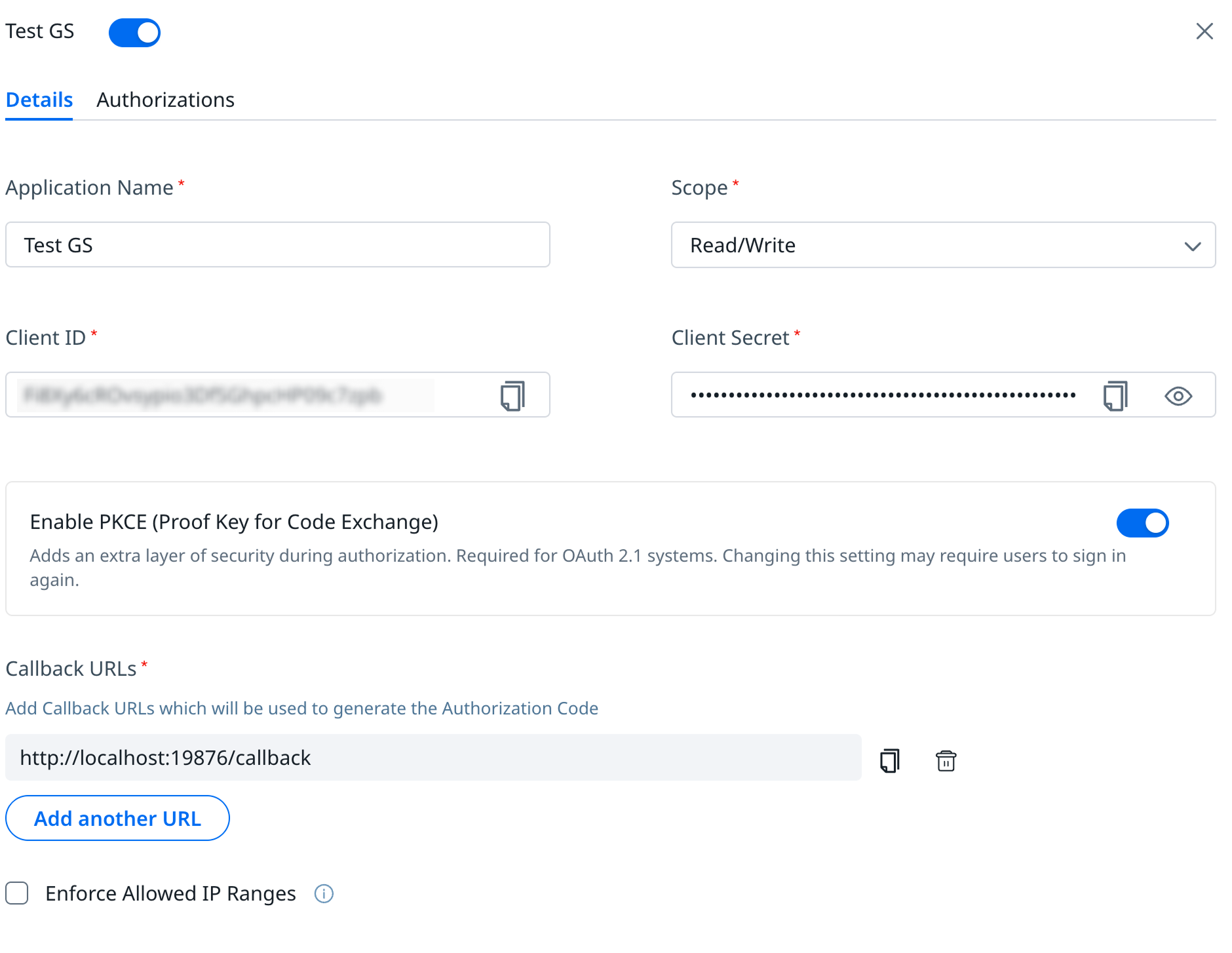
Before logging in, ensure an OAuth application is registered in your Gainsight tenant with the following settings:
| Setting | Value |
|---|---|
| Scopes | read, write |
| PKCE | Enabled |
| Callback URL | http://localhost:19876/callback |
For step-by-step instructions on creating and configuring the OAuth app, see the OAuth for Gainsight APIs guide.
Auto-enrollment ()
No client ID or secret needed. Your browser fetches OAuth credentials from Gainsight automatically.
gs-admin --base-url https://your-company.gainsightcloud.com login- A browser tab opens to your tenant's OAuth enrollment page.
- After you log in, credentials are fetched and a PKCE token exchange completes.
- The access token is stored securely in the OS keychain (or AES-256-GCM encrypted file as fallback).
The base_url is saved to ~/.gs-admin/config.json after a successful login — subsequent commands don't need --base-url.
Verify
gs-admin whoamiBase URL: https://your-company.gainsightcloud.com
Auth mode: OAuth PKCE
Config file: /Users/you/.gs-admin/config.json
Secret store: macOS Keychain
Token store: macOS Keychain
Token: valid (expires in 3527s)Command Reference
Commands follow the pattern gs-admin <domain> <resource> <action> [flags].
Global flags (go before the subcommand):
| Flag | Purpose |
|---|---|
| --base-url <url> | Override GS_BASE_URL |
| --format <fmt> | table | json | detail | compact | ids | status |
| --json | Shortcut for --format json |
| --fields <a,b,c> | Select output columns (matched against each action's fieldsCatalog) |
| --debug | Enable framework debug output |
| --skip-version-check | Skip CLI/server version compatibility check |
Auth & Config
| Command | What it does |
|---|---|
| gs-admin config --client-id … --client-secret … --auth-url … --token-url … | Save OAuth config |
| gs-admin login | Browser OAuth login |
| gs-admin logout | Remove tokens for the current base_url from every backend |
| gs-admin whoami | Show auth status, backend locations, and token validity |
| gs-admin tokens backends | List token-storage backends in priority order; mark which is active |
| gs-admin tokens migrate | Move tokens from legacy ~/.gs-admin/tokens.json to the highest-available backend |
Journey Orchestrator (journey / jo)
Programs (jo p)
| Command | Summary |
|---|---|
| gs-admin jo p list [--search …] [--limit N] [--page N] | List JO programs with pagination |
| gs-admin jo p describe --id <guid> | Full program detail with flow structure |
| gs-admin jo p create --name "…" | Create a new Dynamic Program |
| gs-admin jo p publish --id <guid> [--wait] | validate → save → publish pipeline; --wait polls until done |
| gs-admin jo p publish-status --id <guid> | Read the current publish status |
| gs-admin jo p validate --id <guid> | Run 10 pre-publish rules; called automatically by publish |
| gs-admin jo p save --id <guid> | Commit cached mutations to the BE (publish calls this automatically) |
| gs-admin jo p pause --id <guid> | Pause a running program (PROCESSING → PAUSE) |
| gs-admin jo p resume --id <guid> [--without-update] | Resume a paused program; auto-saves cache first by default |
| gs-admin jo p stop --id <guid> | Stop a program (irreversible at the BE) |
| gs-admin jo p cache start --id <guid> | Force-refresh the local cache from the BE |
| gs-admin jo p cache discard --id <guid> | Drop the local cache without committing |
| gs-admin jo p exclusion-list --id <guid> --file <path> | Upload an exclusion list CSV |
Local cache. Every mutating JO command buffers changes locally — no BE save per call. The cache is committed only via jo p save (manual) or jo p publish (automatic). Latency: ~800 ms per mutation without cache → ~5 ms. A typical 20-step build drops from ~16 s to ~1 s of save overhead.
Participant Sources (jo p src)
| Command | Summary |
|---|---|
| gs-admin jo p src csv-setup --id <guid> --file <path> --standard-mapping "…" | One-shot: upload CSV + attach + map |
| gs-admin jo p src dd-setup --id <guid> --object-name <name> --standard-mapping "…" | One-shot: attach Data Designer source + map |
| gs-admin jo p src describe --id <guid> | Show attached source type, mapping, and custom fields |
Email & Survey Nodes (jo p n e / jo p n s)
| Command | Summary |
|---|---|
| gs-admin jo p n e add --id <guid> --config-file <path> | One-shot: full email node from JSON config |
| gs-admin jo p n e create --id <guid> --name "…" | Create a bare email-node skeleton |
| gs-admin jo p n e set-template --id <guid> --node-id <nid> --template-id <tid> | Attach a template (required before headers/tokens) |
| gs-admin jo p n e set-global-headers --id <guid> --node-id <nid> --from-name … --from-email … | Set global sender/recipient headers (partial merge) |
| gs-admin jo p n e map-standard-tokens --id <guid> --node-id <nid> --token-mappings '{…}' | Map template tokens to participant fields |
| gs-admin jo p n e set-exit-timer --id <guid> --node-id <nid> --timer-value N --interval-unit DAYS | Add exit timer; expands to branched outPorts (Not Opened / Opened) |
| gs-admin jo p n s add --id <guid> --config-file <path> | One-shot: full survey-email node from JSON config |
| gs-admin jo p n add-delay --id <guid> --timer-value N --interval-unit DAYS | Add a delay (timer) step |
| gs-admin jo p n connect --id <guid> --from-port <pid> --to-port <pid> | Wire two nodes together |
| gs-admin jo p n disconnect --id <guid> --from-port <pid> --to-port <pid> | Remove an existing connection |
| gs-admin jo p n set-connections --id <guid> --connections-json '[…]' | Bulk-replace all connections in one atomic save |
| gs-admin jo p n remove --id <guid> --node-id <nid> | Remove a node and its connections (refuses START and paired CREATE_CTAs) |
CTA Action Nodes (jo p n cc / jo p n xc)
| Command | Summary |
|---|---|
| gs-admin jo p n cc add --id <guid> --config-json '{…}' | One-shot CREATE_CTA node from JSON config |
| gs-admin jo p n cc create --id <guid> --node-name "…" --cta-name "…" --type-id <gsid> | Bare CREATE_CTA skeleton |
| gs-admin jo p n cc set-exit-timer --id <guid> --node-id <nid> … | Expand to 2 branched outPorts (CTA Not Closed / CTA Closed) |
| gs-admin jo p n xc add --id <guid> --config-json '{…}' | One-shot CLOSE_CTA node (requires srcCreateCtaNodeId) |
Email Assets (jo e)
| Command | Summary |
|---|---|
| gs-admin jo e templates | List available email templates |
| gs-admin jo e template --id <tid> | Template detail with variants and token IDs |
| gs-admin jo e connectors | List email connectors |
Data Management (data-management / dm)
| Command | Summary |
|---|---|
| gs-admin dm objects list [--search …] | List Gainsight objects |
| gs-admin dm objects describe --name <name> | Full field metadata for an object |
| gs-admin dm objects list-and-describe [--search …] | Bulk list + describe |
| gs-admin dm objects create --label <label> --file <csv> | Create a custom object (fields defined via CSV) |
| gs-admin dm objects add-field --name <name> --file <csv> | Add new fields to an existing object |
| gs-admin dm objects update --name <name> [--file <csv>] | Update object metadata or patch existing fields |
| gs-admin dm dependencies check --name <name> | Object dependency report |
| gs-admin dm dropdowns list [--search …] | List picklist categories |
| gs-admin dm dropdowns describe --name <name> | Full dropdown with all values |
| gs-admin dm dropdowns add-item --name <name> --item-name <value> | Add a single dropdown value |
| gs-admin dm dropdowns upload-csv --name <name> --file <csv> | Bulk-create dropdown values from CSV |
Rules Engine (rules-engine / re)
| Command | Summary |
|---|---|
| gs-admin re r list [--search …] | List rules |
| gs-admin re r describe --name <name> | Full rule detail: tasks, criteria, actions |
| gs-admin re r describe --name <name> --task-id <id> | COMPLEX rules: per-task drilldown — source, show fields, group by, join conditions, task criteria |
| gs-admin re r list-and-describe | All rules with action types and mapping counts |
| gs-admin re r create --name "…" | Create a new rule |
| gs-admin re r set-source --rule-name "…" --type MDA --object-name company | Set the rule's data source |
| gs-admin re r set-source-template --rule-name "…" --template-name "…" | Attach a Data Designer template (COMPLEX flow) |
| gs-admin re r add-criteria --rule-name "…" --condition "A:Arr:GT:10000" | Add filter criteria |
| gs-admin re r add-action cta --rule-name "…" --type Risk --priority Medium … | Add a CTA action |
| gs-admin re r add-action set-score --rule-name "…" --measure "…" --score "…" | Add a scorecard set-score action |
| gs-admin re r add-action success-plan --rule-name "…" --type <t> --status <s> … | Add a Success Plan action |
| gs-admin re r add-action update-success-plan --rule-name "…" --type <t> … | Add an Update Success Plan action |
| gs-admin re r add-action close-cta --rule-name "…" --type <t> --status <s> … | Add a Close-CTA action |
| gs-admin re r add-action load-to-gainsight --rule-name "…" --target-object <name> --operation UPSERT --mapping … | Write results to any MDA object |
| gs-admin re r add-action load-to-company --rule-name "…" --operation UPSERT --mapping … | Write results to the Company object (with compound lookup support) |
| gs-admin re r add-action load-to-object --rule-name "…" --target-type MDA --target-object <name> … | Write results to any object (MDA or SFDC) |
| gs-admin re r edit-action cta --rule-name "…" --action-id <id> … | Edit an existing CTA action |
| gs-admin re r edit-action set-score --rule-name "…" --action-id <id> … | Edit an existing Set-Score action |
| gs-admin re r edit-action success-plan --rule-name "…" --action-id <id> … | Edit an existing Success Plan action |
| gs-admin re r edit-action update-success-plan --rule-name "…" --action-id <id> … | Edit an existing Update Success Plan action |
| gs-admin re r edit-action close-cta --rule-name "…" --action-id <id> … | Edit an existing Close-CTA action |
| gs-admin re r edit-action load-to-gainsight --rule-name "…" --action-id <id> … | Edit an existing Load-to-Gainsight action |
| gs-admin re r edit-action load-to-company --rule-name "…" --action-id <id> … | Edit an existing Load-to-Company action |
| gs-admin re r list-executions --name "…" | Execution history with status and timing |
| gs-admin re r debug --name "…" | Debug a rule: current execution, recent runs, trend |
| gs-admin re chains list | List rule chains |
| gs-admin re chains describe --name "…" | Rule chain detail with ordered task list |
| gs-admin re chains debug --name "…" | Debug a chain: per-task phase breakdown |
Data Designer (data-designer / dd)
| Command | Summary |
|---|---|
| gs-admin dd templates list | List Data Designer templates |
| gs-admin dd templates create --name "…" | Create a new template |
| gs-admin dd templates add-task --template-name "…" --type mda --name "…" --object-name company … | Add a task (extract, join, transform, etc.) |
| gs-admin dd templates preview --template-name "…" | Preview sample output |
| gs-admin dd templates describe --template-name "…" | Full template and task detail |
| gs-admin dd templates delete --template-name "…" | Delete a template |
Scorecard (scorecard / sc)
| Command | Summary |
|---|---|
| gs-admin sc list | List scorecards |
| gs-admin sc create --name "…" | Create a scorecard |
| gs-admin sc update --name "…" | Update a scorecard |
| gs-admin sc measures list | List measures |
| gs-admin sc measures create --name "…" | Create a measure |
| gs-admin sc measure-groups list | List measure groups |
| gs-admin sc measure-groups create --name "…" | Create a measure group |
| gs-admin sc scheme list | List scoring schemes |
Connectors (connectors / cn)
| Command | Summary |
|---|---|
| gs-admin cn list [--search …] [--status …] | List iPaaS connector connections |
| gs-admin cn jobs --connector-id <id> [--describe] | List jobs; --describe adds full field mappings |
| gs-admin cn activity --connector-id <id> | Batch or real-time execution activity |
| gs-admin cn px-activity | PX connector job execution activity |
| gs-admin cn audit --connector-id <id> | Connector configuration change audit log |
| gs-admin cn job-chains list | List iPaaS job execution chain sets |
| gs-admin cn job-chains describe --name "…" | Full job chain detail with ordered job list |
Report (report / rp)
| Command | Summary |
|---|---|
| gs-admin rp list [--limit N] [--page N] | List reports with pagination |
| gs-admin rp describe --name "…" | Report definition: columns, sort, filters |
| gs-admin rp run --name "…" | Execute a report and return its data rows |
| gs-admin rp create --name "…" | Create a new report |
| gs-admin rp update --name "…" | Update an existing report |
Query (query / q)
Execute ad-hoc queries against any Gainsight object:
# Basic query — default LIMIT 50
gs-admin q execute --object Company --select Name,Arr

# With limit, ordering, and pagination
gs-admin q execute --object Company --select Name,Arr --limit 100 --order-by 'Arr DESC'
gs-admin q execute --object Company --select Name,Arr --limit 100 --page 2

# High-priority with compatibility mode
gs-admin q execute --object Company --select Name,Status --hp --cmode IGNORE
| Flag | Default | Purpose |
|---|---|---|
| --object | required | Gainsight object name (e.g. Company) |
| --select | required | Comma-separated field names |
| --limit | 50 | Appends LIMIT N to the query |
| --page | 1 | Page number (used with --limit) |
| --order-by | — | Appends ORDER BY <value> (e.g. 'Arr DESC') |
| --timezone | UTC | Timezone for date/time fields |
| --hp | false | High-priority query execution |
| --cmode | — | Compatibility mode (e.g. IGNORE) |
| --consumer-asset-type | — | Context hint (e.g. GS_REPORTS) |
MCP Integration
gs-admin starts in MCP mode automatically when connected via stdio. No separate binary or config — just add it to your MCP host.
Pre-flight (one-time per machine):
gs-admin login # or: gs-admin --base-url https://… loginClaude Code
Add to .mcp.json in your project root (or ~/.claude.json for user-global):
{
  "mcpServers": {
    "gs-admin": {
      "command": "node",
      "args": ["/path/to/gs-admin-cli/bin/gs-admin.js"],
      "env": {
        "GS_BASE_URL": "https://your-company.gainsightcloud.com"
      }
    }
  }
}
After a global npm install -g, you can use "command": "gs-admin" with no args.
Restart Claude Code and run /mcp to confirm gs-admin appears in the tool list.
Claude Desktop
Edit ~/Library/Application Support/Claude/claude_desktop_config.json (macOS). Same JSON shape as above. Quit with Cmd+Q and relaunch.
Cursor / Windsurf / Zed
Paste the same mcpServers entry into each app's MCP settings.
Verify the MCP server starts
GS_BASE_URL=https://your-company.gainsightcloud.com gs-admin --mcpIt should hang silently on stdin (no errors, no exit). Ctrl+C to stop.
MCP tool inventory (115 tools)
103 artifact tools + 12 runtime tools. Tool names are <namespace>_<action> with dashes converted to underscores.
| Domain | Example tool names |
|---|---|
| Journey — Programs | journey_list_programs, journey_create_program, journey_publish_program, journey_validate, journey_save_program, journey_pause_program, journey_resume_program, journey_stop_program |
| Journey — Sources | journey_setup_csv_source, journey_setup_dd_source, journey_save_mapping, journey_save_unique_criteria |
| Journey — Email nodes | journey_add_email_node, journey_create_email_node, journey_set_email_node_template, journey_set_email_node_global_headers, journey_map_email_node_standard_tokens |
| Journey — Survey nodes | journey_add_survey_node, journey_set_survey_node_survey, journey_map_survey_node_tokens |
| Journey — CTA nodes | journey_add_create_cta_node, journey_add_close_cta_node, journey_list_cta_options |
| Journey — Connections | journey_connect_nodes, journey_disconnect_nodes, journey_set_connections, journey_remove_node |
| Data Management | list_objects, describe_object, create_object, add_object_fields, update_object, list_dropdowns, describe_dropdown, add_dropdown_item, upload_csv_dropdown_items |
| Rules Engine | list_rules, describe_rule, list_and_describe_rules, rules_engine_debug_rule, rules_engine_debug_chain, list_chains, describe_chain |
| Data Designer | data_designer_list_templates, data_designer_create_template, data_designer_add_task, data_designer_preview_task_outputs |
| Scorecard | scorecard_list_scorecards, scorecard_create_scorecard, scorecard_create_measure, scorecard_assign_measures |
| Connectors | connectors_list_connectors, connectors_list_connector_jobs, connectors_list_activity, connectors_audit_connector, connectors_describe_job_chain |
| Report | report_list_reports, report_describe_report, report_fetch_report_data |
| Query | query_execute |
Troubleshooting
"No authentication configured" — run gs-admin login to authenticate via browser OAuth.
Token expired — the CLI auto-refreshes tokens silently when client_id/client_secret are stored. Otherwise, re-run gs-admin login when the token expires.
gs-admin not on PATH after npm install -g:
echo $PATH
npm config get prefix   # bin/ under this path must be on PATH
On macOS/Linux this is usually /usr/local/bin or ~/.npm-global/bin. Add it to your shell profile.
CORS error during browser login — ensure your OAuth app includes the following in the Gainsight admin console:
- Allowed Origins (CORS):
http://localhost:19876 - Allowed Callback URLs:
http://localhost:19876/callback
"MCP server gs-admin not connected" — run GS_BASE_URL=https://… gs-admin --mcp to verify the server starts (it should hang silently). If it exits, check GS_BASE_URL and token validity.
CLI older than deployed server:
✗ Your gs-admin-cli (v1.1.0) is older than the deployed server (v1.3.0).
  Run 'npm update -g gs-admin-cli' to upgrade.
CLI mode blocks on version mismatch; MCP mode warns but continues. Upgrade with: npm install -g @gainsight/gs-admin-cli@latest
Uninstall
npm uninstall -g @gainsight/gs-admin-cli

# Remove tokens per tenant (run for each base_url you've used)
gs-admin --base-url https://your-company.gainsightcloud.com logout

# Remove all local config and stored state
rm -rf ~/.gs-admin
Security
To report a vulnerability, email [email protected] with the subject line [CLI Security] <brief description>.
For safe harbor terms and our full Vulnerability Disclosure Program, see gainsight.com/security/vulnerability-disclosure-program.
Further Reading
- Full Usage Guide — complete command reference, all flags, common workflows, multi-tenant setup, commit conventions