
@gceico/claude-make-it-rain
v1.0.15
Published
Satirical menu bar app that estimates today's Claude Code spend and makes it rain

Maintainers
 gceico
Readme
Make It Rain 💸


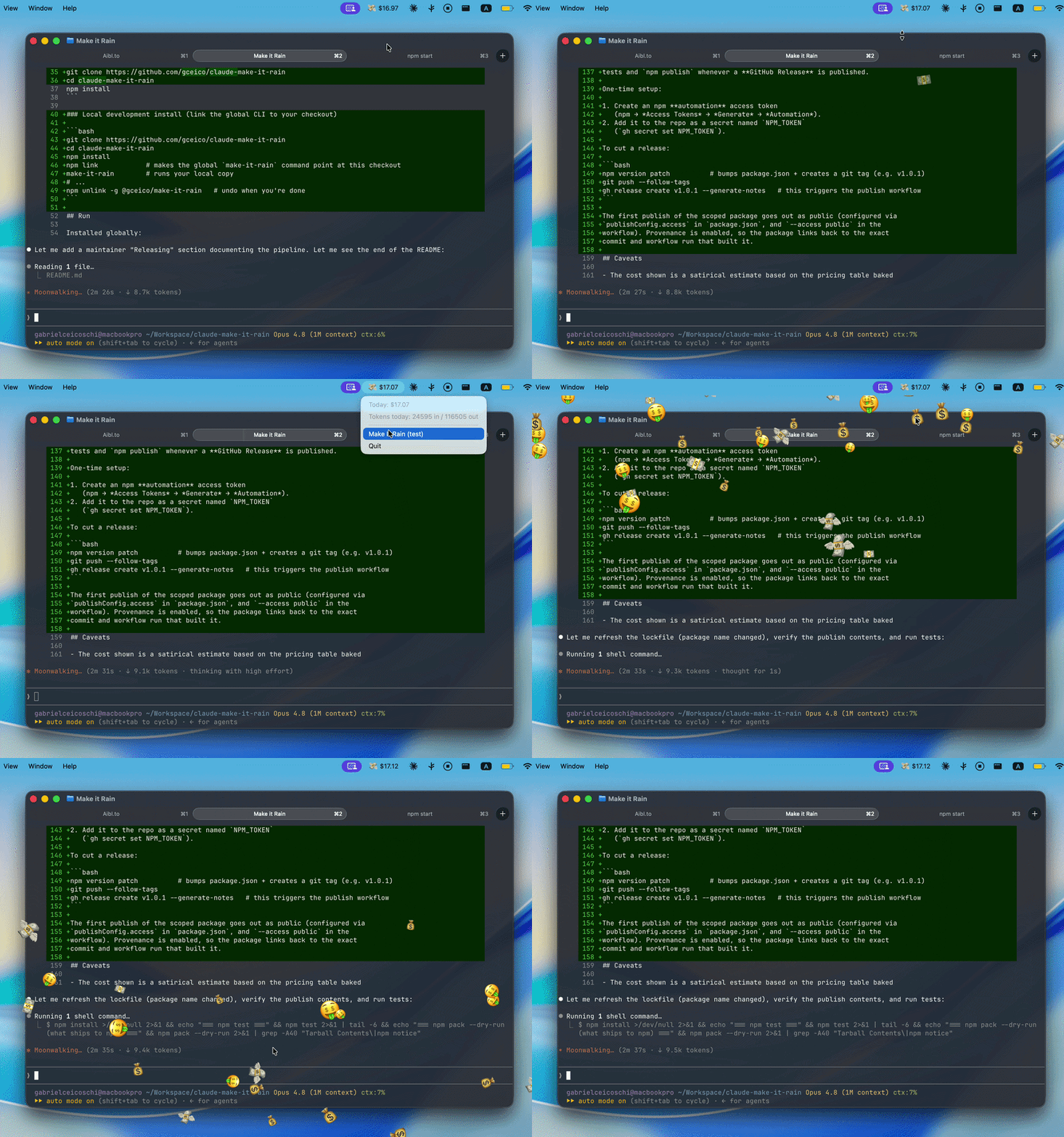
A menu bar app that makes your AI coding-agent spend — Claude Code and OpenAI Codex, combined into one running total — impossible to ignore. Every $1 flies a 💵 off the menu bar — and every $100 makes it rain. 💸 Then it adds your day into a shared picture of what everyone is spending, and asks the only question that matters: was it worth building it?
Install
npm install -g @gceico/claude-make-it-rain
claude-make-it-rain
Or run it once without installing:
npx @gceico/claude-make-it-rainThe app detaches from the terminal and lives in your tray/menu bar. Quit it from the tray menu.
Needs Node 22+ (you have it if you run Claude Code). It reads the session logs
your agents already write — ~/.claude/projects for Claude Code and
~/.codex/sessions for Codex (both defaults); whichever you don't use simply
contributes nothing. Runs on macOS, Windows,
and Linux — the dollar amount next to the tray icon is macOS-only; elsewhere
it lives in the tooltip and menu.
What you get
💸 $12.34in your tray, turning🤑once today crosses $100.- A 💵 flies off the tray at every whole dollar. Money stacks burst at $10 and $50, and every $100 plays a ~6-second full-screen money shower. The overlay is click-through and only exists while animating.
- See your wealth in the tray: today's total broken into 💰/💵/🪙, plus what it bought in plain terms — ≈ 2 burgers 🍔, ≈ 10% of a trip to Greece 🏛️ — and the nudge, was it worth building it?
- A tray menu with today's total, token counts, animation previews, and the collective-board controls.
- A daily update check: when a new version ships, an ⬆️ Update item appears in the menu and installs it for you.
Collective spend, not a scoreboard
See what Claude Code costs — together — at aiburn.dev. A ranked "who spent the most" board quietly rewards spending more, which is the opposite of the point. So the board shows the collective curve instead: how much everyone spent today and when the peaks and valleys hit, resetting every day (UTC). Your own total sits beside a tangible equivalence so the number means something.

Every 10 minutes the app reports two things: a random gamer tag generated on
first run (e.g. TurboLlama7392) and today's estimated total. Nothing else
leaves your machine; the server keeps only per-tag daily totals plus an
aggregate hourly curve, pruned daily. View leaderboard… opens your personal
reflection page (aiburn.dev/?tag=<yourTag>) — your spend, your share of the
collective, and what it adds up to. Toggle reporting off with Share on daily
leaderboard in the tray menu, or reroll your tag with New random tag.
Settings live in config.json under Electron's userData directory (e.g.
~/Library/Application Support/make-it-rain/ on macOS). You can also self-host
the backend — a zero-dependency Bun server under server/
(it uses only bun:sqlite and Bun.serve) — and point apiBaseUrl at it:
bun server/index.ts # http://localhost:8787The board page itself is an Astro static site in
web/ (cd web && bun run build), which the server serves from web/dist.
How it works
The app polls ~/.claude/projects/*/*.jsonl every 3 seconds, reading only
newly appended bytes. Each assistant message with a usage block from today
is priced with the per-model table in src/lib/pricing.ts (cache reads at 10% of
the input rate, cache writes at 1.25×/2×), deduplicated by
requestId:messageId, and the total resets at local midnight.
The figure is an estimate from list prices — it won't match your actual bill. Animations render on the primary display.
Development
Built with Bun (≥ 1.3) as the package manager, test runner, and bundler; the sources are TypeScript. (The published CLI still runs under your Node — Electron embeds its own.)
git clone https://github.com/gceico/claude-make-it-rain
cd claude-make-it-rain
bun install
bun start        # build + launch Electron (logs in the terminal)
bun run start:all  # full local stack: leaderboard server + landing page on
                   # http://localhost:8787 + the app reporting to it (isolated
                   # config in .dev/ — your real settings are untouched)
bun run test     # unit tests, no Electron window
Debug hooks for the animations:
MIR_TEST_RAIN=1 bun start                 # $100 rain 1.5s after launch
MIR_TEST_STACK=5 bun start                # burst 5 money stacks
MIR_TEST_SHOT=/tmp/overlay.png bun start  # screenshot the overlay
Architecture notes live in CLAUDE.md and docs/DECISIONS.md.
Releasing (maintainers)
npm version patch
git push --follow-tags
gh release create v1.0.1 --generate-notes
Publishing the GitHub Release triggers .github/workflows/publish.yml, which
builds, tests, and publishes to npm with provenance via OIDC Trusted
Publishing — there is no npm token to configure. One-time setup: add a Trusted
Publisher entry for this repo + workflow on npmjs.com.
Who's behind this
I'm Gabriel. I build things like this for fun and ship the ones that turn out good. Check out One's Skills, my Claude Skills collection, or come say hi at Aibl.to — I run AI workshops and help people turn their expertise into compounded value.
— Gabriel C.