
@getalecs/n8n-nodes-cloudflare
v0.1.7
Published
n8n nodes for Cloudflare services including R2, D1, Workers AI, KV and Queues

Maintainers
 dsfaccini
Readme
Cloudflare Nodes for n8n
This is a collection of n8n community nodes for Cloudflare services. Currently supported services: R2 object storage, D1 serverless database, Workers AI, KV storage, and Queues.
Disclaimer: This is a community-developed project and is not officially affiliated with or endorsed by Cloudflare or n8n. I'm just a fan that wanted to use cloudflare services in n8n. This repository is in development, which means that not all cloudflare services are implemented as nodes yet and some operations may currently not be available. Additionally you may encounter bugs or unhelpful error messages. Please report any issues you find and provide as much context as possible, include screenshots and error messages in code blocks if possible.
Available Nodes
Cloudflare R2
Object storage compatible with Amazon S3 API.
Operations:
- Buckets: List, create, delete, get info
- Objects: Upload, download, list, delete, copy
- URLs: Generate presigned URLs for temporary access
Important Note: R2 buckets can only be deleted when completely empty. If you encounter a 409 error when trying to delete a bucket, ensure all objects (including hidden files and incomplete multipart uploads) are removed first. You may need to manually verify the bucket is empty in the Cloudflare dashboard.
Cloudflare KV
Globally distributed key-value store.
Operations:
- Namespaces: List, create, delete
- Key-Value: Get, set, delete, list keys
- Bulk: Get/set/delete multiple keys at once
- Advanced: Expiration, metadata, prefix filtering
Cloudflare Queue
Message queue service for asynchronous processing.
Operations:
- Queue Management: List, create, update, delete queues
- Messages: Send, pull, acknowledge, retry messages
- Trigger Mode: Auto-poll for new messages with configurable intervals
Cloudflare AI
Access to Cloudflare's AI/ML models.
Operations:
- Text Generation: Completions and chat models
- Image Generation: AI-powered image creation
- Speech: Transcription and text-to-speech
Cloudflare D1
Serverless SQL database built on SQLite.
Operations:
- Database Management: List, create, delete databases
- Query Execution: Run SQL queries and commands
- Data Operations: CRUD operations with structured data
Installation
Install directly in n8n:
- Go to Settings > Community Nodes
https://YOUR_N8N_DOMAIN/settings/community-nodes - Enter:
@getalecs/n8n-nodes-cloudflare - Click Install
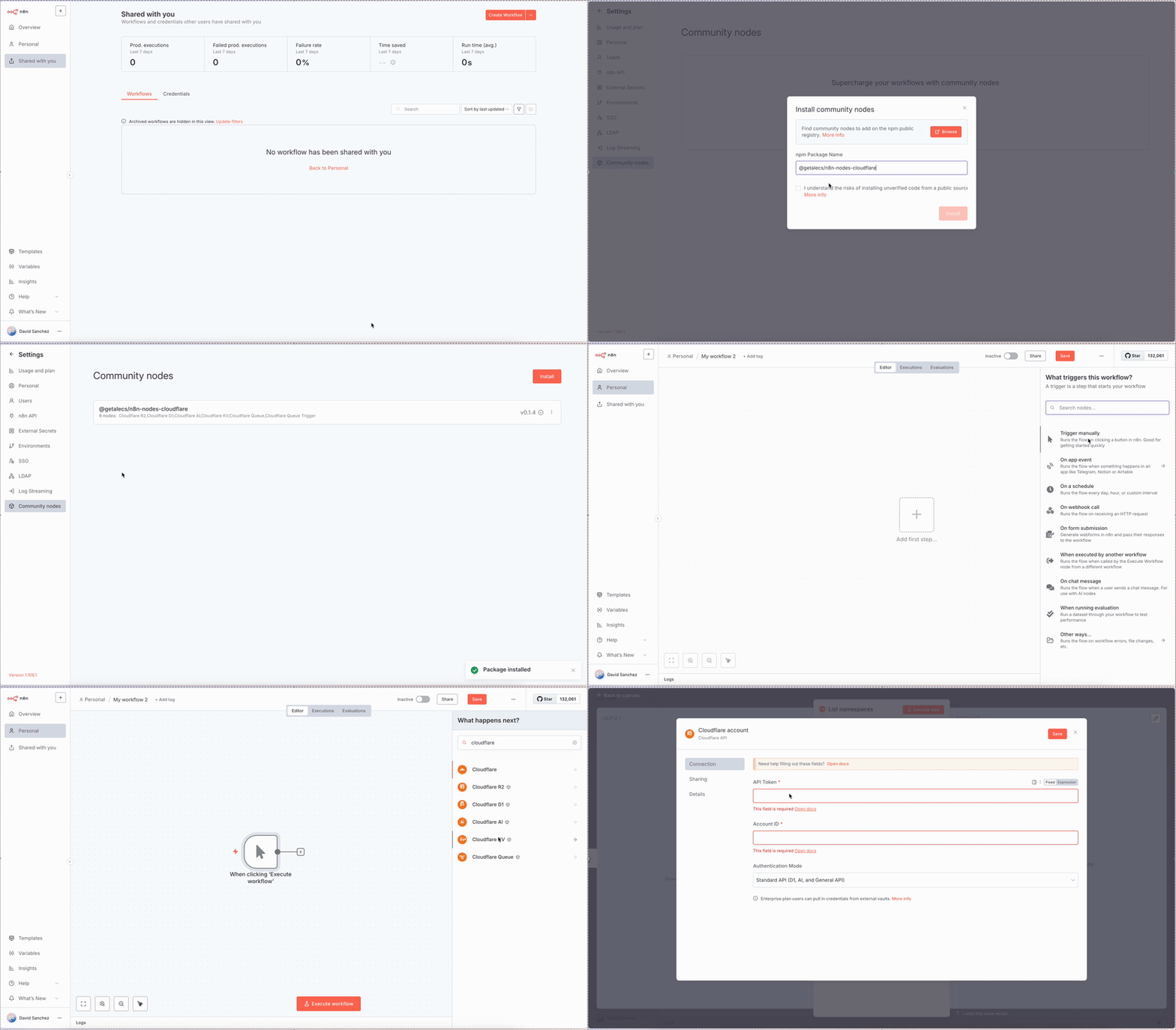
Or install via npm in your n8n instance:
npm install @getalecs/n8n-nodes-cloudflareStarter Templates
Get started quickly with pre-built workflow templates for each Cloudflare service. These templates demonstrate common use cases and best practices.
R2 Starter ✅ Tested
Basic R2 operations: upload, download, list objects
https://raw.githubusercontent.com/dsfaccini/cloudflare-nodes/refs/heads/master/starter-templates/r2-starter.jsonKV Starter ✅ Tested
Key-value operations with metadata and expiration
https://raw.githubusercontent.com/dsfaccini/cloudflare-nodes/refs/heads/master/starter-templates/kv-starter.jsonD1 Starter ✅ Tested
SQL database operations and query examples
https://raw.githubusercontent.com/dsfaccini/cloudflare-nodes/refs/heads/master/starter-templates/d1-starter.jsonAI Starter ⚠️ Untested
Text generation, image creation, and speech
https://raw.githubusercontent.com/dsfaccini/cloudflare-nodes/refs/heads/master/starter-templates/ai-starter.jsonQueue Starter ⚠️ Untested
Message sending and processing basics
https://raw.githubusercontent.com/dsfaccini/cloudflare-nodes/refs/heads/master/starter-templates/queue-starter.jsonQueue Trigger ⚠️ Untested
Automated message polling with error handling
https://raw.githubusercontent.com/dsfaccini/cloudflare-nodes/refs/heads/master/starter-templates/queue-trigger-starter.jsonHow to Import Templates
- Copy the template URL from the table above
- In n8n, go to Workflows → Add workflow → Import from URL...
- Paste the URL and click Import
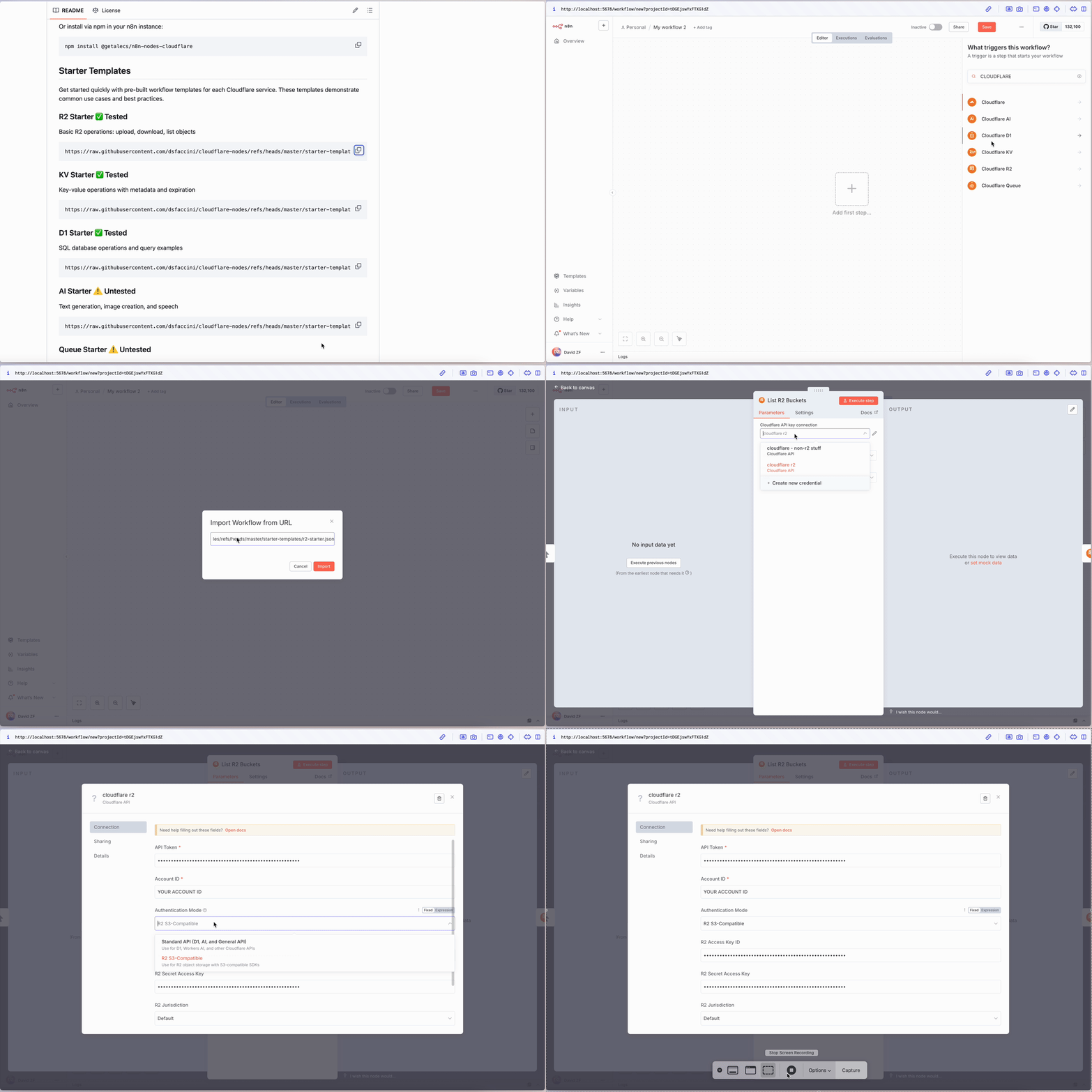
💡 Tip: After importing, remember to add your Cloudflare credentials in the node settings!
Prerequisites
[!IMPORTANT] Cloudflare Queues requires a paid Workers plan. Free accounts will receive 403 errors when using Queue nodes. Learn more about Workers pricing.
- Valid Cloudflare account
- For Queues: Paid Workers plan
- For R2: Separate R2 API token (see below)
Authentication
🔑 API Token Types
Cloudflare offers two types of API tokens with different scopes:
1. User-Level Tokens (Recommended for most services)
Perfect for D1, AI, KV, and Queues. Use this pre-configured link:
📝 Create user-level token for non R2 services (Pre-configured with required permissions)
Create a separate user-level token for R2 (Recommended)
2. Account-Level Tokens
📝 Or create an account-level token for non R2 services (Pre-configured with required permissions)
Or a separate account-level token for R2
🔐 Authentication Modes
Standard Mode (D1, AI, KV, Queue):
- ✅ API Token (from link above)
- ✅ Account ID
R2 Mode (Object Storage):
- ✅ Account ID
- ✅ R2 Access Key ID
- ✅ R2 Secret Access Key
- ✅ R2 Jurisdiction (default/eu/fedramp)
[!WARNING] R2 requires special S3-compatible API tokens, not regular Cloudflare API tokens. These provide Access Key ID and Secret Access Key for S3 compatibility.
🚀 Quick Setup
For most services (D1, AI, KV, Queues):
- Create a user or acccount api token with the permissions for the services you want to use. Use the link above to navigate to cloudflare dashboard to generate the api token with the required permissions pre-selected.
- Click "Continue to summary" → "Create Token"
- Copy the token and your Account ID
For R2 object storage:
- Follow the R2 API Token Guide
- Create an S3-compatible token
- Use the Access Key ID and Secret Access Key provided
In n8n:
- Add Cloudflare API credentials
- Choose the appropriate authentication mode
- Enter your token(s) and Account ID
🛠️ Custom Token Generation
If you won't use all the services or you want to keep separate keys for different services you can select them manually on the cloudflare api token dashboard or use one of the pre-configured links above and remove the permissions you don't need.
Key Features
- ✅ Complete API Coverage: Implements all major operations for each service
- ✅ Error Handling: Comprehensive error messages and continue-on-fail support
- ✅ Security: Implements a custom AWS Signature v4 for R2 authentication, and uses the official AWS SDK for generating presigned URLs.
- ✅ Performance: Efficient bulk operations and streaming support
- ✅ Trigger Support: Queue trigger node for real-time message processing
Documentation
A detailed guide for advanced R2 usage is available in the repository:
- [Cloudflare R2 Advanced Guide](./R2 guide.md) - In-depth look at architecture, authentication, and operations.
Examples
Upload File to R2
HTTP Request → CloudflareR2 (Upload) → Success ResponseProcess Queue Messages
CloudflareQueue Trigger → Code Node → CloudflareQueue (Acknowledge)Store Data in KV
Code Node → CloudflareKV (Set) → Email NodeRequirements
- n8n version 0.198.0 or higher
- Node.js 20.15.0 or higher
- Valid Cloudflare account with API access
Troubleshooting
🚨 Common Issues
Queue Operations Return 403 Forbidden
Error: Request failed with status code 403Solution: Cloudflare Queues requires a paid Workers plan. Upgrade your account or visit your Queue dashboard.
R2 Authentication Errors
Error: The AWS Access Key Id you provided does not exist in our recordsSolution: R2 requires S3-compatible API tokens, not regular Cloudflare tokens. Create one at the R2 Token page.
Invalid Account ID
Error: Unknown account identifierSolution: Double-check your Account ID in the Cloudflare dashboard sidebar. It should be a 32-character hexadecimal string.
Token Permission Errors
Error: API token does not have the required permissionsSolution: Verify that the token you're using has the right permissions for the service you want to use it for. You can use the preconfigured links provided above.
📖 Additional Resources
Support
License
n8n original + MIT License - see LICENSE file for details.
Built with ❤️ for the cloudflare and n8n communities