
@ggboy123/dsh-paper-reader
v1.6.1
Published
DeepSeek Harness 插件:论文伴读工作台 — PDF 转录 / 检索 / 原生对话伴读 + 内置阅读器页面。

Maintainers
 ggboy123
Readme
dsh-paper-reader




English: README_EN.md
DeepSeek Harness (dsh) 插件:论文伴读工作台 —— 文献库 + PDF 阅读器 + AI 伴读,回答自带页码、点页码跳回原文。当前版本 v1.6.1。
💬 QQ 交流群:1127244508 —— 安装/使用问题、功能建议、bug 反馈都欢迎来聊。

核心能力
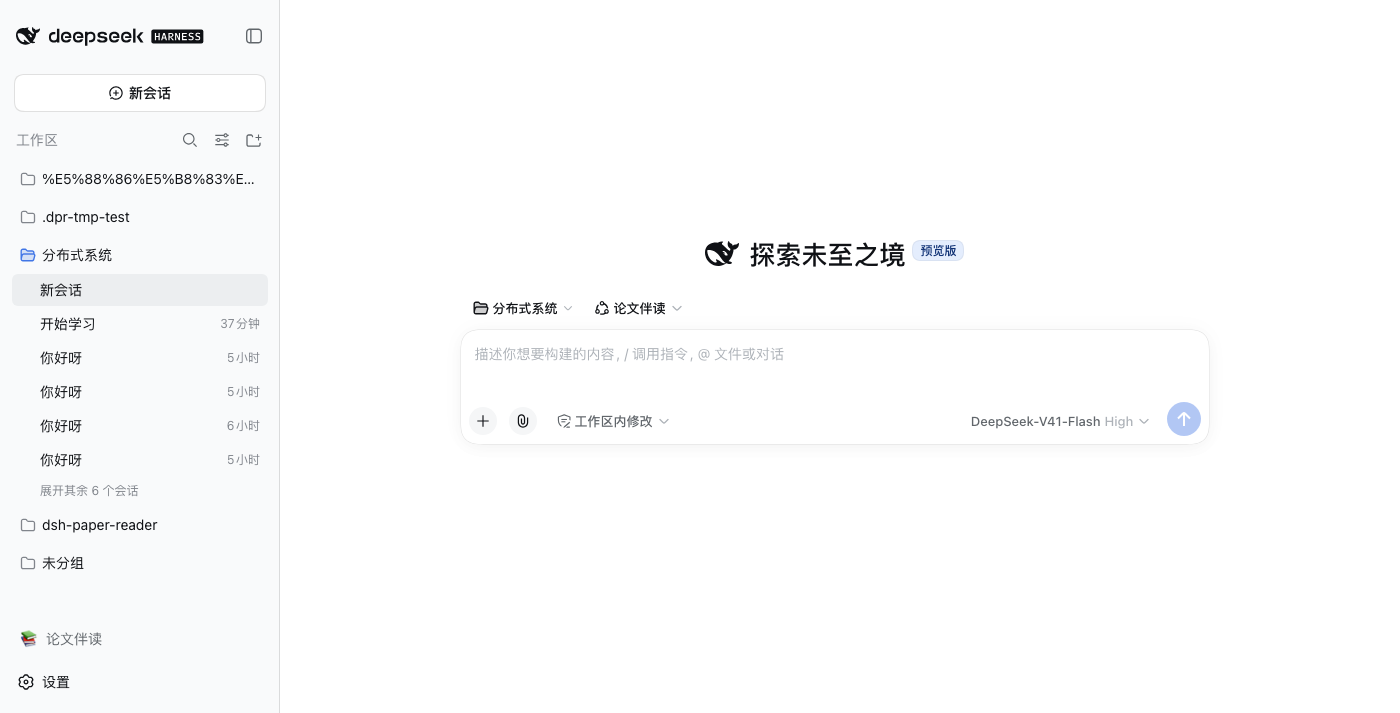
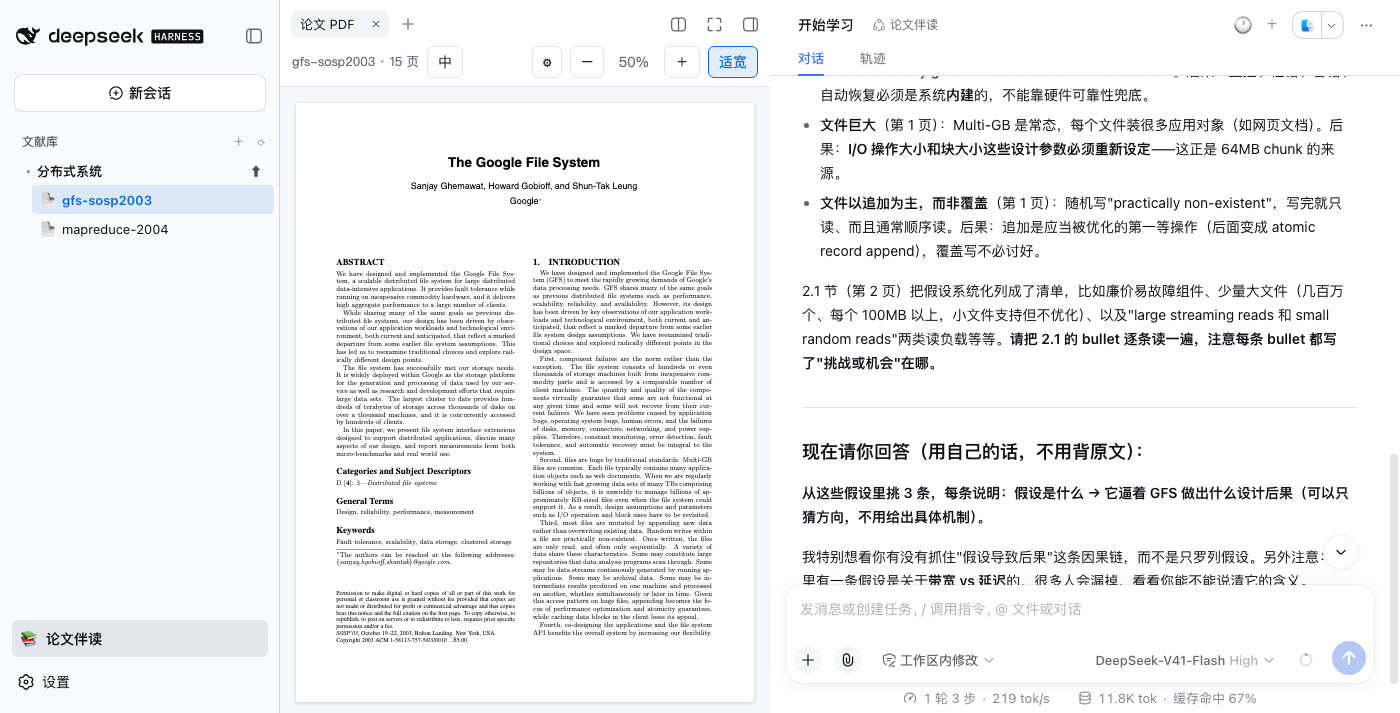
- 📚 三栏工作台:专题文献库 + PDF 阅读器 + 右侧原生对话;安装后不改动官方界面,侧栏只多一行开关
- 💬 带页码的伴读:回答必带页码,点页码跳回原文并高亮;选中文字即问;支持历史对话
- 🤖 可选教练式带读:专用 preset 制定分步计划;你读原文、作答,AI 点评追问,当前阶段答好才继续,学习进度跨会话累积
- 🀄 一键中文版:原文 ↔ 纯中文原地切换,译文 PDF 一键导出(纯中文 / 中英对照),翻译引擎零预装自动安装
- 📏 长段落不截断 + 实时进度:翻译由
babeldoc-driver.py驱动 babeldoc —— 按输入估算输出预算(不再吃 babeldoc 写死的 2048),finish_reason=length自动拆段重译;顶栏进度条实时显示「翻译段落 76%(521/798)」这样的阶段进度,端点拒绝关闭推理时自动降推理强度重试 - 🈯 划词翻译(公式保留)(v1.6.1):选中点「译」出纯译文气泡;选区含公式时用 MinerU 识别的 LaTeX 替换文本层乱码、要求模型原样保留
- 🖥️ 中英对照 / 分屏(v1.6.1):并排对照页或左右分屏同步滚动,随时切换、按文献记忆
- 🗂️ 文献管理:专题/论文改名、删除进回收站可恢复
- ➕ 可选增强(默认关):MinerU 解析——扫描件可读、公式可点引用可检索;嵌入端点——大白话命中术语段落
各功能的前提与配置细节见 docs/features.md。
安装
普通用户:桌面端装好即用(推荐)
两步:装 DeepSeek 官方桌面端 → 里面直接装插件。
- 下载安装 DeepSeek 官方桌面端(即 DeepSeek Harness 桌面版),登录 DeepSeek 账号
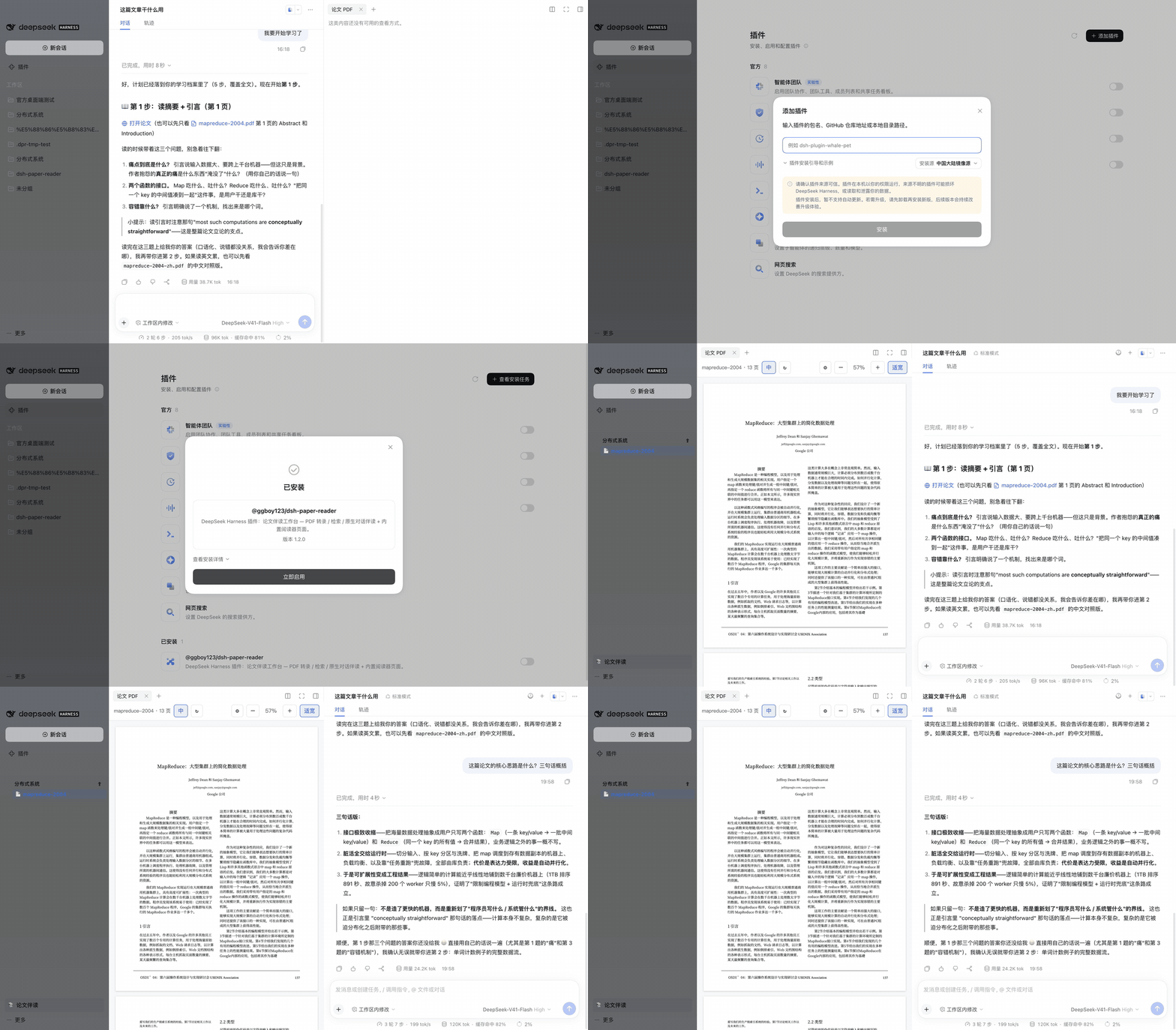
- 侧栏 → 插件 → 添加插件,输入
@ggboy123/dsh-paper-reader@latest,装完点进插件详情打开「启用」开关,重启桌面端
完成。侧栏底部点「📚 论文伴读」进入文献库,上传 PDF 开始用。
需要官方桌面端 V0.2.0-rc.2 或更新版本(内置 dsh ≥0.2.0-rc.2);dsh 0.1.5 不再支持。 想逛插件市场可另装社区插件
dshmarket,本插件已在其目录中。
排坑(都是实测踩过的):
- 升级后插件开关会回到停用:重新打开「启用」并重启。症状有迷惑性——文献树还在但点论文没反应
- 添加务必带
@latest:不带版本号对已装过的插件是 no-op,不会追新 - pnpm 供应链策略
minimumReleaseAge拦新包时:等过窗口期,或把本包加进豁免清单(~/.dsh/profiles/web/.npmrc的minimum-release-age-exclude[];桌面端在~/.dsh/profiles/desktop/pnpm-workspace.yaml的minimumReleaseAgeExclude)
开发者:命令行 dsh
dsh plugin --profile web add @ggboy123/dsh-paper-reader@latest # 升级也是这条;不带版本号是 no-op不要用
github:GGboya/dsh-paper-reader安装 —— dist 不入库,git 安装会导致 profile 起不来。
怎么用
- 进入:侧栏底部点「📚 论文伴读」(再点还原)
- 入库:+ 新建专题 → ⬆ 上传 PDF
- 读 + 问:直接提问(回答自带页码),或选中文字弹框提问;点「第 N 页」跳回原文
- 中文版:顶栏「中」一键生成(首次需在弹出表单里配一次 OpenAI 兼容端点,DeepSeek/GLM/Kimi 的 key 都行)
- 管理:行悬停出 ✎ 改名 / 🗑 删除;对话头部 🕐 历史、+ 新开
文献管理(安全说明)
- 删除 = 移入回收站
data/.trash/(带 manifest,移回即恢复);会处理该文献的全部产物:<文献>.pdf、.txt、.pages.json、.transcript.json、.mineru.md、.mineru.json、.embeddings.json、.study.json与译文变体<文献>-en.pdf/-zh.pdf/-dual.pdf(含.tmp-*残留);伴读会话历史不删。运行中会话/翻译中的文献会被前置拒绝;路径穿越一律拒绝、失败自动回滚——细则见 docs/features.md
参与开发
git clone https://github.com/GGboya/dsh-paper-reader
cd dsh-paper-reader && pnpm install && pnpm run build
dsh plugin --profile web add ./dsh-paper-reader   # 从父目录执行,或用绝对路径
dsh --profile web                                  # 侧栏变为文献库树
改完 pnpm run build 重启 profile 即生效;npm test 跑全量测试(354 用例,CI 三平台)。架构、测试守卫与开发约定见 AGENTS.md。
贡献者
感谢每一位贡献者:
Star 趋势
License
MIT