
@git-diff-view/cli
v0.1.10
Published
@git-diff-view/cli

Maintainers
 mrwang555
Readme
@git-diff-view/cli
Terminal-based diff viewer with GitHub-style UI for CLI environments


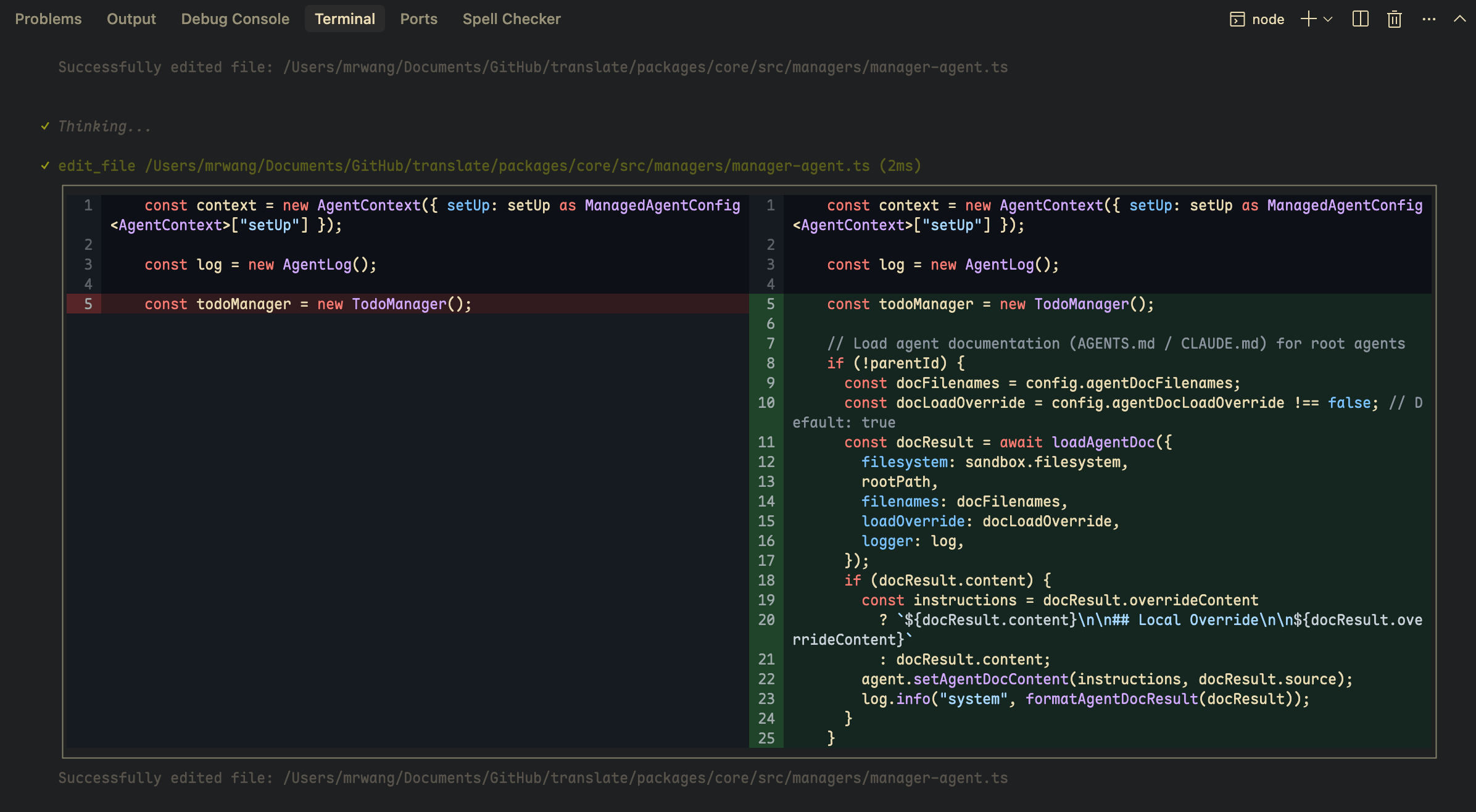
Features
- ✅ Terminal-friendly diff rendering
- ✅ Split & Unified views in terminal
- ✅ Syntax highlighting in CLI
- ✅ Light & Dark themes
- ✅ Configurable width and display options
- ✅ Fixed-height viewport scrolling (
CodeView&DiffView) - ✅ Works with @git-diff-view/core and @git-diff-view/file
Installation
npm install @git-diff-view/cli
# or
pnpm add @git-diff-view/cli
# or
yarn add @git-diff-view/cli
Quick Start
Basic Usage
import { DiffView, DiffModeEnum } from "@git-diff-view/cli";

DiffView({
  data: {
    oldFile: { fileName: "old.ts", content: "...", fileLang: "typescript" },
    newFile: { fileName: "new.ts", content: "...", fileLang: "typescript" },
    hunks: ["..."]
  },
  diffViewMode: DiffModeEnum.Split,
  diffViewTheme: "dark",
  diffViewHighlight: true,
  width: 120  // Terminal width
});
With DiffFile
File Comparison Mode
import { DiffView } from "@git-diff-view/cli";
import { generateDiffFile } from "@git-diff-view/file";

const file = generateDiffFile(
  "old.ts", oldContent,
  "new.ts", newContent,
  "typescript", "typescript"
);
file.init();
file.buildSplitDiffLines();

DiffView({ diffFile: file, width: 120 });
Git Diff Mode
import { DiffView } from "@git-diff-view/cli";
import { DiffFile } from "@git-diff-view/core";

const file = new DiffFile(
  oldFileName, oldContent,
  newFileName, newContent,
  hunks,
  oldFileLang, newFileLang
);
file.init();
file.buildSplitDiffLines();

DiffView({ diffFile: file });
API Reference
DiffView Props
| Prop | Type | Description |
|------|------|-------------|
| data | DiffData | Diff data with oldFile, newFile, and hunks |
| diffFile | DiffFile | Pre-processed diff file instance |
| diffViewMode | DiffModeEnum | View mode (default: SplitGitHub) |
| diffViewTheme | "light" \| "dark" | Theme (default: "light") |
| diffViewHighlight | boolean | Enable syntax highlighting |
| diffViewTabSpace | boolean | Show tab/space characters |
| diffViewTabWidth | "small" \| "medium" \| "large" | Tab display width (default: "medium") |
| diffViewHideOperator | boolean | Hide the +/-/ operator column |
| diffViewNoBG | boolean | Disable neutral background colors for transparent terminals |
| diffViewThemeColors | DiffViewColorTheme | Custom color overrides (see Theme Customization) |
| width | number | Fixed terminal width for rendering |
| height | number | Viewport height in visual rows; enables scroll mode (see Scroll API) |
| onScrollChange | (state: ScrollState) => void | Called when scroll state changes |
| diffViewExtendLineHeight | number | Visual row height for extend lines in scroll layout (default: 1) |
| extendData | ExtendData | Additional data per line |
| renderExtendLine | Function | Custom extend line renderer |
CodeView Props
| Prop | Type | Description |
|------|------|-------------|
| data | { content: string; fileName?: string; fileLang?: string } | Source file data |
| file | File | Pre-processed file instance |
| codeViewTheme | "light" \| "dark" | Theme (default: "light") |
| codeViewHighlight | boolean | Enable syntax highlighting |
| codeViewTabSpace | boolean | Show tab/space characters |
| codeViewTabWidth | "small" \| "medium" \| "large" | Tab display width (default: "medium") |
| codeViewNoBG | boolean | Disable neutral background colors for transparent terminals |
| codeViewThemeColors | DiffViewColorTheme | Custom color overrides (see Theme Customization) |
| width | number | Fixed terminal width for rendering |
| height | number | Viewport height in visual rows; enables scroll mode (see Scroll API) |
| onScrollChange | (state: ScrollState) => void | Called when scroll state changes |
DiffData Type
type DiffData = {
  oldFile?: {
    fileName?: string | null;
    fileLang?: string | null;
    content?: string | null;
  };
  newFile?: {
    fileName?: string | null;
    fileLang?: string | null;
    content?: string | null;
  };
  hunks: string[];
};
Theme Customization
You can override any color token via diffViewThemeColors / codeViewThemeColors. All fields are optional — unset keys fall back to the built-in GitHub-style defaults.
import type { DiffViewColorTheme } from "@git-diff-view/cli";

const myTheme: DiffViewColorTheme = {
  addContent: { light: "#d4edda", dark: "#1b4332" },
  delContent: { light: "#f8d7da", dark: "#3d0f0f" },
  addContentHighlight: { light: "#a3d9a5", dark: "#2d6a4f" },
  delContentHighlight: { light: "#f1aeb5", dark: "#6c1e1e" },
};
<DiffView
diffFile={file}
diffViewMode={DiffModeEnum.Unified}
diffViewTheme="dark"
diffViewThemeColors={myTheme}
/>Available Color Tokens
| Token | Description |
|-------|-------------|
| addContent | Background for added lines |
| delContent | Background for deleted lines |
| plainContent | Background for unchanged lines |
| expandContent | Background for expand/context lines |
| emptyContent | Background for empty placeholder areas |
| addLineNumber | Line number background for added lines |
| delLineNumber | Line number background for deleted lines |
| plainLineNumber | Line number background for unchanged lines |
| expandLineNumber | Line number background for expand lines |
| hunkLineNumber | Hunk header line number background |
| plainLineNumberColor | Line number text color for unchanged lines |
| expandLineNumberColor | Line number text color for expand lines |
| hunkContentColor | Hunk header text color |
| addContentHighlight | Inline change highlight for added text |
| delContentHighlight | Inline change highlight for deleted text |
| hunkContent | Hunk header background |
| border | Border color |
| noBGAddContent | Stronger add background when noBG is enabled |
| noBGDelContent | Stronger delete background when noBG is enabled |
| noBGAddLineNumber | Stronger add line number background when noBG is enabled |
| noBGDelLineNumber | Stronger delete line number background when noBG is enabled |
| noBGAddContentHighlight | Stronger add highlight when noBG is enabled |
| noBGDelContentHighlight | Stronger delete highlight when noBG is enabled |
Each token is { light: string; dark: string } — hex color strings for each theme variant.
Scroll API
Both CodeView and DiffView support a fixed-height viewport with programmatic scrolling. Pass height (in visual rows, after line wrap) to enable scroll mode.
Without height, the full content is rendered (backward compatible). DiffView skips scroll layout calculation in that case.
When height is larger than the content, the viewport shrinks to content height (no trailing blank rows). ScrollState.viewportHeight reports the effective height.
Shared types
import type { ScrollState, ScrollViewRef } from "@git-diff-view/cli";

type ScrollState = {
  totalLines: number;      // logical line count
  totalRows: number;       // visual row count after wrap
  viewportHeight: number;  // min(height, totalRows) when height is set; else totalRows
  scrollOffset: number;    // top visual row (0-based)
  startLine: number;       // first visible logical line (includes partial clips)
  endLine: number;         // last visible logical line (includes partial clips)
  canScrollUp: boolean;
  canScrollDown: boolean;
};
Ref methods (ScrollViewRef)
| Method | Description |
|--------|-------------|
| getScrollState() | Current scroll snapshot |
| scrollToTop(line) | Align the target logical line's first visual row to the viewport top |
| scrollToBottom(line) | Align the target logical line's last visual row to the viewport bottom |
| scrollUp({ unit?, step? }) | Scroll up (unit: "visual" | "logical", default "visual") |
| scrollDown({ unit?, step? }) | Scroll down |
CodeViewRef adds getFileInstance(). DiffViewRef adds getDiffFileInstance().
Line semantics
| Component | line meaning |
|-----------|----------------|
| CodeView | Source file line number (1-based, File.rawFile) |
| DiffView | 1-based index in the flattened display sequence: hunk → content → extend per content block. The first content block has no leading hunk line. |
Example
import { useRef } from "react";
import { CodeView, DiffView, type CodeViewRef } from "@git-diff-view/cli";

const ref = useRef<CodeViewRef>(null);

<CodeView
  ref={ref}
  file={file}
  height={20}
  width={80}
  onScrollChange={(state) => console.log(state.startLine, state.endLine)}
/>;

ref.current?.scrollToTop(100);
ref.current?.scrollDown({ unit: "logical" });
Width / mode changes
When width changes, scroll offset resets to 0 (wrap counts change). DiffView also resets when switching split ↔ unified.
Extend lines (DiffView)
Custom renderExtendLine content height is estimated via diffViewExtendLineHeight (default 1) for scroll layout. Set it to match your extend UI when using height.
Implementation details
See SCROLL.md for architecture notes. Scroll tests:
pnpm --filter @git-diff-view/cli test:scroll
pnpm --filter @git-diff-view/cli test:scroll:interactive        # CodeView
pnpm --filter @git-diff-view/cli test:scroll:interactive:diffview
Use Cases
- CLI diff tools
- Terminal-based code review
- Git hooks with visual diff
- CI/CD pipeline diff display
- SSH remote diff viewing
- Terminal-based editors
Examples
// Simple diff with custom width
<DiffView data={diffData} width={160} diffViewHighlight={true} />

// Unified view in dark theme
<DiffView
  diffFile={file}
  diffViewMode={DiffModeEnum.Unified}
  diffViewTheme="dark"
/>

// Transparent terminal with no background colors
<DiffView
  data={diffData}
  diffViewNoBG={true}
  diffViewTheme="dark"
/>

// With custom theme colors
<DiffView
  data={diffData}
  diffViewThemeColors={{
    addContent: { light: "#d4edda", dark: "#1b4332" },
    delContent: { light: "#f8d7da", dark: "#3d0f0f" },
  }}
/>

// CodeView for single file rendering
<CodeView
  data={{ content: sourceCode, fileLang: "typescript" }}
  codeViewTheme="dark"
  codeViewHighlight={true}
/>

// Fixed-height scroll viewport
<DiffView
  diffFile={file}
  height={18}
  width={100}
  onScrollChange={console.log}
/>
Related Packages
- @git-diff-view/core - Core diff engine
- @git-diff-view/file - File comparison
- @git-diff-view/react - React UI components
- @git-diff-view/vue - Vue UI components
License
MIT © MrWangJustToDo