
@glare-labs/vue-reflect-attribute
v0.0.1-pre.2
Published
_If there are any errors in the documentation, suggestions are welcome._


Readme
@glare-labs/vue-reflect-attribute
If there are any errors in the documentation, suggestions are welcome.
Dynamically update data through the attributes of the observe HTMLElement object.
npm i @glare-labs/vue-reflect-attribute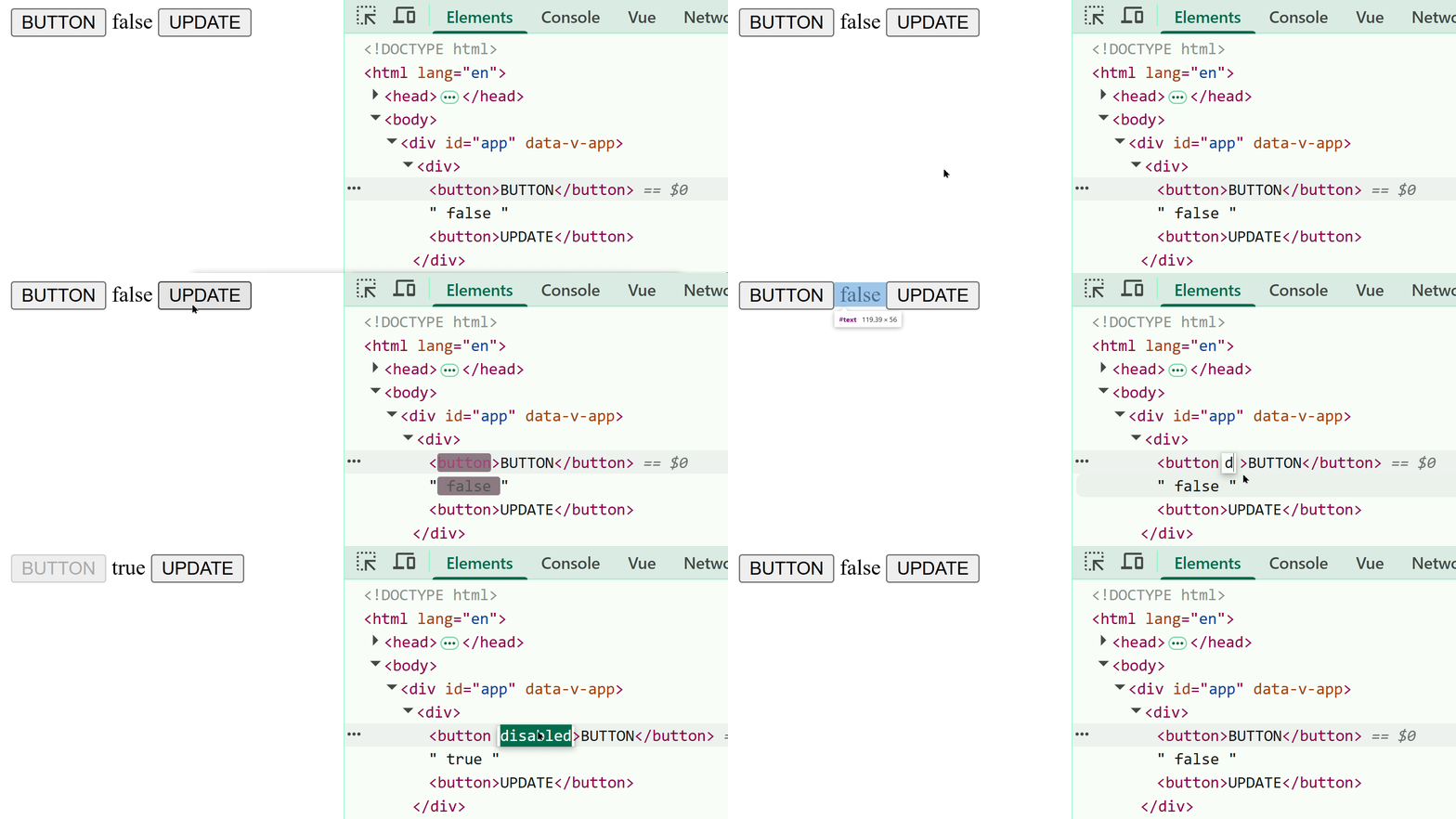
<template>
  <div>
    <button ref="buttonRef">BUTTON</button>

    {{ disabledProp }}

    <button @click="handleClick">UPDATE</button>
  </div>
</template>

<script setup lang="ts">
import { ref } from 'vue';
import { useReflectAttribute } from '@glare-labs/vue-reflect-attribute';

const buttonRef = ref<HTMLElement | null>(null)
const disabledProp = ref(false)

useReflectAttribute(buttonRef, {
  attributes: [
    { attribute: 'disabled', ref: disabledProp, reflect: true, type: 'boolean' },
  ]
})

const handleClick = () => {
  disabledProp.value = !disabledProp.value
}

</script>
Usage
This tool is very simple. Please use the following code example to understand the usage of the useReflectAttribute function:
<template>
  <div>
    <button id="target-button" ref="htmlElementRef">BUTTON</button>
    {{ disabledProp }}
    {{ selectedProp }}
    {{ textProp }}
    {{ paragraphProp }}
  </div>
</template>

<script setup lang="ts">
import { useReflectAttribute } from '@glare-labs/vue-reflect-attribute'
import { nextTick, onMounted, ref } from 'vue'

const htmlElementRef = ref<HTMLElement | null>(null)

const disabledProp = ref(false)
const selectedProp = ref(false)
const textProp = ref("default text")
const paragraphProp = ref("default text")

useReflectAttribute(htmlElementRef, {
  attributes: [
    { attribute: 'disabled',  ref: disabledProp,  reflect: true,  type: 'boolean' },
    { attribute: 'selected',  ref: selectedProp,  reflect: false, type: 'boolean' },
    { attribute: 'text',      ref: textProp,      reflect: true,  type: 'string' },
    { attribute: 'paragraph', ref: paragraphProp, reflect: false, type: 'string' },
  ],
  tick: 'before',
})

onMounted(() => {
  const button = document.querySelector('#target-button')

  button?.setAttribute('disabled', '')
  button?.setAttribute('selected', '')
  button?.setAttribute('text', 'NEW TEXT')
  button?.setAttribute('paragraph', 'NEW TEXT')

  nextTick(() => {
    console.log(`HTML: ${button?.hasAttribute('disabled')} DATA: ${disabledProp.value}`);
    console.log(`HTML: ${button?.hasAttribute('selected')} DATA: ${selectedProp.value}`);
    console.log(`HTML: ${button?.getAttribute('text')} DATA: ${textProp.value}`);
    console.log(`HTML: ${button?.getAttribute('paragraph')} DATA: ${paragraphProp.value}`);
  })

  /**
   * @output
   * HTML: true      DATA: true
   * HTML: true      DATA: false
   * HTML: NEW TEXT  DATA: NEW TEXT
   * HTML: NEW TEXT  DATA: default text
   */
})

</script>
<template>
<div>
<button id="target-button" ref="htmlElementRef">BUTTON</button>
{{ disabledProp }}
{{ selectedProp }}
{{ textProp }}
{{ paragraphProp }}
</div>
</template>
<script setup lang="ts">
import { useReflectAttribute } from '@glare-labs/vue-reflect-attribute'
import { nextTick, onMounted, ref } from 'vue'
const htmlElementRef = ref<HTMLElement | null>(null)
const disabledProp = ref(false)
const selectedProp = ref(false)
const textProp = ref("default text")
const paragraphProp = ref("default text")
useReflectAttribute(htmlElementRef, {
attributes: [
{ attribute: 'disabled', ref: disabledProp, reflect: true, type: 'boolean' },
{ attribute: 'selected', ref: selectedProp, reflect: false, type: 'boolean' },
{ attribute: 'text', ref: textProp, reflect: true, type: 'string' },
{ attribute: 'paragraph', ref: paragraphProp, reflect: false, type: 'string' },
],
tick: 'after',
})
onMounted(() => {
const button = document.querySelector('#target-button')
button?.setAttribute('disabled', '')
button?.setAttribute('selected', '')
button?.setAttribute('text', 'NEW TEXT')
button?.setAttribute('paragraph', 'NEW TEXT')
nextTick(() => {
console.log(`HTML: ${button?.hasAttribute('disabled')} DATA: ${disabledProp.value}`);
console.log(`HTML: ${button?.hasAttribute('selected')} DATA: ${selectedProp.value}`);
console.log(`HTML: ${button?.getAttribute('text')} DATA: ${textProp.value}`);
console.log(`HTML: ${button?.getAttribute('paragraph')} DATA: ${paragraphProp.value}`);
})
/**
* @output
* HTML: false DATA: false
* HTML: false DATA: false
* HTML: default text DATA: default text
* HTML: default text DATA: default text
*/
})
</script>reflect option
The reflect option defaults to true.
When the reflect option value is true, data changes will update the attributes of HTMLElement, and changes in the attributes of HTMLElement will cause data updates.
attribute option
attribute specifies the attribute name of the target HTML element.
Example:
<template>
  <div>
    <button ref="htmlElementRef">{{ myRef }}</button>
  </div>
</template>

<script setup lang="ts">
import { useReflectAttribute } from '@glare-labs/vue-reflect-attribute'
import { ref } from 'vue'

const htmlElementRef = ref<HTMLElement | null>(null)

const myRef = ref("WoW")

useReflectAttribute(htmlElementRef, {
  attributes: [
    { attribute: 'my-wow', ref: myRef, reflect: true, type: 'string' },
  ]
})
</script>
Taking the above code as an example, if you modify the attribute my-wow of the button element in developer mode in the browser, the myRef responsive data will also be updated.
If I change it to MoM:
<button my-wow="MoM">MoM</button>/**
* @output
* MoM
*/
console.log(myRef.value)tick option
The tick option determines when useReflectAttribute performs data binding. The default value of tick is 'after', which means useReflectAttribute will perform data binding in nextTick of onMounted.
tick: 'before'
onMounted(() => {
  // ...
})
tick: 'after'
onMounted(() => {
  nextTick(() => {
    // ...
  })
})