npm package discovery and stats viewer.

Discover Tips

  • General search

    [free text search, go nuts!]

  • Package details

    pkg:[package-name]

  • User packages

    @[username]

Sponsor

Optimize Toolset

I’ve always been into building performant and accessible sites, but lately I’ve been taking it extremely seriously. So much so that I’ve been building a tool to help me optimize and monitor the sites that I build to make sure that I’m making an attempt to offer the best experience to those who visit them. If you’re into performant, accessible and SEO friendly sites, you might like it too! You can check it out at Optimize Toolset.

About

Hi, 👋, I’m Ryan Hefner  and I built this site for me, and you! The goal of this site was to provide an easy way for me to check the stats on my npm packages, both for prioritizing issues and updates, and to give me a little kick in the pants to keep up on stuff.

As I was building it, I realized that I was actually using the tool to build the tool, and figured I might as well put this out there and hopefully others will find it to be a fast and useful way to search and browse npm packages as I have.

If you’re interested in other things I’m working on, follow me on Twitter or check out the open source projects I’ve been publishing on GitHub.

I am also working on a Twitter bot for this site to tweet the most popular, newest, random packages from npm. Please follow that account now and it will start sending out packages soon–ish.

Open Software & Tools

This site wouldn’t be possible without the immense generosity and tireless efforts from the people who make contributions to the world and share their work via open source initiatives. Thank you 🙏

© 2026 – Pkg Stats / Ryan Hefner

@go-to-k/cdkd

v0.66.0

Published

CDK Direct - Deploy AWS CDK apps directly via SDK/Cloud Control API

Readme

cdkd

cdkd (CDK Direct) - A from-scratch CDK CLI with its own deployment engine — provisions via AWS SDK instead of CloudFormation.

  • Direct provisioning via AWS SDK instead of CloudFormation
  • From-scratch CDK CLI - synthesis orchestration, asset publishing, context resolution (no aws-cdk / toolkit-lib dependency)
  • CDK compatible - use your existing CDK app code as-is
  • Own deployment engine - diff calculation, dependency graph, parallel execution, state management (what CloudFormation handles internally)

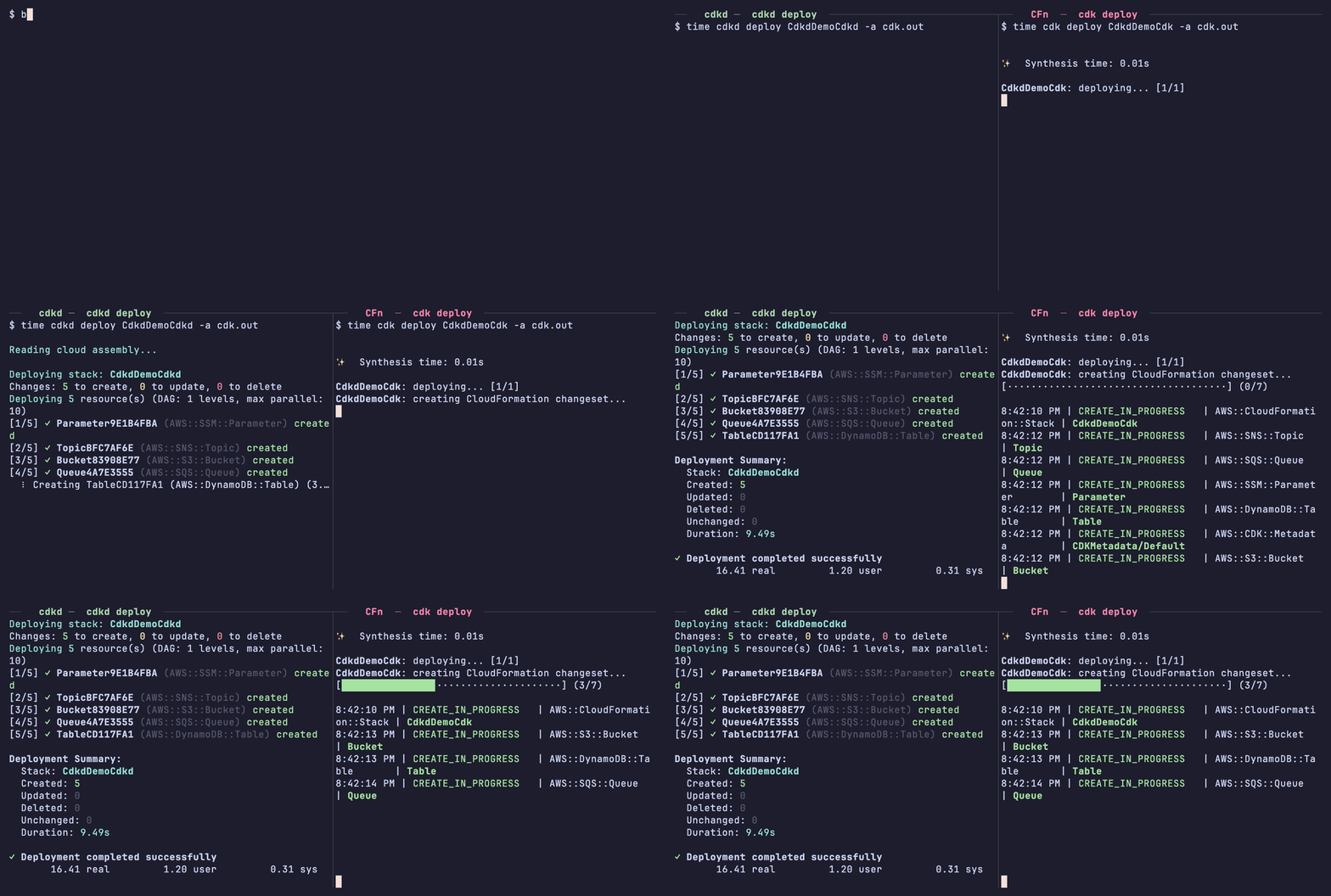
cdkd demo

⚠️ WARNING: NOT PRODUCTION READY

This project is in early development and is NOT suitable for production use. Features are incomplete, APIs may change without notice, and there may be bugs that could affect your AWS infrastructure. Use at your own risk in development/testing environments only.

Note: This is an experimental/educational project exploring alternative deployment approaches for AWS CDK. It is not intended to replace the official AWS CDK CLI, but rather to experiment with direct SDK provisioning as a learning exercise and proof of concept.

Features

  • Synthesis orchestration: CDK app subprocess execution, Cloud Assembly parsing, context provider loop
  • Asset handling: Self-implemented asset publisher for S3 file assets (ZIP packaging) and Docker images (ECR)
  • Context resolution: Self-implemented context provider loop for Vpc.fromLookup(), AZ, SSM, HostedZone, etc.
  • Hybrid provisioning: SDK Providers for fast direct API calls, Cloud Control API fallback for broad resource coverage
  • Diff calculation: Self-implemented resource/property-level diff between desired template and current state
  • S3-based state management: No DynamoDB required, uses S3 conditional writes for locking
  • DAG-based parallelization: Analyze Ref/Fn::GetAtt dependencies and execute in parallel
  • --no-wait for async resources: Skip the multi-minute wait on CloudFront / RDS / ElastiCache / NAT Gateway and return as soon as the create call returns (CloudFormation always blocks)
  • VPC route DependsOn relaxation (on by default): Drop CDK-injected defensive DependsOn edges from VPC Lambdas onto private-subnet routes so CloudFront::Distribution and Lambda::Url start their ~3-min propagation in parallel with NAT Gateway stabilization (~50% faster on VPC + Lambda + CloudFront stacks). Pass --no-aggressive-vpc-parallel to opt out.

Note: Resource types not covered by either SDK Providers or Cloud Control API cannot be deployed with cdkd. If you encounter an unsupported resource type, deployment will fail with a clear error message.

Benchmark

cdkd deploys up to ~5x faster than AWS CDK (CloudFormation).

Measured on us-east-1 with 5 independent resources per stack (fully parallelized by cdkd's DAG scheduler).

SDK Provider path — 4.8x faster (20.5s vs 98.4s)

Stack: S3 Bucket, DynamoDB Table, SQS Queue, SNS Topic, SSM Parameter.

| Phase | cdkd | AWS CDK (CFn) | Speedup | | --- | --- | --- | --- | | Synthesis | 3.5s | 4.1s | 1.2x | | Deploy | 17.0s | 94.4s | 5.5x | | Total | 20.5s | 98.4s | 4.8x |

Cloud Control API fallback path — 1.5x faster (44.6s vs 69.1s)

Stack: SSM Document × 3 + Athena WorkGroup × 2 (no SDK provider — CC API fallback).

| Phase | cdkd | AWS CDK (CFn) | Speedup | | --- | --- | --- | --- | | Synthesis | 3.7s | 4.2s | 1.1x | | Deploy | 40.9s | 64.9s | 1.6x | | Total | 44.6s | 69.1s | 1.5x |

Reproduce with ./tests/benchmark/run-benchmark.sh all. See tests/benchmark/README.md for details.

How it works

┌─────────────────┐
│  Your CDK App   │  (aws-cdk-lib)
└────────┬────────┘
         │
         ▼
┌─────────────────┐
│ cdkd Synthesis  │  Subprocess + Cloud Assembly parser
└────────┬────────┘
         │
         ▼
┌─────────────────┐
│ CloudFormation  │
│   Template      │
└────────┬────────┘
         │
         ▼
┌─────────────────┐
│ cdkd Engine     │
│ - DAG Analysis  │  Dependency graph construction
│ - Diff Calc     │  Compare with existing resources
│ - Parallel Exec │  Event-driven dispatch
└────────┬────────┘
         │
    ┌────┴────┐
    ▼         ▼
┌────────┐ ┌────────┐
│  SDK   │ │ Cloud  │
│Provider│ │Control │  Fallback for many
│        │ │  API   │  additional types
└────────┘ └────────┘

For a step-by-step walkthrough of the full cdkd deploy pipeline (CLI parsing → synthesis → asset publishing → per-stack deploy), see docs/architecture.md.

Supported Features

Intrinsic Functions

| Function | Status | Notes | |----------|--------|-------| | Ref | ✅ Supported | Resource physical IDs, Parameters, Pseudo parameters | | Fn::GetAtt | ✅ Supported | Resource attributes (ARN, DomainName, etc.) | | Fn::Join | ✅ Supported | String concatenation | | Fn::Sub | ✅ Supported | Template string substitution | | Fn::Select | ✅ Supported | Array index selection | | Fn::Split | ✅ Supported | String splitting | | Fn::If | ✅ Supported | Conditional values | | Fn::Equals | ✅ Supported | Equality comparison | | Fn::And | ✅ Supported | Logical AND (2-10 conditions) | | Fn::Or | ✅ Supported | Logical OR (2-10 conditions) | | Fn::Not | ✅ Supported | Logical NOT | | Fn::ImportValue | ✅ Supported | Cross-stack references via S3 state | | Fn::GetStackOutput | ✅ Supported (same-account) | Cross-stack / cross-region output reference via S3 state. Cross-account RoleArn is rejected with a clear error (not yet implemented). | | Fn::FindInMap | ✅ Supported | Mapping lookup | | Fn::GetAZs | ✅ Supported | Availability Zone list | | Fn::Base64 | ✅ Supported | Base64 encoding | | Fn::Cidr | ✅ Supported | CIDR address block generation |

Pseudo Parameters

| Parameter | Status | |-----------|--------| | AWS::Region | ✅ | | AWS::AccountId | ✅ (via STS) | | AWS::Partition | ✅ | | AWS::URLSuffix | ✅ | | AWS::NoValue | ✅ | | AWS::StackName | ✅ | | AWS::StackId | ✅ |

Resource Provisioning

cdkd ships 90+ dedicated SDK Providers (direct AWS SDK calls, no polling overhead) covering the most-used services — IAM, Lambda, S3, DynamoDB, EC2, RDS, ECS, API Gateway, CloudFront, Step Functions, EFS, KMS, Cognito, AppSync, and more. Any other CloudFormation resource type is handled via the Cloud Control API fallback (async polling). Resource types not supported by either path fail at deploy time with a clear error.

See docs/supported-resources.md for the full per-type table.

Other Features

| Feature | Status | Notes | |---------|--------|-------| | CloudFormation Parameters | ✅ | Default values, type coercion | | Conditions | ✅ | With logical operators | | Cross-stack references | ✅ | Via Fn::ImportValue + S3 state | | Cross-region references | ✅ (same-account) | Via Fn::GetStackOutput + S3 state. Cross-account RoleArn not yet implemented. | | JSON Patch updates | ✅ | RFC 6902, minimal patches | | Resource replacement detection | ✅ | 10+ resource types | | Dynamic References | ✅ | {{resolve:secretsmanager:...}}, {{resolve:ssm:...}} | | DELETE idempotency | ✅ | Not-found errors treated as success | | Asset publishing (S3) | ✅ | Lambda code packages | | Asset publishing (ECR) | ✅ | Self-implemented Docker image publishing | | Custom Resources (SNS-backed) | ✅ | SNS Topic ServiceToken + S3 response | | Custom Resources (CDK Provider) | ✅ | isCompleteHandler/onEventHandler async pattern detection | | Rollback | ✅ | --no-rollback flag to skip | | DeletionPolicy: Retain | ✅ | Skip deletion for retained resources | | UpdateReplacePolicy: Retain | ✅ | Keep old resource on replacement | | Implicit delete dependencies | ✅ | VPC/IGW/EventBus/Subnet/RouteTable ordering | | Stack dependency resolution | ✅ | Auto-deploy dependency stacks, -e to skip | | Multi-stack parallel deploy | ✅ | Independent stacks deployed in parallel | | Attribute enrichment | ✅ | CloudFront OAI, DynamoDB StreamArn, API Gateway RootResourceId, Lambda FunctionUrl, Route53 HealthCheckId, ECR Repository Arn | | CC API null value stripping | ✅ | Removes null values before API calls | | Retry with HTTP status codes | ✅ | 429/503 + cause chain inspection | | Drift detection | ✅ | cdkd drift — state vs AWS reality, including console-side changes to keys you didn't template. See Drift detection below. |

Prerequisites

  • Node.js >= 20.0.0
  • AWS CDK Bootstrap: You must run cdk bootstrap before using cdkd. cdkd uses CDK's bootstrap bucket (cdk-hnb659fds-assets-*) for asset uploads (Lambda code, Docker images). Custom bootstrap qualifiers are supported — CDK embeds the correct bucket/repo names in the asset manifest during synthesis.
  • AWS Credentials: Configured via environment variables, ~/.aws/credentials, --profile, or --role-arn option. The credentials must have admin-equivalent permissions for the resources being deployed. Unlike cdk deploy, cdkd does NOT route through CloudFormation, so there is no cfn-exec-role to delegate to — every IAM / EC2 / Lambda / etc. API call is issued from cdkd directly. CDK CLI's cdk-hnb659fds-deploy-role-* only carries CFn + asset-publish permissions and is therefore NOT sufficient for cdkd. See --role-arn in docs/cli-reference.md for assuming a role with the right permissions.

Installation

From npm

npm i -g @go-to-k/cdkd          # latest release
npm i -g @go-to-k/[email protected]    # pin to a specific version

The installed binary is cdkd — run it the same way in either install path.

cdkd is an experimental / educational project and is not intended for production use — see the warning at the top of this README. Pin to a specific version if you need reproducible installs.

From source

git clone https://github.com/go-to-k/cdkd.git
cd cdkd
pnpm install
pnpm run build
npm link

If cdkd is not found after npm link, set an alias in the current shell:

alias cdkd="node $(pwd)/dist/cli.js"

Quick Start

First-time setup: cdkd requires a one-time cdkd bootstrap per AWS account before any other command will work — it creates the S3 state bucket (cdkd-state-{accountId}) that cdkd uses to track deployed resources. This is separate from cdk bootstrap (which sets up the CDK asset bucket / ECR repo and is also required — see Prerequisites).

# Bootstrap (creates S3 state bucket — one-time setup, once per AWS account)
cdkd bootstrap

# List stacks in the CDK app
cdkd list

# Deploy your CDK app
cdkd deploy

# Check what would change
cdkd diff

# Tear down
cdkd destroy

That's it. cdkd reads --app from cdk.json and auto-resolves the state bucket from your AWS account ID (cdkd-state-{accountId}). If you bootstrapped under a previous cdkd version, the legacy region-suffixed name (cdkd-state-{accountId}-{region}) is still picked up automatically with a deprecation warning.

Usage

cdkd has two command families:

  • Top-level commands (cdkd deploy / destroy / diff / synth / list / import / orphan) require a CDK app — they synthesize a template to learn what they're operating on.
  • cdkd state ... subcommands (state info / list / resources / show / orphan / destroy / migrate / refresh-observed) operate on the S3 state bucket only and do NOT need the CDK app — use them to inspect / clean up state when the source is gone or you don't want to synth. cdkd state destroy is the CDK-app-free counterpart of cdkd destroy.

Options like --app, --state-bucket, and --context can be omitted if configured via cdk.json or environment variables (CDKD_APP, CDKD_STATE_BUCKET).

# Bootstrap (create S3 bucket for state)
cdkd bootstrap \
  --state-bucket my-cdkd-state \
  --region us-east-1

# Synthesize only
cdkd synth --app "npx ts-node app.ts"

# List all stacks in the CDK app (alias: ls)
cdkd list
cdkd ls
cdkd list --long              # YAML records with id/name/environment
cdkd list --long --json       # same, but JSON
cdkd list --show-dependencies # id + dependency list per stack
cdkd list 'MyStage/*'         # filter by display path (CDK CLI parity)

# Deploy from a pre-synthesized cloud assembly directory
cdkd deploy --app cdk.out

# Deploy (single stack auto-detected, reads --app from cdk.json)
cdkd deploy

# Deploy specific stack(s)
cdkd deploy MyStack
cdkd deploy Stack1 Stack2

# Deploy all stacks
cdkd deploy --all

# Deploy with wildcard (matched against the physical CloudFormation stack name)
cdkd deploy 'My*'

# Deploy stacks under a CDK Stage using the hierarchical path (CDK CLI parity)
# Patterns containing '/' are routed to the CDK display path; both forms work:
cdkd deploy 'MyStage/*'        # all stacks under MyStage
cdkd deploy MyStage/Api        # specific stack by display path
cdkd deploy MyStage-Api        # same stack by physical CloudFormation name

# Deploy with context values
cdkd deploy -c env=staging -c featureFlag=true

# Deploy with explicit options
cdkd deploy MyStack \
  --app "npx ts-node app.ts" \
  --state-bucket my-cdkd-state \
  --verbose

# Show diff (what would change)
cdkd diff MyStack

# Detect drift between cdkd state and AWS reality (state-only; no synth)
# Exits 0 with no drift, 1 when drift is detected, 2 on partial revert failure.
cdkd drift MyStack
cdkd drift --all --json

# Resolve drift: state ← AWS (catch up state with manual console changes)
cdkd drift MyStack --accept --yes

# Resolve drift: AWS ← state (push state values back into AWS via provider.update)
cdkd drift MyStack --revert --yes

# Refresh the deploy-time AWS snapshot used as drift baseline.
# Optional — `cdkd deploy` itself auto-refreshes on the first deploy after
# upgrading from a pre-v3 cdkd binary (= state schema `version: 2`), in
# parallel with the deploy at no critical-path cost. This command is the
# manual / non-deploy path: run it when you want the baseline refreshed
# without redeploying (e.g. for resources that won't change in any
# near-future deploy). Idempotent on the same v3 state — see "Drift
# detection" below for the full upgrade story.
cdkd state refresh-observed MyStack

# Dry run (plan only, no changes)
cdkd deploy --dry-run

# Deploy with no rollback on failure (Terraform-style)
cdkd deploy --no-rollback

# Deploy only the specified stack (skip dependency auto-inclusion)
cdkd deploy -e MyStack

# Skip the multi-minute wait on async resources (CloudFront, RDS, NAT GW, etc.)
cdkd deploy --no-wait

# Synth + build + publish assets only (no deploy) — typical CI split
cdkd publish-assets

# Destroy resources
cdkd destroy MyStack
cdkd destroy --all --force

# Force-unlock a stale lock from interrupted deploy
cdkd force-unlock MyStack

# Adopt already-deployed AWS resources into cdkd state.
# See docs/import.md for the full guide (auto / selective / hybrid modes,
# --resource overrides, --resource-mapping CDK CLI compatibility).
cdkd import MyStack --dry-run
cdkd import MyStack --yes

# Inspect state-bucket info on demand (bucket name, region, source, schema version, stack count).
# Routine commands (deploy / destroy / etc.) no longer print the bucket banner by default —
# pass --verbose to surface it in their debug logs, or use this subcommand for an explicit answer.
cdkd state info
cdkd state info --json        # JSON output for tooling
cdkd state info --state-bucket my-bucket  # explicit bucket; reports Source: --state-bucket flag

# List stacks registered in the cdkd state bucket
cdkd state list
cdkd state ls --long          # include resource count, last-modified, lock status
cdkd state list --json        # JSON output (alone, or combined with --long)

# List resources of a single stack from state
cdkd state resources MyStack          # aligned columns: LogicalID, Type, PhysicalID
cdkd state resources MyStack --long   # per-resource block with dependencies and attributes
cdkd state resources MyStack --json   # full JSON array

# Show full state record for a stack (metadata, outputs, all resources incl. properties)
cdkd state show MyStack
cdkd state show MyStack --json        # raw {state, lock} JSON

# Orphan one or more RESOURCES from cdkd's state (does NOT delete AWS resources).
# Per-resource, mirrors aws-cdk-cli's `cdk orphan --unstable=orphan`.
# Synth-driven — needs --app / cdk.json. Construct paths use CDK's L2-style form
# (`<StackName>/<Path/To/Construct>`); the synthesized `/Resource` suffix is
# matched implicitly. Passing an L2 wrapper that contains multiple CFn resources
# orphans every child under it (matches upstream's prefix-match semantics).
cdkd orphan MyStack/MyTable                    # confirmation prompt (y/N)
cdkd orphan MyStack/MyTable --yes
cdkd orphan MyStack/MyTable MyStack/MyBucket   # multiple resources, same stack
cdkd orphan MyStack/MyTable --dry-run          # print rewrite audit, no save
cdkd orphan MyStack/MyTable --force            # also fall back to cached
                                               # attributes when live fetch fails

# State-driven counterpart that orphans a WHOLE STACK's state record
# (no CDK app needed — works against the bucket).
cdkd state orphan MyStack             # confirmation prompt (y/N)
cdkd state orphan MyStack --yes       # skip confirmation
cdkd state orphan StackA StackB --force # also bypass the locked-stack refusal

# Destroy a stack's AWS resources AND remove its state record, without
# requiring the CDK app (no synth — works from any working directory).
cdkd state destroy MyStack            # per-stack confirmation prompt
cdkd state destroy MyStack OtherStack --yes
cdkd state destroy --all -y           # every stack in the bucket
cdkd state destroy MyStack --region us-east-1

--no-wait: skip async-resource waits

CloudFront / RDS / ElastiCache / NAT Gateway typically take 1–15 minutes to fully provision. By default cdkd waits (matching CFn). cdkd deploy --no-wait returns as soon as the create call returns and lets AWS finish in the background — handy for CI where nothing in the deploy flow needs the resource fully active. Deploy-only: cdkd destroy always waits (NAT in deleting state holds ENIs and would DependencyViolation sibling deletes).

See docs/cli-reference.md for per-resource caveats (NAT egress, RDS final-snapshot timing, etc.).

VPC route DependsOn relaxation (on by default)

CDK injects defensive DependsOn from VPC Lambdas onto private-subnet routes. The dependency is real at runtime but NOT required at deploy time. cdkd drops it by default so CloudFront + Lambda::Url propagation runs in parallel with NAT stabilization (~50% faster on VPC+Lambda+CloudFront stacks; bench-cdk-sample 398s → 181s). Pass cdkd deploy --no-aggressive-vpc-parallel to opt out (e.g. when a Custom Resource synchronously invokes a VPC Lambda outside cdkd's Lambda-ServiceToken Active wait).

See docs/cli-reference.md for the full type-pair allowlist and trade-off notes.

Importing existing resources

cdkd import adopts AWS resources that are already deployed (via cdk deploy, manual creation, or another tool) into cdkd state so the next cdkd deploy updates them in-place instead of CREATEing duplicates.

# Adopt a whole stack previously deployed by cdk deploy (tag-based auto-lookup).
cdkd import MyStack --yes

# Adopt only specific resources (CDK CLI parity).
cdkd import MyStack --resource MyBucket=my-bucket-name

# Migrate off CloudFormation in one shot — adopt + retire the source CFn stack.
cdkd import MyStack --migrate-from-cloudformation --yes

See docs/import.md for the full guide: three import modes (auto / selective / hybrid), --resource-mapping CDK CLI compatibility, CloudFormation migration flow, provider coverage, and the parity matrix vs upstream cdk import.

Drift detection

cdkd drift (state-driven; no synth) compares each managed resource against AWS reality and reports divergence — including console-side changes to keys you did NOT template (S3 public-access-block, IAM Role tags, Lambda env keys, etc.).

cdkd drift                       # auto-detect single stack, exit 1 if drift
cdkd drift MyStack --json        # machine-readable, for CI gating
cdkd drift MyStack --accept --yes   # state ← AWS (catch up after a console edit)
cdkd drift MyStack --revert --yes   # AWS ← state (undo a console edit)
cdkd state refresh-observed MyStack # populate the drift baseline without redeploying

See docs/cli-reference.md cdkd drift for the full reference: --no-capture-observed-state deploy opt-out (per-command vs per-project, mid-flight reversibility), v2→v3 state upgrade flow, exit codes, and what changes when capture is off.

Orphan vs destroy

destroy deletes the AWS resources and the state record; orphan deletes only the state record (AWS resources stay intact, just no longer tracked by cdkd). Mirrors aws-cdk-cli's cdk orphan.

Two orphan variants at different granularities:

  • cdkd orphan <constructPath>... — synth-driven, per-resource. Rewrites every sibling reference (Ref / Fn::GetAtt / Fn::Sub / dependencies) so the next deploy doesn't re-create the orphan.
  • cdkd state orphan <stack>... — state-driven, whole-stack. Removes the entire state record. Works without the CDK app.

Both cdkd destroy (synth-driven) and cdkd state destroy (state-driven, no synth) delete AWS resources + state.

Stack termination protection

CDK's new Stack(app, 'X', { terminationProtection: true }) is honored by cdkd destroy and cdkd destroy --all. A protected stack is refused before the lock is acquired and before any per-resource delete runs; in --all runs sibling unprotected stacks still destroy and the protected ones contribute to the partial-failure exit code 2.

Bypass workflow:

  1. Edit the CDK code to set terminationProtection: false.
  2. Redeploy: cdkd deploy MyStack.
  3. Retry: cdkd destroy MyStack.

cdkd state destroy (state-only, no synth) does not honor terminationProtection — the flag is a CDK property surfaced via synth and is not stored in cdkd's state.json. Use cdkd destroy when synth is available, or accept that state destroy is the explicit "I know what I'm doing, ignore CDK guards" escape hatch.

--remove-protection: one-shot bypass for protected resources

cdkd destroy --remove-protection and cdkd state destroy --remove-protection flip every protection flag off in-place before each provider's delete API call so the destroy proceeds without an intermediate edit / redeploy. The flag covers both stack-level terminationProtection (the bypass logs a WARN line naming the stack) and resource-level protection on the following types:

| Resource type | Protection field | | --- | --- | | AWS::Logs::LogGroup | DeletionProtectionEnabled | | AWS::RDS::DBInstance | DeletionProtection | | AWS::RDS::DBCluster | DeletionProtection | | AWS::DocDB::DBCluster | DeletionProtection (DocDB DBInstance has no DeletionProtection field, so per-instance bypass is a no-op) | | AWS::Neptune::DBCluster | DeletionProtection | | AWS::Neptune::DBInstance | DeletionProtection | | AWS::DynamoDB::Table | DeletionProtectionEnabled | | AWS::EC2::Instance | DisableApiTermination | | AWS::ElasticLoadBalancingV2::LoadBalancer | attribute deletion_protection.enabled | | AWS::Cognito::UserPool | DeletionProtection (ACTIVE / INACTIVE) | | AWS::AutoScaling::AutoScalingGroup | DeletionProtection (none / prevent-force-deletion / prevent-all-deletion) — flag also sets ForceDelete: true so AWS terminates running instances as part of the delete |

The flip-off call is idempotent — providers always issue it when the flag is set, regardless of whether the resource currently has protection on. This is per-PR-level: a single --remove-protection covers every protection-bearing type listed above; there is no per-type variant.

The interactive confirmation prompt is updated when the flag is set: About to destroy N resources from stack "X", REMOVING DELETION PROTECTION on K of them. Continue? (y/N). The default flips from Y/n to y/N so the destructive bypass requires an explicit y / yes. --yes / -y / -f skips the prompt.

Other protected resource types (CloudFront Distributions, Lambda function reserved concurrency, S3 bucket retention, etc.) are out of scope — the flag list is curated to the cases where AWS exposes a synchronous "flip protection off" API call.

cdkd diff (read-only) and cdkd deploy (forward-only) are unaffected — only destroy is gated.

publish-assets: synth + build + publish, no deploy

cdkd publish-assets runs the asset half of the deploy pipeline only — synthesize, build Docker images, upload file assets to S3, push images to ECR — and stops. No state writes, no provisioning. Typical CI split where one runner builds + uploads assets and a separate runner deploys.

cdkd publish-assets                  # all stacks (or auto-detect single stack)
cdkd publish-assets MyStack          # specific stack
cdkd publish-assets -a cdk.out       # skip synth, use pre-synthesized assembly

See docs/cli-reference.md for stack-selection rules and concurrency knobs.

State Management

State is stored in S3 with optimistic locking via S3 Conditional Writes (no DynamoDB required). Keys are scoped by (stackName, region) so the same stack deployed to two regions has two independent state files.

| Setting | CLI | cdk.json | Env var | Default | |---------|-----|----------|---------|---------| | Bucket | --state-bucket | context.cdkd.stateBucket | CDKD_STATE_BUCKET | cdkd-state-{accountId} (legacy cdkd-state-{accountId}-{region} is still read with a deprecation warning — run cdkd state migrate to consolidate) | | Prefix | --state-prefix | - | - | cdkd |

The state bucket is shared across all CDK apps in the same account by default. To isolate apps, pass different --state-prefix values. cdkd destroy --all only targets stacks from the current CDK app (determined by synthesis), not all stacks in the bucket.

See docs/state-management.md for the full spec: S3 key layout, optimistic-locking mechanism (ETag-based), state schema, legacy version: 1 migration, bucket-name migration via cdkd state migrate, and troubleshooting.

Stack Outputs

CDK's CfnOutput constructs are resolved and stored in the state file:

// In your CDK code
new cdk.CfnOutput(this, 'BucketArn', {
  value: bucket.bucketArn,  // Uses Fn::GetAtt internally
  description: 'ARN of the bucket',
});

After deployment, outputs are resolved and saved to the S3 state file:

{
  "outputs": {
    "BucketArn": "arn:aws:s3:::actual-bucket-name-xyz"
  }
}

Key differences from CloudFormation:

  • CloudFormation: Outputs accessible via aws cloudformation describe-stacks
  • cdkd: Outputs saved in S3 state file (e.g., s3://bucket/cdkd/MyStack/us-east-1/state.json)
  • Both resolve intrinsic functions (Ref, Fn::GetAtt, etc.) to actual values

Exit codes

cdkd commands distinguish three outcomes via the process exit code so CI / bench scripts can react without grepping log output:

| Exit | Meaning | |------|---------| | 0 | Success — command completed and no resources are in an error state | | 1 | Command-level failure — auth error, bad arguments, synth crash, unhandled exception | | 2 | Partial failure — work completed but one or more resources failed (state.json is preserved, re-running typically resolves it) |

Exit 2 is currently emitted by cdkd destroy and cdkd state destroy when one or more per-resource deletes fail. The summary line also switches from ✓ Stack X destroyed to ⚠ Stack X partially destroyed (...). State preserved — re-run 'cdkd destroy' / 'cdkd state destroy' to clean up. so the visual marker matches the exit code.

License

Apache 2.0