
@gramex/documap
v2.0.1
Published
A visual topic map of documents

Maintainers
 sanand0
Readme
@gramex/documap
A visual topic map of documents.
Example
Given this document and topics list from the Gettysberg address:
{
  "docs": [
    "Four score and seven years ago ...",
    "Now we are engaged in a great civil war ...",
    "We are met on a great battle-field of that war."
    // ...
  ],
  "topics": [
    { "name": "Ideals", "text": "The Founding Ideals of America" },
    { "name": "Purpose", "text": "The Gravity and Purpose of the Civil War" },
    { "name": "Honor", "text": "Respect and Remembrance for the Fallen" },
    { "name": "Responsibility", "text": "The Responsibility of the Living" }
  ],
  "docTopicMap": [
    [0, 0],
    [1, 1],
    [2, 1]
    // ... list of [document id, topic id] mappings
  ]
}
... we can render the following documap. (Click on the topics - "Ideals", "Purpose", etc. - to highlight matching documents.)
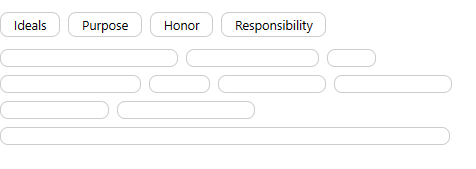
Here is the source code for the network above
Installation
Install via npm:
npm install @gramex/documapUse locally as an ES module:
<script type="module">
  import { documap } from "./node_modules/@gramex/documap/dist/documap.js";
  const chart = documap(...);
</script>
Use locally as a script:
<script src="./node_modules/@gramex/documap/documap.min.js"></script>
<script>
  const chart = gramex.documap(...);
</script>
Use via CDN as an ES Module:
<script type="module">
  import { documap } from "https://cdn.jsdelivr.net/npm/@gramex/documap@2";
  const chart = documap(...);
</script>
Use via CDN as a script:
<script src="https://cdn.jsdelivr.net/npm/@gramex/documap@2/dist/documap.min.js"></script>
<script>
  const chart = gramex.documap(...);
</script>
This library uses optional chaining - an ES2020 feature.
On Babel, optional-chaining is part of the ES2020 present-env. Run:
npm install @babel/preset-env --save-devThen add this to your babel.config.js or ``.babelrc`
{
  "presets": ["@babel/preset-env"]
}
CSS styling
You can style the documap using CSS.
Read the CSS to understand the class used
DOM structure
documap(el, ...) renders the following HTML on el:
<div class="documap-topics">
  <a class="documap-topic" data-documap-topic="0">Topic 1</a>
  <a class="documap-topic active" data-documap-topic="1">Topic 2</a>
  ...
</div>

<div class="documap-docs">
  <svg class="documap-doc" data-documap-doc="0" width="176" height="1rem"></svg>
  <svg class="documap-doc" data-documap-doc="1" width="131" height="1rem">
    <circle class="documap-marker" r="0.4rem" transform="translate(65.5, 8)"></circle>
    ...
  </svg>
  ...
</div>
Topics are rendered first.
- All topics are contained in a
<div class="documap-topics">element. You can change the tag and class withtopicsTagandtopicsClass. - Each topic is rendered as
<a class="documap-topic" data-documap-topic="${i}">. You can change the tag and class withtopicTagandtopicClass. - The
data-documap-topic=attribute contains the topic index (0, 1, 2, ...) in thetopicsarray. - The
activeclass is toggled when the topic is clicked. It indicates selected topics. You can change the class withtopicActiveClass.
Documents are rendered next.
- Documents are contained in a
<div class="documap-docs">element. You can change the tag and class withdocsTaganddocsClass. - Each document is rendered as
<svg class="documap-doc" data-documap-doc="${i}" width="${width}" height="${height}">. You can change the tag and class withdocTaganddocClass. - The
data-documap-doc=attribute contains the document index (0, 1, 2, ...) in thedocsarray. - The
widthandheightare set to thedocWidthanddocHeightparameters.
When a topic is clicked, it adds marker elements to matching documents.
- Each marker is rendered as
<circle class="documap-marker" r="${markerSize}" transform="translate(${x}, ${y})">. You can change the tag and class withmarkerTagandmarkerClass. - The
rattribute is set to themarkerSizeparameter. - The
transformattribute is set to thexandycoordinates of the marker. You can change the style withmarkerStyle.
Style docs and topics
documap() returns a .doc and a .topic D3 join. You can style them like any D3 selection. In this example:
chart.doc.attr(doc => ...).style(...)colors and resizes the documentschart.topic.text(topic => ...).style(...)colors and re-labels the topics
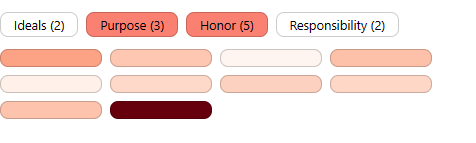
See how to style docs and topics
Style markers
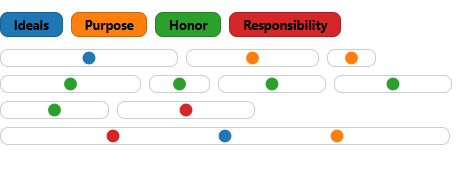
"Markers" are the nodes added when the user clicks a topic. You can style them using the markerStyle function which accepts a D3 join. In this example:
markerStyle: (marker) => marker.style(...)ensures thatdocumap()colors themarkerD3 join when it is dynamically renderedchart.topic.style(...)colors the topics
Note: You can't style the markers using the chart.marker D3 join because it is empty when the chart is initialized, and is updated dynamically. So we pass a markerStyle function instead.
You can use events as another way of styling markers.
Update topics
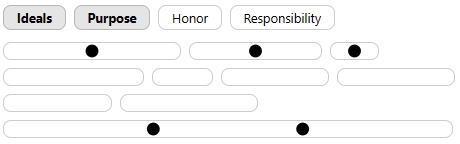
To activate / deactivate topics, use .update({ topics }). For example, this activates the "Ideals" and "Purpose" topics.
chart.update({ topics: (d) => ["Ideals", "Purpose"].includes(d.name) });Else, you can manually update each topic's active class and call chart.update().
Events
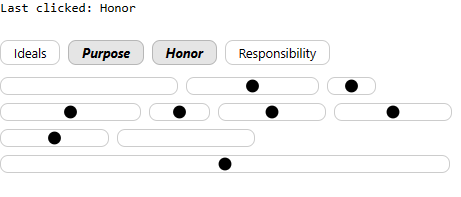
You can listen to the click event fired on topics to process clicks - using regular JavaScript.
Click on the topics below to see the clicked topic's details displayed.
Add tooltips
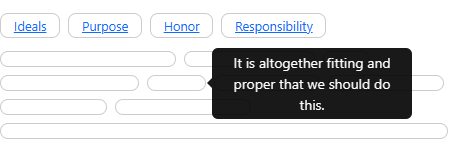
You can use Bootstrap tooltips.
- Add a
data-bs-marker="tooltip" title="..."attribute to each feature usingupdate - Call
new bootstrap.Tooltip(element, {selector: '[data-bs-marker="tooltip"]'})to initialize tooltips
Add modals
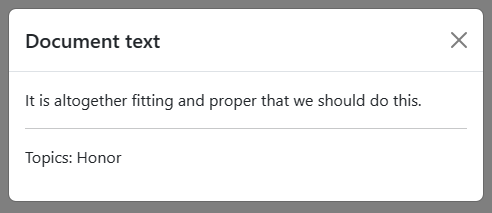
You can use Bootstrap modals.
- Create a new
new bootstrap.Modal(document.querySelector("...")); - Use
chart.doc.on()orchart.topic.on()orchart.marker.on()to listen toclickevents and update the modal content.
Bring your own D3
If you already have D3 loaded, or want to use a specific version / instance of D3, pass it to documap(el, { d3 }):
See how to use your own D3 version
React usage
Use the following pattern when using documap with React:
const { useEffect } = React;
function App() {
  useEffect(() => documap(d3.select("#documap"), { ... }), []);
  return React.createElement("div", { id: "documap" });
}
const root = ReactDOM.createRoot(document.querySelector("#root"));
root.render(React.createElement(React.StrictMode, null, React.createElement(App)));
See how to use documap with React
Here are instructions to create a React Component:
npx create-react-app documap-react
cd documap-react
npm install d3 @gramex/documap
In public/index.html, add the line:
<link rel="stylesheet" href="https://gramener.com/gramex-documap/docs/gettysberg.css" />Create src/DocumapComponent.js with this code:
Modify src/App.js as follows:
Then run npm start or npm run build.
API
Release notes
- 2.0.1: 18 Auf 2024. Fix:
chart.update()resets topics ONLY if provided - 2.0.0: 19 Dec 2023.
chart.update()draws all markers based on active topics- Backward incompatible changes:
updateevent removed. Theclickevent provides sufficient information.
- 1.0.2: 23 Nov 2023. Document React usage and fix React compatibility
- 1.0.1: 17 Oct 2023. Use
chart.markerinstead ofchart.markersfor consistency. Add docs. - 1.0.0: 16 Oct 2023. Initial release
Authors
- Anand S [email protected]
- Aayush Thakur [email protected]
- Chandana Sagar [email protected]