
@grapecity-software/dsh-spreadjs-editor
v0.2.1
Published
DeepSeek Harness Web UI plugin: SpreadJS workbook editor for the harness's own right Sidebar, with binary save.
Downloads
1,174


Readme
SpreadJS Editor for DeepSeek Harness
GitHub · npm: @grapecity-software/dsh-spreadjs-editor
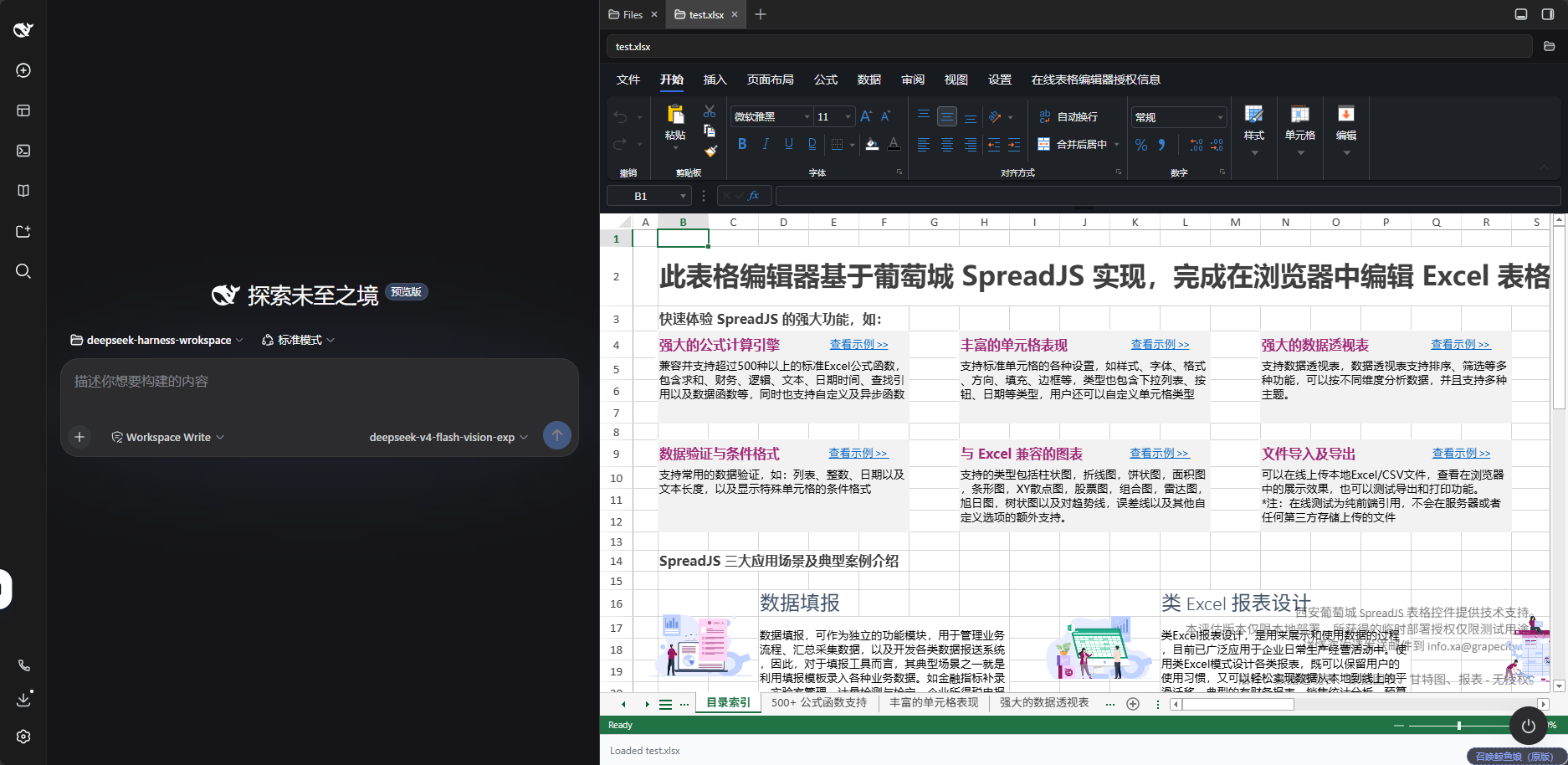
在 DeepSeek Harness Web UI 里,直接在右侧文件树中打开、查看和编辑 Excel / SpreadJS 文件。
A DeepSeek Harness Web UI plugin that opens, views, and edits Excel / SpreadJS files directly from the right-side file tree.
中文说明
功能
- 支持
.xlsx、.xlsm、.csv、.sjs、.ssjson文件。 - 从文件树打开工作簿,使用 SpreadJS Designer 编辑表格。
- 编辑后可直接保存回原文件:原子写入、限制在会话工作区内、带冲突检测。
- 编辑器跟随 DSH 的浅色/深色主题,工具栏与工作表区域一起变;DSH 偏好设为「跟随系统」时自然跟着系统走。
- 「设置」标签里有「关于」按钮:内置版本、授权状态与版权信息在弹窗里。
内置版本与文件兼容性
| 组件 | 内置版本 | | --- | --- | | SpreadJS | 19.2.0 | | SpreadJS Designer | 19.2.0 |
内置版本、授权状态与版权信息在 Designer「设置」标签的「关于」弹窗里。低版本 SpreadJS 可能无法打开本版本保存的 .sjs 或 .ssjson 文件;与旧版系统交换文件时,建议保留原文件并确认兼容性。
安装
需要 DSH >=0.1.5-rc.3。插件使用 DSH 自带的右侧栏,不需要安装任何第三方侧边栏插件。
插件内置 SpreadJS 和 Designer,无需编译。使用已安装的 DSH CLI 安装并启动:
dsh plugin --profile web add @grapecity-software/dsh-spreadjs-editor
dsh --profile web
启动后,在 Web UI 右侧文件树中打开 .xlsx、.xlsm、.csv、.sjs 或 .ssjson 文件即可。
也可以通过 npx 安装并启动:
npx --yes @deepseek-ai/dsh@latest plugin --profile web add @grapecity-software/dsh-spreadjs-editor
npx --yes @deepseek-ai/dsh@latest --profile web旧版本用户请参阅升级说明。
保存
保存只有一处入口:Designer「文件」菜单里的「保存到工作区」,就在原本内置"另存为 .sjs"那颗按钮的位置上。改动写回你打开的那个文件,不会再问你"要不要保存",因为按下保存本身就是你的意图。
- 「文件」菜单只剩一个保存动作。 Designer 原本的保存是「弹框下载到本地」;本插件把它换成写回你打开的那个文件,菜单里只保留这一个动作,新建、打开、导入、导出、打印、信息等分类一并移除。需要一份副本时,用 DSH 自己的文件下载即可。
- 工作簿还没载入完时不让保存。 载入中的工作簿是空的,此时保存会用空表覆盖原文件;载入完成前保存命令会拒绝并说明。
- 不会冲掉别人的修改。 打开文件时插件记下其内容哈希;保存前重新比对,若磁盘上的文件在此期间被改过(Agent 改过、你在别处存过),保存会被拒绝并说明原因,而不是覆盖掉那些改动。
- 不会写出半个文件。 同目录临时文件写完后 rename 覆盖,其他程序任何时候读到的都是完整文件。
- 写不出工作区。 目标必须在当前会话的工作区内,越界(含
..逃逸)直接拒绝。 - 只有循环回环地址可用。 保存接口与 DSH 其它接口一样只服务本机来源;通过局域网地址访问时,需要把该地址加进
trustedHosts。
配置
如已获得许可证,在 web profile 的 cordis.patch.yml 中添加以下配置:
| Key | 默认值 | 说明 |
| --- | --- | --- |
| licenseKey | '' | SpreadJS 部署许可证。留空以带水印的试用模式运行。 |
| designerLicenseKey | '' | 独立的 SpreadJS Designer 部署许可证。留空保持 Designer 试用状态。 |
| maxSaveBytes | 67108864 | 单次保存允许的最大字节数;超出直接拒绝,不做截断。 |
| trustedHosts | [] | 除本机回环地址外,额外允许调用保存接口的地址(局域网部署时使用)。 |
- id: spreadjs-editor
  config:
    licenseKey: 'YOUR_SPREADJS_KEY'
    designerLicenseKey: 'YOUR_DESIGNER_KEY'
修改后重启 DSH 并刷新网页。
验证
| 命令 | 验证内容 |
| --- | --- |
| npm run typecheck、npm test | 类型契约,以及 84 个单元测试(保存路由的每条守卫、文件地址解析、保存命令重定向的每条分支,以及编辑器主题桥的每条分支) |
| node scripts/smoke-client.mjs | 构建后的浏览器半结构:loader 包装、内联的 SpreadJS 与样式、外部依赖只有 react |
| node scripts/smoke-node.mjs | 构建后的宿主半:路由注册、许可证配置,以及保存路径的真实写盘、冲突与越界拒绝 |
| npm run probe:live | 对着正在运行的 DSH 跑一遍真实保存:真实 ctx.fs 的解析、落盘、冲突守卫、工作区越界 |
npm run probe:live 要求 DSH 已重启到本版本;如果它报 404,说明进程里还是旧的宿主半。可选参数:--url(默认 http://127.0.0.1:3080)、--session <id>、--home <DSH_HOME>。探针会在会话工作区内建一个临时文件,结束时删除。
许可
插件代码免费提供,采用 MIT 许可证。内置的 SpreadJS 和 Designer 是葡萄城商业产品,未配置许可证时可按其试用条款体验;插件免费不包含这两个产品的商业授权。
如用于正式部署或 SaaS 服务,请根据使用场景获取适用的 SpreadJS 和 Designer 授权。
English
Features
- Opens
.xlsx,.xlsm,.csv,.sjs, and.ssjsonfiles. - Open workbooks from the file tree and edit them with SpreadJS Designer.
- Save edits straight back to the file: atomic, confined to the session workspace, with conflict detection.
- Follows the harness's light or dark theme, toolbars and worksheet alike; a harness preference of
systemstill tracks the OS. - An About button in the settings tab reports the bundled versions, the licence state and the copyright.
Bundled Versions and File Compatibility
| Component | Bundled version | | --- | --- | | SpreadJS | 19.2.0 | | SpreadJS Designer | 19.2.0 |
The About button in the Designer's settings tab shows the bundled versions, the licence state and the copyright. Older SpreadJS versions may not open .sjs or .ssjson files saved by this version. When exchanging files with older systems, keep the original files and check compatibility.
Installation
Requires DSH >=0.1.5-rc.3. The plugin uses the harness's own right Sidebar and needs no third-party sidebar plugin.
The plugin includes SpreadJS and Designer, with no build step required. With the DSH CLI installed:
dsh plugin --profile web add @grapecity-software/dsh-spreadjs-editor
dsh --profile web
After startup, open .xlsx, .xlsm, .csv, .sjs, or .ssjson from the right-side file tree.
Alternatively, install and start through npx:
npx --yes @deepseek-ai/dsh@latest plugin --profile web add @grapecity-software/dsh-spreadjs-editor
npx --yes @deepseek-ai/dsh@latest --profile web
For upgrades, see the release notes.
Saving
Save has a single entry point: the 保存到工作区 button in the Designer's File tab, in the place the built-in "save as .sjs" button used to occupy. It writes your changes back to the file you opened, and there is no second prompt, because pressing Save is the intent.
- The File tab is reduced to one Save action. The Designer's own Save is a dialog that downloads a file; this plugin replaces it with a write-back to the file you opened, and the File tab keeps only that one action — new, open, import, export, print and info are removed outright. A copy is what the harness's own file download is for.
- A workbook that is still loading cannot be saved. It has no content yet, so saving would overwrite the file with an empty book; the save command refuses, with an explanation, until the load finishes.
- It will not clobber someone else's edit. The plugin records the file's content hash when it opens it and re-checks before writing; if the file changed in the meantime (an agent edited it, you saved it elsewhere), the save is refused with an explanation instead of overwriting those changes.
- It never leaves half a file. A same-directory temporary file is renamed over the target, so any other reader always sees a complete workbook.
- It cannot write outside the workspace. The target must sit inside the current session's workspace; anything else — including
..escapes — is refused. - Loopback only. The save endpoint serves the local machine like the rest of DSH. If you reach DSH through a LAN address, add that address to
trustedHosts.
Configuration
If you have licenses, add the following to the web profile's cordis.patch.yml:
| Key | Default | Description |
| --- | --- | --- |
| licenseKey | '' | SpreadJS deployment key. Empty runs in evaluation mode with a watermark. |
| designerLicenseKey | '' | Separate SpreadJS Designer deployment key. Empty keeps Designer in evaluation mode. |
| maxSaveBytes | 67108864 | Largest payload one save may carry; a bigger one is refused, never truncated. |
| trustedHosts | [] | Extra authorities allowed to call the save endpoint, beyond loopback (for LAN deployments). |
- id: spreadjs-editor
  config:
    licenseKey: 'YOUR_SPREADJS_KEY'
    designerLicenseKey: 'YOUR_DESIGNER_KEY'
Restart DSH and refresh the browser after changing the configuration.
Verification
| Command | What it proves |
| --- | --- |
| npm run typecheck, npm test | The type contract, and 84 unit tests: every save guard, file-address parsing, every branch of the Save-command redirect, and every branch of the editor theme bridge |
| node scripts/smoke-client.mjs | The built browser half's structure: loader wrapper, inlined SpreadJS and styles, react as the only runtime external |
| node scripts/smoke-node.mjs | The built host half: route registration, license config, and the save path writing real bytes plus refusing conflicts and escapes |
| npm run probe:live | A real save against a running DSH: the actual ctx.fs resolving, writing, refusing a stale base hash, and refusing a workspace escape |
npm run probe:live needs DSH restarted onto this version; a 404 from it means the running process still carries the old host half. Options: --url (default http://127.0.0.1:3080), --session <id>, --home <DSH_HOME>. The probe creates one temporary file inside the session workspace and deletes it.
License
The plugin code is free under the MIT license. Bundled SpreadJS and Designer are GrapeCity commercial products available for evaluation under their trial terms without license keys. The free plugin does not include commercial licenses for these products.
For production or SaaS deployments, obtain SpreadJS and Designer licenses appropriate to your use.