
@graysilver/dsh-task-modes
v0.2.0
Published
Composable working, reasoning, and quality controls for DeepSeek Harness Web.

Maintainers
 graysilver
Readme
dsh-task-modes
一个可独立安装的 DeepSeek Harness Web bundle,通过一个包含三个可组合维度的任务模式按钮工作,不修改 DeepSeek Harness core:
- 工作状态:执行或计划;
- 推理方式:标准或第一性原理;
- 质量门:关闭、对抗性审查或验收审查。
安装
无需全局安装 DSH,直接将固定 npm 版本安装到 Web profile:
npx -y @deepseek-ai/dsh plugin --profile web add @graysilver/[email protected]如果已经全局安装 dsh,可以使用:
dsh plugin --profile web add @graysilver/[email protected]安装后重启 Web profile,输入区工具旁会出现一个任务模式按钮。按钮显示当前组合,例如 Execute · Standard · Off;点开后可选择三个维度。bundle 会接管独立的 Plan 状态 UI seat,因此输入区只保留一个任务模式入口,同时仍复用官方 Plan service 和审批流程。该 bundle 要求标准 DSH Plan mode capability;若服务不存在,它会明确加载失败,而不会伪造一个计划模式。
需要审计源码或进行开发时,可以安装固定 Git revision:
dsh plugin --profile web add github:GraySilver/dsh-task-modes#<trusted-commit>Git 安装包会执行安装期代码,请只安装可信 revision。
任务模式菜单
任务模式按钮会打开一个分组菜单,默认是 Execute · Standard · Off。三个维度彼此独立。例如,高影响决策可以选择“计划 + 第一性原理”;实现功能时可以选择“执行 + 验收审查”。
| 控制项 | 选项 | 行为 |
| --- | --- | --- |
| 工作状态 | 执行、计划 | 计划委托给官方 @deepseek-ai/dsh-plan-mode,复用 /plan、持久化 plan/mode 事件和 exit_plan_mode 的用户审批流程。 |
| 推理方式 | 标准、第一性原理 | 第一性原理向 system prompt 注入目标、事实与假设、约束、推导和验证要求。 |
| 质量门 | 关闭、对抗性审查、验收审查 | 每个完成的父回合后运行一个独立建议型 fork。对抗性与验收是互斥 profile,不会叠加运行多个审查器。 |
计划模式与工具
官方 Plan mode 生效时,插件通过 DSH 的 tools/pre-execute pipeline 真实执行工具策略。只允许 read、glob、grep、read_image、已配置的平台 shell 和 exit_plan_mode;所有修改工具及其它工具会收到明确拒绝。
已配置的 shell 刻意保持完整能力:macOS/Linux 默认使用 bash,Windows 默认使用 pwsh。因此 Plan mode 不是 操作系统级只读 sandbox。模型或审查器仍可能通过 shell 发出修改命令。需要进程隔离时,应配置具备约束能力的 shell/sandbox provider 与权限策略。
Plan 审核不会延迟或阻断官方 exit_plan_mode 审批。启用质量 profile 后,插件会在已完成的 Plan 回合之后生成建议型报告。官方退出工具成功提交计划时,审查的候选内容是该计划本身,而不仅是周围的助手文本。
第一性原理证据
第一性原理 section 会进入持久化的 request/header.system。Trajectory 从其中投影完全相同的内容为上下文式检查行,因此历史请求能直接看到该注入。它不会追加用户消息,也不会人为增加 transcript event。关闭后续请求不再包含该 section,已有行则保留为历史证据。
质量 profile
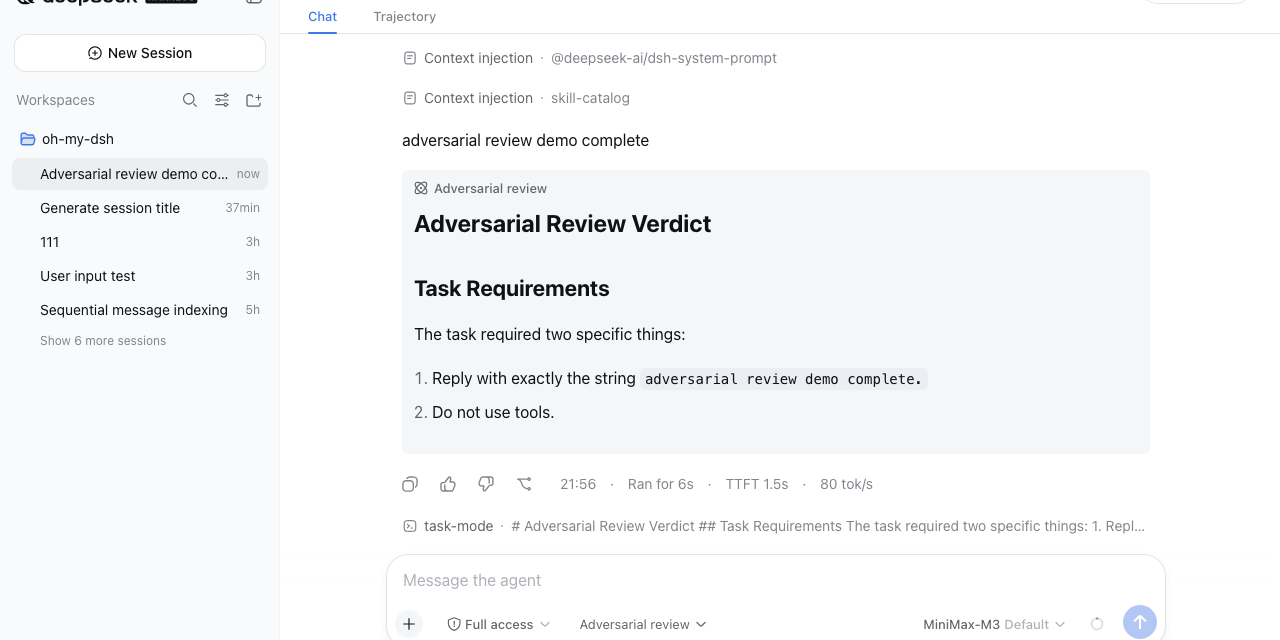
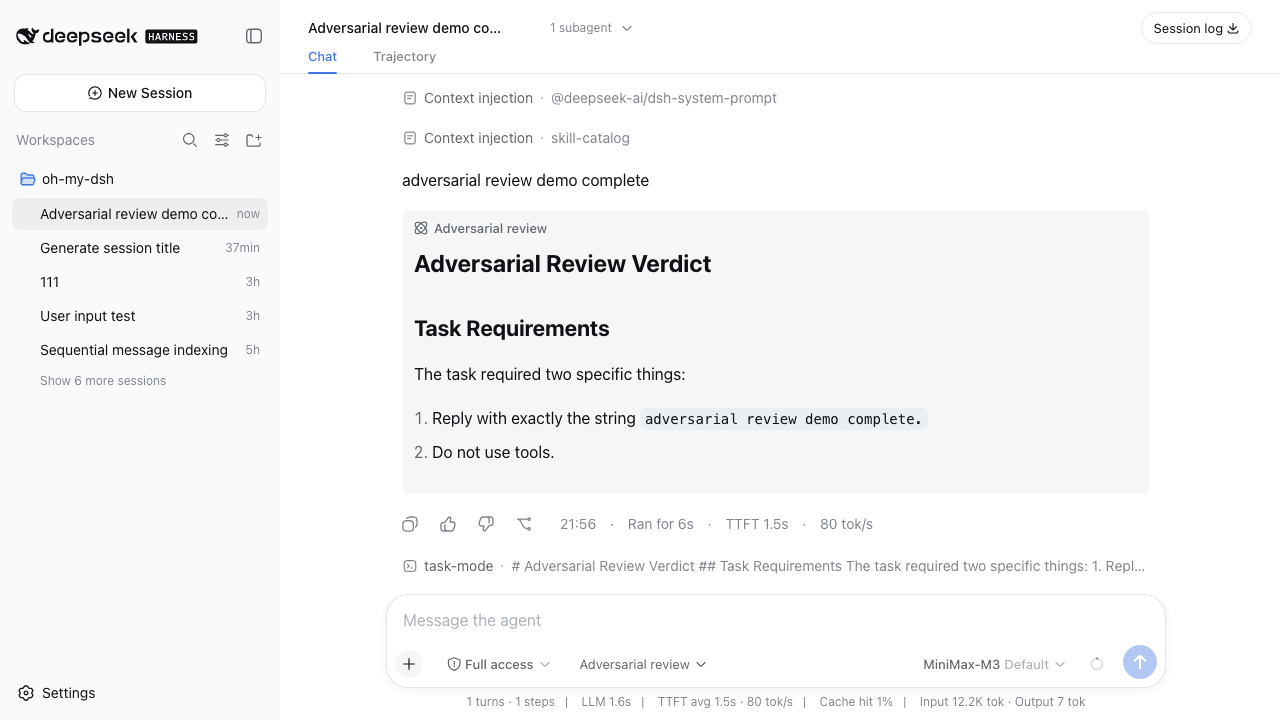
对抗性审查会检查当前任务和答案中的未满足要求、缺少依据的声明、遗漏、回归、反例与安全风险,并返回包含证据和后续行动的建议型 Markdown verdict。
验收审查独立比对任务、候选答案,以及存在时的已批准计划。它按 Met、Gap、Unverified、Evidence 和 Concrete follow-up 输出 Markdown checklist。这是纯模型/子 Agent 审查:不会自动识别或执行项目 test、lint、build 命令,也不会重写、重试或修复父结果。
两种审查都可以使用 read、glob、grep、read_image 和已配置的平台 shell。提示词要求进行非修改性检查,但提示词限制不是操作系统 sandbox。审查失败会以不可用状态持久化,且不会阻断父答复或 Plan 审批。
Web 端会在对应 AI 回复下方以折叠 Markdown 显示审查;展开后的正文固定为 240px 高度并可滚动。
持久化与命令
bundle 使用 graysilver_task_modes storage domain 保存记录。工作状态不会在这里重复存储,而是由官方 Plan mode 从 session log 折叠得到。推理选择、质量选择和报告可跨服务重启、会话重新加载继续存在,同时不新增自定义 DSH session event 类型。
0.2.0 保持 domain descriptor 的版本为 1,启动时自动重写旧记录:
| 旧模式 | 推理方式 | 质量门 |
| --- | --- | --- |
| normal | standard | off |
| first-principles | first-principles | off |
| adversarial-review | standard | general-review |
可在 Web 输入区或命令 API 使用:
/task-mode
/task-mode working execute
/task-mode working plan
/task-mode reasoning standard
/task-mode reasoning first-principles
/task-mode quality off
/task-mode quality general-review
/task-mode quality acceptance-review
/task-mode review <turn>
/task-mode reviews
旧的单一模式别名会在 0.2.x 期间继续接受:normal、first-principles 和 adversarial-review。它们会将工作状态重置为执行,并按上表转换。
配置
bundle 会自动选择平台 shell。只有目标 profile 已注册该工具时才覆盖:
- id: dsh-task-modes
  config:
    shellTool: bash
质量审查要求 DSH 的 fork/subagent capability;计划模式要求官方 planMode service 和 tools pipeline。
兼容性
需要提供 Web plugin loader、client UI slots、storage domain、forked subagent、官方 Plan mode service 与 DSH tools pipeline 的 DeepSeek Harness 版本。npm 是推荐的稳定分发渠道;固定 Git revision 继续用于源码审计和开发。
反馈
Bug 和功能建议请提交到 GitHub Issues。欢迎在 DeepSeek Harness Discussions 分享集成和使用反馈。
许可证
MIT