
@guard22/opencode-status-signals
v0.3.4
Published
Visual status signals for OpenCode sessions with in-app theme mapping.

Maintainers
 guard2
Readme
OpenCode Status Signals
Visual status signals for OpenCode sessions, powered by OpenCode's own TUI theme system.
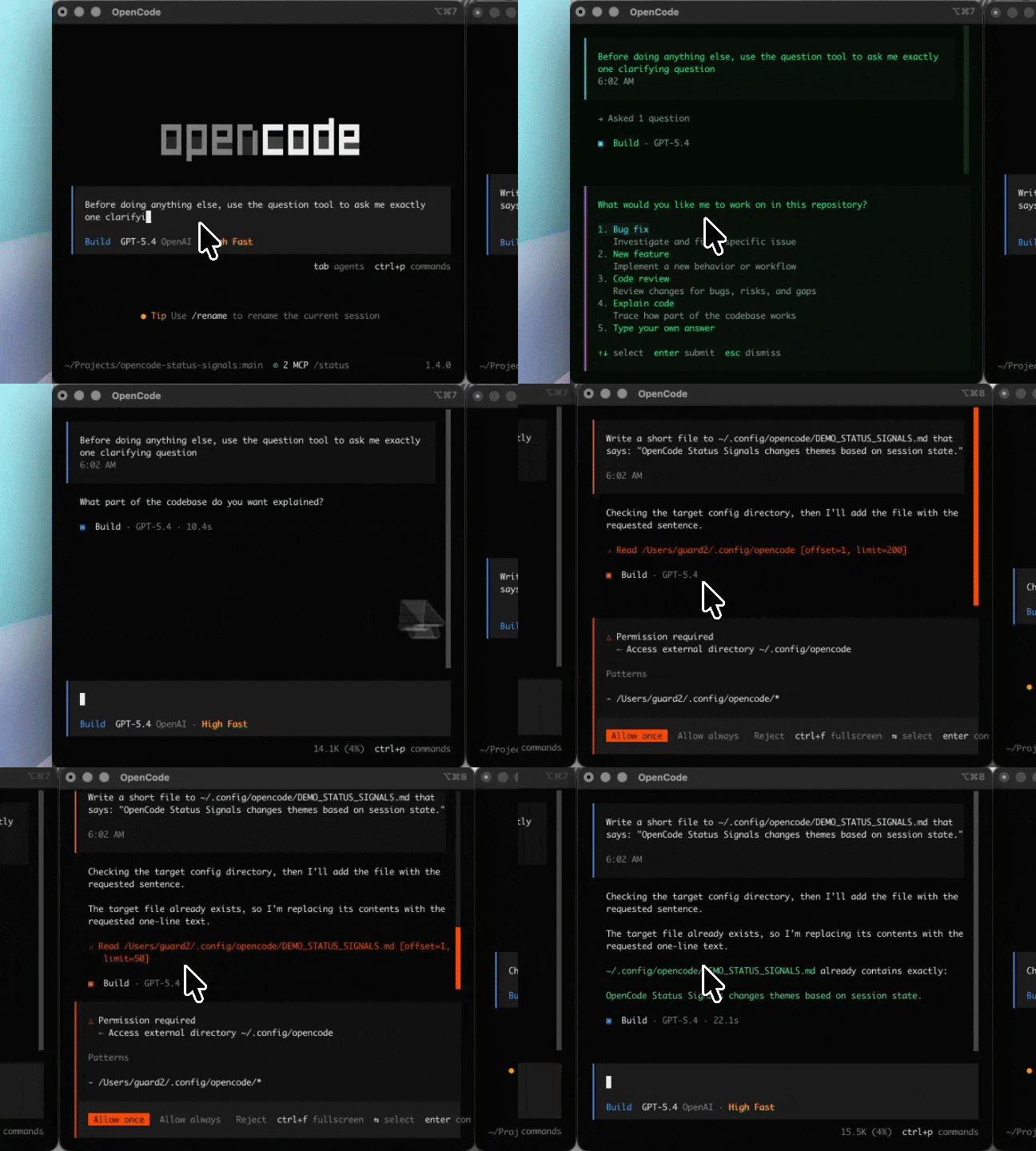
This plugin does not touch iTerm2 or any other terminal emulator. It changes the OpenCode theme itself based on the current session state, so the behavior works at the OpenCode layer instead of the terminal layer.
The repository name is opencode-status-signals, and the published package name is @guard22/opencode-status-signals.
What it does
The plugin maps these states to themes:
defaultstartedcompletequestionpermissionerror
By default it uses stable built-in OpenCode themes:
| State | Default theme |
| --- | --- |
| default | opencode |
| started | tokyonight |
| complete | opencode |
| question | matrix |
| permission | orng |
| error | dracula |
The plugin defaults to forceThemeMode: "dark", so built-in themes stay on their dark variants instead of following a light system mode.
Why this approach
This project started as a terminal-color experiment, but the correct long-term solution is to use OpenCode's own theme system.
That gives you:
- no terminal-specific hacks
- no AppleScript
- no dependency on
iTerm2 - the same behavior in any terminal that can run OpenCode
- a cleaner mental model: session state -> OpenCode theme
Interactive setup inside OpenCode
The plugin includes an in-app mapping flow, so you can configure themes directly inside OpenCode.
Commands:
/theme-states/theme-states-reset
The main flow lets you:
- pick a state
- choose a built-in theme
- preview it immediately
- confirm or revert
- save the mapping
Mappings are stored in the plugin KV store as local user preferences.
How it works
The plugin listens to native OpenCode session events and derives the current theme from the active session view.
Signals used:
session.statussession.idlepermission.askedpermission.repliedquestion.askedquestion.repliedquestion.rejectedsession.error
Theme priority is:
errorpermissionquestionstartedcompletedefault
Install
Recommended install
Use OpenCode's native plugin installer:
opencode plugin @guard22/opencode-status-signals@latest --globalThat command will install the plugin and patch your global OpenCode TUI config automatically.
Then restart OpenCode and use /theme-states to customize it.
GitHub fallback
curl -fsSL https://raw.githubusercontent.com/guard22/opencode-status-signals/main/install.sh | bashThat command will:
- download the plugin into
~/.config/opencode/plugins/opencode-status-signals.js - patch
~/.config/opencode/tui.json - install the default status-to-theme mapping automatically
Then restart OpenCode and use /theme-states to customize it.
Manual install
If you want to manage the files yourself, copy src/tui.js into your OpenCode plugin directory and reference that file from tui.json.
Global config path:
~/.config/opencode/tui.jsonExample:
{
  "$schema": "https://opencode.ai/tui.json",
  "theme": "opencode",
  "plugin": [
    [
      "~/.config/opencode/plugins/opencode-status-signals.js",
      {
        "forceThemeMode": "dark",
        "defaultTheme": "opencode",
        "startedTheme": "tokyonight",
        "completeTheme": "opencode",
        "questionTheme": "matrix",
        "permissionTheme": "orng",
        "errorTheme": "dracula"
      }
    ]
  ]
}
Then restart OpenCode.
Configuration options
Plugin options supported in tui.json:
defaultThemestartedThemecompleteThemequestionThemepermissionThemeerrorThemeforceThemeMode(dark,light, orsystem)pollMsdebug
The interactive /theme-states flow can override these defaults and save user mappings locally.
OpenCode's top-level theme in tui.json should usually match your plugin defaultTheme, otherwise the plugin will intentionally override the global theme whenever session state changes.
Development
Validate the plugin locally:
npm run checkDry-run the npm package contents:
npm run package:checkOpen Source
This is an open source project and contributions are very welcome.
If you want to help, the most useful things are:
- report bugs
- suggest UX or workflow improvements
- propose new session-state features
- submit fixes or cleanup PRs
- improve documentation
If you have an idea, found a bug, or want to add functionality, please open an issue or submit a pull request.
Even small improvements are helpful and make the project easier to maintain over time.
See CONTRIBUTING.md for the lightweight contribution guide.
Limitations
- This is a plugin-only solution, not an OpenCode core patch.
- Theme state is derived locally from shared session state and events.
- That means it avoids release-to-release patch maintenance, but it is not a new server-side theme state primitive inside OpenCode.
License
MIT