
@guitar-chords/svg
v0.0.9
Published
Use SVG to generate guitar chords or edit it.

Maintainers
 capricorncd
Readme
@guitar-chords/svg
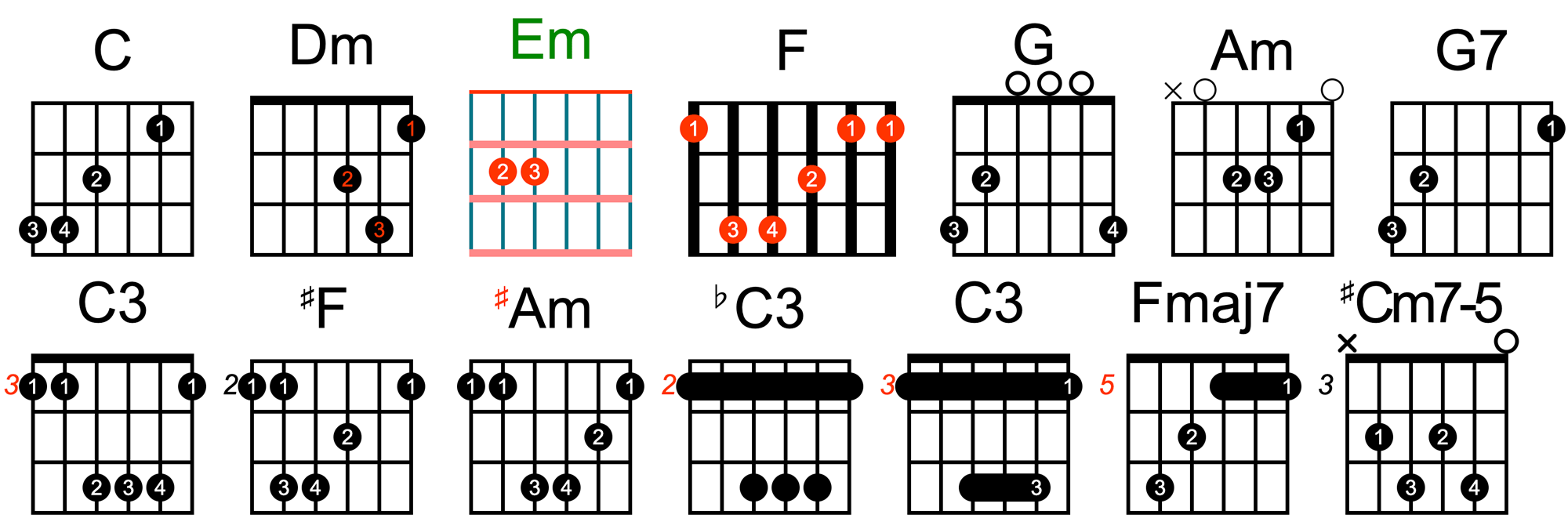
Use SVG to generate guitar chords. View the chord diagrams it generates →.
Install
npm install @guitar-chords/svgUsage
options GuitarChords Instantiation Options, See GuitarChordsOptions.
import { GuitarChords } from '@guitar-chords/svg'

const guitarChords = new GuitarChords({
  name: 'C',
  matrix: [
    [0, 0, 0, 0, 1, 0],
    [0, 0, 2, 0, 0, 0],
    [3, 4, 0, 0, 0, 0],
  ],
})
// get canvas element and append to body
document.querySelect('body').append(guitarChords.element)
// get data
console.log(guitarChords.data)
Property
data
Get the chord data.
- @returns
GuitarChordsDataSee GuitarChordsData
element
Get the Svg element of the GuitarChords
- @returns
SvgElement
gridRect
Get the size and position information of the chord grid.
- @returns
GridRectSee GridRect
height
Get the height of the chord
- @returns
number
version
Get the version of the chord
- @returns
stringversion1.0.0
width
Get the width of the chord
- @returns
number
Methods
render(options)
Re-render the chord.
Param|Types|Required|Description
:--|:--|:--|:--
options|Partial<GuitarChordsOptions>|no|Chord instantiation options, see GuitarChordsOptions
- @returns
GuitarChords
Types
GridRect
Grid size and position information.
Prop|Types|Required|Description
:--|:--|:--|:--
width|number|yes|Grid Width
height|number|yes|Grid Height
top|number|yes|The position of the top of the grid in the entire chord diagram
right|number|yes|The position of the right of the grid in the entire chord diagram
bottom|number|yes|The position of the bottom of the grid in the entire chord diagram
left|number|yes|The position of the left of the grid in the entire chord diagram
GuitarChordsData
Guitar Chords All Options (Configuration Data).
Prop|Types|Required|Description
:--|:--|:--|:--
autoRender|boolean|yes|Whether to automatically render when instantiated, the default is true
defaultColor|string|yes|Default colors (except for the color of the finger number text)
defaultLineWidth|number|yes|Default line width
transpose|number|yes|Chord transposition value, 1 is a sharp semitone, -1 is a flat semitone, default is 0
transposeTextColor|string|yes|The font color of the chord transposition symbol is the same as the chord name font color by default
name|string|yes|Chord Name
nameFontSize|number|yes|Chord name font size
nameTextColor|string|yes|Chord Name Color
nameLetterSpacing|number|yes|The spacing between chord name letters, default is 0
spacing|number|yes|Spacing between chord names and the chord grid
nutLineWidth|number|yes|The width of the nut line (default is the value of lineWidth)
nutColor|string|yes|Nut Line Color
fretsSpacing|number|yes|Fret Line Spacing
fretsColor|string|yes|Fret Line Color
fretsLineWidth|number|yes|Fret Line Width
stringSpacing|number|yes|String line spacing
stringColor|string|yes|String line color
stringLineWidth|number|yes|String line width
stringCount|number|yes|The number of strings, which is the value of matrix[i].length or 6
fingerRadius|number|yes|Radius of the fingering dot
fingerCircleColor|string|yes|Fingering dot color
showFingerNumber|boolean|yes|Whether to display the finger number, the default is true
fingerNumberTextColor|string|yes|Finger number font color, default #fff
startFrets|number|yes|The starting fret of the chord, default is 0
startFretsTextColor|string|yes|Starting grade font color
matrix|number[][]|yes|Matrix of chord fingerings and number of frets (2D array with rows representing chords and columns representing frets)
mergeFingerCircle|boolean|yes|Whether to merge fingering dots when playing barre/barre, default is false
showNotesOutsideOfChords|boolean|yes|Used to configure whether to display a small cross x/o at the head of the empty string column, the default is false
notesOutsideOfChords|Record<number, boolean>|yes|Whether to display open strings as notes outside of chords option {chord number (strings 1-6 for guitar): true or false}
crossLineWidth|number|yes|The line thickness of the notes x/o outside the chord is the default string line width. Its length is the diameter of the fingering dot
crossLineColor|string|yes|Line color for the non-chord tones x/o
crossRadius|number|yes|The radius of the chord outside the tone x/o, the default is fingerRadius * 0.75
GuitarChordsOptions
Required configuration options for chord strength, see GuitarChordsData
type GuitarChordsOptions = {
  name: string;
  matrix: GuitarChordsData['matrix'];
} & Omit<GuitarChordsData, 'stringCount'>
Constants
Chord Default Options
{
  autoRender: true,
  defaultColor: '#000',
  defaultLineWidth: 4,
  transpose: 0,
  nameFontSize: 60,
  spacing: 20,
  fretsSpacing: 50,
  stringSpacing: 30,
  fingerRadius: 15,
  showFingerNumber: true,
  fingerNumberTextColor: '#fff',
  startFrets: 0,
  matrix: [
    [0, 0, 0, 0, 0, 0],
    [0, 0, 0, 0, 0, 0],
    [0, 0, 0, 0, 0, 0],
  ],
  mergeFingerCircle: false,
  showNotesOutsideOfChords: false,
}