
@henrygd/queue
v1.2.0
Published
Tiny async queue with concurrency control. Like p-limit or fastq, but smaller and faster.

Maintainers
 henrygd
Readme
@henrygd/queue


Tiny async queue with concurrency control. Like p-limit or fastq, but smaller and faster. Optional time-based rate limiting also available. See comparisons and benchmarks below.
Works with:
Usage
Create a queue with the newQueue function. Then add async functions - or promise returning functions - to your queue with the add method.
You can use queue.done() to wait for the queue to be empty.
import { newQueue } from '@henrygd/queue'

// create a new queue with a concurrency of 2
const queue = newQueue(2)

const pokemon = ['ditto', 'hitmonlee', 'pidgeot', 'poliwhirl', 'golem', 'charizard']

for (const name of pokemon) {
    queue.add(async () => {
        const res = await fetch(`https://pokeapi.co/api/v2/pokemon/${name}`)
        const json = await res.json()
        console.log(`${json.name}: ${json.height * 10}cm | ${json.weight / 10}kg`)
    })
}

console.log('running')
await queue.done()
console.log('done')
The return value of queue.add is the same as the return value of the supplied function.
const response = await queue.add(() =>
  fetch("https://pokeapi.co/api/v2/pokemon")
);
console.log(response.ok, response.status, response.headers);
queue.all is like Promise.all with concurrency control:
import { newQueue } from "@henrygd/queue";

const queue = newQueue(2);

const tasks = ["ditto", "hitmonlee", "pidgeot", "poliwhirl"].map(
  (name) => async () => {
    const res = await fetch(`https://pokeapi.co/api/v2/pokemon/${name}`);
    return await res.json();
  }
);

// Process all tasks concurrently (limited by queue concurrency) and wait for all to complete
const results = await queue.all(tasks);
console.log(results); // [{ name: 'ditto', ... }, { name: 'hitmonlee', ... }, ...]
You can also mix existing promises and function wrappers.
const existingPromise = fetch("https://pokeapi.co/api/v2/pokemon/ditto").then(
  (r) => r.json()
);
const results = await queue.all([
  existingPromise,
  () =>
    fetch("https://pokeapi.co/api/v2/pokemon/pidgeot").then((r) => r.json()),
]);
Note that only the wrapper functions are queued, since existing promises start running as soon as you create them.
Time-based rate limiting
If you need to limit not just concurrency (how many tasks run simultaneously) but also rate (how many tasks can start within a time window), use @henrygd/queue/rl.
This is useful when working with APIs that have rate limits.
import { newQueue } from '@henrygd/queue/rl'

// max 10 concurrent requests, but only 3 can start per second
const queue = newQueue(10, 3, 1000)

const start = Date.now()

for (let i = 1; i <= 10; i++) {
   queue.add(async () => console.log(`Task ${i} started at ${Date.now() - start}ms`))
}

await queue.done()
The signature is: newQueue(concurrency, rate?, interval?).
concurrency- Maximum number of tasks running simultaneouslyrate- Maximum number of tasks that can start within theinterval(optional)interval- Time window in milliseconds for rate limiting (optional)
If you omit rate and interval, it works exactly like the main package (just concurrency limiting).
[!TIP] If you need support for Node's AsyncLocalStorage, import
@henrygd/queue/async-storageinstead.
Queue interface
/** Add an async function / promise wrapper to the queue */
queue.add<T>(promiseFunction: () => PromiseLike<T>): Promise<T>
/** Adds promises (or wrappers) to the queue and resolves like Promise.all */
queue.all<T>(promiseFunctions: Array<PromiseLike<T> | (() => PromiseLike<T>)>): Promise<T[]>
/** Returns a promise that resolves when the queue is empty */
queue.done(): Promise<void>
/** Empties the queue - pending promises are rejected, active promises continue */
queue.clear(): void
/** Returns the number of promises currently running */
queue.active(): number
/** Returns the total number of promises in the queue */
queue.size(): number
Comparisons and benchmarks
| Library | Version | Bundle size (B) | Weekly downloads | | :-------------------------------------------------------------- | :------ | :-------------- | :--------------- | | @henrygd/queue | 1.2.0 | 472 | hundreds :) | | @henrygd/queue/rl | 1.2.0 | 685 | - | | p-limit | 5.0.0 | 1,763 | 118,953,973 | | async.queue | 3.2.5 | 6,873 | 53,645,627 | | fastq | 1.17.1 | 3,050 | 39,257,355 | | queue | 7.0.0 | 2,840 | 4,259,101 | | promise-queue | 2.2.5 | 2,200 | 1,092,431 |
Note on benchmarks
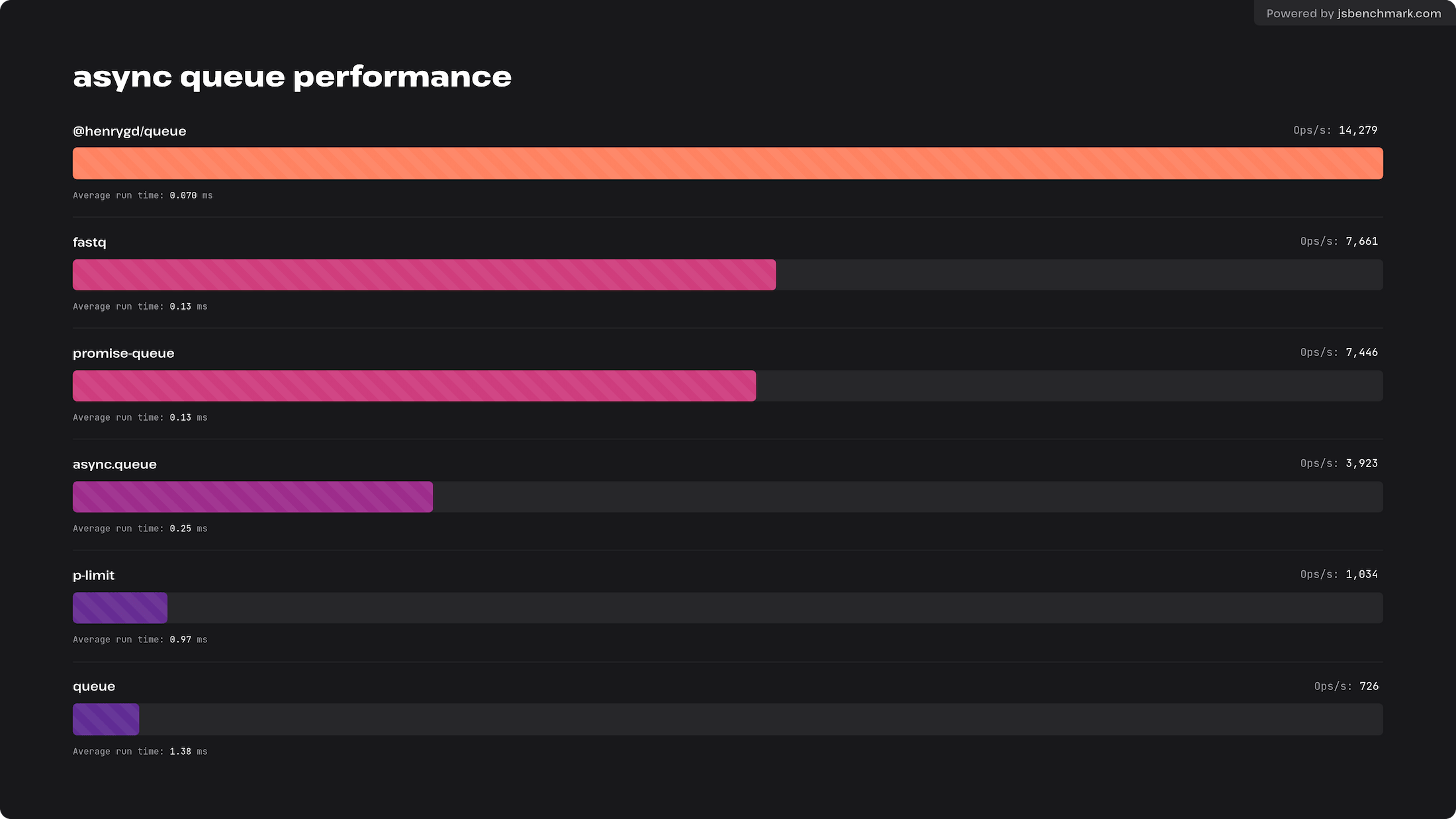
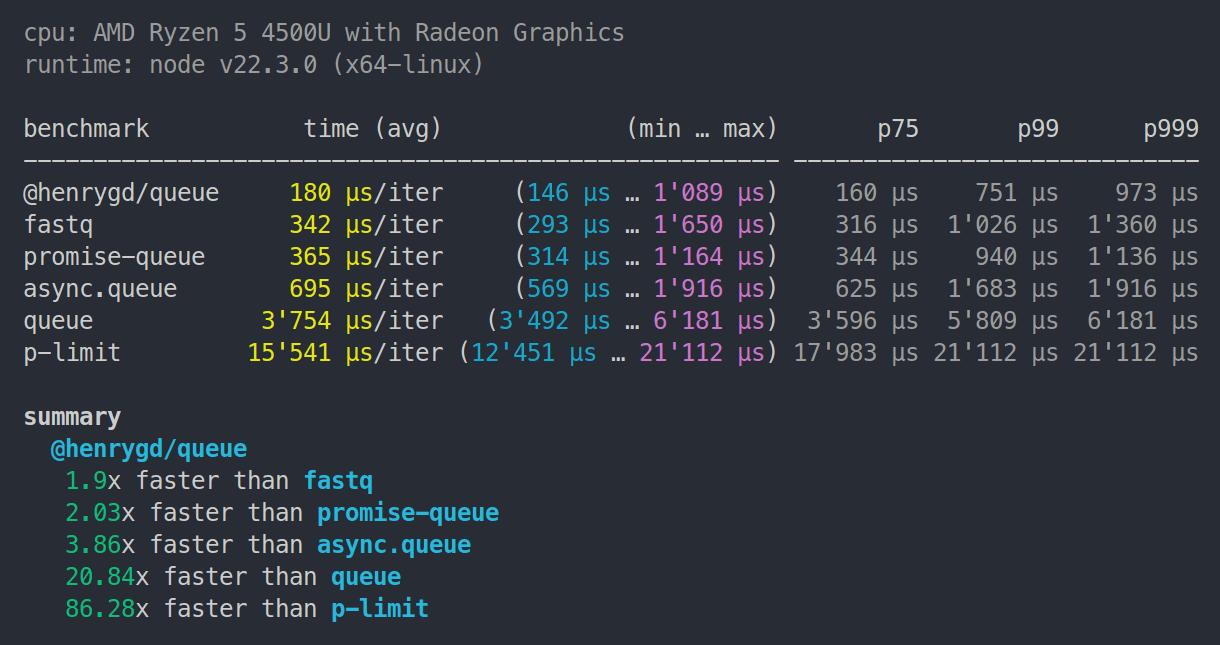
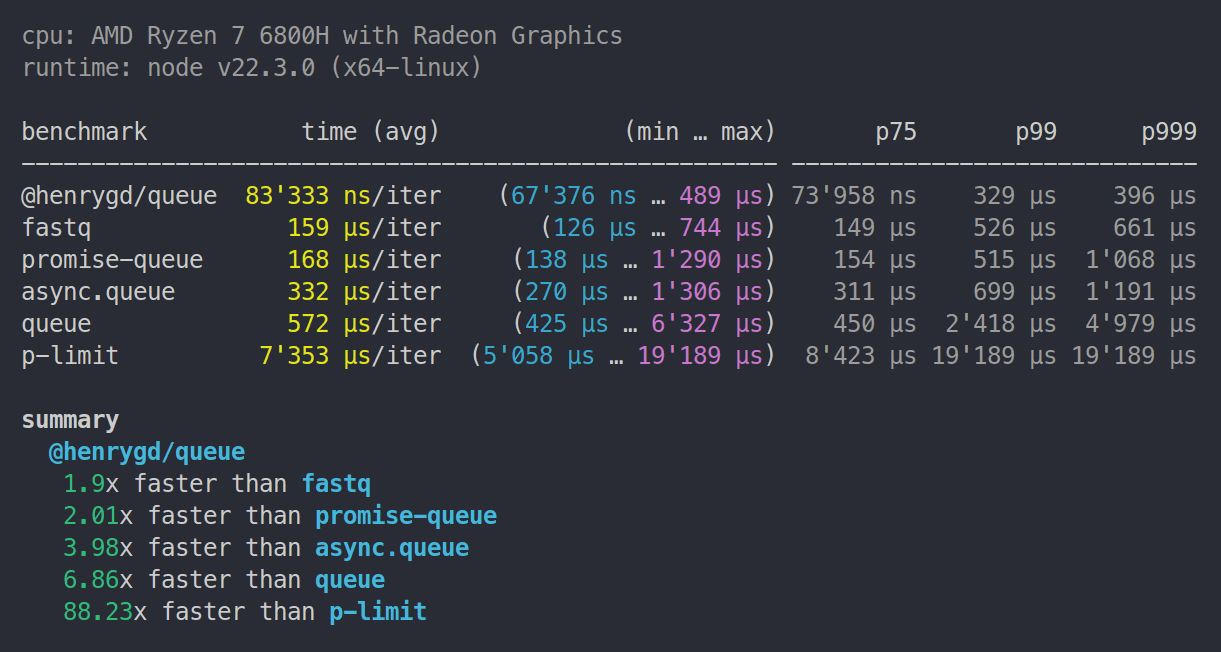
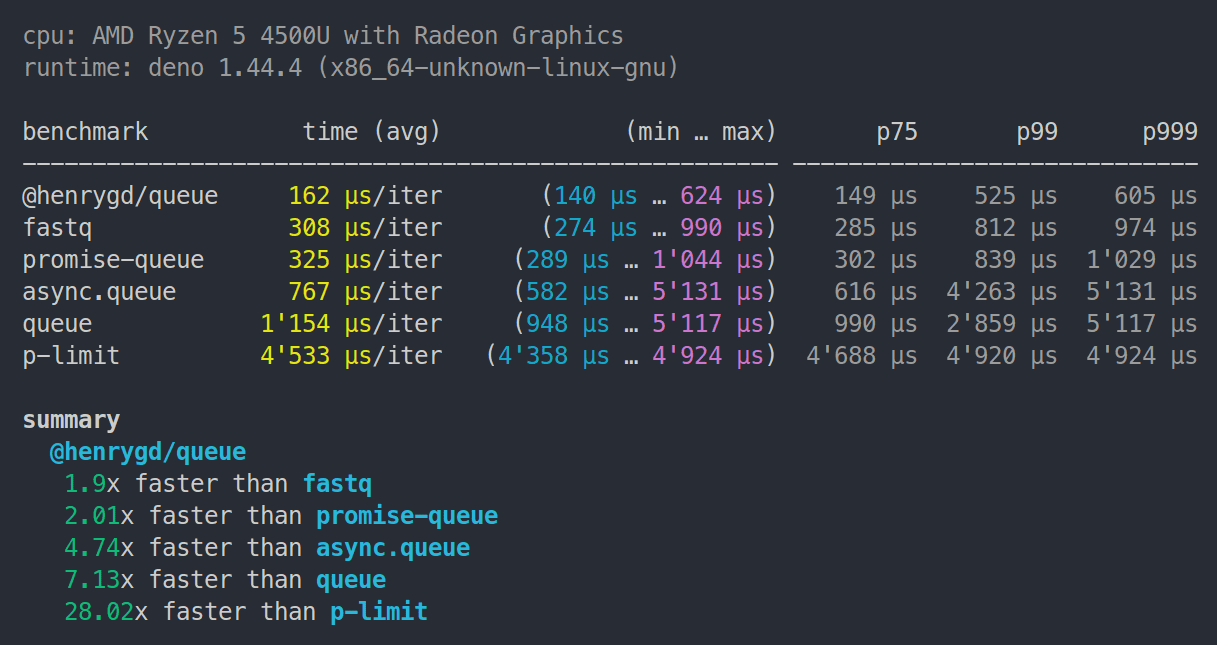
All libraries run the exact same test. Each operation measures how quickly the queue can resolve 1,000 async functions. The function just increments a counter and checks if it has reached 1,000.[^benchmark]
We check for completion inside the function so that promise-queue and p-limit are not penalized by having to use Promise.all (they don't provide a promise that resolves when the queue is empty).
Browser benchmark
This test was run in Chromium. Chrome and Edge are the same. Firefox and Safari are slower and closer, with @henrygd/queue just edging out promise-queue. I think both are hitting the upper limit of what those browsers will allow.
You can run or tweak for yourself here: https://jsbm.dev/TKyOdie0sbpOh
Node.js benchmarks
Note:
p-limit6.1.0 now places betweenasync.queueandqueuein Node and Deno.
Ryzen 5 4500U | 8GB RAM | Node 22.3.0
Ryzen 7 6800H | 32GB RAM | Node 22.3.0
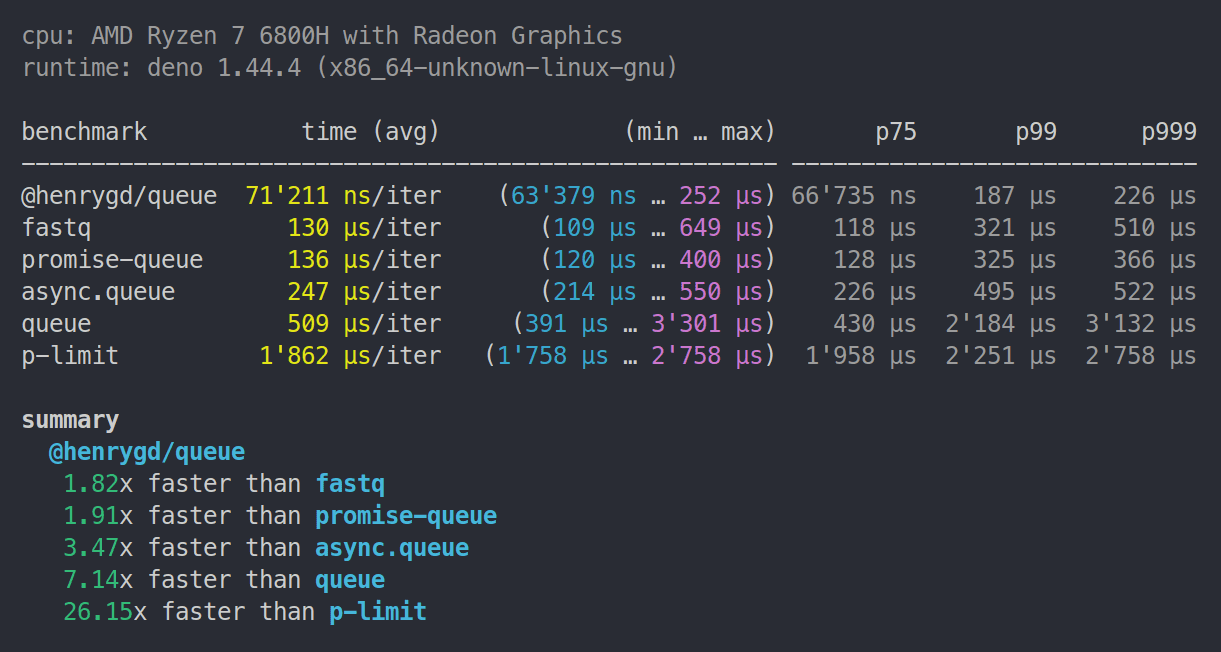
Deno benchmarks
Note:
p-limit6.1.0 now places betweenasync.queueandqueuein Node and Deno.
Ryzen 5 4500U | 8GB RAM | Deno 1.44.4
Ryzen 7 6800H | 32GB RAM | Deno 1.44.4
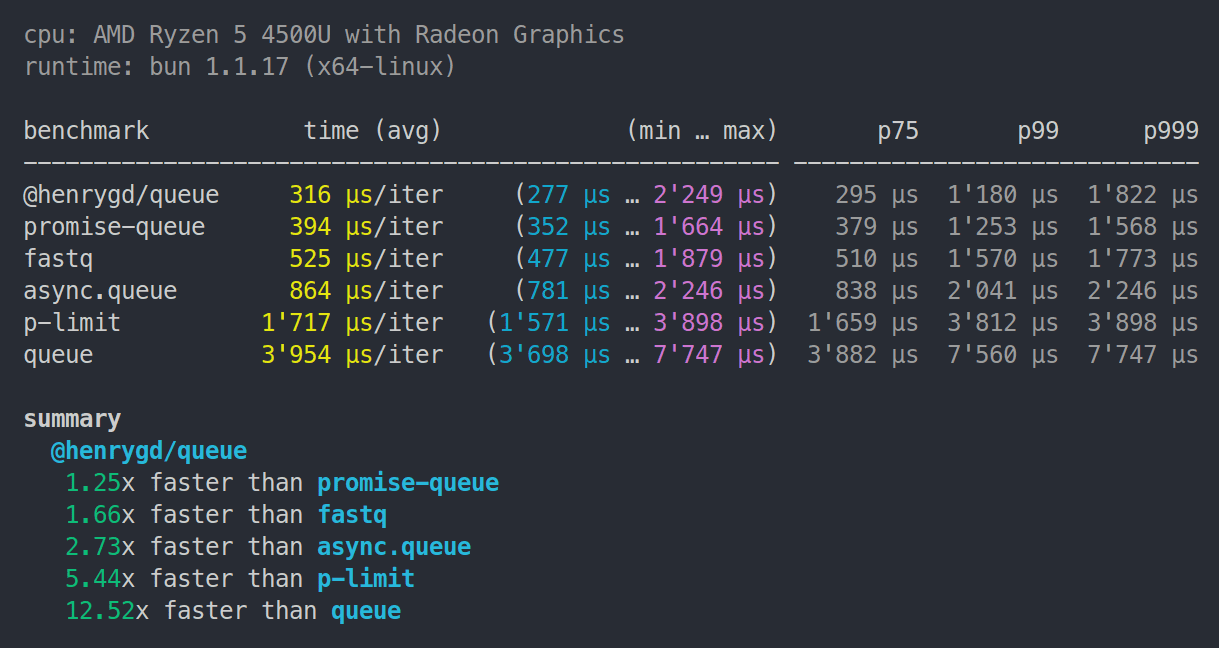
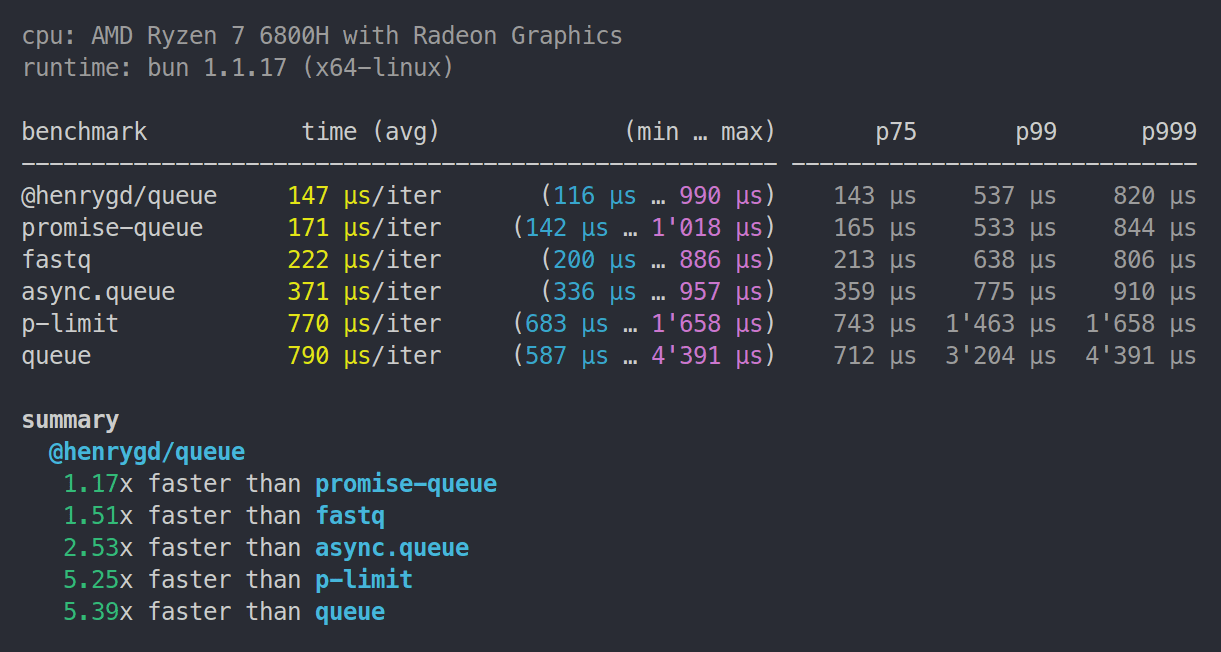
Bun benchmarks
Ryzen 5 4500U | 8GB RAM | Bun 1.1.17
Ryzen 7 6800H | 32GB RAM | Bun 1.1.17
Cloudflare Workers benchmark
Uses oha to make 1,000 requests to each worker. Each request creates a queue and resolves 5,000 functions.
This was run locally using Wrangler on a Ryzen 7 6800H laptop. Wrangler uses the same workerd runtime as workers deployed to Cloudflare, so the relative difference should be accurate. Here's the repository for this benchmark.
| Library | Requests/sec | Total (sec) | Average | Slowest | | :------------- | :----------- | :---------- | :------ | :------ | | @henrygd/queue | 816.1074 | 1.2253 | 0.0602 | 0.0864 | | promise-queue | 647.2809 | 1.5449 | 0.0759 | 0.1149 | | fastq | 336.7031 | 3.0877 | 0.1459 | 0.2080 | | async.queue | 198.9986 | 5.0252 | 0.2468 | 0.3544 | | queue | 85.6483 | 11.6757 | 0.5732 | 0.7629 | | p-limit | 77.7434 | 12.8628 | 0.6316 | 0.9585 |
Related
@henrygd/semaphore - Fastest javascript inline semaphores and mutexes using async / await.
License
[^benchmark]: In real applications, you may not be running so many jobs at once, and your jobs will take much longer to resolve. So performance will depend more on the jobs themselves.