
@henrysssilveira/mcp-host-universal
v1.0.9
Published
<!--  --> [](https://postimg.cc/bDG7SmkX)


Readme
MCP Host Universal

Visão Geral
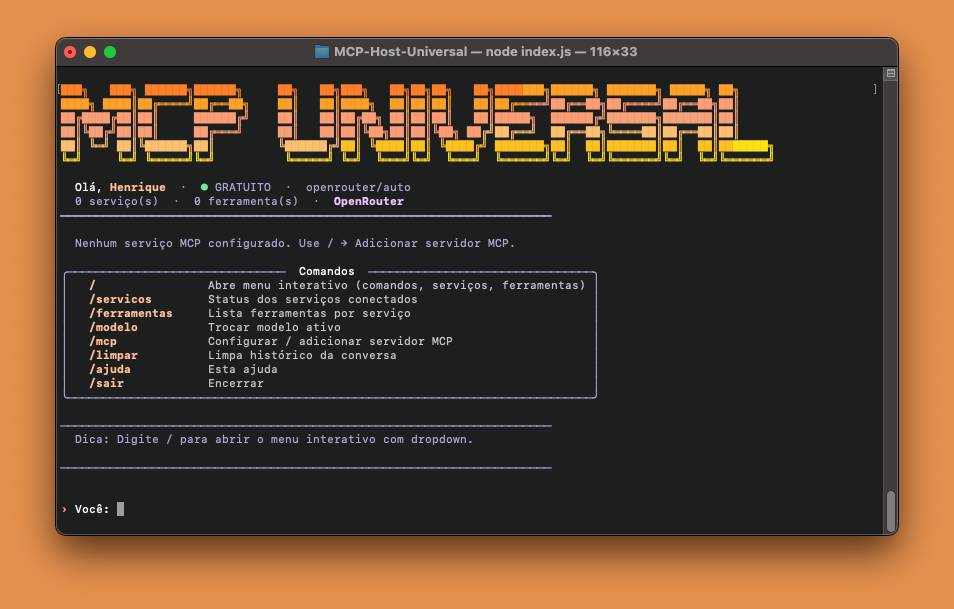
MCP Host Universal é um host de linha de comando para servidores MCP (Model Context Protocol), com suporte a múltiplos modelos de linguagem via OpenRouter. Permite conectar ferramentas externas (n8n, filesystem, APIs customizadas) diretamente ao seu terminal com uma interface rica e interativa.
Instalação
npm install -g @henrysssilveira/mcp-host-universalApós instalar, rode com:
mcp-hostPré-requisitos
- Node.js 18+
- Uma chave de API do OpenRouter
Primeiro uso
Na primeira execução, o CLI abre um assistente de configuração interativo que solicita:
- Seu nome
- Chave da API do OpenRouter
- Tipo de modelos (pagos ou gratuitos)
- Modelo principal de tool-use e modelo de resposta final
- Configuração opcional de um servidor MCP
As configurações são salvas em config.json no diretório de instalação.
Modelos suportados
Pagos
| Modelo | Contexto | |---|---| | Claude Sonnet 4.5 | 200k | | Claude Opus 4 | 200k | | GPT-4o | 128k | | Gemini 2.5 Pro | 1M | | Mistral Large | 128k | | DeepSeek Chat V3 | 64k | | e outros... | — |
Gratuitos
| Modelo | Contexto | |---|---| | Auto Router (recomendado) | — | | Llama 3.3 70B | 128k | | Gemma 4 31B | 128k | | Qwen3 Coder 480B | 128k | | e outros... | — |
Servidores MCP suportados
| Tipo | Descrição |
|---|---|
| HTTP | Qualquer servidor MCP via Streamable HTTP (ex: n8n) |
| stdio | Servidores locais via processo (ex: @modelcontextprotocol/server-filesystem) |
Templates prontos
n8n—http://localhost:5678/mcpOpenRouter MCP—https://openrouter.ai/mcpFilesystem—npx @modelcontextprotocol/server-filesystem /tmp- Personalizado via HTTP ou stdio
Comandos disponíveis
| Comando | Descrição |
|---|---|
| / | Abre o menu interativo com dropdown |
| /servicos | Status dos serviços conectados |
| /ferramentas | Lista ferramentas por serviço |
| /modelo | Troca o modelo ativo |
| /mcp | Configura ou adiciona um servidor MCP |
| /limpar | Limpa o histórico da conversa |
| /ajuda | Exibe a ajuda |
| /sair | Encerra o CLI |
Configuração manual
O arquivo config.json gerado tem a seguinte estrutura:
{
  "_user": { "nome": "Seu Nome" },
  "openrouter": {
    "apiKey": "sk-...",
    "pago": false,
    "models": {
      "tools": ["openrouter/auto"],
      "final": ["openrouter/auto"]
    }
  },
  "services": [
    {
      "name": "n8n",
      "transport": "http",
      "url": "http://localhost:5678/mcp",
      "token": "",
      "systemPrompt": "Você tem acesso ao n8n para criar e executar workflows.",
      "enabled": true
    }
  ]
}
Stack
@modelcontextprotocol/sdk— cliente MCP- OpenRouter — roteamento de modelos
chalk,ora,figlet,gradient-string,cli-table3,boxen— UI de terminal
Licença
MIT © Henrique Silveira