
@hicccc77/electron-liquid-glass
v0.4.0
Published
Low-latency native liquid glass backdrop panels for Electron apps (Windows: DXGI Desktop Duplication + D3D11 + DirectComposition)

Maintainers
 hicccc77
Readme
Electron-Liquid-Glass
English | 简体中文
Windows 全局原生低延迟「液态玻璃」背景面板,for Electron。基于 DXGI Desktop Duplication + D3D11 + DirectComposition。
把液态玻璃渲染为一个全局独立的原生窗口,放在你的 Electron 窗口正下方作为实时背景层。
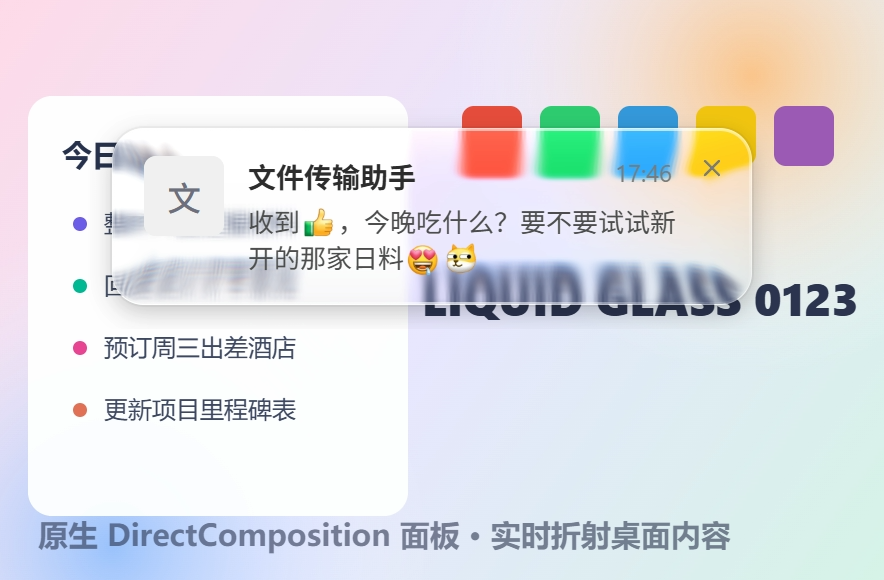
真实渲染截图:通知卡片为 Electron 透明窗口,卡片背后的折射、模糊、色散与驱动文字反色的亮度采样全部来自本模块的原生面板。
特性
- 物理折射效果:圆角矩形 SDF 透镜位移,边缘可见清晰的背景折射与色散,中心通透
- 6ms 级响应:DXGI 零拷贝拿 GPU 桌面纹理,D3D11 渲染,DirectComposition 直接渲染上屏幕
- 深度节能:全链路事件驱动 + 增量——桌面不动不画、脏区与面板不相交不画、桌面镜像按脏区增量维护(GPU 拷贝量正比实际变化面积而非全屏)、自家面板 Present 产生的 DWM 回声脏区被识别丢弃(不会自激重绘)、无面板自动休眠释放采集会话
- 自适应反色支持:内置亮度带采样(均值色 + luma p15/p85),重绘驱动、与画面同帧推送(上限 ~60Hz),驱动上层文字明暗自适应
- z 序锚定:面板自动钉在指定 Electron 窗口正下方,并周期性重申(防其他置顶窗口插队)
- 可选捕获策略:兼容旧版的
all用WDA_EXCLUDEFROMCAPTURE排除一切捕获;dda-only用WCA_EXCLUDED_FROM_DDA只隔离本模块的 DXGI 输入,既防回环,又能被显示器级 WGC/GDI 截图录屏看到 - 零 Electron 侵入:纯 N-API 原生模块 + 命令队列,跨 Electron 版本 ABI 稳定,任何 Electron 应用可直接接入
原理
DXGI Desktop Duplication(零拷贝 GPU 桌面纹理,仅画面变化时出帧)
  → D3D11 三趟着色(半分辨率可分离高斯模糊 ×2 → 圆角 SDF 透镜位移 + RGB 色散 + 饱和度 + 圆角 AA)
→ DirectComposition 预乘 alpha 交换链直接上屏(不经过 DWM 重定向位图)- 全链路在一个独立工作线程 + GPU 上完成,无像素跨进程/跨线程拷贝
- 面板窗口
WS_EX_NOREDIRECTIONBITMAP + WS_EX_TRANSPARENT + WS_EX_NOACTIVATE(鼠标穿透、不抢焦点、不进任务栏) - JS 侧所有调用经命令队列异步投递到工作线程,天然线程安全
- 分层协作:本面板负责「玻璃背后的世界」(折射/模糊/色散),你的 Electron 透明窗口负责「玻璃表面」(文字、高光、描边、tint)
┌─ Electron 透明窗口(内容层:文字 / 高光 / 边框)─┐   ← 你的应用
│  ┌─ 原生玻璃面板(折射层,钉在正下方)────────┐  │   ← 本模块
│  │      实时折射的桌面背景                    │  │
└──┴────────────────────────────────────────────┴──┘
系统要求
| 平台 | 支持状态 |
|---|---|
| Windows 10 2004 (build 19041)+ | 完整支持 |
| Windows 更旧版本 | isSupported() 返回 false(缺少 WDA_EXCLUDEFROMCAPTURE) |
| macOS / Linux | 模块可正常安装加载,isSupported() 返回 false,请回退到你自己的方案(如 Chromium 桌面流 + WebGL);macOS 原生后端(ScreenCaptureKit + Metal)在路线图中 |
安装
npm install @hicccc77/electron-liquid-glassnpm 包内置 win32-x64 预编译二进制(N-API 8,跨 Electron / Node 版本 ABI 稳定),安装零编译、无需任何构建工具链;非 Windows 平台上没有预编译产物时模块自动降级(isSupported() 返回 false),同样不触发编译。
Electron 打包(electron-builder)注意把 .node 解包出 asar:
"build": { "asarUnpack": ["node_modules/@hicccc77/electron-liquid-glass/**/*"] }从源码构建(仓库检出,Windows):需要 Node.js 18+、VS Build Tools(C++ 桌面工作负载)+ Python,npm run build 产出 build/Release,npm run prebuilds 产出随包分发的 prebuilds/win32-x64。
快速上手(Electron 主进程)
const { screen } = require('electron')
const glass = require('@hicccc77/electron-liquid-glass')

if (glass.isSupported()) {
  const dpr = screen.getPrimaryDisplay().scaleFactor
  // 两层 HWND 必须使用同一策略。若选择性 DDA 排除不可用,helper 会
  // 安全降级为旧版的全捕获保护,并返回 false。
  const capturePolicy = glass.setWindowCapturePolicy(myToastWindow, 'dda-only')
    ? 'dda-only'
    : 'all'
  const panel = glass.createPanel({
    // 屏幕物理像素
    x: 1560, y: 40, width: 344, height: 96,
    cornerRadius: 20, blurSigma: 5,
    displacementScale: 70, aberrationIntensity: 2, saturation: 1.4,
    dpr,
    capturePolicy,
    anchorWindow: myToastWindow,          // 面板钉在该 BrowserWindow 正下方
    lumaBands: [                          // 自适应反色的亮度采样带(面板本地物理像素)
      { id: 0, x: 0, y: 0, width: 344, height: 48 },
      { id: 1, x: 0, y: 48, width: 344, height: 48 }
    ],
    onLuma: bands => {
      // bands = { '0': { r, g, b, darkTail, lightTail }, '1': ... }
      // 均值 RGB + luma p15/p85(gamma 域 0~255)。重绘驱动:
      // 背景变化的同一帧推送(上限 ~60Hz),桌面静止时不推送
      // 据此切换上层文字的明暗配色
    }
  })

  panel.show(120)                          // 淡入 120ms
  panel.setBounds({ x, y, width, height }) // 跟随窗口移动/改尺寸
  panel.hide(240)                          // 淡出
  panel.destroy()
} else {
  // 回退:Chromium 桌面流 + WebGL 折射管线,或静态 backdrop-filter
}
上层窗口只需把玻璃区域留透明(Electron transparent: true 天然满足),自己绘制文字/描边/高光/tint 等内容层,折射背景由本面板提供。
API
完整类型见 index.d.ts。所有面板方法线程安全。
| 方法 | 说明 |
|---|---|
| isSupported() | 当前环境是否可用(Windows 10 2004+ 且原生二进制已构建) |
| createPanel(options) | 创建面板,返回句柄;不可用时返回 null |
| setWindowCapturePolicy(windowOrHwnd, policy) | 给 Electron BrowserWindow/HWND 设置 all、dda-only 或 none,返回是否成功应用目标策略 |
| panel.show(fadeMs?) / panel.hide(fadeMs?) | 淡入 / 淡出(0 = 立即) |
| panel.setBounds(bounds) | 移动 / 改尺寸(物理像素) |
| panel.setParams(params) | 更新视觉参数(圆角、模糊、位移、色散、饱和度) |
| panel.anchor(windowOrHwnd) | 重新钉到某窗口正下方(接受 BrowserWindow 或 HWND Buffer) |
| panel.setLumaBands(bands) / panel.onLuma(cb) | 更新亮度采样带 / 回调 |
| panel.destroy() | 销毁面板 |
| shutdown() | 停止工作线程并销毁所有面板 |
实测(1080p,动态背景,Windows 11)
| 指标 | Chromium 流方案(getUserMedia + WebGL) | 本模块 | |---|---|---| | 感知位置滞后(中位 / p90) | 77ms / 89ms | 6ms / 6ms | | 满载 CPU 增量(主+GPU+渲染进程合计) | ~1.5% | ~0.3% | | 静止桌面开销 | 持续采集出帧 | 0 渲染 / 0 拷贝(事件驱动) | | 首帧启动 | ~80-300ms(getUserMedia 协商) | <150ms(面板常驻复用后为 0) | | 40 轮通知压测 | — | 面板 1 建 81 复用,内存零增长,零异常 |
测量方法:同帧差分法——同一帧屏幕采集内对比玻璃呈现内容与背景真值条纹的计数差,两个时间戳均来自绘制时刻,结果与探针自身延迟无关。
源码结构
src/
├── addon.cc       N-API 绑定层(参数解析、亮度回调线程安全投递)
├── session.cc/h   调度中枢:独占工作线程跑「采集→渲染→上屏」闭环、命令队列、节能策略
├── capture.cc/h   DXGI Desktop Duplication 采集(零拷贝 GPU 纹理 + 脏区 + 自回声过滤)
├── renderer.cc/h  D3D11 三趟玻璃管线 + 亮度带直方图采样
├── panel.cc/h     DirectComposition 无重定向位图窗口、淡入淡出、z 序锚定、捕获排除
├── d3d_utils.cc/h 设备创建辅助
├── stats.h        内部性能计数器(`_stats` 诊断导出,基准测试用)
└── addon_stub.cc  非 Windows 桩(isSupported() = false)
已知限制
- 目前仅 Windows 有原生实现(macOS ScreenCaptureKit + Metal 后端在路线图中,API 已按平台后端可插拔设计)
capturePolicy: "all"(向后兼容的默认值)仍排除于所有截屏/录屏;"dda-only"可被显示器级 WGC/GDI 捕获,但所有同样使用 DXGI Desktop Duplication 的外部录屏仍看不到它,且只抓单窗口的 WGC 可能漏掉独立锚定的原生面板 HWND- 安全桌面(UAC / 锁屏)期间采集暂停,返回后自动恢复
- 多显示器:采集会话跟随首个可见面板所在显示器;跨屏移动面板会自动重建会话