
@hiroyuki-akimoto/dep-tree
v0.2.5
Published
Analyze file-level dependency trees and visualize them as a self-contained interactive HTML

Maintainers
 hiroyuki-akimoto
Readme
@hiroyuki-akimoto/dep-tree


A CLI that analyzes file-level dependency trees and visualizes them as a self-contained interactive HTML.
Instead of drawing dependency diagrams on a whiteboard, answer questions like "what does this component depend on?" and "which team's screens use this shared component?" with a single command.
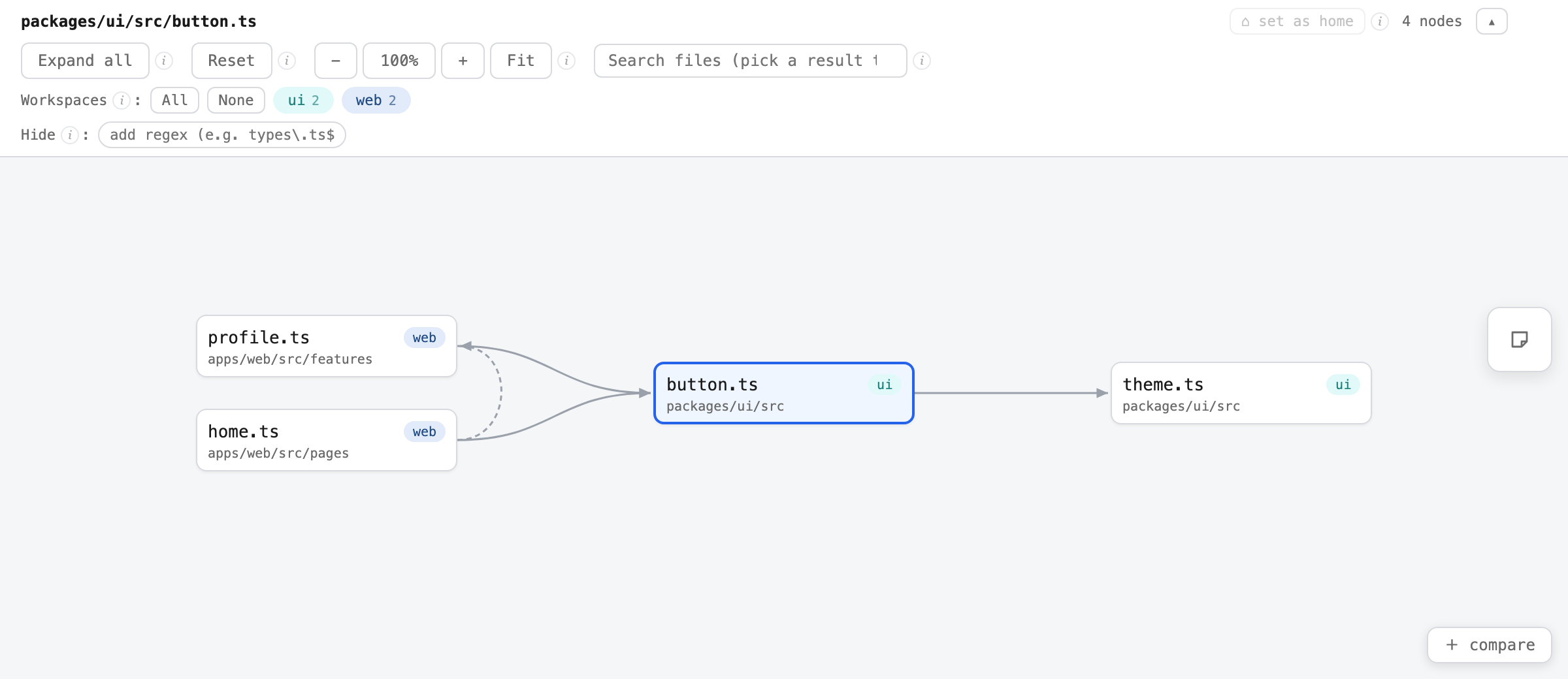
The screenshot uses the bundled sample fixture under
test/fixtures/.
Features
- Both directions: forward dependency tree (what this file imports) and reverse tree (who imports this file)
- Interactive HTML: expand/collapse nodes, search by path, jump to the first occurrence of revisited nodes. The output is a single self-contained file with no external libraries or CDN, so it works offline and survives being attached to chat tools
- Drill-down focus: double-click any node (or its focus icon) to re-root the graph on that file and explore its parents/children one step at a time; a breadcrumb takes you back, and "set as home" makes the current root the one Reset returns to
- On-screen comparison: split into resizable panes with "+ compare" (or pass multiple entry files), each a fully interactive viewer; close panes with × to return to one; toggle stacked / side-by-side
- Explore mode:
--exploreembeds the whole workspace graph, so any file can be searched and set as the root without re-running the CLI - Directory at a glance: every node shows its directory path (head-elided when long), so you can tell which domain a file belongs to without hovering
- Monorepo aware: auto-detects pnpm / npm / yarn workspaces, resolves tsconfig
pathsaliases, and traces dependencies across packages - Workspace filter: color-coded workspace chips toggle each package's nodes on and off
- Hide filter: hide noisy files (e.g.
types\.ts$, generated schemas) with toggleable regex chips — pass--hideor add patterns right in the viewer; saved per repository via localStorage - Git recency heatmap:
--changescolors files by how recently they were changed in git history (all authors, not your working diff) — the more recent the last commit, the redder the node, with aNd agobadge. Spot the actively-churning areas at a glance - Sticky notes: add Miro-style sticky note comments from the right-side toolbar; notes pan/zoom with the graph and survive regeneration via localStorage
- Cycle highlighting: files involved in circular dependencies are flagged
Usage
# Run without installing
pnpm dlx @hiroyuki-akimoto/dep-tree <entry-file>

# or with npm
npx @hiroyuki-akimoto/dep-tree <entry-file>
# Generate an HTML dependency tree and open it in a browser
pnpm dlx @hiroyuki-akimoto/dep-tree apps/web/src/pages/home.tsx --open
# Forward only (what this file imports)
pnpm dlx @hiroyuki-akimoto/dep-tree apps/web/src/pages/home.tsx -d forward
# Who imports this component? (reverse dependencies)
pnpm dlx @hiroyuki-akimoto/dep-tree packages/ui/src/button.tsx -d reverse
# Rendered in the terminal
pnpm dlx @hiroyuki-akimoto/dep-tree src/main.ts -f text
# Hide noisy files (type definitions, generated schemas, ...) — toggleable in the viewer
pnpm dlx @hiroyuki-akimoto/dep-tree src/main.ts --hide "types\.ts$" "schema\.ts$"
# Exclude files from the analysis entirely (smaller output, not toggleable)
pnpm dlx @hiroyuki-akimoto/dep-tree src/main.ts -x "types\.ts$" "schema\.ts$"
# Compare two entry files in a single HTML (stacked panes, switchable to side-by-side)
pnpm dlx @hiroyuki-akimoto/dep-tree src/features/a/Select.tsx src/features/b/Select.tsx -d both
# Explore mode: embed the whole workspace graph and re-root to any file in the viewer
pnpm dlx @hiroyuki-akimoto/dep-tree src/main.ts --explore
# Heatmap by git history recency (recently-changed files are redder)
pnpm dlx @hiroyuki-akimoto/dep-tree src/main.ts --changes
pnpm dlx @hiroyuki-akimoto/dep-tree src/main.ts --changes 14 # only the last 14 daysOptions
| Option | Description | Default |
| --- | --- | --- |
| -d, --direction <dir> | forward / reverse / both | both |
| --depth <n> | Max tree depth (for html: initial expansion depth) | unlimited (html: 1) |
| -f, --format <fmt> | html / text / json | html |
| -o, --output <path> | Output path | ./dep-tree.<name>.html, multiple entries: ./dep-tree.compare.html (text/json: stdout) |
| --root <path> | Repository root | auto-detected from the entry file |
| --scope <paths...> | Directories to scan for reverse dependencies | all projects |
| -x, --exclude <patterns...> | Regex patterns of file paths to exclude from the analysis | - |
| --hide <patterns...> | Regex patterns hidden by default in the html viewer (toggleable chips; patterns can also be added/removed in the viewer) | - |
| --explore | Embed the whole workspace graph so any file can become the root in the viewer (implies -d both) | - |
| --changes [days] | Heatmap by git history recency: more recently committed files are redder. days = window to consider | 30 |
| --include-tests | Include test, stories and mock files | excluded |
| --no-type-only | Exclude type-only imports | included |
| --open | Open the generated HTML in a browser | - |
How it works
- Dependency analysis is powered by dependency-cruiser; results are normalized into a graph keyed by repo-root-relative paths
- The repository root is auto-detected in this order:
pnpm-workspace.yaml→package.jsonwith aworkspacesfield →.git - The tsconfig of the entry file's project (the nearest directory with a
package.json) is used to resolvepathsaliases reverse/bothanalyze every project in the workspace with its own tsconfig and merge the results, so the cost grows with the number of projects. Use--scopeto narrow it down
Programmatic API
import { analyzeDependencies, renderHtml } from '@hiroyuki-akimoto/dep-tree';

const graph = await analyzeDependencies({
  entryFile: 'src/pages/home.tsx',
  direction: 'both',
});
const html = await renderHtml(graph, { initialDepth: 2 });
Limitations
- Only imports / requires that dependency-cruiser can trace (TypeScript / JavaScript) are analyzed
- Cross-package imports in a monorepo are traced when they resolve to real files via symlinks (pnpm, etc.) or tsconfig
paths