
@hisence666/pi-tool-renderer
v1.8.0
Published
High-performance compact Pi tool renderer with cached terminal chrome, configurable OSC 8 file links, tool_batch, and rich diffs.
Downloads
69

Maintainers
 hisence666
Readme
pi-tool-renderer
High-performance compact tool rendering for Pi.
面向长会话优化的 Pi 工具渲染扩展:保留紧凑工具行、tool_batch 和富 diff,同时消除历史工具输出在每次 TUI 刷新时产生的重复文件 I/O 与 ANSI/OSC 8 解析。
Why this fork
Long Pi sessions can accumulate hundreds of rendered tool components. The original renderer produced good compact output, but unchanged history was still processed during each TUI refresh. OSC 8 file links made that repeated ANSI-aware wrapping especially expensive.
This fork adds three focused performance improvements:
- Cached settings: extension settings are read once per working directory instead of calling
readFileSync()andJSON.parse()from render hot paths. - Cached tool chrome: unchanged tool output reuses a
WeakMaprender cache keyed by component, width, theme, settings revision, and source lines. - Configurable file links:
fileHyperlinkssupportsauto,on, andoffwithout disabling compact rendering.
Local Windows Terminal measurements used during development:
| Benchmark | Result | | --- | ---: | | 100,000 cached setting lookups | 58.7 ms | | Chrome render, 1,000 OSC 8 lines, cold | 12.69 ms | | Chrome render, 1,000 unchanged lines, cached | 0.0125 ms/render |
These are directional microbenchmarks from one machine, not universal performance guarantees.
Features
- Compact one-line renderers for
read,bash,grep,find, andls. - Optional
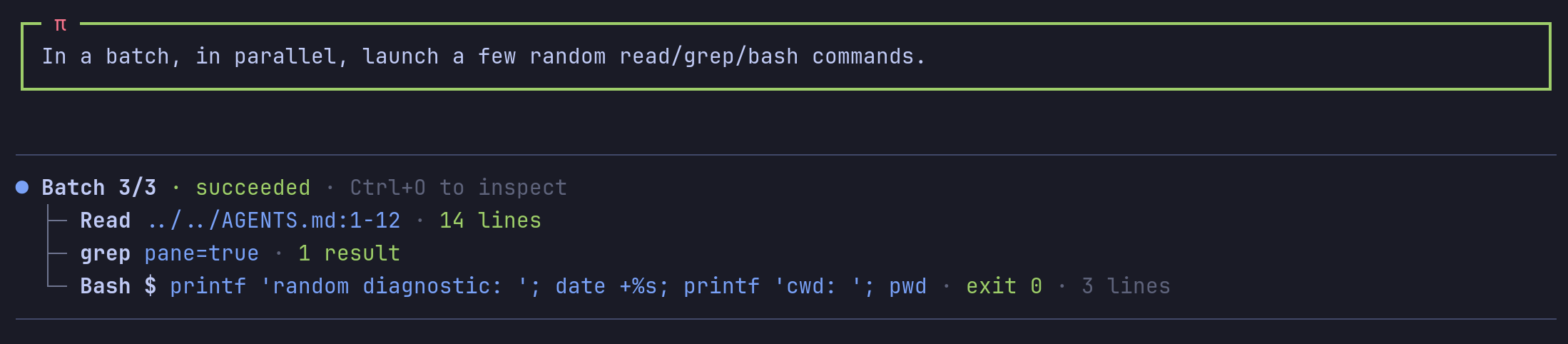
tool_batchfor parallel read/search/list/diagnostic shell calls. - Delayed live bash tails for long-running commands.
- Optional rich Shiki diffs for
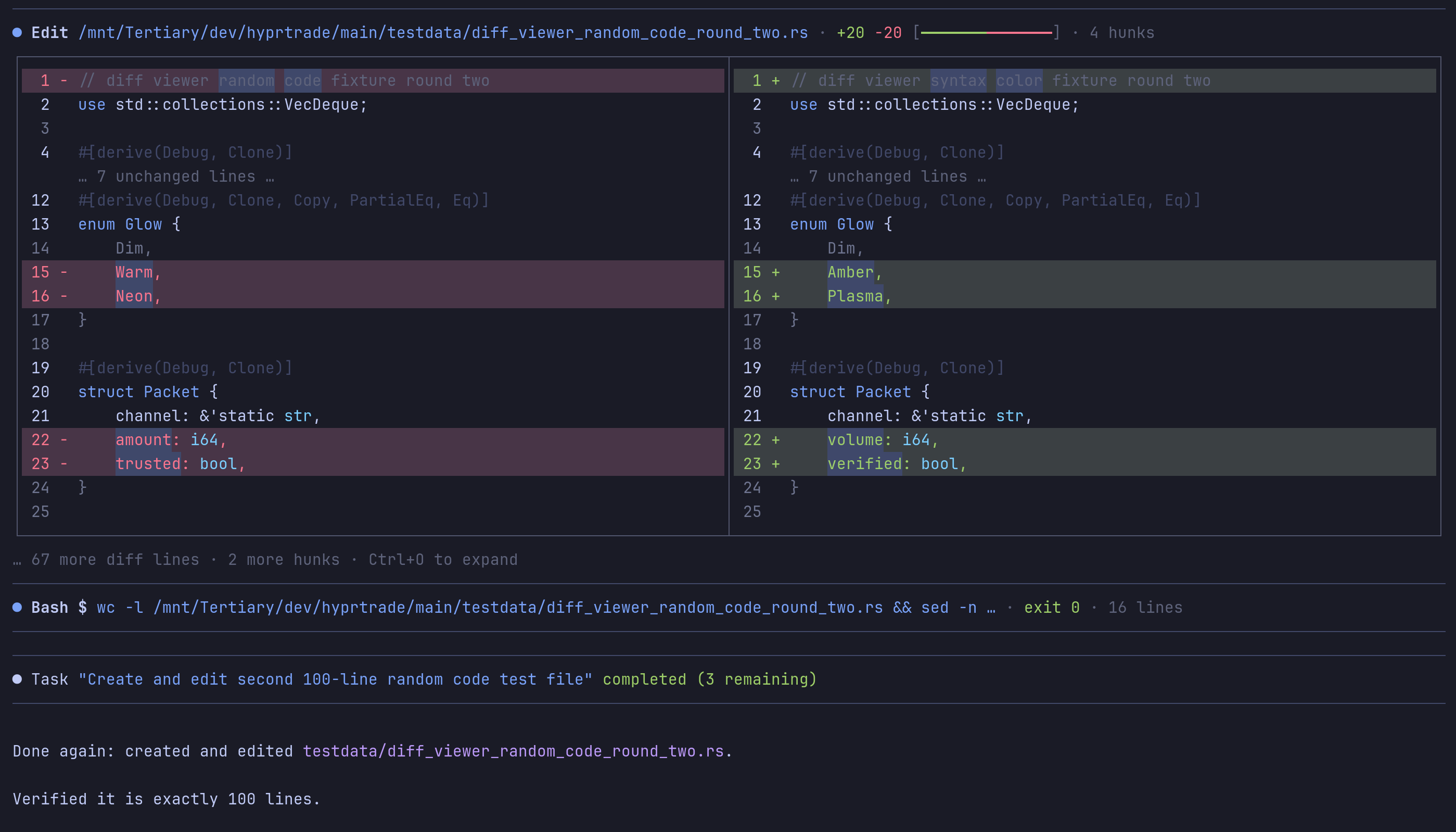
edit,write, bash patches, andapply_patch. - Side-by-side diffs, hunk counts, inline word highlights, and line backgrounds.
- Generic renderers for MCP and OpenAI-style tools.
- Compact user, compaction, and skill-invocation messages.
- Styled Markdown code blocks and optional global tool chrome.
- Unicode or ASCII glyph modes.
Mutation renderers remain opt-in, so Pi's built-in edit and write rendering stays enabled by default.
Install
Remove the upstream package first so both extensions are not loaded together, then install this fork from npm:
pi remove npm:@vanillagreen/pi-tool-renderer
pi install npm:@hisence666/pi-tool-renderer
The GitHub repository remains available as an alternative source:
pi install git:github.com/hisence999/pi-tool-rendererRestart Pi after installation. To try the repository without installing it permanently:
pi -e git:github.com/hisence999/pi-tool-rendererPi clones git packages under ~/.pi/agent/git/ and runs the package install automatically.
Performance settings
Open /extensions:settings and select Tool Renderer, or configure it directly:
{
  "vstack": {
    "extensionManager": {
      "config": {
        "@hisence666/pi-tool-renderer": {
          "fileHyperlinks": "auto",
          "toolChrome": "outlines",
          "readOutputMode": "preview",
          "searchOutputMode": "preview",
          "bashOutputMode": "opencode"
        }
      }
    }
  }
}
The fork also reads legacy settings stored under @vanillagreen/pi-tool-renderer and @hisence999/pi-tool-renderer; values under the new @hisence666/pi-tool-renderer key take precedence.
Recommended choices
| Setting | Values | Notes |
| --- | --- | --- |
| File path hyperlinks | auto, on, off | auto follows terminal capabilities; use off for terminals with slow OSC 8 selection. |
| Global tool chrome | off, transparent, outlines | outlines is the default. |
| Read output mode | hidden, summary, preview | Controls expanded file previews. |
| Search output mode | hidden, count, preview | count minimizes long search output. |
| Bash output mode | hidden, summary, opencode, preview | opencode is the default. |
| Working indicator | default, pulse, hidden | Reducing animation can help very slow terminals. |
| Guard terminal right margin | boolean | Renders one column short to avoid terminal auto-wrap flashes. |
Settings cache invalidation is automatic when extension settings change, sessions switch, or project trust changes.
tool_batch
{
  "calls": [
    { "tool": "read", "args": { "path": "README.md" } },
    { "tool": "grep", "args": { "pattern": "registerTool", "path": "extensions" } },
    { "tool": "bash", "args": { "command": "git status --short" } }
  ],
  "concurrency": 3
}
Supported child tools are read, grep, find, ls, and diagnostic bash. Do not use tool_batch for mutating, order-dependent, or interactive commands.
Development
Requirements:
- Node.js 22.19 or newer
- Bun for the test suite
npm install
bun test extensions/__tests__
Upstream and license
This repository is based on @vanillagreen/pi-tool-renderer version 1.7.1, including upstream source through commit a634e17.
Original renderer design and features are by vanillagreen and contributors. Performance caching, configurable file hyperlinks, standalone package metadata, and related tests in this fork are maintained by hisence999.
Licensed under the MIT License. See LICENSE.