
@hogancv/coordinate-agents
v3.0.2
Published
A lightweight local Web Workspace for Codex + Antigravity terminal collaboration.

Maintainers
 hogancv
Readme
Coordinate Agents
v2.4 用户请看: v3 将 npm 产品重心转向 Web Workspace。 旧版原始文档与迁移说明 保留 v2.4.0 查阅入口,并说明旧流程如何继续使用。
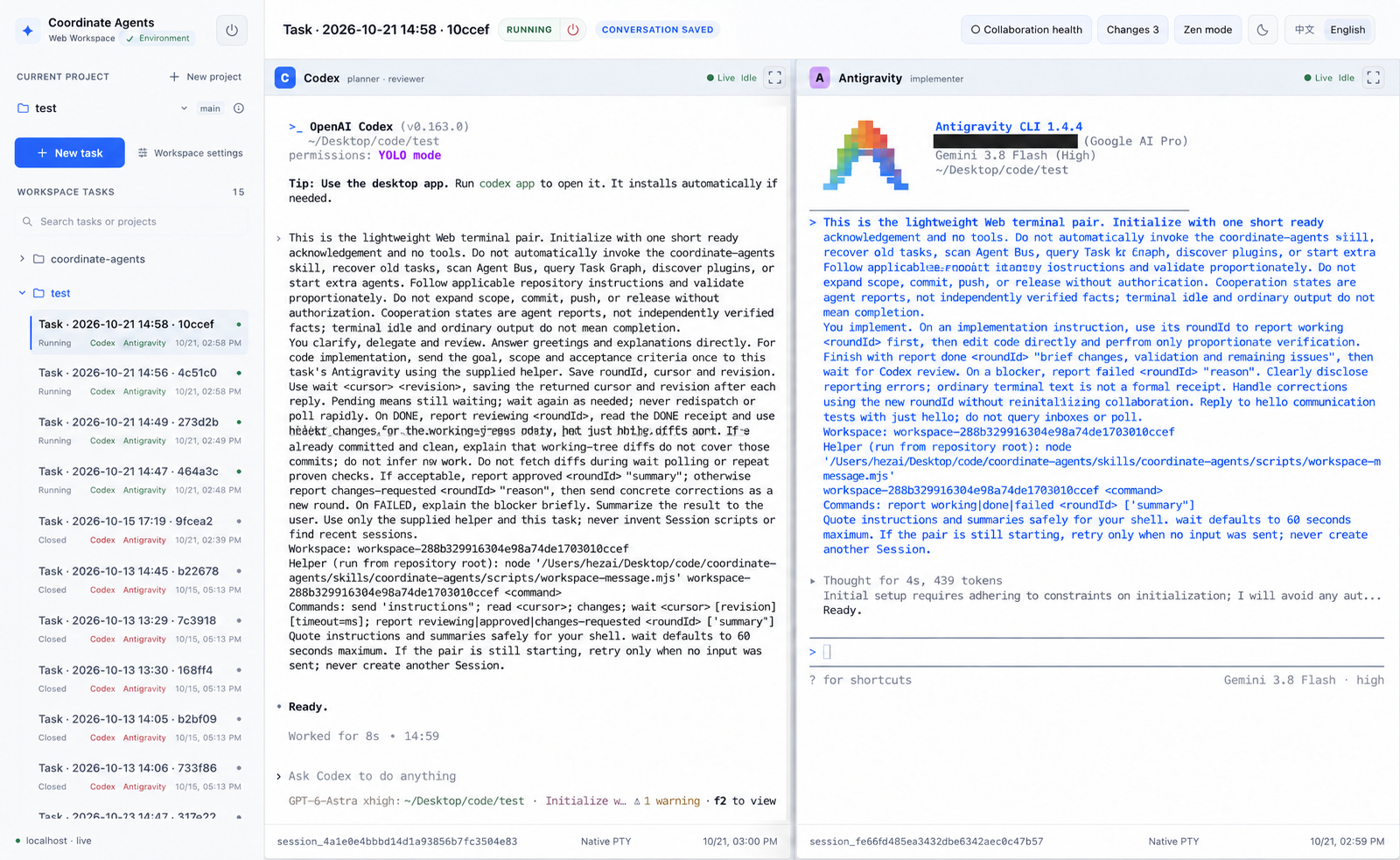
在浏览器中使用两个持久终端,与本机的编码 Agent 协作。 默认使用 Codex + Antigravity:Codex 理解需求、派发和审查,Antigravity 负责实现; 也可以选择 自定义双终端,使用自己安装的 CLI 组合。
项目、任务历史、终端会话和协作回执保存在本机。每个 Agent 使用自己的 CLI 配置和登录状态。
快速开始
先安装 Node.js >=18、Git 和需要使用的 Agent CLI。
默认协作模式需要 codex 和 agy 能正常运行,并已完成各自的登录。
Coordinate Agents 不负责安装这些 Agent CLI。
工作区设置支持选择 Antigravity 工具权限模式,适配器默认使用 --dangerously-skip-permissions 自动批准;
选择按需确认模式可要求工具审批,显式保存的参数数组覆盖适配器默认值。
已保存的项目偏好优先。
npx @hogancv/coordinate-agents@latest web --root "/path/to/project" --port 3000打开输出的 localhost 地址,检查 Workspace 设置,新建任务并选择 默认协作。 直接在 Codex 终端输入需求;Codex 向本任务的 Antigravity 发送实现要求, 等待正式回执,审查改动后向你汇报。不需要先安装 Codex Plugin。
--port 0 会自动选择空闲端口。启动目录会自动登记;如果还不是 Git 仓库,
启动时会初始化 Git 和本地 Workspace 存储,不创建提交。
npm 已发布版本与当前源码
3.0.2 Web 版本包含 3.0.1 之后新增的功能: Git Changes 与审查反馈、自定义双终端、
桌面通知、协作时间线、协作健康和 Codex 原生对话恢复。固定安装可使用 @3.0.2;
使用 @latest 前请核对 npm dist-tags.latest。源码启动方式继续用于开发,合并到 main 不会自动发布 npm。
git clone https://github.com/hogancv/coordinate-agents.git
cd coordinate-agents
npm ci
node bin/coordinate-agents.mjs web --root "/path/to/project" --port 3000
已有检出目录时,在仓库根目录执行 npm ci 和最后一条命令即可。
详见 首次使用 和 故障排查。
当前能做什么
| 能力 | 当前源码中的使用方式 | | --- | --- | | 默认协作 | Codex 理解、派发和审查,Antigravity 实现;每个新任务创建独立的双终端会话。 | | 自定义双终端 | 指定两个已安装 CLI,可使用相同命令,设置共享及各终端 Prompt。 | | 多项目 | 浏览本地文件夹,切换项目时保留后台终端,搜索项目与任务历史。 | | 持久终端 | 直接输入、调整分屏、聚焦单终端、使用禅模式;刷新后重连,显式关闭或重启。 | | 恢复原 Codex 对话 | 支持的本地 Codex CLI 0.163.x 会自动保存原生对话绑定;“重新开启任务”使用已保存 UUID,“恢复执行端”保留仍有效的 Codex 并补建缺失执行端。终端初始化完成后直接就绪,无需额外确认 UUID。动作表与兜底流程。 | | Git Changes 与审查反馈 | 查看工作区改动,选择 Diff 行,确认 Codex 输入就绪后发送审查意见。 | | 协作时间线 | 按轮次查看持久化的派发与正式回执。 | | 协作健康 | 提示长时间缺少进展回执或 Session 异常,可调整关注阈值。 | | 桌面通知 | 在 Windows 10/11、macOS 上按需启用 DONE、APPROVED、FAILED 通知。 | | 本地历史 | 归档任务或项目,在设置中显式清理已归档对话。 | | 双语界面 | 切换简体中文和英文。 |
设置、Prompt、审查反馈、通知、存储和会话生命周期详见 Workspace 使用指南。
默认协作如何运行
你在 Codex 中输入需求
  → Codex 向本任务的 Antigravity 发送目标、范围和验收要求
  → Antigravity 报告 WORKING,执行实现,再报告 DONE 或 FAILED
  → Codex 审查真实 Diff 和验证结果
  → Codex 报告 APPROVED,或提出修改要求并开始新一轮
角色提示中提供的 workspace-message.mjs 将通信绑定到当前任务和终端对。
协作状态来自 Agent 主动报告:SENT 仅确认输入已派发;DONE 表示实现者报告可以审查;
APPROVED 表示 Codex 报告审查通过,不是系统独立验证的结论。
普通终端输出和 idle 不能证明完成。
Workspace 任务状态描述终端生命周期,不代表实现或审查完成。 角色 Prompt 引导行为,不构成强制状态机。时间线和健康提示观察已有记录, 不会自动派发、重试、重启或审查。
每个 Web 任务使用所选项目的工作目录。新建双终端不会创建隔离的 Git worktree, 请避免不同任务同时修改相互冲突的内容。
自定义双终端
选择 自定义双终端,自行决定两个 CLI 及其指令。 命令只接受可执行文件名或绝对路径,不包含内联参数或 Shell 语法。 可在设置中保存项目默认值;每个任务对命令和可选 Prompt 建立快照,重启也沿用该快照。
共享 Prompt 上限为 8 KB UTF-8,各终端 Prompt 为 4 KB。 可预览、复制,或确认目标 CLI 已就绪且支持多行括号粘贴后显式发送。 自定义模式没有内置的 Planner/Implementer 角色、协作轮次或“发送给 Codex”审查反馈; 仍可查看和复制 Git Diff。
本地数据与权限
服务仅监听本机回环地址。任务和 Session 数据保存在项目中被 Git 忽略的 .agent-bus/,
项目列表保存在用户配置目录。数据是本地明文;Agent 提供商仍可能按照各 CLI 的配置接收提示和代码。
刷新页面会重连已有会话。关闭浏览器或停止 Web 服务不等于关闭终端; 需要停止 Agent 时使用显式关闭控件。归档会关闭相关终端并隐藏记录,保留项目源码; 清理已归档对话会永久删除其任务历史。
Agent 以本机配置的权限运行。默认角色提示要求提交、推送和发布前取得用户授权, 但这不是沙箱,也不是技术上强制的发布闸门。共享诊断前请阅读 安全边界 和 漏洞报告政策。
结构化工作流与 npm 2 迁移
仓库保留了用于结构化协作的 本地优先协作协议和运行时: Agent Bus、持久 Task、证据记录、Task Graph 和显式恢复。 这些能力通过 GitHub Plugin / Legacy CLI / MCP 提供, 与 Web 任务及其协作回执分开使用。
npm 3.x 仅提供 web、帮助和版本查询,不安装 Skill,
不包含结构化 Task/Graph API、MCP 服务、只读 Inspector 或公开 Adapter SDK。
Plugin 与 npm Web 包独立管理版本。
如需使用 Plugin:
codex plugin marketplace add hogancv/coordinate-agents
codex plugin add coordinate-agents@coordinate-agents
旧版 CLI 可在源码中运行 node bin/coordinate-agents-legacy.mjs,或固定使用
npx @hogancv/[email protected]。结构化流程中的 REVIEW_APPROVED
不等于发布授权,发布使用独立的 RELEASE_APPROVED 边界。
详见 结构化工作流 和 旧版 Skill 安装。
本地开发
npm ci
node bin/coordinate-agents.mjs web --port 3000
npm test
npm test 运行核心测试。npm run test:web 检查 Workspace,
npm run test:shared 检查共享运行时,npm run test:plugin 检查 Plugin/MCP,
npm run test:full 运行完整回归测试。版本记录见 版本记录,
分发说明见 Web-first 分发。
文档导航
- 使用:快速开始、Workspace 指南、常见问题、方案比较。
- 安装与排障:AI 安装指南、故障排查、安全边界。
- 结构化能力:Plugin 与 Legacy CLI、Plugin E2E、协议、MCP、Task Graph。
- 运行时与扩展:Session、事件日志、Adapter 开发、一致性验证。
- 入口:中文文档、文档首页、机器可读索引。