
@hojiakbar_dev/calendar
v0.7.1
Published
Server-driven React calendar: day, week, month, year and agenda views; drag to create, move and resize; range-based loading with optimistic edits.

Maintainers
 hojiakbar_dev
Readme
@hojiakbar_dev/calendar
A React calendar that keeps events on your server instead of your client. It asks for the visible range, caches what it has already loaded, and applies every drag, resize and edit optimistically — rolling back if the server says no.
Day, week, month, year and agenda views. Ships as a hook plus an optional styled shell, so you can take the behaviour and write your own markup.
Live preview — every view against an in-memory mock server · Documentation — install, the server contract, event looks, theming, with live examples
npm i @hojiakbar_dev/calendarimport { Calendar, useCalendar, localStoragePreferences } from "@hojiakbar_dev/calendar"
import "@hojiakbar_dev/calendar/styles.css"
const resources = [
{ id: "dr-lee", name: "Dr. Lee", color: "#3b82f6" },
{ id: "dr-osei", name: "Dr. Osei", color: "#f59e0b" },
]
function ClinicCalendar({ source }) {
const cal = useCalendar({
id: "clinic", // required — see "Preferences"
source, // required — see "Server-side by design"
resources,
storage: localStoragePreferences(),
initialView: "week",
})
return <Calendar instance={cal} height={640} />
}Preview
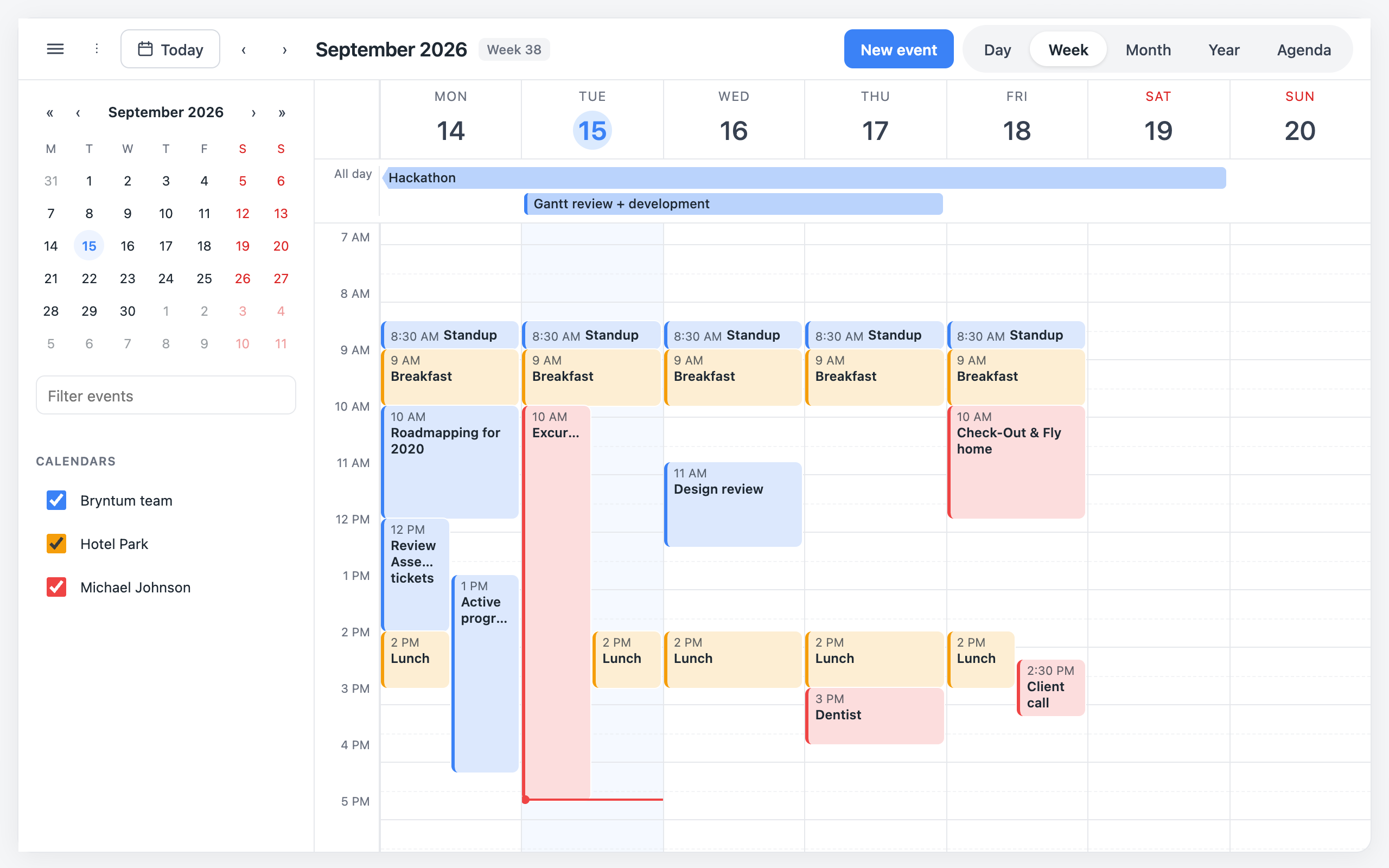
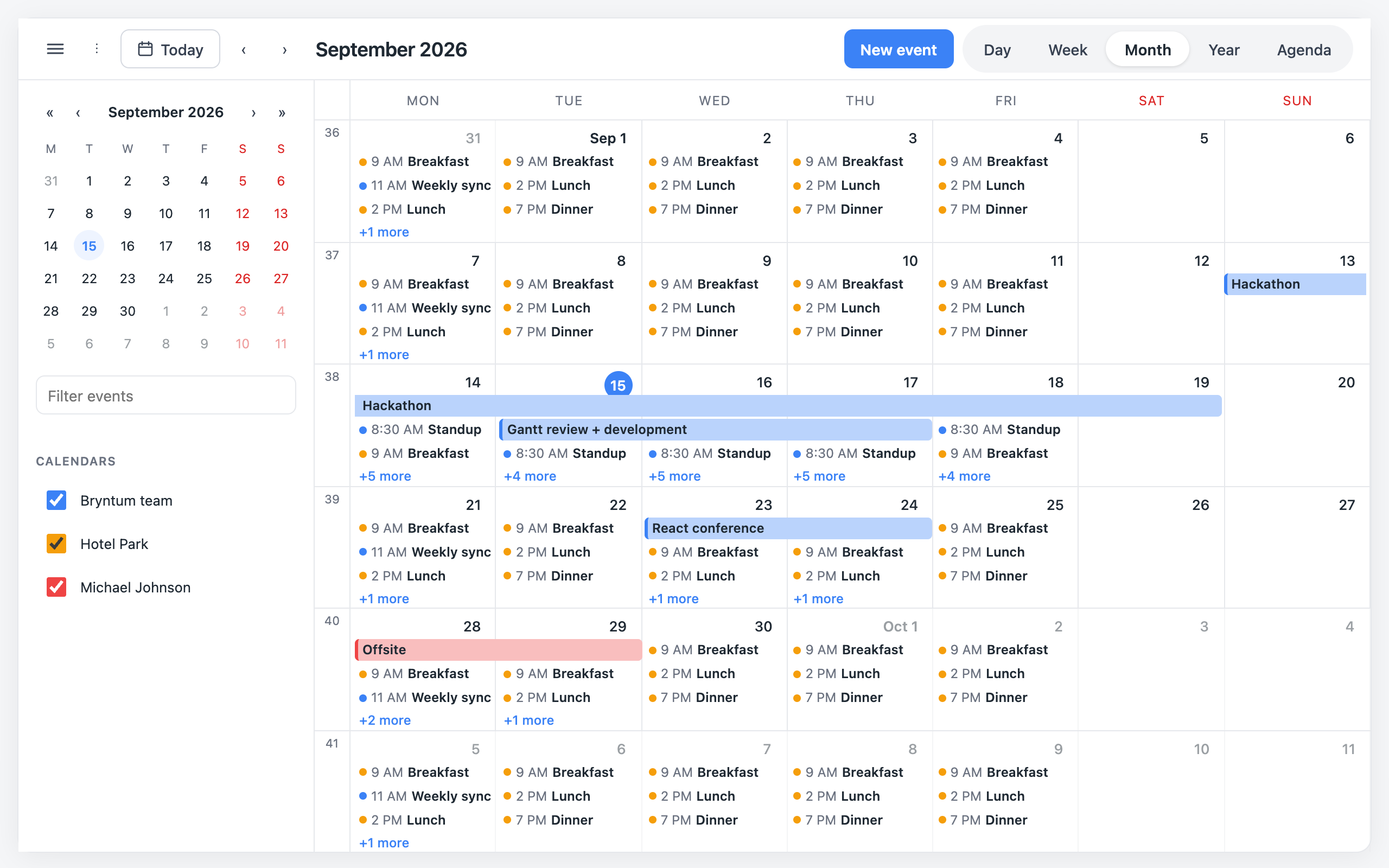
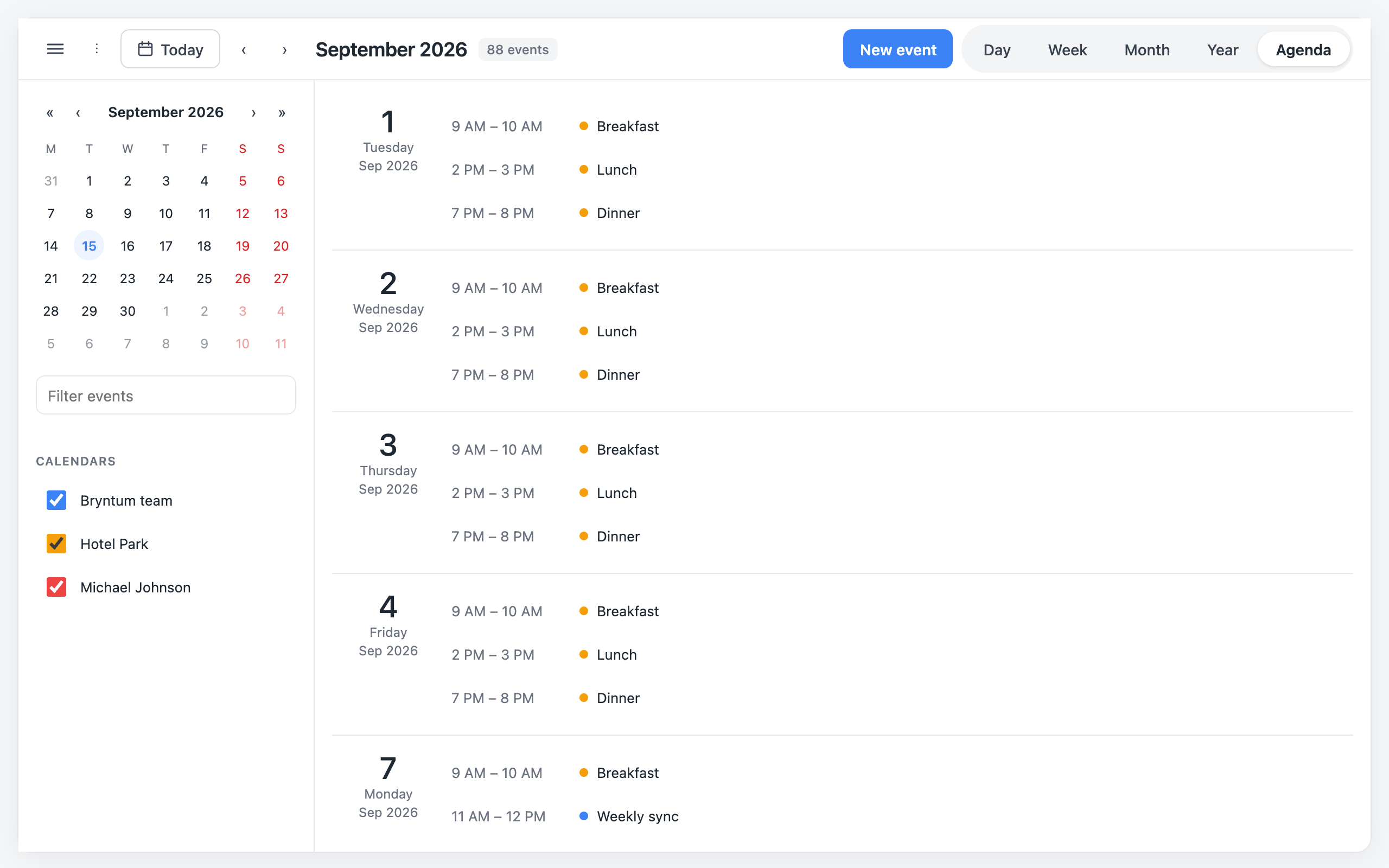
Everything below is the demo — hosted here, or pnpm dev
on your machine — running against the in-memory mock server in src/demo/mockServer.ts: the same
EventSource contract a real backend implements. The docs
build on it with a live, editable example beside every feature.
| Month | Agenda |
|---|---|
|  |
|  |
|
| Editor opens on click | Dark theme |
|---|---|
|  |
| 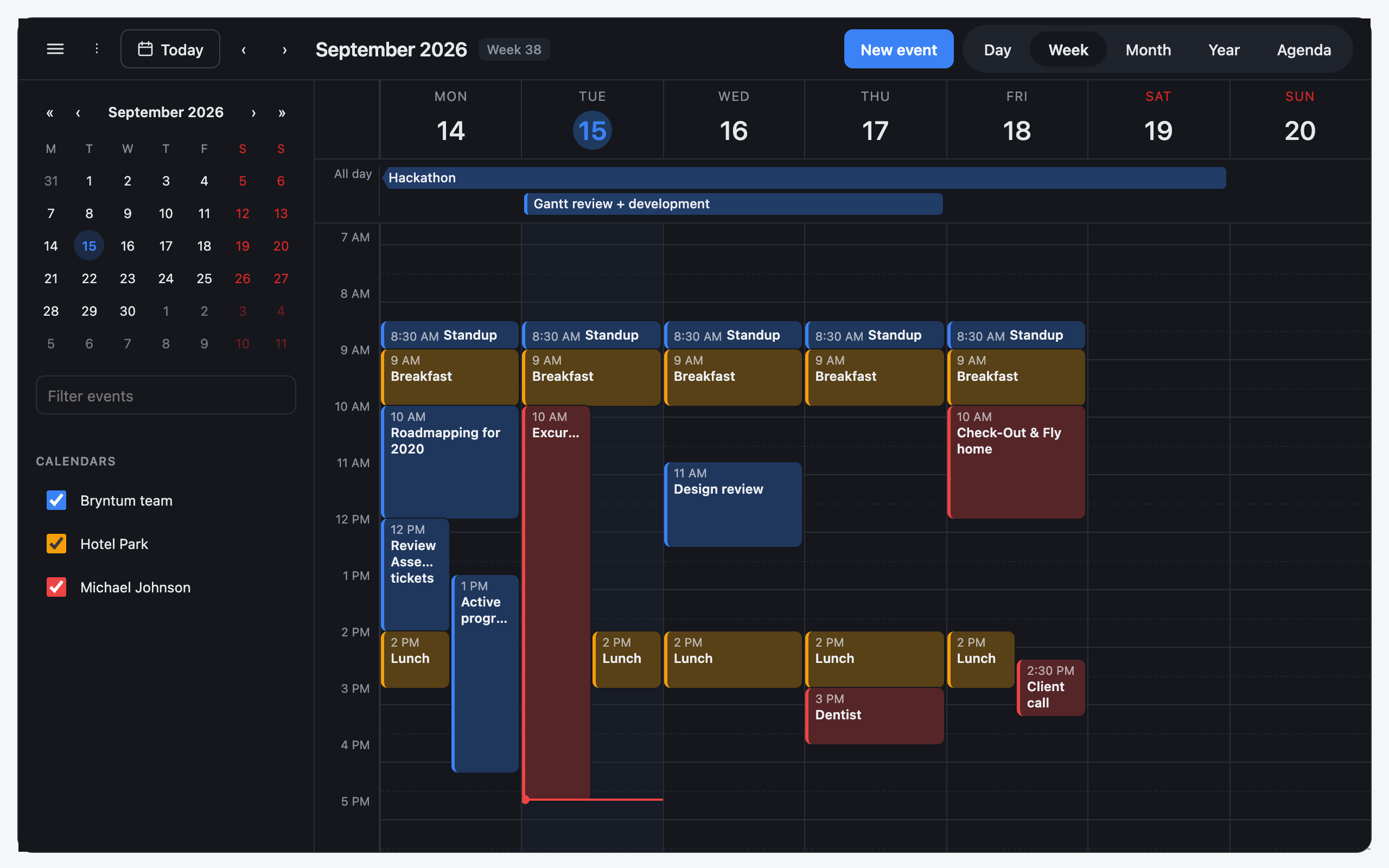 |
|
What it does
| | |
|---|---|
| Five views | Day, week, month, year, agenda. Switch from the toolbar or instance.setView. |
| Drag to create, move, resize | Drag empty space (or double-click it) to draw a new event, drag an event to another time or day, drag its bottom edge to change its end. Each gesture is only offered when the source supports the matching mutation. |
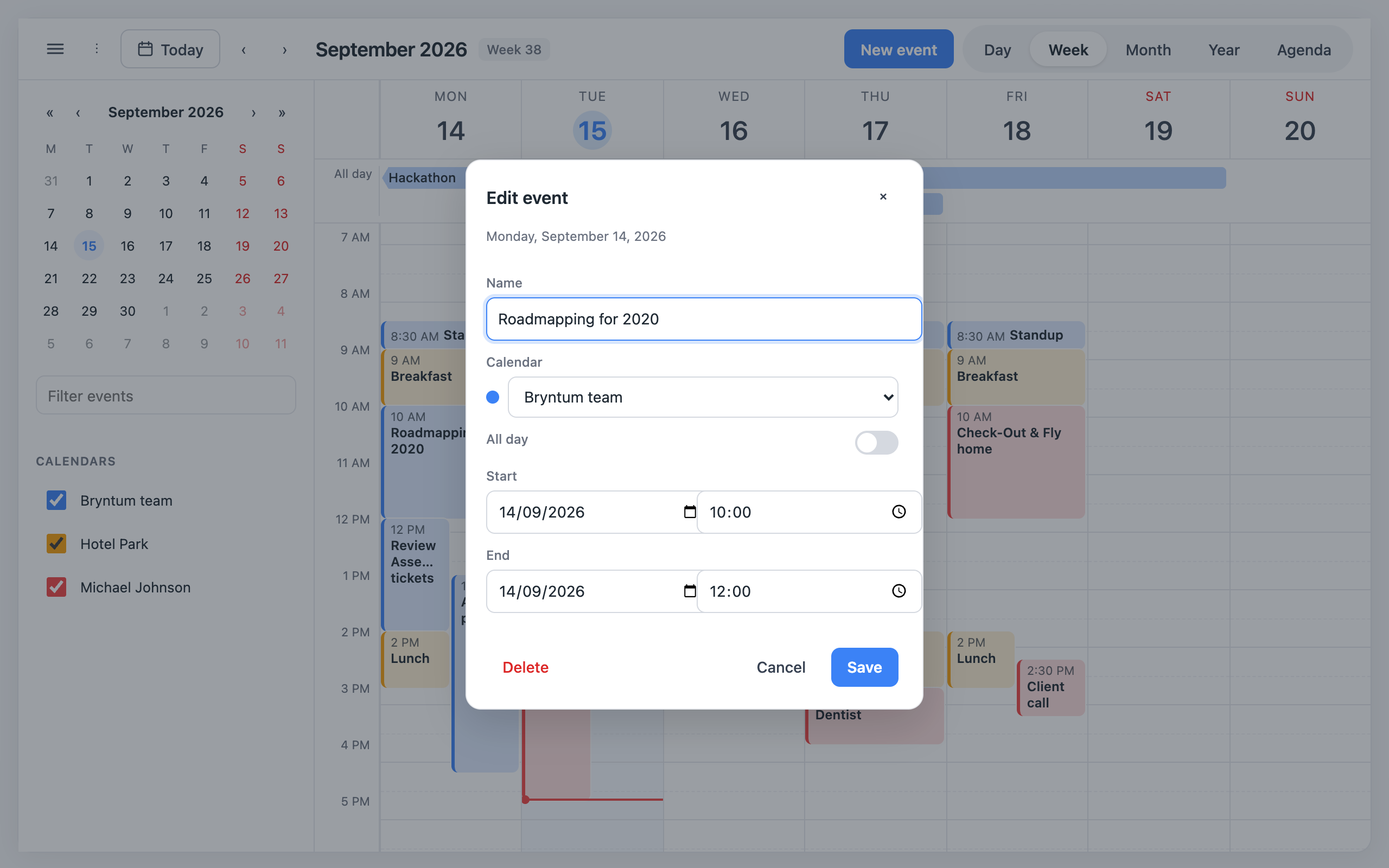
| Editor | Click an event, or a newly drawn one, to name it, colour it, assign a resource, and set its exact start and end — opens as a centred modal, or a bottom sheet on a narrow viewport. |
| Tooltip | Hover an event for a read-only preview — name, date, time, resource — before committing to opening the editor. |
| Sidebar | A mini month picker, a text filter, and per-resource visibility toggles, collapsible from the toolbar. |
| Keyboard navigation | ← and → move to the previous/next period, t jumps to today, Escape closes whatever is open (the editor, the settings menu, an in-progress drag). |
| Remembers itself | View, weekend visibility and hidden resources persist per calendar, per user. The anchor date deliberately does not — see "Preferences". |
| Light and dark | Follows prefers-color-scheme by default; pin it with theme. |
What 0.2 adds
A host's clock
The calendar asks now what time it is — for the day drawn as today, the
now-line, the «Today» button and the day it opens on. It reads the LOCAL fields
of the Date it gets back, exactly as it reads every event's start and end.
So a host whose users live in another zone than their browser shifts both
alike: each event, and now, become Dates whose local fields are that zone's
wall clock (10:00 in Tashkent is new Date(y, m, d, 10, 0), whatever the
browser's zone):
// toWallClock(instant, zone): a Date whose local fields read the zone's clock — the host's helper.
useCalendar({ id, source, now: () => toWallClock(new Date(), "Asia/Tashkent") })
An inline function is fine: the calendar reads it through a ref, so a new one on every render costs nothing.
Looks — one record, many dates
An event can be drawn the way a Gantt chart draws work, so one record can put any number of dates on the calendar and each reads for what it is:
| Field | Values | Drawn as |
|---|---|---|
| appearance | plan · actual · overrun | a dashed outline · the ordinary filled chip · striped red |
| marker | tick · dot | a one-day mark with a bar (a limit, a due day) or a dot (a moment, a payment) |
| tone | primary · success · danger · neutral | the colour's meaning, from --cal-accent, --cal-success, --cal-danger, --cal-neutral |
| className | any | your own look, written in your own (unlayered) CSS |
| groupId | any | the record the date belongs to: pointing at one lights up the others (day, week, month) |
const step = [
  { id: "s1:plan", name: "Закупка · план", start, end: planEnd, allDay: true, appearance: "plan", groupId: "s1" },
  { id: "s1:late", name: "Закупка · просрочка", start: planEnd, end: doneOn, allDay: true, appearance: "overrun", groupId: "s1" },
  { id: "s1:due", name: "Закупка · срок", start: due, end: addDays(due, 1), allDay: true, marker: "tick", groupId: "s1" },
]
An overrun is drawn in danger unless it names a tone of its own. A colour
given as color wins over the tone, and the tone over the resource's colour.
appearance and marker shape the chips that are bars: the time grid's,
the all-day strip's, the month's whole-day spans and the agenda's spans. A
single-day timed event in the month or the agenda stays a dot and a time.
The other dates of a record light up while one is under the pointer in the
day, week and month views.
Opening a record yourself
<Calendar instance={calendar} onEventClick={(event) => navigate(`/tasks/${event.id}`)} />With onEventClick the calendar's editor never opens for an event; the host
opens its own page or dialog. A source with only load offers no drag, no
resize, no «+ New event» and no editor at all — unless the host creates
records itself:
<Calendar instance={calendar} onCreateRequest={(draft, anchor) => openMyMenu(draft.start, draft.end, anchor)} />With onCreateRequest a drag or double-click on empty space, or «+ New
event», hands the host the draft (its start, end and allDay) and where
it was picked (anchor, null from the toolbar); the editor never opens for a
new event.
Grouped resources
Give resources a group and the sidebar files them under a heading that folds
like an accordion — its name and chevron open and fold it — with a checkbox of
its own: ticked while all of the group shows, mixed while part of
it does, and one click shows or hides the whole group
(instance.setResourcesHidden(ids, hidden)). Hidden resources are remembered
as before.
Crowded hours and the agenda
A cluster of overlapping timed events takes at most maxEventColumns columns (default 3 in a
week, twice that in the day view); the rest gather into one «+N» slot that opens the day view
from a week, or the agenda from a day. The agenda opens on today when the month shown holds it,
and agendaSpans: "first" lists a multi-day event once, under the first shown day it touches,
rather than under every day ("each", the default). In Latin Uzbek (locale: "uz") the month and
weekday names come from built-in CLDR words where the browser's Intl has none — Chrome answers
"M10" for October.
Server-side by design
The calendar never holds "all the events" — it asks for a range and keeps only what it has been handed. This is the part most calendar libraries bolt on afterwards, so it is worth being explicit about how it works.
The EventSource contract.
interface EventSource<TData = unknown> {
  load(range: DateRange, options: { signal: AbortSignal }): Promise<CalendarEvent<TData>[]>
  create?(draft: EventDraft<TData>): Promise<CalendarEvent<TData>>
  update?(id: string, patch: EventPatch<TData>, previous: CalendarEvent<TData>): Promise<CalendarEvent<TData>>
  remove?(id: string): Promise<void>
}
Only load is required. Leave a mutation out and the matching gesture is simply not
offered: no create means no drag-to-create and no "+ New event" button, no update means
no drag-to-move, drag-to-resize or opening the editor to change something, no remove means
no Delete button in the editor. useCalendar's features option can turn a gesture off
further, but it can never turn one on that the source does not support.
A REST adapter.
const eventSource: EventSource<Appointment> = {
  async load(range, { signal }) {
    const qs = `start=${range.start.toISOString()}&end=${range.end.toISOString()}`
    const res = await fetch(`/api/events?${qs}`, { signal })
    if (!res.ok) throw new Error(`Load failed: ${res.status}`)
    return (await res.json()).map(fromApi)
  },
  async create(draft) {
    const res = await fetch("/api/events", {
      method: "POST",
      headers: { "Content-Type": "application/json" },
      body: JSON.stringify(toApi(draft)),
    })
    if (!res.ok) throw new Error(`Create failed: ${res.status}`)
    return fromApi(await res.json())
  },
  async update(id, patch) {
    const res = await fetch(`/api/events/${id}`, {
      method: "PATCH",
      headers: { "Content-Type": "application/json" },
      body: JSON.stringify(toApi(patch)),
    })
    if (!res.ok) throw new Error(`Update failed: ${res.status}`)
    return fromApi(await res.json())
  },
  async remove(id) {
    const res = await fetch(`/api/events/${id}`, { method: "DELETE" })
    if (!res.ok) throw new Error(`Delete failed: ${res.status}`)
  },
}

// The wire format is ISO strings; the calendar only ever sees Date objects.
function fromApi(row: ApiEvent): CalendarEvent<Appointment> {
  return { ...row, start: new Date(row.start), end: new Date(row.end) }
}
function toApi(event: Partial<CalendarEvent<Appointment>>) {
  return { ...event, start: event.start?.toISOString(), end: event.end?.toISOString() }
}
load is handed an AbortSignal and must respect it — the calendar aborts a request the
moment its answer is no longer needed, and a fetch passed the signal directly does the
right thing for free.
Loading. Only the visible range is fetched, and it is widened to whole weeks first —
switching from week view to a single day inside that same week, or paging day by day, never
refetches. Every loaded range is kept in a merged, sorted list, so "do we already have this?"
is one scan rather than a set-cover problem: navigating back into a month you have already
opened costs nothing. Navigation is faster than the network, so a new request aborts the one
before it; a response is applied only if it is still the newest, which catches the case an
abort cannot — a source that ignores the signal and resolves anyway. instance.reload()
empties the cache and fetches the current window again, for a manual refresh or after a
change made outside the calendar.
Optimistic mutations, with rollback. Every edit is written to the store immediately and
undone precisely if the source rejects. createEvent draws the new event under a temporary
id (tmp:1, tmp:2, …) before the server has one; on success the temporary event is
replaced by the server's in a single store update, so it never blinks out between the two;
on failure the temporary event is dropped and createEvent resolves to null.
updateEvent and removeEvent behave the same way — a snapshot taken before the edit is
restored if the promise rejects, and they resolve to null / false respectively. While an
edit is in flight its id is in instance.pendingIds, for a "saving" style on the chip or a
disabled Save button. Every rejection also reaches onError(error, action), where action
is "load" | "create" | "update" | "remove".
Recurrence is the server's job. load(range) asks for one range and expects plain,
one-off CalendarEvents back — there is no rrule field, and the calendar has no idea an
event was generated from a recurring series. Expand a series into concrete occurrences that
overlap the requested range on the server and return those; two occurrences are just two
events with different ids and their own start/end.
A NestJS sketch, since that is the usual home for this on the author's stack:
@Controller("events")
export class EventsController {
  constructor(private readonly events: EventsService) {}

  @Get()
  findInRange(@Query() query: FindEventsDto) {
    // Recurring series are expanded to occurrences inside [start, end) here —
    // the client only ever sees concrete start/end pairs.
    return this.events.findInRange(query.start, query.end)
  }

  @Post()
  create(@Body() dto: CreateEventDto) {
    return this.events.create(dto)
  }

  @Patch(":id")
  update(@Param("id") id: string, @Body() dto: UpdateEventDto) {
    return this.events.update(id, dto)
  }
}
DELETE :id, backing remove, follows the same shape.
Half-open intervals
An event's end is exclusive: an event from 09:00 to 10:00 ends the instant 10:00 begins.
That makes "does A overlap B" a single comparison (overlaps, exported from core/date)
with no special case for two events that touch — one's end equalling the other's start is
not an overlap.
An all-day event on the 15th is { allDay: true, start: <15th, 00:00>, end: <16th, 00:00> }
— not 23:59 on the 15th. spansWholeDays(event) (exported) is true for that event, and for
any timed event whose range crosses a calendar-day boundary; internally that second case is
what isMultiDay computes, and it treats an event ending exactly at the following midnight
as still single-day — one minute later, and it spans two days.
Resources
A CalendarResource is { id, name, color } — pass the list via resources on
useCalendar. An event opts in with event.resourceId.
Colour. instance.colorOf(event) resolves the event's own color, else its resource's
color, else the accent token (var(--cal-accent)). An event can always override its
resource's colour for itself without touching the resource.
Hiding. Each resource has a checkbox in the sidebar; instance.setResourceHidden(id,
hidden) drives it directly. Hidden ids are filtered out of instance.events and persisted
with the rest of the preferences. If a resource is later removed from your code, its id is
dropped from stored hiddenResourceIds the next time preferences load — an old entry can
never hide a resource that no longer exists, or linger as an unreachable, unhideable ghost.
Preferences
Same shape as the data-table's layout storage: keyed by the calendar's id, so one adapter
serves every calendar in an application.
import { localStoragePreferences } from "@hojiakbar_dev/calendar"

useCalendar({ id: "clinic", storage: localStoragePreferences(), /* … */ })
By default nothing is stored. Supply any object with three methods:
const serverPreferences: PreferenceStorage = {
  load: (id) => cache.get(id) ?? null,
  save: (id, preferences) => { void fetch(`/api/calendar-preferences/${id}`, {
    method: "PUT", body: JSON.stringify(preferences),
  }) },
  clear: (id) => { void fetch(`/api/calendar-preferences/${id}`, { method: "DELETE" }) },
}
load is called once when the calendar mounts, so it must be synchronous — fetch
preferences alongside the rest of your page data and read them from your cache here. save
is debounced: it fires a short while after the last change settles, never on mount and never
per interaction, so switching views three times in a row writes once.
What is stored: view, showWeekends, hiddenResourceIds. What is deliberately not
stored: the anchor date. Reopening a calendar on the day someone last looked at, weeks ago,
is a surprise, not a convenience — every visit starts on today unless initialDate says
otherwise.
A page that wants the view and the day in its address — so a reload or a link opens the same
month — holds them itself: view and date win over the stored view and the calendar's own
day, and onViewChange / onDateChange tell it of every switch and step, which it writes
back. A switch is still stored, so the address without a view opens on the last one used.
const [params, setParams] = useSearchParams()
const calendar = useCalendar({
  id: "clinic",
  source,
  view: readView(params),          // undefined → the stored view
  onViewChange: (view) => setParams((p) => ({ ...Object.fromEntries(p), view })),
  date: readDay(params),           // undefined → today
  onDateChange: (date) => setParams((p) => ({ ...Object.fromEntries(p), date: toDay(date) })),
})
Styling
Three layers, from least to most specific.
Tokens. Every colour and dimension is a CSS custom property with a working default, so the calendar looks finished out of the box and restyles without touching its source:
.cal-root {
  --cal-accent: #7c3aed;
  --cal-radius: 6px;
  --cal-hour-height: 56px;
}
Target .cal-root itself, in an unlayered stylesheet (see the cascade layer, below). A value set
on an ancestor — :root, body or your own wrapper — never arrives: .cal-root declares every
token on its own element, and an element's own declaration beats an inherited one. The event
editor and the hover tooltip are portaled to <body>, outside whatever element renders
<Calendar>, but they carry .cal-root too, so one .cal-root rule themes every layer. A
className on <Calendar> reaches the calendar and not those two.
| Token | Purpose |
|---|---|
| --cal-bg --cal-fg --cal-muted-fg | Surface and text |
| --cal-border --cal-border-strong --cal-radius --cal-radius-sm | Edges |
| --cal-font --cal-font-size | Typography |
| --cal-accent --cal-accent-soft --cal-danger --cal-on-accent | Interactive accents; --cal-on-accent is the text/icon colour drawn on top of a solid --cal-accent fill (today's circle, a filled heat cell). |
| --cal-header-bg --cal-header-fg --cal-header-height | Toolbar |
| --cal-sidebar-bg --cal-sidebar-width | Sidebar |
| --cal-hover-bg --cal-selected-bg | Hover and selected states |
| --cal-weekend-fg --cal-today-fg | Weekend columns and today |
| --cal-hour-height --cal-gutter-width --cal-allday-row-height | Time grid |
| --cal-event-radius --cal-event-fg --cal-now-line | Events and the current-time line |
| --cal-chip-mix --cal-chip-mix-hover | Percentage of an event's colour mixed into its chip background; -hover adds roughly ten points more. |
| --cal-shadow --cal-root-shadow --cal-focus-ring | --cal-shadow is floating-card elevation (the popover, the tooltip, the editor's modal), --cal-root-shadow is the calendar's own, and --cal-focus-ring is the visible-focus outline. |
| --cal-mini-cell | Mini month picker |
Dark mode follows prefers-color-scheme. Pass theme="light" or theme="dark" to pin it.
The cascade layer. All of the library's CSS lives in @layer calendar, so any unlayered
stylesheet of yours — a plain .css file, styled-components, most setups — beats a
cal-* rule automatically, with no !important:
.cal-event {
  border-radius: 0;
}
Tailwind v4 generates its own utilities inside their own layers, and a later @layer
declaration wins ties. If you want a Tailwind utility class to beat the calendar's styling,
declare the layer order yourself before Tailwind's own layers register:
@layer calendar, theme, base, components, utilities;
@import "tailwindcss";
The classes prop. For the rare case a token and a plain override cannot reach — adding
your own class to one slot, for a CSS Module or a Tailwind utility that must apply directly
rather than cascade in — <Calendar> takes a classes prop:
<Calendar
  instance={cal}
  classes={{ event: "my-event", toolbar: "my-toolbar" }}
/>
Each key adds a class alongside the slot's own cal-* class; it never replaces it. Slots:
root, toolbar, sidebar, miniCalendar, resourceFilter, view, dayHeader,
allDayRow, timeGrid, event, month, monthCell, year, agenda, popover,
dialog, editor, tooltip.
Also: theme="light" | "dark" (above), className on the root element, labels (below,
for translation), and on useCalendar: locale (a BCP 47 tag, defaults to the browser's)
and weekStartsOn (Date.getDay() numbering, default 1 for Monday).
labels overrides individual CalendarLabels keys — today, previous, next, the five
view names, newEvent, allDay, noEvents, loadFailed/retry, the editor's field
labels (name, resource, start, end, save, delete, …), and eventDescription
("{name}, {start} to {end}"), which becomes every event chip's aria-label. The full list
is CalendarLabels in types.ts; anything you omit falls back to defaultLabels.
Headless use
Calendar is optional. useCalendar returns a CalendarInstance — state plus every action
— and every piece the built-in shell is made of is exported too, so a bespoke layout can
recompose them around the same instance instead of reimplementing drag-to-create or popover
placement from nothing:
import { useCalendar, Toolbar, WeekView, EventEditor } from "@hojiakbar_dev/calendar"

const instance = useCalendar({ id: "clinic", source, resources })

<Toolbar instance={instance} labels={defaultLabels} sidebarOpen={false} onToggleSidebar={() => {}} />
<WeekView instance={instance} labels={defaultLabels} onEventOpen={open} onCreateRequest={create} onEventHover={hover} />
Exported views: DayView, WeekView, MonthView, YearView, AgendaView. Exported
chrome: Toolbar, Sidebar, MiniCalendar, ResourceFilter, EventEditor, EventTooltip,
Popover (an anchored floating-card primitive, still handy for a headless menu or a custom
tooltip), and Dialog (a modal/bottom-sheet primitive — what EventEditor itself renders
inside; see presentation on both).
Two pure helpers are worth borrowing rather than rewriting:
layoutDay(events, day) — packs one day's timed events into side-by-side columns for a
time grid: clips to the day's 0–1440 minute range, groups transitively overlapping events
into clusters, and assigns each a column and the cluster's total columns so overlapping
events render at equal width.
layoutSegments(events, days, "spans" | "all") and limitRows(segments, maxRows, columns)
— lay out all-day and multi-day events as bars across a row of day columns (the all-day
strip, or a month cell's stack), first-fit by row, then split what fits in maxRows from
what to report as hidden per column (a month day's overflow dots and its card).
API
useCalendar(options)
| Option | Type | Default | |
|---|---|---|---|
| id | string | — | Required. Unique per application; the preferences storage key. |
| source | EventSource<TData> | — | Required. See "Server-side by design". |
| resources | CalendarResource[] | [] | |
| initialDate | Date | today | |
| initialView | CalendarView | "week" | Ignored once a user has a stored view. |
| view | CalendarView | | Held by the host (an address); wins over the stored view. |
| onViewChange | (view) => void | | Every switch; a host holding view writes it back. |
| date | Date | | Held by the host; wins over the calendar's own day. |
| onDateChange | (date) => void | | Every step, «Today» and day picked; a host holding date writes it back. |
| filter | (event) => boolean | | The host's own filter over what is loaded; nothing is asked again when it changes. |
| storage | PreferenceStorage | none | Where preferences live. |
| initialPreferences | Partial<CalendarPreferences> | {} | Applied on a user's first visit; loses to anything stored. |
| features | CalendarFeatureFlags | all on | Turn off create, move, resize, edit or remove; each still needs its source method too. |
| weekStartsOn | WeekDay | 1 (Monday) | |
| locale | string | the browser's language | BCP 47 tag for Intl. |
| dayStartHour | number | 0 | First hour drawn on the time grid. |
| dayEndHour | number | 24 | Hour boundary the time grid ends at. |
| snapMinutes | number | 15 | Drag and create gestures round to this many minutes. |
| defaultEventMinutes | number | 60 | Length of an event created with a click. |
| now | () => Date | the browser's clock | What "now" is. Reads the local fields of the Date it returns; see "A host's clock". |
| maxEventColumns | number | 3 | Columns a cluster of overlapping timed events takes in a week (twice that in the day view) before the rest gather into «+N». |
| agendaSpans | "each" \| "first" | "each" | List a multi-day event under every day it touches, or once under the first. |
| onError | (error: unknown, action: EventSourceAction) => void | — | Called on every rejection from the source. |
Returns a CalendarInstance<TData> — see below.
<Calendar />
| Prop | Type | Default | |
|---|---|---|---|
| instance | CalendarInstance<TData> | — | Required. From useCalendar. |
| labels | Partial<CalendarLabels> | English | Every string, for translation. |
| theme | "light" \| "dark" | system | |
| className | string | — | Added to the root element. |
| classes | Partial<Record<slot, string>> | — | Adds a class to one named slot; see "Styling". |
| sidebar | boolean | true | Whether the sidebar can be shown at all. |
| height | number \| string | auto | CSS height of the root; omit to fill the parent (min 480px). |
| editorPresentation | "modal" \| "sheet" \| "auto" | "auto" | How the event editor's Dialog presents itself; "auto" is a bottom sheet under a 640px viewport, a centred modal otherwise. |
| onEventClick | (event, chip) => void | — | A click or Enter on an event. Given, the editor never opens; the host opens its own record. |
| onCreateRequest | (draft, anchor) => void | — | A new event asked for — a drag or double-click on empty space, or New event (anchor null). Given, the editor never opens for a new event, and the gestures are offered even when the source cannot create. |
| collapsedGroups | string[] | — | The sidebar's resource groups folded shut. Given, the folding is the host's to keep; omit it and the calendar keeps it while mounted, every group open. |
| onCollapsedGroupsChange | (groups) => void | — | Told the folded groups after a fold or an open. |
| overflow | "card" \| "expand" | "card" | What a day's "+N" does. "card" opens the day's card. "expand" opens it in place: a month's week grows to show all its events (up to --cal-month-expanded-max-height, then it scrolls inside, the other weeks keeping their height), and the week and day views' all-day strip shows every row (up to --cal-allday-max-height), toggled from its gutter too and remembered as the allDayExpanded preference. Each has a "Collapse" under its rows. A phone's month keeps the card. |
CalendarInstance
| Field | Type | |
|---|---|---|
| id | string | |
| date | Date | The anchor date: the day shown, or a day inside the week/month/year shown. |
| view | CalendarView | |
| range | DateRange | What the current view covers; for month that is its 6-week grid. |
| days | Date[] | Day columns/cells in order; empty for the year view. |
| events | CalendarEvent<TData>[] | Overlapping range, after the resource and text filters, sorted by start. |
| resources | CalendarResource[] | |
| hiddenResourceIds | readonly string[] | |
| filterText | string | |
| showWeekends | boolean | |
| allDayExpanded | boolean | The all-day strip shows every row (overflow="expand"); a preference, stored with the others. |
| status | "idle" \| "loading" \| "error" | |
| error | unknown | The rejection from the last failed load, if any. |
| pendingIds | ReadonlySet<string> | Ids with a create, update or remove still in flight. |
| flags | Required<CalendarFeatureFlags> | Feature flags already combined with what the source can do. |
| settings | CalendarSettings | weekStartsOn, locale, dayStartHour, dayEndHour, snapMinutes, defaultEventMinutes. |
| isCustomised | boolean | True once preferences were loaded from storage or changed since mount. |
| setDate setView goToday goNext goPrevious | (…) => void | Navigation. |
| setFilterText setResourceHidden setShowWeekends setAllDayExpanded resetPreferences | (…) => void | Preferences. |
| reload | () => void | Forgets every cached range and fetches the visible one again. |
| createEvent | (draft) => Promise<CalendarEvent<TData> \| null> | null when the source rejected (the draft is rolled back). |
| updateEvent | (id, patch) => Promise<CalendarEvent<TData> \| null> | null when the source rejected (the patch is rolled back). |
| removeEvent | (id) => Promise<boolean> | false when the source rejected (the event is restored). |
| resourceOf colorOf | (event) => … | The event's resource, and its resolved colour. |
Accessibility
- Toolbar controls are real
<button>s witharia-labels (previous, next, toggle sidebar) andaria-pressedwhere relevant (sidebar toggle, the view switcher); the current period's title isaria-live="polite". - Every event chip carries
role="button", is keyboard-focusable, and itsaria-labelis built fromlabels.eventDescription— the name plus its start and end — rather than a bare, indistinguishable "button". Enter, Space or a click opens the editor; a double-click still works too, without reopening a second time. - The editor opens in a
Dialog(role="dialog",aria-modal="true"): the first form field is focused on open (an earlier button, e.g. the ×, is skipped in favour of it),TabandShift+Tabcycle within the card instead of escaping it, focus returns to whatever held it before the dialog opened, andEscapeor a click on the backdrop closes it. The page behind it stops scrolling while it is open. A validation error is announced withrole="alert". - The read-only hover tooltip is a plain, non-interactive card — it carries no focus trap of its own, since nothing inside it can be focused.
- The settings menu and an in-progress drag both close on
Escapetoo. - Month, year and the mini month picker use
role="grid"/"row"/"gridcell"witharia-labels, matching what a screen reader expects from a date grid. - A month day's overflow dots are one button named with the
morelabel ("+6 more"), witharia-haspopup="dialog"andaria-expanded. Its card is a dialog named by its date: the focus moves into it, ↑/↓ walk its events,Escapeor a click outside closes it and gives the focus back to the dots. prefers-reduced-motion: reduceturns off every transition and animation under.cal-root, including the loading progress bar.- Drag gestures have no keyboard equivalent yet. Creating, moving and resizing an event by dragging is pointer-only; the editor — reachable from a focused chip with Enter, or the "+ New event" button — is the keyboard path for all three today.
Requirements
React 18 or 19. No other runtime dependencies.
Licence
MIT