
@holdmyticket/hmt-riot
v3.15.0
Published
Simple and elegant component-based UI library


Readme

BUILD
Update package.json with new version
Run
make rawAdd and commit
Tag the version
git tag -s vX.X.X -m 'vX.X.X'Push it to Github
git push
git push origin tag vX.X.X
Publish to NPMJS
npm login
npm publish
Simple and elegant component-based UI library




-JOIN_CHAT_%E2%86%92-551a8b.svg?style=flat-square)




Framework Size Comparison
| Framework | Version | Minified Size (gzip) | |------------------------------------------------|-----------------|----------------------| | @angular/core + Polyfills | 7.0.0 | 314.18kb | | Ember | 2.18.2 | 121.84kb | | Polymer + Web Components Polyfill Lite | 1.8.0 | 66.3kb | | Polymer + webcomponents-loader.js + webcomponents-bundle.js |3.0.0 | 45.70kb | | React + Map and Set Polyfills | 16.5.2 | 44.75kb | | Web Components Polyfill | 0.7.24 | 33.68kb | | Vue | 2.5.17 | 31.65kb | | Riot | 3.13.2 | 10.85kb | | Inferno | 6.0.0 | 7.65kb | | Preact | 8.3.1 | 3.48kb |
The above comparison includes polyfills to support old browsers like IE9 that in Riot.js are supported by default.
Browsers support
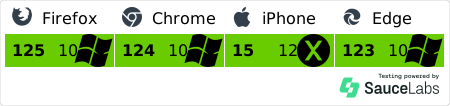
Riot is supported by all modern browsers and it does not require any additional polyfill
- IE 9+
- Edge
- Chrome
- Safari 7+
- Firefox
- Safari iOS
- Android
Custom tags • Concise syntax • Simple API • Tiny Size
Riot brings custom tags to all modern browsers. Think React + Polymer but with enjoyable syntax and a small learning curve.
Tag definition
<timer>

  <p>Seconds Elapsed: { time }</p>

  this.time = opts.start || 0

  tick() {
    this.update({ time: ++this.time })
  }

  var timer = setInterval(this.tick, 1000)

  this.on('unmount', function() {
    clearInterval(timer)
  })

</timer>Mounting
riot.mount('timer', { start: 0 })Nesting
Custom tags lets you build complex views with HTML.
<timetable>
  <timer start="0"></timer>
  <timer start="10"></timer>
  <timer start="20"></timer>
</timetable>
HTML syntax is the de facto language on the web and it's designed for building user interfaces. The syntax is explicit, nesting is inherent to the language and attributes offer a clean way to provide options for custom tags.
Expressions Bindings
- Absolutely the smallest possible amount of DOM updates and reflows.
- One way data flow: updates and unmounts are propagated downwards from parent to children.
- Expressions are pre-compiled and cached for high performance.
- Lifecycle events for more control.
Close to standards
- No proprietary event system.
- Event normalization.
- The rendered DOM can be freely manipulated with other tools.
- No extra HTML root elements or
data-attributes. - Plays well with any frontend framework.
Use your dearest language and tools
- Create tags with CoffeeScript, Jade, LiveScript, Typescript, ES6 or any pre-processor you want.
- Integrate with NPM, CommonJS, AMD, Bower or Component
- Develop with Gulp, Grunt, Wintersmith, webpack*, Rollup*, Browserify*, Babel* or Bublé
- Test with Karma*, Mocha or whatever you like
Note: * officially maintained
CDN hosting
Concise syntax
- Power shortcuts:
class={ enabled: is_enabled, hidden: hasErrors() }. - No extra brain load such as
render,state, orconstructor. - Interpolation:
Add #{ items.length + 1 }orclass="item { selected: flag }" - Compact ES6 method syntax.
Demos
- Riot Examples - Community's Official
- Riot Animore - Official Tags Animations Library
- Riot Todo MVC
- Hackernews reader
- Vuejs examples by Riotjs
- Flux-like ES6 Todo
- Timer
- Another flux demo comparable to React ones
- Various experiments
- Isomorphic application
- Isomorphic proof of concept
- flux-riot todo
- Another Riot Todo MVC
- Cheft isomorphic by express
- electron-riot - Riot in an electron application
- An express, riot, jade, webpack simple boilerplate
- Riot.js vs React.js comparison of a simple comment box
- Riot Seed project - webpack, routing, ava tests, dispatcher
- Riot-Redux League Table example
- Riot vs React vs Ractive Counters using Redux store
- Riot Chrome Extension Boilerplate
Books
Tutorials
- Building Apps with Riot, ES6 and Webpack
- Building Apps with Riot, Babel, RiotControl and Webpack
- Building tabs with Riot
- The "React tutorial" for Riot
- How to package "tag libraries" in Riot
- Another React tutorial with Riot
- Riot Custom Tag by Example
- Riot Compiler Explained
- Adding compiled Riot tags to your Gulp + Browserify build
- The anatomy of a tag - a primer tutorial
- Using TDD with Riot+mocha+chai
- The Basics - from ground up to connected tag-networks
- Hello Riot.js : a quick tutorial about this awesome lib
Video Tutorials
- Introduction
- Loops, Events and Callbacks
- Server Rendering with Node & Express
- Riot And Webpack Setup
- Riot and Redux - Part 1
- Riot and Redux - Part 2
- Riot and Redux - Part 3
- Riot and Redux - Part 4
- Riot and Redux - Part 5
- Riot and Redux - Part 6
Libraries / Frameworks
- Flux- like event controller for Riot
- flux-riot framework
- Cheftjs - chinese framework for Riot
- Veronica - flux adaption for Riot
- Minimal Flux dispatcher pattern
- riot-format: a format library for riotjs, like angular $filter
- riot-view-router: a simple state based router mixin
- riotx - Centralized State Management for riot.js
- storybook for riot.js components alpha
Components
- Material UI
- RiotGear Components
- RiotGear Router
- Riot Bootstrap
- iToolkit
- Riot Routehandler-(Demo)
- Riot Flipcard - (Demo)
- Riot Grid - (Demo)
- Riot Grid2 - (Demo)
- Riot Subtag - faster than lots of if's
- ESLint Riot Plugin
- riot-animate
- Nest UI - (Demo)
- rGrid - (Demo)
- typewriter - (Demo)
Resources
- create-riot-app dev environment
- Riot + AngularJS
- Module loader for WebPack
- Riot + Meteor
- Riot Snake Game
- Riot Tag Syntax Checker
- Riot 文档中译版 :cn:
- Riot + Wintersmith
- Riot precompiler plugin for lineman
- Riot Startkit - Flux inspired skeleton app + WebPack + PostCSS
- Yeoman generator - Generator riot mobile
- Yeoman generator - Generator riot element
- Riot for TypeScript
- Riot loader plugin for RequireJS
- Riot loader plugin for JSPM/SystemJS
- RiotJS Style Guide
- Riot Cheatsheet
Miscellaneous
1) Clone the repo and browse to the riot folder
$ git clone [email protected]:riot/riot.git && cd riot2) Set up your git branch
$ git checkout -b feature/my-awesome-patch3) Install the npm dependencies
$ npm i4) Build and test riot using the Makefile
# To build and test riot
$ make riot

# To build without testing
$ make raw

# To build anytime you change a src file
$ make watch

# To bench riot
$ make perf
Credits
Riot is made with :heart: by many smart people from all over the world. Thanks to all the contributors It's actively maintained by:
Official Website
http://riot.js.org
Backers
Support us with a monthly donation and help us continue our activities. Become a backer

Sponsors
Become a sponsor to get your logo on our README. Become a sponsor

Thanks
Special thanks to Browserstack for their support