
@hraness/peopleblade
v0.15.1
Published
The contact book you own, built for your agent. PeopleBlade is a local personal CRM that gathers contacts from your apps and exports into one private book.

Maintainers
 benzguo
Readme
PeopleBlade
The contact book you own, built for your agent.
PeopleBlade is a local personal CRM for everyone you know.
PeopleBlade builds one contact book on your computer from your address book, accounts, and exports. Your agent searches it, keeps notes, and tells you which import each contact came from. There is no app to open. Your agent runs PeopleBlade's commands against a private database on your computer.
Free CLI · macOS and Linux · No account needed · peopleblade.com
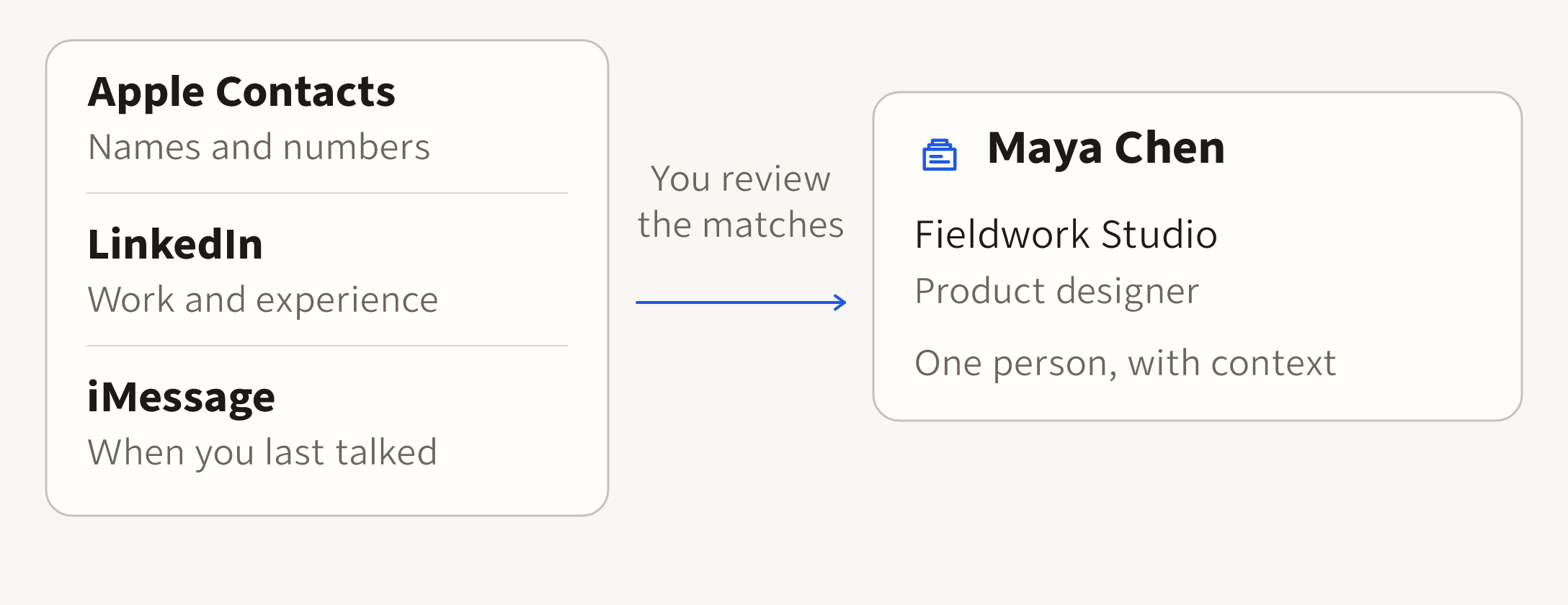
Every contact lists the imports it came from. An exact email or phone match joins two records once you accept it, or automatically if you opt in. A shared name alone never does.
Watch the 44-second launch video (no sound, fictional people):
Install
bun add --global @hraness/peopleblade@latestNeeds Bun 1.3.14 or newer on macOS or Linux.
Try it in a minute
peopleblade init                         # create your contact book
peopleblade stats                        # zero contacts, no account
peopleblade contacts sync                # on a Mac: read Apple Contacts, never write back
peopleblade linkedin import FILE.zip     # anywhere: your official LinkedIn export
peopleblade identity suggest             # one possible match, with the detail both records share
peopleblade identity decide TOKEN accept # join them; identity separate undoes it
peopleblade query --search "Maya"        # find a person across every import
On Linux, or on a Mac without Apple Contacts, start from a file:
contacts import FILE --account personal reads a CSV, vCard, or Outlook export.
The file must be private to you, so run chmod 600 FILE first. Your book lives at
~/Library/Application Support/PeopleBlade/peopleblade.sqlite3 on macOS and
${XDG_DATA_HOME:-~/.local/share}/peopleblade/peopleblade.sqlite3 on Linux.
Where your contacts come from
PeopleBlade imports from apps on your Mac, signed-in accounts through GhostGet, official data exports, and your own contact files. peopleblade.com/sources says what each one imports and what it leaves out.
| Where | Source | Command | Status |
| --- | --- | --- | --- |
| On your Mac | Apple Contacts | peopleblade contacts sync | Ready |
| On your Mac | iMessage | peopleblade imessage sync | Ready |
| Signed-in accounts | Google Contacts | peopleblade google sync | Limited: your own Google OAuth desktop client |
| Signed-in accounts | Gmail interactions | peopleblade google interactions sync | Needs setup: your own Google OAuth desktop client; who you emailed and when, never message text |
| Signed-in accounts | Beeper | peopleblade beeper sync | Limited: Beeper Desktop's local contacts |
| Signed-in accounts | WhatsApp | peopleblade whatsapp sync | Limited: linked-device contacts and local interaction history |
| Signed-in accounts | Substack subscribers | peopleblade substack sync --publication NAME | Limited: publications up to 500 subscribers |
| Signed-in accounts | X live mutuals | peopleblade x mutuals sync | Needs setup: a browser signed in to X |
| Official data exports | LinkedIn | peopleblade linkedin import FILE.zip | Ready |
| Official data exports | Instagram | peopleblade instagram import FILE.zip --owner-username YOUR_USERNAME | Ready |
| Official data exports | X data archive | peopleblade x import FILE.zip | Limited: accounts known only by a number stay unmatched |
| Your own files | Contact CSV | peopleblade contacts import FILE --account NAME | Ready |
| Your own files | vCard contacts | peopleblade contacts import FILE --account NAME --format vcard | Limited: photos and card notes are skipped |
| Your own files | Outlook contact export | peopleblade contacts import FILE --account NAME --format outlook-csv | Limited: English column headers only |
| Your own files | Calendar invitations | peopleblade calendar import FILE --account NAME --owner-email EMAIL | Limited: invitations only, not attendance |
| Your own files | Apple Photos | peopleblade photos import FILE --apple-account NAME | Limited: needs an Apple Contacts import and a Photos export from GhostGet |
Apple Contacts and iMessage need macOS. The Apple Photos file is an export you make with GhostGet. Telegram is not available.
Connect signed-in accounts
Signed-in accounts go through GhostGet, a separate Hraness tool you install and sign in to. PeopleBlade never holds your sign-ins or drives a browser. It asks GhostGet for named read operations and checks each answer before saving anything. Signed-in accounts need GhostGet 0.18.44 or a later 0.18 release. Start with the version below; optional Beeper interaction counts need exactly this version:
bun add --global https://github.com/hraness/ghostget/releases/download/v0.18.57/hraness-ghostget-0.18.57.tgz
ghostget adapter sync-bundled
WhatsApp contacts and interaction counts are supported through a linked device you pair from your phone. Use GhostGet 0.18.69 for WhatsApp:
bun add --global https://github.com/hraness/ghostget/releases/download/v0.18.69/hraness-ghostget-0.18.69.tgz
ghostget adapter sync-bundled
Counts cover the linked device's local history and can understate activity. Finish any running import before changing global Bun packages, because a global install changes GhostGet's shared package folder.
Connect signed-in accounts gives the sign-in step and the import command for each account.
Use it with your agent
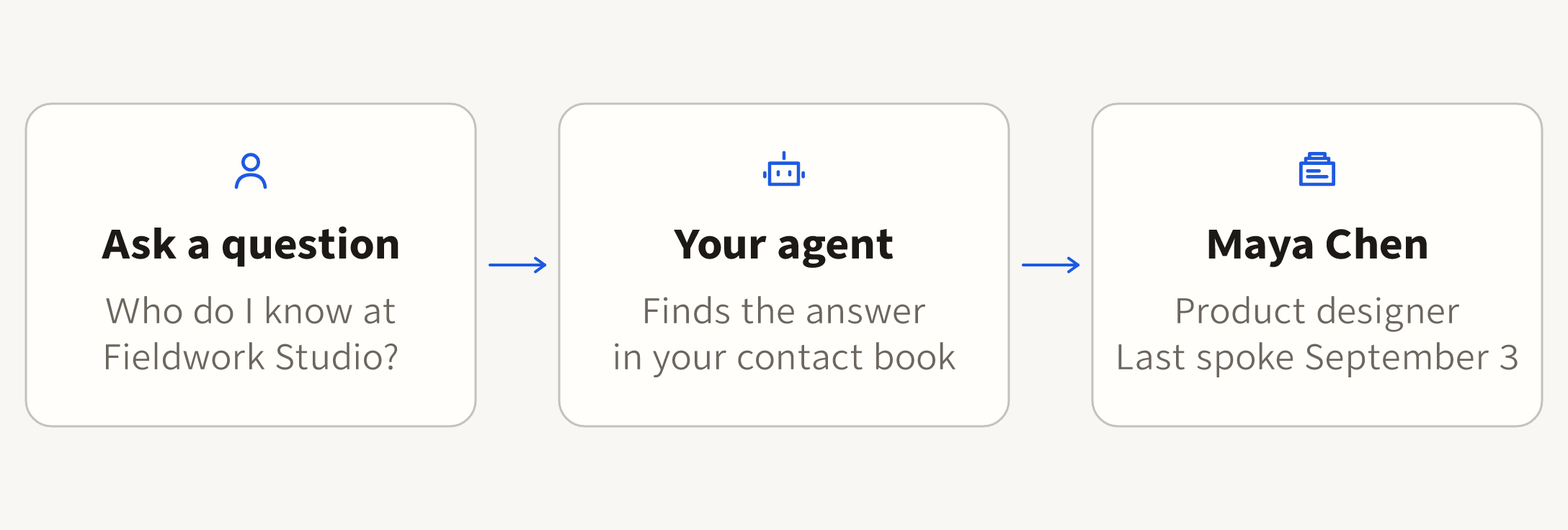
Your agent runs the same commands you would and reads their JSON. It needs no password, browser session, or message text.
- More than 100 commands accept
--json. - Errors come back as one
peopleblade.error.v1JSON object on standard output, and a usage error exits with status 2. - Your agent can read and write notes, tags, and reminders.
peopleblade --helplists the common commands, andpeopleblade help advancedlists every command and flag.peopleblade capabilities --jsondescribes what this install can do, offline.
Add the Agent Skill
The package includes the PeopleBlade Agent Skill, which teaches a coding agent when and how to run these commands and what to keep private. Install it with:
peopleblade skill installThat copies the skill into ~/.claude/skills/peopleblade for Claude Code and
~/.codex/skills/peopleblade for Codex. Use --agent agents for
~/.agents/skills, or --dir PATH for any other skills folder. Run it again
after you upgrade PeopleBlade to refresh the skill, then start a new agent
session so the agent loads it.
If your agent uses the open skills installer, npx skills add
https://peopleblade.com fetches the same skill from the website. That copy
tracks the website rather than your installed version.
The one command that sends through your messaging accounts,
exposure attest-send, sends one contact a signed summary of an exposure check, after
you allow attachment sending in GhostGet and pass --confirm.
What you can do
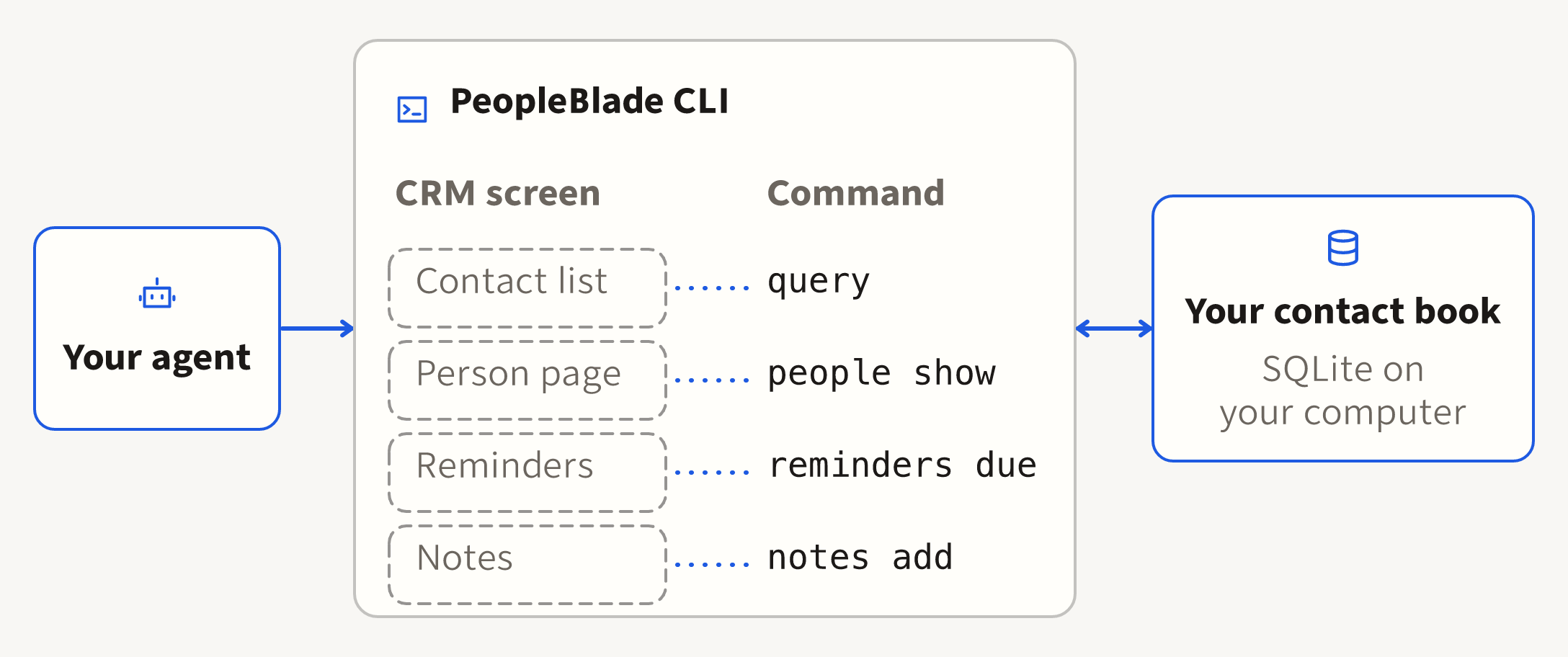
Each CRM feature is a command. Your agent runs it and reads the JSON, so there is no screen to open.
peopleblade query --search "Fieldwork Studio" --json   # search names, organizations, titles
peopleblade people show 12 --json                      # one person, with the source of the name, organization, and title
peopleblade people edit 12 --title "Design lead"       # later imports never overwrite your edit
peopleblade tags add 12 client
peopleblade searches save clients --tag client --sort last-contact
peopleblade people cadence 12 6w                       # keep in touch every six weeks
peopleblade reminders add 12 --due 2w --text "Send the proposal"
peopleblade reminders due --within 7 --json
peopleblade people timeline 12 --json
peopleblade notes add --person-id 12 --occurred-at 2026-09-03T10:30:00Z --body "Met at the studio"
peopleblade notes history 42 --json
peopleblade research profile 12 --provider github     # exact GitHub or Bluesky profiles
peopleblade research attest 12 --json                 # public checks that cite their sources
peopleblade backup                                    # a consistent copy of your book
The guide covers each group. Every schema upgrade backs up your book before it runs.
Where your data goes
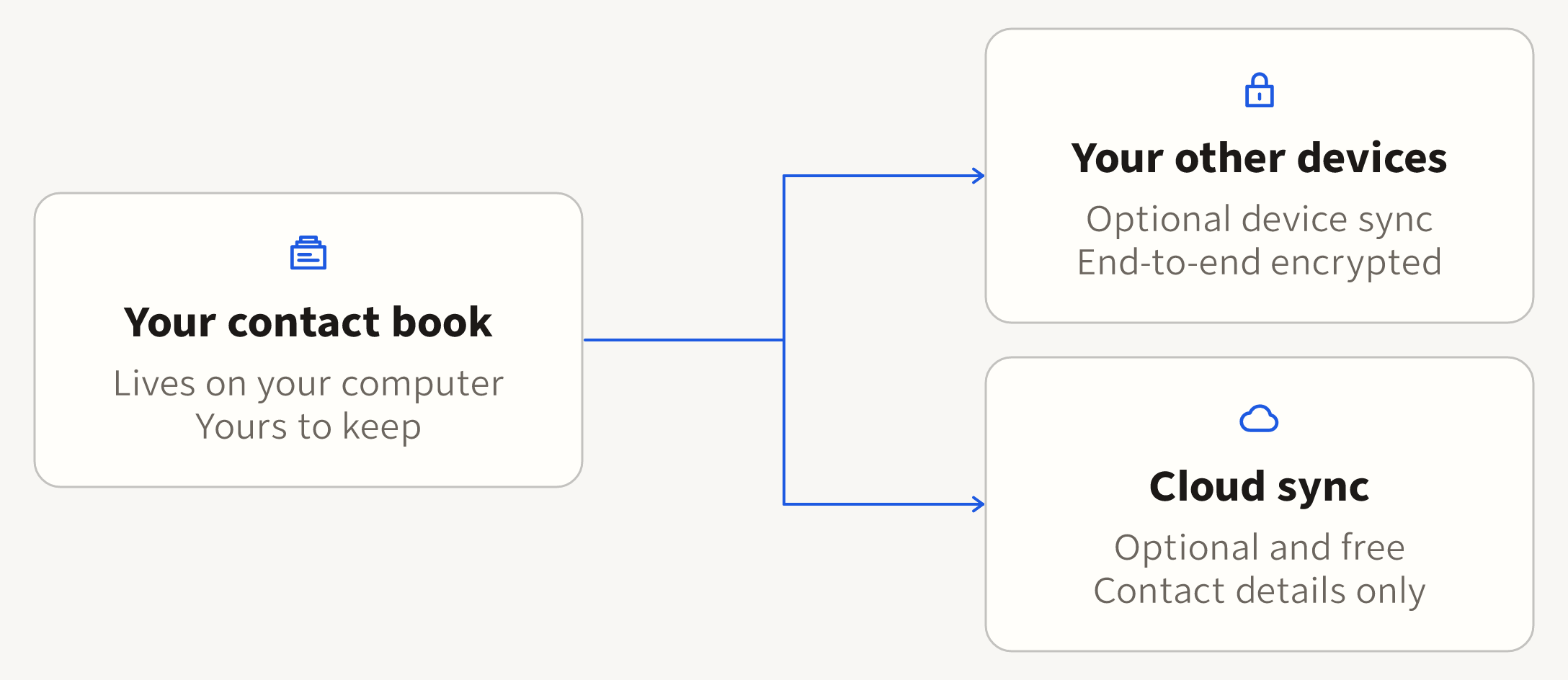
Your contact book is a SQLite database on your computer. Data leaves it only when you run a command that sends something: device sync, cloud sync, a research check on public profiles, an exposure check against breach and public-record sources, a Hunter work-email lookup, or sending a signed exposure summary to one contact. Each of those commands states what it sends.
Device sync (peopleblade sync) copies the whole book, notes included, to
your other devices. It is end-to-end encrypted, so the sync server stores only
ciphertext. It needs a PeopleBlade account, and you pair a device with a
six-digit code.
Cloud sync (peopleblade cloud sync) uploads only your contact details, the
contact projection, to your PeopleBlade account for devices you approve and for
hosted research, an optional service that looks up public details about a contact. It never includes notes, message text, or
account sign-ins.
Hosted research is optional and costs at most $0.16 per contact. Previewing a run is free and shows the contacts it would research. The final price is set when a run settles, from what it actually used, and you pay only for contacts where it saves at least one detail. Credits are prepaid, one credit per cent, in packs of $10, $25, $50, or $100. You pay through Stripe Checkout; Stripe sells the credits through Link and adds any tax at checkout. See peopleblade.com/privacy for every service a command can contact.
Limits
- Runs with Bun 1.3.14 or newer on macOS and Linux. Apple Contacts and iMessage need macOS.
- Substack sync handles publications up to 500 subscribers, and only for a publication you own.
- Signed-in accounts need GhostGet 0.18.44 or a later 0.18 release.
- X live mutuals need GhostGet 0.18.48 or a later 0.18 release and a browser signed in to X. GhostGet 0.18.57 is recommended.
- Telegram is not available.
- The CLI is free and MIT licensed. The web account page is not open source.
Optional support and updates
peopleblade support shows optional ways to support PeopleBlade and get product
updates. Nothing is charged or subscribed without your confirmation in the
browser, and the options never limit the tool. Set HRANESS_SUPPORT=off to hide
them.
Update or remove
Supported Bun and npm global installs check for a newer release at most once a day, before a command starts. When the installation is idle, PeopleBlade updates it with the same package manager and starts the command with the new version. The release check sends the package name to npm; it sends no contacts, command arguments, imported files, or credentials.
peopleblade update check --json
peopleblade update
peopleblade update disable   # keep the installed version
peopleblade update enable    # resume automatic updates
peopleblade update status --json
peopleblade skill install     # refresh the Agent Skill, if you installed it
bun remove --global @hraness/peopleblade
Set HRANESS_NO_UPDATE=1 to skip automatic updates for one invocation. CI,
help, version, capability discovery, and skill commands do not check for an
update. Source checkouts, project dependencies, transient runners, and linked
installs keep their existing update process. A Bun install with an exact
version, such as @hraness/[email protected], stays pinned until you run
peopleblade update enable.
npm does not reliably retain its original global version constraint; use
peopleblade update disable to keep the installed version.
Removing the package does not delete your contact book, its backups, or an installed Agent Skill folder.
Links
License
The public PeopleBlade CLI package is available under the MIT License. The license covers this npm package, not PeopleBlade's hosted service.
X audience counts
With an existing Ghostget X connection and one active numeric X identity for the
selected person, run peopleblade x reach refresh PERSON_ID --auth x-chrome --json.
peopleblade x reach show PERSON_ID --json reads saved exact follower and following
counts with their source and observation time. Unknown counts stay unknown. This
is a single-contact operation, with no discovery, bulk refresh or sending. A
changed numeric identity, ambiguous match, inactive source or do-not-contact flag
stops the refresh. Counts describe the past observation, not relationship strength
or permission to contact. Saved observations join encrypted device sync and stay
out of the hosted contact projection.