
@hushvert/engine
v0.2.4
Published
Client-side file conversion engine: images (incl. JPEG XL, BMP, TIFF, compress), archives, PDF page ops and rendering, audio, small video and DOCX preview as WebAssembly in the browser. Your files never leave your device.

Maintainers
 nirdiamant
Readme
@hushvert/engine



File conversion that never uploads the file.
A JavaScript/TypeScript library that converts images, HEIC, audio, video, archives, PDFs, and data files (CSV/JSON/YAML/XLSX) entirely in the browser, using WebAssembly. The heavy codecs run in Web Workers (images, PDF page ops, DOCX preview, and the worker-backed archive and ffmpeg libraries); the light text and vector modules (SVG, ICO, TXT, data, PDF render) run on the main thread. The bytes never touch a network. Open your network tab during a conversion and watch nothing leave, or pull the plug and watch it still work.
Try it live · Source on GitHub · Quickstart · What it converts · Serving the wasm assets · Heavy formats (hosted API)
This is the open-source engine behind hushvert, the private file converter. Source and issues live at github.com/hushvert/engine; the hosted API for server-only formats is at hushvert.com/for-developers.
Building an AI agent? There is also an MCP server,
@hushvert/mcp, that gives your
agent (Claude Code, Cursor, Claude Desktop) a convert_file tool over the hosted
API. It handles the conversions a browser cannot do, and refuses the ones it can,
pointing back to this engine so the agent never pays for a local conversion.
Demo
A 608 KB PNG converted to an 11 KB JPG with the network switched off. Both sides are formats the browser can draw, so you can watch the image come out intact - and watch nothing leave the machine while it does:
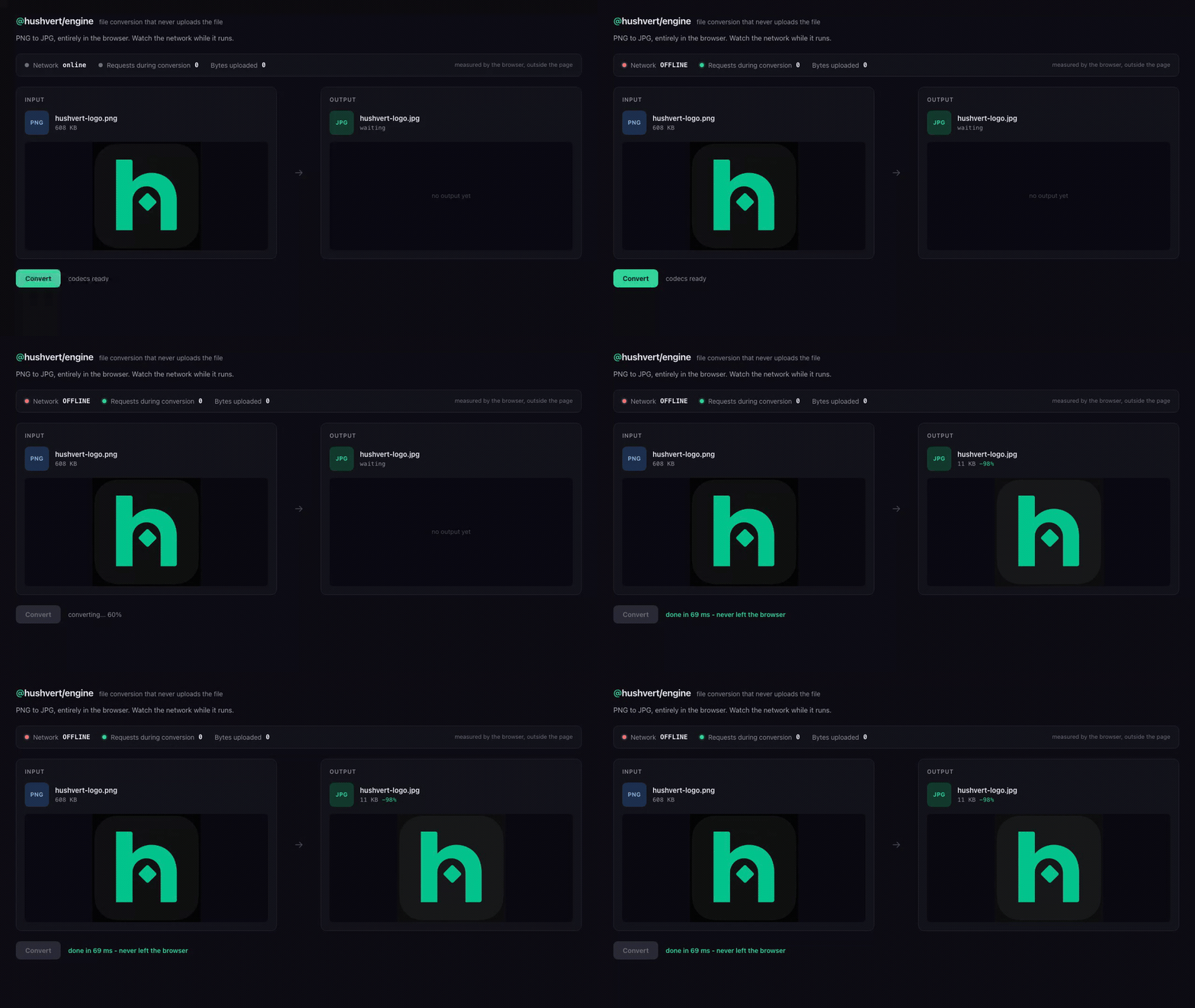
The counters in that strip are not the page talking about itself. The browser was put offline at the context level and every request it made was counted from outside the page, by the test harness driving it. During the conversion: 0 requests, 0 bytes uploaded, and across the entire page load, 0 requests to any host other than the app's own origin. The app and its wasm load from your origin like any web app; the file never moves.
The demo app, the image, and the harness that recorded it are all in
assets/demo-src,
so you can re-run it yourself: record.mjs fails if a single request fires while
the file is converting, so the GIF cannot drift away from the claim.
Why
Every other conversion library or API uploads the file to a server. That is a
retention policy to trust, a data-processing agreement to sign, and a breach
surface, for a file conversion. @hushvert/engine removes the upload entirely:
- Private by construction. The file stays on the user's device. Not a promise in a privacy policy, a fact you and your users can verify in the network tab.
- Zero server cost. Conversions run on your users' CPUs. Conversion volume never lands on your compute bill.
- Compliance-friendly. For apps that handle sensitive files (health, legal, finance, HR), there is no upload to secure in the first place.
Why not just wire up ffmpeg.wasm yourself?
You can, and for a narrow job you should.
If you only need JPG, PNG and WebP, use the canvas. canvas.toBlob() does
those three natively in about five lines, with no dependency and no wasm. Reach
for that instead; this package would be dead weight.
The canvas stops at those three. It will not decode the HEIC your users' iPhones
produce, and it will not touch AVIF or JXL encoding, audio, video, archives, PDFs
or spreadsheets. Past that line you are assembling it yourself: this engine is
seventeen upstream libraries (heic-to, six @jsquash codecs, ffmpeg.wasm,
libarchive.js, zip.js, pdf-lib, pdfjs, mammoth, xlsx, and friends)
behind one convertFile call, plus the parts that are genuinely annoying: which
codec owns which pair, wasm asset loading, Web Worker plumbing so the main thread
does not lock, progress reporting, and a format matrix that says what is actually
possible.
So the honest split: narrow and image-only, use the platform. Broad, or HEIC at all, and you are either building this or uploading the file. This is the third option.
Quickstart
npm install @hushvert/engineConvert your first file in three lines. Images need zero setup, the codecs are bundled:
import { convertFile } from '@hushvert/engine'

// HEIC, PNG, JPG, WebP, AVIF, JXL. No configuration required.
const jpg = await convertFile(
  heicFile,
  { from: 'heic', to: 'jpg', module: 'images' },
  (pct) => console.log(`${pct}%`),
)
// `jpg` is a Blob. It never left the browser.
That is the whole thing. jpg is a Blob you can download or preview, and the
input never touched a network. Every bundler needs one line of config first, see
the note directly below: Vite optimizeDeps.exclude, Next.js transpilePackages.
If your bundler complains
@hushvert/engine ships as TypeScript source, on purpose: that keeps its Web
Workers, WASM glue, and tree-shaking under your bundler's control, and keeps the
no-upload behavior auditable rather than hidden in a pre-built blob. The trade is
that your bundler has to transpile the package and resolve its
new Worker(new URL('./...worker.ts', import.meta.url)) calls. Most modern
bundlers need one line or nothing:
- Next.js: add it to
transpilePackages:// next.config.ts export default { transpilePackages: ['@hushvert/engine'] } - Vite: exclude the package from dependency pre-bundling:
Without this, Vite rewrites the package's// vite.config.ts export default { optimizeDeps: { exclude: ['@hushvert/engine'] } }new Worker(new URL('./workers/images.worker.ts', import.meta.url))into its.vite/depscache, the worker fails to load, and the first conversion dies withConvertError: Conversion worker crashed. Verified on Vite 6. (Rollup, which has no pre-bundling step, resolves the workers as-is.) - Webpack 5 (standalone): two things. Your
ts/babelloader rule must not excludenode_modules/@hushvert/engine, and.jsin dependencies needsfullySpecified: false:
Without the first rule the build fails with// webpack.config.js module: { rules: [ { test: /\.js$/, resolve: { fullySpecified: false } }, { test: /\.ts$/, exclude: /node_modules\/(?!@hushvert\/engine)/, use: 'ts-loader' }, ], }Can't resolve '../../../' in .../wasm-bindgen-rayon-*/src: one of the image codecs ships a"type": "module"package whose worker helper imports a directory, which ESM does not allow. Web Worker URL resolution itself is on by default in Webpack 5. Verified on Webpack 5.108.
If you hit Can't resolve './workers/...worker.ts' or a syntax error on an
import from the package, the bundler is not transpiling it - add the line above.
If conversions fail with Conversion worker crashed and the network tab shows the
worker URL failing, the bundler is rewriting the worker path - that is the Vite
case above.
Each of these is checked against the published tarball rather than this repo: a
throwaway app per bundler, installing @hushvert/engine from npm, converting a
real HEIC in a real browser. As of 0.2.2 that is Vite 6.4, Next.js 15.5 (next dev
and next build + next start, under both strict: true and strict: false),
and Webpack 5.108. If your bundler is not on that list, the instructions for it are
untested, and an issue with the error text is genuinely useful.
The asset copying and configureEngine call in the next two sections are checked
the same way, in a real browser against the installed package: avi to mp3
through ffmpeg, 7z to zip through libarchive, and pdf to png through pdfjs,
each asserting the output is a real file of that type and that the vendored assets
were actually served from the app's own origin.
CI cannot do this for you, and it is worth knowing why: this package ships
TypeScript source, so your tsconfig compiles it and your bundler resolves
its workers. Our test suite passing says nothing about whether the package works in
your project. scripts/check-consumer-install.mjs in the repo packs the tarball,
installs it into a clean app, and compiles it under both strict settings on every
CI run, because two bugs of exactly that shape shipped in 0.2.1 and were invisible
to our own typecheck.
Heavier formats need one config call
Audio, video, archive and PDF-render conversions run from WASM workers your app
serves, so they need a one-time configureEngine call pointing at those assets:
import { configureEngine, convertFile } from '@hushvert/engine'

configureEngine({
  ffmpeg: {
    coreUrl: '/vendor/ffmpeg/ffmpeg-core.js',
    wasmUrl: '/vendor/ffmpeg/ffmpeg-core.wasm',
    classWorkerUrl: '/vendor/ffmpeg/worker.js',
  },
  libarchiveWorkerUrl: '/vendor/libarchive/worker-bundle.js',
  pdfjsWorkerUrl: '/vendor/pdfjs/pdf.worker.min.mjs', // only for pdf-render
})

const wav = await convertFile(mp3File, { from: 'mp3', to: 'wav', module: 'audio-video' })
See Serving the wasm assets for those asset paths.
The pair is a plain object: from, to, and which module runs it, plus an
optional op: 'merge' for multi-file combines via convertFiles (n PDFs into
one, n images into one PDF) and 'compress' for the same-format shrink op. Keep
your own format matrix as the routing authority and pass its rows through.
What it converts
Every pair below is reachable today; the modules are the engine's own
ENGINE_MODULES, and your app's format matrix stays the routing authority
(it decides WHICH pairs exist and passes its rows to convertFile).
| Module | Runs in | Pairs | Powered by |
| -------------- | ------------- | ---------------------------------------------------- | --------------------------- |
| images | Web Worker | png / jpg / webp / avif / jxl interchange, heic / bmp / tiff decode to jpg / png, compress op (jpg re-encode, lossless png oxipng) | @jsquash/*, heic-to, utif2 |
| archives | main + own worker | tar / tar.gz / 7z to zip, plus listing and per-entry extraction | libarchive.js, @zip.js/zip.js |
| pdf | Web Worker | merge n PDFs into one, combine n images (jpg / png) into one PDF | @cantoo/pdf-lib |
| pdf-render | main thread | PDF pages out as png / jpg (multi-page becomes a zip) | pdfjs-dist |
| svg | main thread | svg to png / jpg / pdf (rasterized via <img> + canvas) | browser canvas, @cantoo/pdf-lib |
| ico | main thread | png / jpg to multi-size ICO favicon | browser canvas |
| txt | main thread | pdf to txt (text-layer extract), txt to pdf (typeset) | pdfjs-dist, @cantoo/pdf-lib |
| data | main thread | csv / json / xlsx tabular interchange, json to / from yaml | SheetJS (xlsx), js-yaml |
| audio-video | main + own worker | mp3 / wav / m4a / flac / ogg audio (and mov / mkv / webm / avi / aac / aiff / wma to mp3), mp4 to webm (small video) | ffmpeg.wasm (singlethread) |
| docx-preview | Web Worker | docx to clean semantic HTML | mammoth |
Office documents to PDF, PDF to Word, and large video genuinely cannot run in a browser; those need a server and are out of scope for this client engine. If you need them, hushvert runs a hosted, usage-metered API for exactly those heavy formats (self-serve API key, free monthly allowance, then account credits): see hushvert for developers.
Heavy formats via the hosted API (opt-in)
By default a server-only pair (office docs, PDF to Word, large video) throws
unsupported-pair: this engine only runs client work. If you want those heavy
formats through the SAME convertFile call, opt in by configuring an API key.
Your hosted API key is a billing secret. Use it only from a trusted server context. Any key placed in browser-bundled code is public: anyone can open DevTools or read your JS bundle and lift it, then spend your credits. So configure
hostedApiserver-side (a Node route, an edge function, your backend) where the key never reaches the browser. If you need heavy conversions from the browser, put a thin proxy of your own in front of the hosted API and keep the key on the server side of that proxy. The client pairs in this engine never need a key and never touch the network; only this opt-in hosted path does.
// server-side only (e.g. a Node route handler, an edge function, a queue
// worker) - never a file that ends up in the browser bundle.
import { configureEngine, convertFile } from '@hushvert/engine'

configureEngine({
  hostedApi: {
    apiKey: process.env.HUSHVERT_KEY!, // server env var, from hushvert.com/developers/keys
    // baseUrl defaults to 'https://hushvert.com'
  },
})

// Server-only pairs route transparently to the hosted API: submit, upload,
// poll, download. Pass the pair's matrix row; the SDK resolves the slug
// ("<from>-to-<to>" if you do not pass one, the convention for every server
// pair). The `module`/`engine` fields are the host matrix's own values; the SDK
// routes server pairs by `engine: 'server'`, not by `module`.
const pdf = await convertFile(
  docxFile,
  { from: 'docx', to: 'pdf', module: 'office', engine: 'server', slug: 'docx-to-pdf' },
  (pct) => console.log(`${pct}%`),
)

// Client pairs still run 100% in the browser when the SDK runs in the browser,
// exactly as before - configuring hostedApi changes nothing about them.
const png = await convertFile(heicFile, { from: 'heic', to: 'png', module: 'images' })
Cross-origin / CORS
The hosted bridge calls hushvert.com from your origin, so when you run the SDK
in a browser (behind your own proxy, or against a self-hosted baseUrl) the
hosted endpoints answer cross-origin requests; that is supported. The presigned
R2 upload (PUT) and download (GET) are served from the storage host, so that
bucket's CORS policy must allow your origin for those two requests to
succeed from a browser. From a server context there is no CORS to satisfy.
What stays true, precisely:
- Client pairs never touch the network. Configuring
hostedApichanges nothing about how an image, audio, archive, PDF page-op, or other client pair runs: it is still WASM in your browser, no upload. The CI network-clean test still holds. - The hosted path is explicit opt-in, server formats only. It activates only
when (a) you configured
hostedApiAND (b) the pair is server-only. With no key configured, a server-only pair throwsunsupported-pairexactly as before and no request is made. The only request that ever carries your file is the hosted upload, which you opted into for a format a browser cannot do. - One file at a time. The hosted API converts a single file per call; pass
one file to
convertFile.
The hosted call is the only network code in the package, isolated in
src/hosted.ts so the no-upload guarantee on the client path
stays trivial to audit.
Verify it yourself
The privacy claim is the whole point, so it is built to be falsifiable:
- Open your browser DevTools, Network tab.
- Convert a file with the engine.
- No request carries your file. (Or go fully offline first; conversion still completes, because nothing is being uploaded.)
The hushvert app ships a CI test that fails the build if any request during a conversion carries file bytes or reaches a third-party host.
Serving the wasm assets
Three modules need assets served by your app, same-origin (which is also what
keeps the privacy claim verifiable). Copy out of node_modules at build time:
libarchive.js/dist/worker-bundle.jsandlibarchive.js/dist/libarchive.wasminto one directory; pass the bundle URL aslibarchiveWorkerUrl.@ffmpeg/core/dist/esm/ffmpeg-core.js+ffmpeg-core.wasm, and@ffmpeg/ffmpeg/dist/esm/worker.js+const.js+errors.jsinto one directory; pass the three URLs inffmpeg.pdfjs-dist/build/pdf.worker.min.mjs; pass its URL aspdfjsWorkerUrl(only needed for thepdf-rendermodule).
Everything else (image codecs, zip.js, pdf-lib, mammoth) is bundled by your
bundler; the engine creates its workers with the standard
new Worker(new URL(...), { type: 'module' }) pattern that webpack, Vite and
friends all understand. The package ships TypeScript source and expects to be
consumed through a bundler.
Installing behind a private registry (the xlsx dependency)
The spreadsheet (data) module depends on SheetJS, which is declared as a CDN
tarball - "xlsx": "https://cdn.sheetjs.com/xlsx-0.20.3/..." - not an npm
registry version. This is deliberate: the registry's xlsx is frozen at 0.18.5
with known prototype-pollution / ReDoS CVEs, and 0.20.3 (CDN-only, lockfile-pinned
with an integrity hash) is clear of them. The trade-off is that npm install
@hushvert/engine needs cdn.sheetjs.com to be reachable.
If you install through a proxy/mirror registry (Artifactory, Nexus, Verdaccio) or
behind a firewall, allowlist cdn.sheetjs.com, or pin your own mirror of SheetJS
0.20.3 via an overrides/resolutions entry. If you do not use the data
(CSV/JSON/YAML/XLSX) module at all, the import is lazy, so a blocked CDN does not
affect any other conversion at runtime - only the install step.
Why singlethread ffmpeg
The multithreaded ffmpeg core needs SharedArrayBuffer, which requires COOP/COEP
headers on every embedding page; COEP in turn breaks common third-party embeds
(CAPTCHAs, ad iframes) on at least some browsers. The singlethread core runs
everywhere with zero header requirements and is fast enough for audio and small
video. Hosts who control their headers can swap in the multithreaded core URLs
with no engine changes.
Limits worth knowing
- Audio inputs were tested to 1GB on desktop Chrome; cap near 200MB for low-memory devices.
- Video encoding is singlethread wasm: budget roughly real time. Keep inputs small (hushvert caps mp4 to webm at 50MB) and route bigger jobs to a server.
- The docx preview is semantic by design (mammoth): structure survives, page-perfect layout does not.
Contributing
Issues and PRs welcome at github.com/hushvert/engine. The engine is intentionally small and dependency-honest: each module names the library that powers it, and the one rule that never bends is that no module may send file bytes over the network. See CONTRIBUTING.md for the short version and SECURITY.md for responsible disclosure.
Releases (maintainers)
Publishing is automated: bump the version in package.json, then push a matching
engine-v* tag (e.g. git tag engine-v0.2.1 && git push origin engine-v0.2.1).
CI runs the package gate (prepublishOnly: lint, typecheck, test, build) and
publishes to npm with provenance. Without the NPM_TOKEN secret the workflow does
a npm publish --dry-run instead, so it is safe to tag before the token exists.
License
The engine's own source is MIT: inspect, run, fork, and ship it. Source: github.com/hushvert/engine.
Some runtime DEPENDENCIES carry their own (including copyleft) licenses, so the combined work you ship is not MIT-only. Two are copyleft:
@ffmpeg/core(audio/video, theaudio-videomodule) is GPL-2.0-or-later. Its wasm is served as a separate asset you copy fromnode_modules(see "Serving the wasm assets"); if you distribute that asset you take on the GPL's source-availability obligations for it.heic-to(HEIC decoding) is LGPL-3.0 and is loaded only when a HEIC conversion runs.
The full per-dependency list is in THIRD_PARTY_LICENSES.md. If your project cannot take on GPL/LGPL obligations, do not enable the audio/video or HEIC paths (the engine is modular and lazy-loads each codec, so unused ones are never pulled in). This disclosure is deliberate: the project's honesty discipline applies to its own license story too.