
@hytime/dsh-client-ui-shortcuts
v0.1.23
Published
Profile-aware keyboard shortcuts for the DeepSeek Harness Web Client

Maintainers
 hytime
Readme
DSH Client UI Shortcuts



English | 中文
为 DeepSeek Harness Web 提供 browser-safe、profile-aware 的键盘控制。
插件运行在 DSH Web 内,为 Question 和 Approval 流程提供可预测的键盘操作,并在相应 DSH 能力可用时提供 Session 与 Workspace 导航。它不修改 DSH core、agent loop 或模型协议。
为什么安装
- 无需离开键盘即可回答 DSH Question 和 Approval。
- 为交互卡片和全局动作选择只读的 Standard、Vim profile,或创建并切换多个命名 Custom profile。
- 使用显式的物理
Meta、Ctrl、Alt和Shift修饰键导航 Session 与 Workspace。 - 打开已有的可用 Session 前,自动展开处于折叠状态的目标 Workspace。
- 当 DSH 不提供所需能力时,不将不可用动作加入路由和快捷键列表。
- 遵守浏览器和操作系统边界:浏览器保留的快捷键可能不会到达网页。
展示图
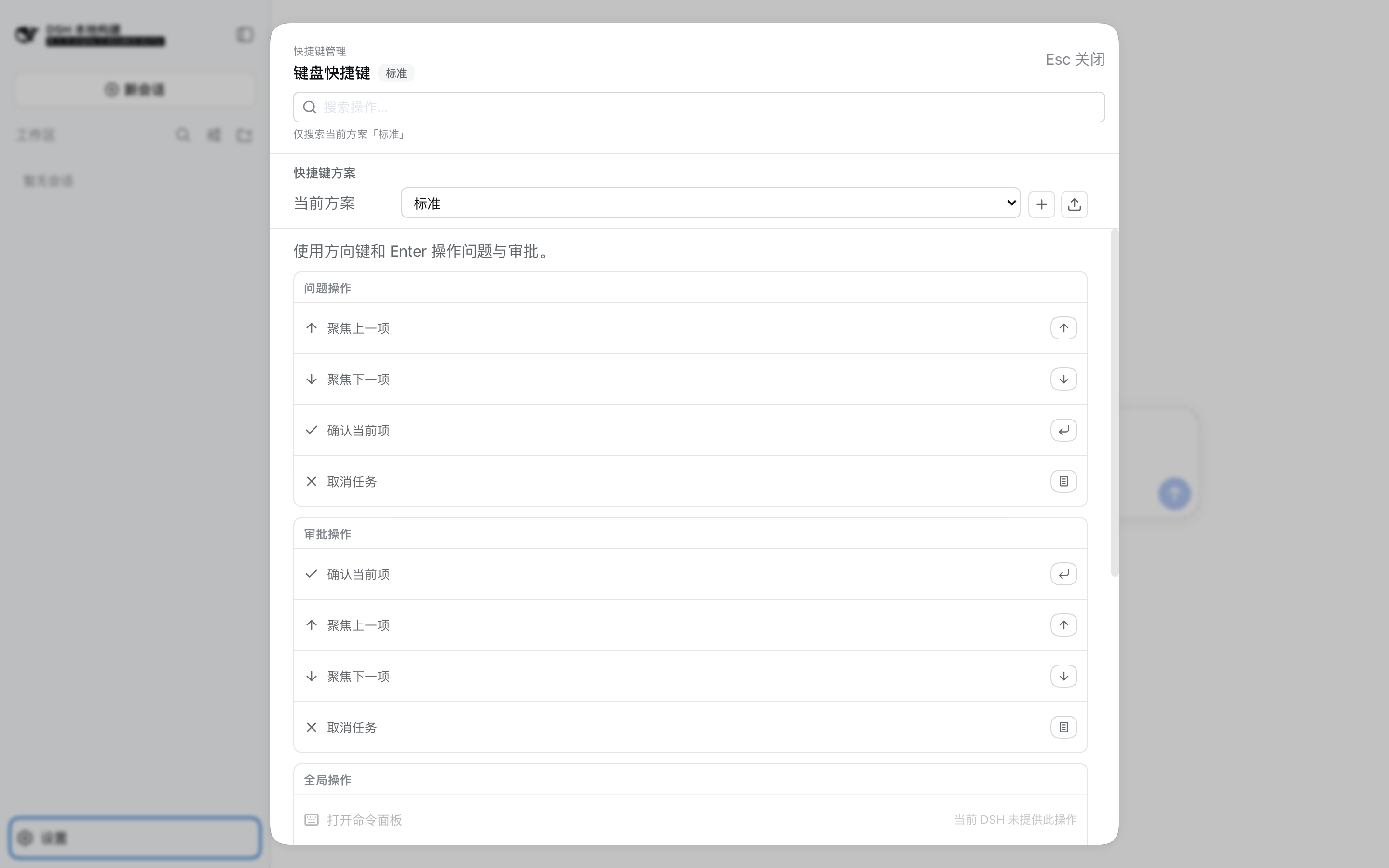
Meta+Alt+Shift+S 打开的统一快捷键管理面板(Standard 只读方案):
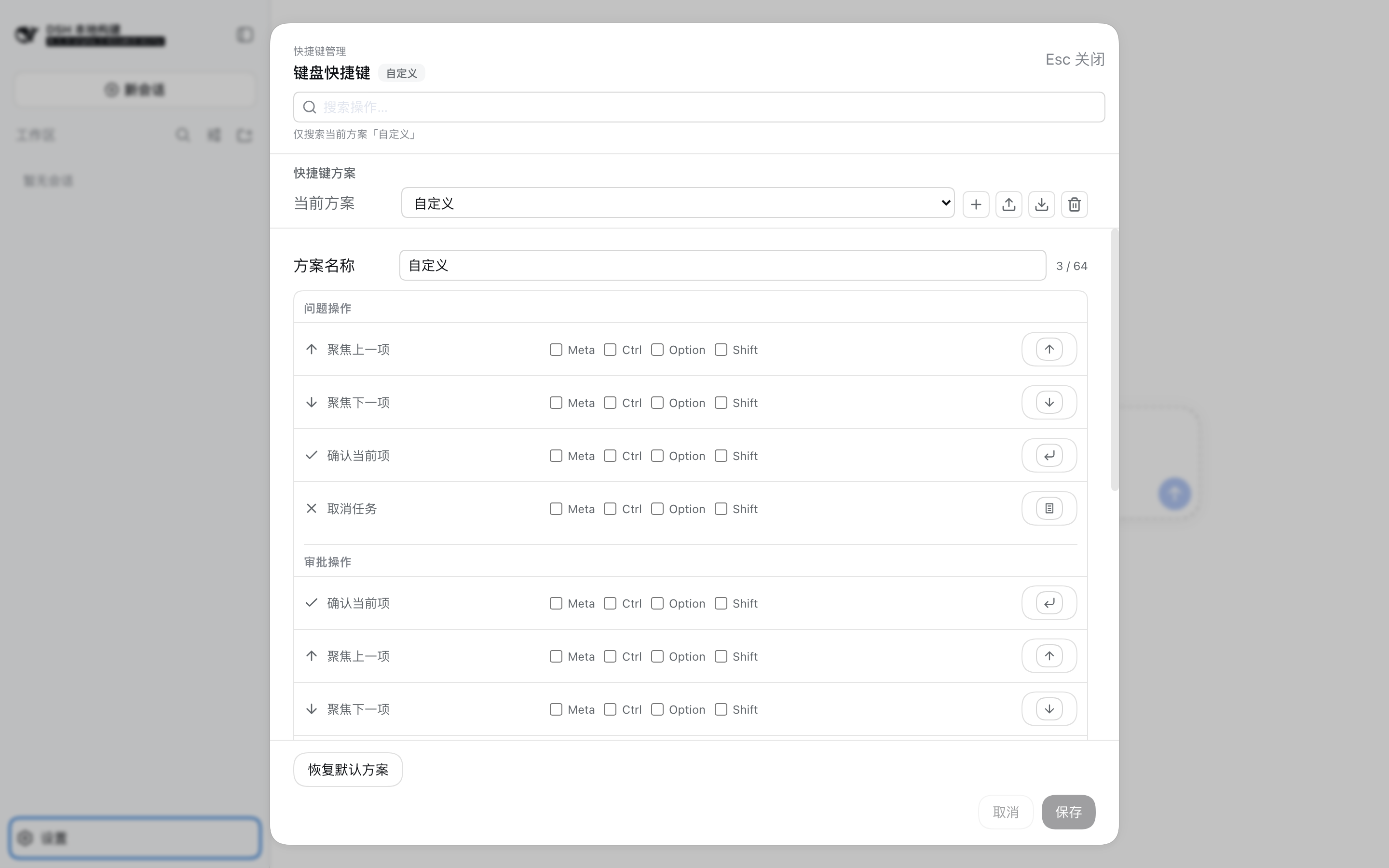
Custom 方案在同一列表中直接编辑,保存 / 取消 / 恢复默认固定在面板底部:
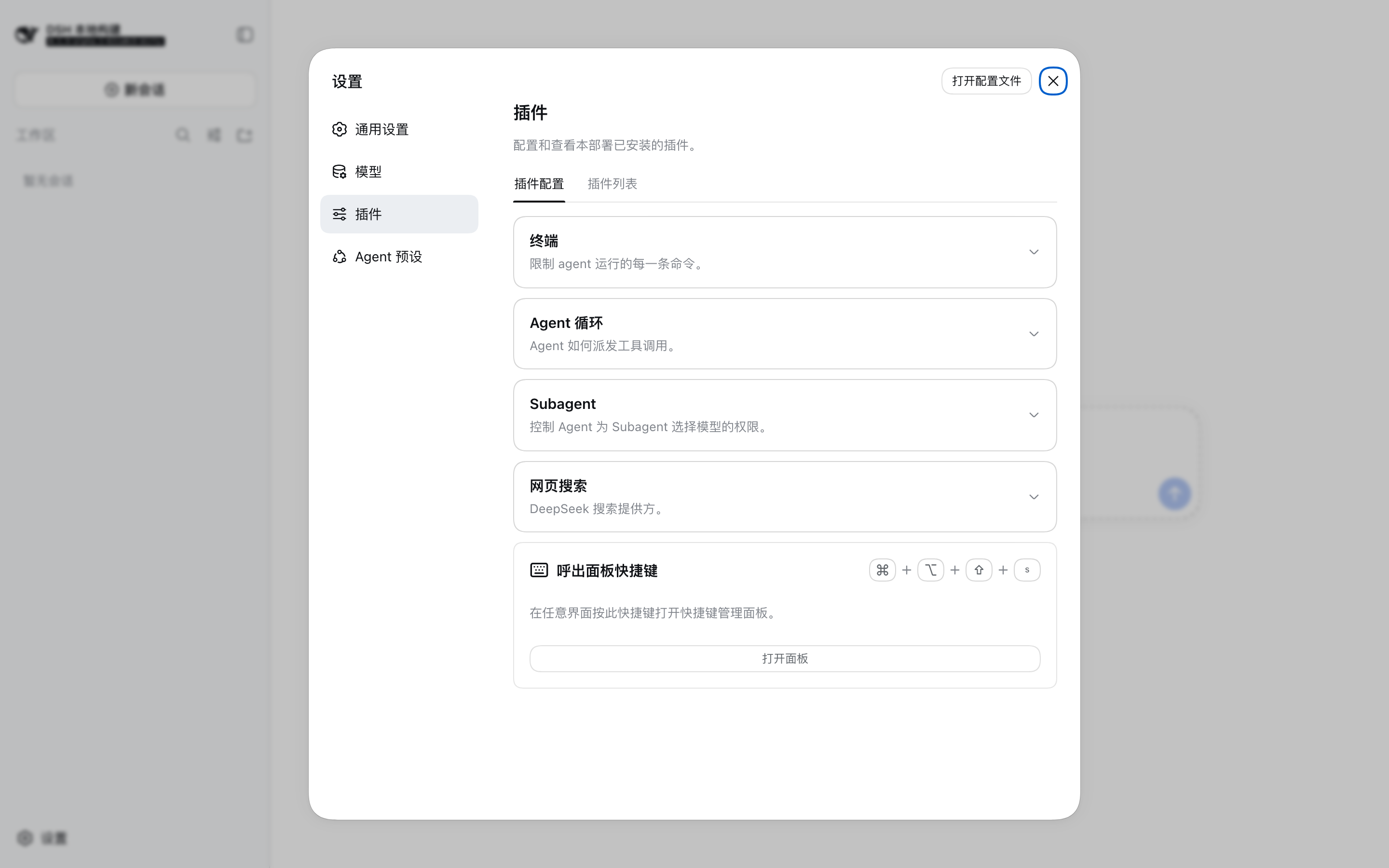
设置页插件区的「呼出面板快捷键」入口,点击即可打开面板并定位到该行:
60 秒安装
推荐安装 npm 发布包,因为其中已经包含预构建的 lib/ 产物,不需要在安装阶段执行构建。通过 DSH CLI 安装插件,然后重启或重新加载 Web composition:
dsh plugin --profile web add @hytime/[email protected]
dsh --profile web
如需改为安装 GitHub 源码,请固定 release tag 或 commit,不要直接安装默认分支:
dsh plugin --profile web add github:hytime/dsh-client-ui-shortcuts#v0.1.14Git 安装会在安装阶段执行包的 prepare 脚本。pnpm 可能要求将错误信息给出的精确 package key 加入 profile 的 allowBuilds;只应为可信且已固定的源码授予该权限。完整步骤见安装指南。
本插件不是独立的 React 或 Vite 应用。不要直接打开 apps/web,也不要使用 npm install、pnpm add 或手动修改 DSH profile manifest、lockfile 的方式安装到 profile。
升级、移除、本地 tarball、profile 检查和排错步骤见安装指南。
当前包含的能力
- Question 卡片:单选、多选、自定义答案、跳过、上一题和提交。
- Approval 卡片:允许一次、拒绝、详情、取消和键盘确认。
- 只读的 Standard、Vim profile,以及多个可命名、可编辑的 Custom profile;同一时间只有一个 profile 处于 active 状态。
- 使用 New、Import、Export 和 Delete 管理可迁移的 Custom profile;导出内容只包含一个已保存方案,不包含内部 ID。
- 显式物理
Meta、Ctrl、Alt和Shift修饰键、候选绑定和两段 chord。 - 浏览器保留快捷键 denylist 与冲突检查。
- 对当前 DSH 组合中不可用功能进行能力检查。
- 在相应 DSH 能力可用时提供 Session、Workspace、session branch 和主题操作。
Meta+Alt+Shift+S打开完整快捷键管理面板:方案切换(Standard / Vim / Custom)、新建 / 导入 / 导出 / 删除方案、Custom 键位编辑,以及一个带搜索的、按 Question/Approval/Global 分组的统一快捷键列表。- 设置页插件区保留一个轻量的「呼出面板快捷键」入口:显示当前呼出键,点击打开面板并自动定位到该行,方便随时修改呼出键。
快捷键参考
Question 和 Approval 卡片
| 命令 | Question | Approval |
| --- | --- | --- |
| 聚焦上一项 | ArrowUp | ArrowUp |
| 聚焦下一项 | ArrowDown | ArrowDown |
| 激活当前项 | Enter | Enter |
| 取消当前任务 | Escape | Escape |
Vim profile 会将两个聚焦绑定替换为 k 和 j;确认和取消仍使用 Enter 与 Escape。这些绑定只在当前交互卡片内生效。
全局动作
当前 profile 的默认全局绑定如下:
| 动作 | 默认绑定 |
| --- | --- |
| 创建 Session | Meta+Alt+Shift+N |
| 上一个 Session | Meta+Alt+Shift+J |
| 下一个 Session | Meta+Alt+Shift+K |
| 上一个 Workspace | Meta+Alt+Shift+H |
| 下一个 Workspace | Meta+Alt+Shift+L |
| Fork 当前 Session | Meta+Alt+Shift+B |
| 切换浅色/深色主题 | Meta+Alt+Shift+T |
| 查看快捷键 | Meta+Alt+Shift+S |
只有在 DSH 提供所需能力时,才会注册全局动作。查看快捷键 是纯浏览器行为、恒可用,按下即打开当前 profile 的完整快捷键管理面板。默认键 Meta+Alt+Shift+S 可在 Custom profile 中改绑;设置页的「呼出面板快捷键」入口可随时定位并修改它。
Profile 与 Custom binding
Standard 使用方向键、Enter 和 Escape 处理 Question 与 Approval 交互。Vim 使用 j/k、Enter 和 Escape。这两个内置 profile 均为只读。
可在快捷键管理面板(Meta+Alt+Shift+S 打开)中创建多个命名 Custom profile,并切换当前 active profile。新建方案会复制当前 profile 的 binding,名称与 binding 在一次操作中保存。每次导入都会创建新的内部 profile ID;重名时会使用连续数字后缀,例如 Name 1、Name 2。只有当前 active 且已保存的 Custom profile 可以导出,生成不含内部 ID 的单方案 JSON v1 文档。删除操作需要确认;删除 active Custom profile 前会先切回 Standard。JSON 格式与限制见安装指南。
Custom profile 可以编辑 Question、Approval 以及由 capability 支持的全局 binding,包括显式修饰键、候选绑定和两段 chord。
按物理 KeyboardEvent.code 匹配按键,并归一化 Esc/Escape、Return/Enter 等别名;会拒绝前缀冲突,并将 chord 限制为最多两段。在 macOS 上,Meta 显示为 Command,Alt 显示为 Option;其他平台将 Meta 显示为 Windows 键,Ctrl 显示为 Control。
当前公开的物理修饰键只有 Meta、Ctrl、Alt 和 Shift。Mod 仅用于旧持久化配置的迁移:读取旧配置时会迁移为 Meta,保存时不会写回 Mod。
浏览器和平台边界
路由器使用浏览器的 capture-phase listener。它会让位于未匹配的文本输入、IME composition、重复事件、待处理的 Question 或 Approval 接管,以及由宿主拥有焦点的 popup。由于全局 binding 是显式配置的,全局动作即使从 input 或 contenteditable 元素中触发,也可以执行。
浏览器 denylist 覆盖已知的 Chrome、Safari、Firefox 和 Edge 组合,并用于冲突检查。它无法查询任意操作系统或浏览器快捷键的占用情况;浏览器或操作系统保留的快捷键可能根本不会把事件分发给网页。capture listener 只能阻止浏览器已经分发到页面的快捷键。
Workspace 与 Session 导航
Session 导航遵循当前 Workspace 保存的 Session 顺序,并跳过 archived、subagent 和 blank Session。Workspace 导航会在目标 Workspace 中打开已有的非 blank Session。
如果目标 Workspace 处于折叠状态,插件会先自动展开它,再打开符合条件的已有 Session。导航不会创建 blank Session,也不会调用 connectWorkspace 来制造目标。
界面语言
面板提供简体中文与英文(DSH 自带的两种语言),另外提供日文与韩文——这两种语言由本插件注册为可选语言。在 DSH 设置的「语言」中选择即可,插件渲染的所有界面都会跟随切换;新增语言在缺少某个键时回退到英文。
日文与韩文能否「被选择」依赖 locale 服务的 addLanguage,而 0.1.0-rc.8 与 0.1.1-rc.2 未提供该方法。在这两个版本上插件仍正常加载,只是仅提供中文与英文。
DSH 兼容边界
DSH 0.1.7-alpha.1 将客户端 settings service settingsScope 改为 configForms。兼容适配层优先使用 configForms 并回退旧版 binder,因此已移除的服务不会成为启动硬依赖,同时继续支持 DSH 0.1.6-alpha.2。
一个发布包支持 DSH 0.1.6-alpha.2 及以后版本(0.1.6-alpha.2 是引入 plugins.bundle.config 的第一个版本),且不再依赖 @deepseek-ai/dsh-client-runtime(该包在 0.1.5-alpha.1 已停止发布)。更早的世代——0.1.0-rc.8 至 0.1.1-rc.2、0.1.2-alpha.1、0.1.5-*——不再受支持;兼容层的运行时能力探测仍然保留,因此它们不会崩溃,而是退化为插件原有行为(例如落到旧的设置页坐席),但不再纳入验收与修复范围。浏览器 adapter 按运行时能力探测,不按 DSH 版本号分支:优先使用当前的 remote.settings,否则回退旧版 Connection settings API;新建 Session 优先使用 uiWorkspace.startSession,否则回退 workspaces.startSession;pending interaction 优先读取 uiSession,否则读取旧版 Session summary;只有在 locale 服务提供 addLanguage 时才注册日文与韩文语言项;设置页入口卡片注入运行中 composition 实际声明的插槽——DSH 0.1.6 及以后为 plugins.bundle.config(按 bundle 包名寻址),此前各代为 settings.plugin.item(按 settings namespace 寻址)。插件只能通过真实的 DSH Web composition 和 DSH 启动与模块加载器加载。安装更新不会替换已经在打开页面中运行的代码;请重新加载 Web 组合,才能加载新的 Client bundle。
开发与验证
下面的命令用于开发本包,不是 profile 安装命令:
pnpm install
pnpm run bundle
pnpm run typecheck
pnpm exec vitest run tests
完整的 DSH composition 流程见安装指南。浏览器验证必须通过带有 boot data 的真实 DSH Web profile;apps/web Vite entry 不是独立的验证目标。
常见问题
会改变模型行为吗?
不会。本插件只改变浏览器交互,不增加 tool、prompt section、模型可见 event 或 model request context。
为什么没有看到某个全局动作?
全局动作仅在当前 DSH 组合提供所需能力时可用。不可用的动作不会注册,也不会显示对应的快捷键行。
为什么隐藏设置快捷键?
DSH 没有公开的设置打开方式,因此保留的 Meta+, 绑定会保持隐藏,不会被激活。
如何查看和管理当前 profile 的快捷键?
随时按 Meta+Alt+Shift+S(默认键,可在 Custom profile 中改绑)打开完整快捷键管理面板。它搜索当前 profile 的命令并区分 Question、Approval 和 Global 操作,同时提供方案切换、新建 / 导入 / 导出 / 删除与 Custom 键位编辑,不依赖 DSH 是否打开设置页。
如何修改打开面板的快捷键?
设置页插件区的「呼出面板快捷键」入口显示当前呼出键,点击会打开管理面板并自动定位到该行。若当前是只读的 Standard / Vim 方案,面板会提示先切换到 Custom 方案即可修改;切到 Custom 后改键保存,下次用新键呼出面板。
安装更新后,当前打开的页面为什么没有变化?
DSH 需要重新加载 Web composition,浏览器才会加载新的 Client bundle。安装包不会替换已经在浏览器中运行的代码。
不使用 DSH Web 可以运行吗?
不可以。浏览器产物是 DSH loader factory,依赖 DSH boot 注入、slots、settings、locale 和运行时环境。
相关链接
License
MIT