
@hytime/dsh-thinking-effort
v0.2.0
Published
为 DSH 的 pi-ai 第三方模型补充可配置的思考强度档位,并设置子 agent 默认思考强度。

Maintainers
 hytime
Readme
dsh-thinking-effort
为 DSH(DeepSeek Harness) 的 llm-pi-ai 第三方模型补充可配置的思考强度档位,并设置子 agent 的默认思考强度。



- English README
- 日本語 README
- 한국어 README
- 安装指南
- English installation guide
- 日本語インストールガイド
- 한국어 설치 안내
- 版本更新日志
- 日本語 changelog
- 한국어 changelog
兼容边界: DSH Runtime compatibility 只负责 Settings 传输:新版 DSH 使用
remote.settings,旧版 DSH 使用connection.api.settings。插件按运行时实际能力进行探测;旧版没有 Remote provider 时不会因此要求可选的 Remote 服务。Gateway Protocol compatibility 是独立的一层。DSH schema 提供时,插件支持 15 个常用标量
llm-pi-ai.compat字段,按角色与推理、格式与输出、流式与工具、存储与缓存 4 组组织。boolean 字段可设为「自动」「支持」或「不支持」,enum 字段可设为「自动」或具体取值。DSH0.1.0-rc.7不提供网关兼容设置;0.1.0-rc.8至<0.1.2-alpha.1支持其他字段,但没有supportsFinishReason和supportsThinkingTokenBudget;0.1.2-alpha.1及更高版本在 schema 支持时提供全部 15 个字段。安装并启用可选的dsh-llm-openai-completionstransport 后,它可以接管符合条件的自定义 OpenAI 兼容思考模型供应商。「自动」会取消当前层覆盖,并恢复继承链中的下一层取值。DSH
0.1.2-alpha.1及更高版本通过LocaleRuntime支持语言包注册外部 locale ID。本插件会动态注册ja和ko,无需维护 DSH fork。只支持固定内置 locale ID 的旧版 DSH 仍只能使用zh和en。发布包的运行入口是
lib/index.js(Host)和lib/client.js(Client)。修改 TypeScript 或 locale 源文件后,运行npm run build,再启动 DSH 或打包插件。当前 DSH 没有公开的 semver metadata 契约,因此运行时能力探测是权威来源。只有显式 metadata 或测试输入提供时才使用可选版本;未知合法版本仍按实际能力运行。插件同时支持新版remote.settings和旧版connection.api.settings。
DSH 版本兼容
| DSH 范围 | 网关兼容设置 |
| --- | --- |
| 0.1.0-rc.7 | 不支持 |
| 0.1.0-rc.8 至 <0.1.2-alpha.1 | schema 暴露时可用,但没有 supportsFinishReason 和 supportsThinkingTokenBudget |
| 0.1.2-alpha.1 至 <0.1.3-0 | schema 暴露时支持全部 15 个字段 |
从 DSH 0.1.0-rc.8 起,后续支持范围均以运行时 schema 暴露为准。
为什么需要它?
DSH 的 llm-pi-ai 适配器允许你手工声明第三方模型,但这些模型通常没有 reasoningEfforts 配置。因此,Composer 的模型选择器不会显示「推理等级」,你也无法把网关实际支持的值(例如 ultra)映射到 DSH 的标准档位。
这个插件解决的是配置层问题:
- 自动为没有声明档位的第三方模型补上默认选项,安装后即可在 Composer 中看到「推理等级」;
- 在设置页按模型自定义档位,并把
high映射为网关需要的任意字符串,例如ultra; - 为子 agent 设置统一的默认思考强度,同时保留显式指定值的优先级;
- 子 agent 的自定义线上值会按实际模型的
reasoningEfforts映射回标准档位,找不到映射时不会注入非法档位; - 不修改已经存在的用户自定义档位,避免覆盖现有配置。
适合谁?
如果你满足下面任一情况,这个插件通常值得安装:
- 通过
llm-pi-ai手工接入了 OpenAI 兼容或其他第三方模型; - 模型接口支持思考强度,但 DSH 的模型选择器没有显示对应选项;
- 不同网关使用不同的线上值,需要把 DSH 的
high、max等档位映射为ultra、reasoning等字符串; - 希望控制子 agent 的成本与响应质量,而不影响主 agent 的显式配置。
如果你只使用 DSH 内置模型,且 Composer 已经提供正确的推理等级,这个插件不是必需品。
标识说明
这几个名称职责不同,请不要混用:
| 名称 | 用途 |
| --- | --- |
| @hytime/dsh-thinking-effort | npm 包名、浏览器 bundle 请求路径、模块加载器注册 ID 和宿主/客户端运行时 ID,安装、升级和卸载时使用 |
| thinking-effort | Cordis 组合条目 ID 和设置页 Slot ID |
功能概览
| 功能 | 作用 |
| --- | --- |
| 默认档位补齐 | 为缺少配置的模型添加 off、high、max,不覆盖已有自定义值 |
| 模型级编辑 | 在「设置 → 模型能力与档位」中逐模型勾选档位并填写线上值;catalog/modelOverrides 和 models[] 模型都可编辑 compat |
| 网关兼容配置 | 按 provider 全局或单个模型配置 15 个常用标量字段,按角色与推理、格式与输出、流式与工具、存储与缓存分组并默认收起 |
| 网关值映射 | 例如 DSH 选择 high 时,实际向网关发送 ultra |
| 子 agent 默认值 | 为未显式指定档位的子 agent 请求自动填入默认思考强度 |
| 快捷预设 | 一键应用官方 DeepSeek 风格或通用档位组合 |
| 多语言设置 | 已包含中文、English、日本語和한국어字典;日语/韩语切换使用 DSH 的语言包支持 |
安装、升级与卸载
DSH 插件必须通过官方 dsh plugin 命令安装。普通 npm install 只会把包放入当前 Node.js 项目,不能替代 DSH profile 的依赖和 bundle 注册;也不要手工编辑 profile 的 package.json。
1. 确认 profile
echo "DSH_HOME=${DSH_HOME:-$HOME/.dsh}"
ls "${DSH_HOME:-$HOME/.dsh}/profiles"
dsh --version
将正在运行的 profile 名称替换下面命令中的 <profile>,例如 web。
2. 安装最新版本
dsh plugin --profile <profile> add @hytime/dsh-thinking-effort安装指定版本:
dsh plugin --profile <profile> add @hytime/[email protected]官方 CLI 会同时更新 profile 依赖、锁文件和 dsh.profile.bundles,无需手工追加 YAML。
3. 升级
dsh plugin --profile <profile> update @hytime/dsh-thinking-effort4. 卸载
dsh plugin --profile <profile> remove @hytime/dsh-thinking-effort
rm -f "${DSH_HOME:-$HOME/.dsh}/thinking-effort-loaded.json"
宿主侧改动需要重启 DSH;浏览器侧刷新 Web 页面。
完整的迁移、验证和排查步骤请查看 INSTALL.md。
从旧包迁移
旧版本可能使用以下依赖:
dsh-thinking-effort
github:hytime/dsh-thinking-effort
如果旧依赖仍然存在,使用官方命令迁移:
dsh plugin --profile <profile> remove dsh-thinking-effort
dsh plugin --profile <profile> add @hytime/[email protected]
如果旧依赖已经被其他工具移除,但 profile 的 bundle 列表仍残留旧名称,先从旧 profile 的 pnpm-lock.yaml 找到旧 GitHub commit,再使用官方命令恢复并移除:
dsh plugin --profile <profile> add github:hytime/dsh-thinking-effort#<old-commit>
dsh plugin --profile <profile> remove dsh-thinking-effort
dsh plugin --profile <profile> add @hytime/[email protected]
不要把 dsh-thinking-effort 添加到新的 dsh.profile.bundles 中。
快速使用
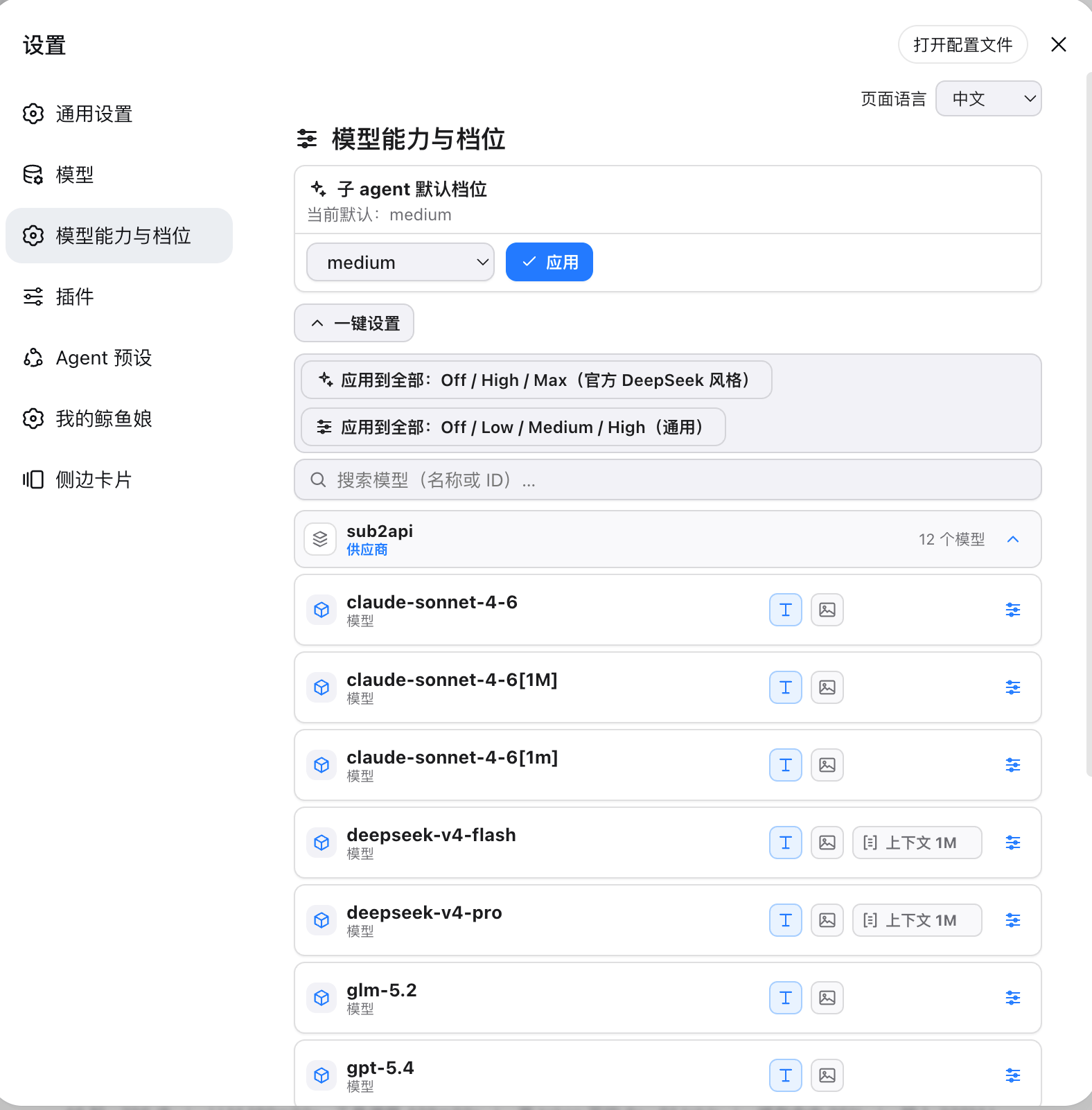
打开 DSH「设置 → 模型能力与档位」。
使用页面顶部的「页面语言」选择中文、English、日本語或한국어。DSH 默认优先使用已保存的语言,其次使用浏览器语言,最后回退 English;选择会持久化到 DSH。
在「子 agent 默认档位」卡片中选择没有显式值时使用的默认档位,然后点击「应用」。
使用「一键设置」将官方 DeepSeek 风格或通用预设应用到全部模型,或展开供应商和模型进行详细配置。
使用搜索框按模型名称或 ID 筛选。模型行会显示文字/图像输入能力、已声明的上下文长度,以及打开单模型设置的按钮。
勾选需要的标准档位,并填写发送给网关的线上值。例如:
| DSH 档位 | 网关线上值 | | --- | --- | |
off| 留空,表示不发送 | |high|ultra| |max|max|回到 Composer,选择对应模型后即可使用「推理等级」。
设置页右下角会显示当前安装版本,例如 v0.1.14。
网关兼容配置
provider 的 compat 区域是该 provider 下全部模型的全局默认值。设置页将 15 个字段按 4 组组织并默认收起。请使用 DSH 官方 YAML 配置结构:
providers:
  qwen-gateway:
    compat:
      supportsDeveloperRole: false
      maxTokensField: max_tokens
    models:
      - id: qwen-plus
      - id: qwen-thinking
        compat:
          maxTokensField: max_completion_tokens
逐字段独立按以下顺序取值:model → provider → base/catalog → protocol。URL/hostname 不会作为 compat 来源。模型值只覆盖当前字段。「自动」(Auto)会删除当前层字段,恢复 provider 继承,并让继承链中的下一层生效。provider 默认值会应用到该路由的所有模型,模型级修改只影响当前模型。对同一路由(provider)而言,非空的 models[] 和非空的 modelOverrides 互斥;官方 schema 会拒绝该无效配置,插件遇到异常数据时 fail closed。
设置页的 provider 全局区域用于修改该 provider 下全部模型的默认值。catalog/modelOverrides 模型和 models[] 模型都能展开后编辑单模型 compat:前者只对目标字段使用 modelOverrides.<model>.compat 下的字段级 set/unset,后者通过一个完整的 providers.<route>.models 数组 set 写回,同时保留其他模型和字段。模型级修改不会影响其他模型。
这些 compat 值属于控制面配置。它们不实现或替代网关 transport;网络请求仍由外部 transport 负责。
设置页界面
页面顶部是语言选择器;其下方的「子 agent 默认档位」卡片控制没有显式档位的请求。「一键设置」负责批量应用预设。供应商和模型列表支持展开/收起;每个模型行显示输入能力、上下文长度,并在设置区域提供网关兼容控件。models[] 保存使用完整数组 set,而不是数组索引 path op。
工作方式
- 宿主侧: 插件读取
llm-pi-ai设置,在启动和设置变更时扫描models与modelOverrides,只为缺少reasoningEfforts的模型补充默认档位。 - 客户端: 通过 DSH Settings Remote(
ctx.remote.settings)注册设置页,并使用 DSH 官方 locale 服务切换和持久化中文、English、日本語、한국어。四种文案分别维护在src/locales/zh.json、src/locales/en.json、src/locales/ja.json和src/locales/ko.json,发布前生成到客户端 bundle。 - 子 agent: 默认值存储在
llm-pi-ai用户层的subagentEffort;agent/requestwaterfall 只对未显式指定档位的子 agent 请求进行补全。 - 版本信息: 设置页右下角显示当前安装版本,例如
v0.1.14;DSH 插件列表从已安装包的package.json.version读取同一版本。
安装验证
grep -n "@hytime/dsh-thinking-effort" \
  "${DSH_HOME:-$HOME/.dsh}/profiles/<profile>/package.json"
dsh --profile <profile> --dump-default-config
组合树应包含:
- id: thinking-effort
  name: '@hytime/dsh-thinking-effort'
且不应再包含:
name: dsh-thinking-effort宿主加载标记位于:
cat "${DSH_HOME:-$HOME/.dsh}/thinking-effort-loaded.json"重要限制
- DSH 的
llm-pi-ai适配器固定提供 7 个标准档位:off、minimal、low、medium、high、xhigh、max。插件不能增加第 8 个显示名称,但可以为每个档位填写任意线上值。 - 非
off档位必须填写线上值;off留空表示不发送该参数。 - 子 agent 使用的模型必须支持所选档位,否则网关可能返回
UNSUPPORTED_REASONING_EFFORT。 off和未设置都可能表现为不发送reasoning参数,是否真正关闭思考取决于第三方网关的协议语义。- 宿主逻辑修改需要重启 DSH;设置页修改通常只需刷新浏览器页面。
CI 与发布维护
- Pull Request 和推送到
main会在 Node22.19.0与24.x上运行质量矩阵。 - workflow 使用
npm ci;依赖变更时,维护者必须提交package-lock.json。 - 普通 CI workflow 不会发布 npm;发布只由
publish.yml接收匹配的v<version>tag 后执行。 - 创建发布 tag 前,维护者先更新
package.json版本和各语言CHANGELOG,提交这些变更,再创建匹配的v<version>tag。tag 指向的提交必须位于main历史中。 - npm 包必须配置 GitHub Trusted Publisher:仓库为
hytime/dsh-thinking-effort,workflow 为publish.yml。发布使用 GitHub OIDC 生成 provenance,不需要NPM_TOKEN。 - 发布前 workflow 会按 rc7 → rc2 → alpha3 顺序构建并测试三个官方 DSH 能力代表:
dsh-v0.1.0-rc.7(0.1.0-rc.7)、dsh-v0.1.1-rc.2(0.1.1-rc.2)和dsh-v0.1.2-alpha.3(0.1.2-alpha.3);通过官方dsh plugin命令安装并执行真实兼容检查。 - workflow 不会自动修改版本或任何
CHANGELOG;如果 npm 中已经存在相同版本,发布也会被阻止。
排查
- 官方组合配置失败: 执行
dsh --profile <profile> --dump-default-config,检查是否仍有旧的name: dsh-thinking-effort。 - 设置页没有出现: 重启 DSH 后刷新 Web 页面,确认 profile 的 bundle 清单包含
@hytime/dsh-thinking-effort。 - 宿主没有补齐: 检查
$DSH_HOME/thinking-effort-loaded.json是否存在;日志前缀为[@hytime/dsh-thinking-effort]。 - 写入档位失败: 检查非
off档位是否填写了线上值,并确认目标模型配置仍然存在。 - 子 agent 报
UNSUPPORTED_REASONING_EFFORT: 改用该模型支持的档位,或恢复为「提供方默认」。