
@hyzyn/dsh-codegraph
v0.6.8
Published
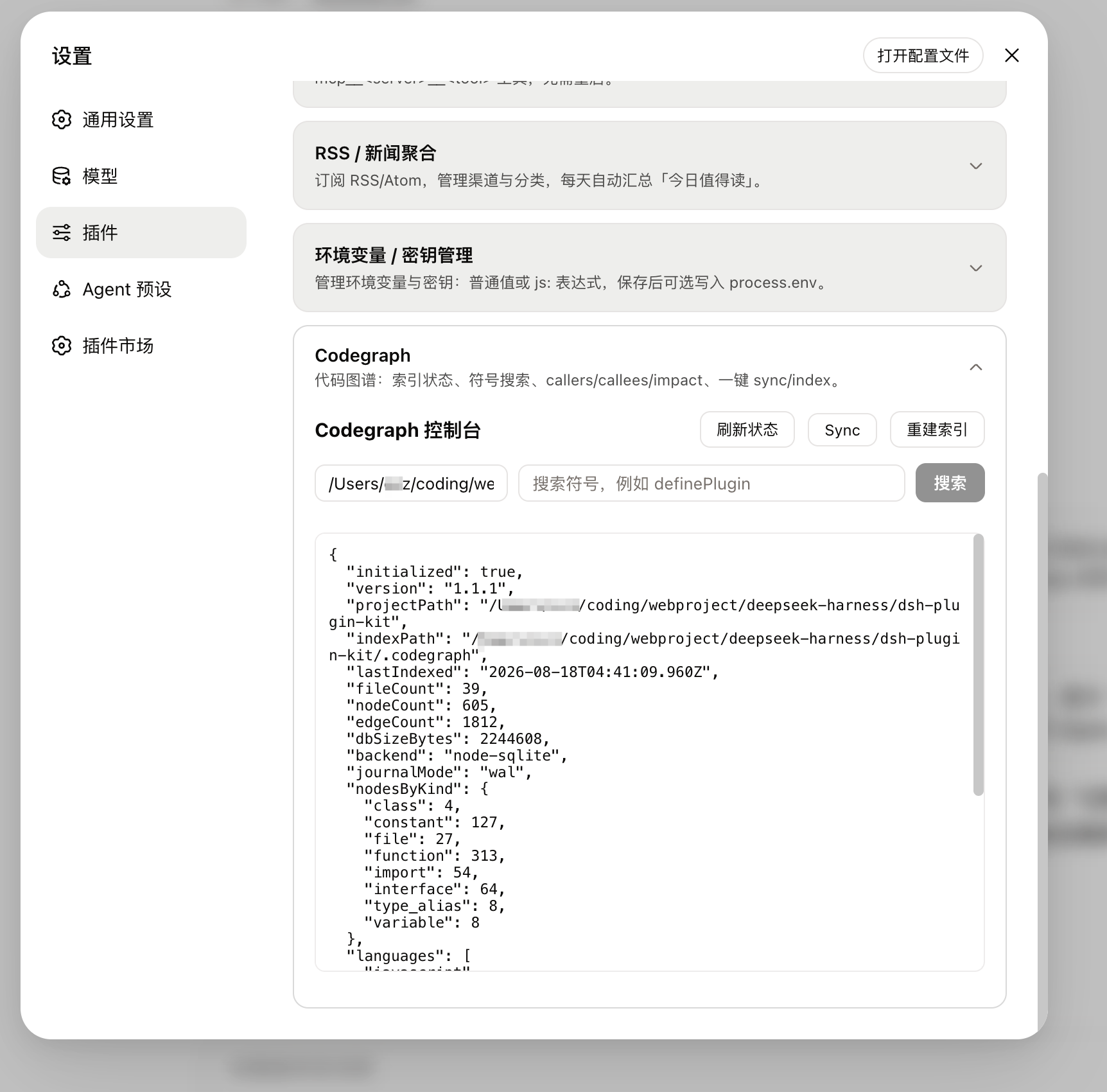
DSH Web GUI 的 Codegraph 集成插件:提供 Codegraph 状态、符号搜索、callers/callees/impact 查看与一键 sync/index,托管 codegraph MCP 服务器项目目录并向 agent 注入能力提示;表单内联在插件详情页「说明」下方(设置 → 插件配置 页里也有同一份)。


Readme
@hyzyn/dsh-codegraph
中文 | English
DSH 设置 → 插件 里的「Codegraph」卡片:把代码图谱的状态、符号搜索、调用链搬进 GUI,并替你把 codegraph MCP 服务器的项目目录对齐好。
特性
status --json字段分区呈现:initialized/version/projectPath/fileCount/nodeCount/edgeCount/lastIndexed/pendingChanges/languages/dbSizeBytes分区铺开,原始 JSON 收进<details>;符号下钻输出带行号的 verbatim 源码 +callers/callees/impact三段关系。CLI 的过期信号(reindexRecommended/builtWithVersion/ 提取器版本差 /worktreeMismatch)会在面板上给出一行警告并把「重建索引」标成建议动作。- 索引两条路径、超时分两档:
sync -- <path>增量、index [--force] -- <path>全量重建走indexTimeoutMs(默认 600s,0= 不限时);status/query/callers/callees/impact/node走cliTimeoutMs(默认 60s,0= 不限时)。超时与取消都走「SIGTERM → 3s 清理窗口 → SIGKILL」的进程组升级链,POSIX 与 Windows 同一套语义;索引类操作进行中卡片有「取消」按钮,关闭页面也会中止 CLI。 - 托管 MCP 服务器行:dsh-mcp-client 不声明 MCP roots,
codegraph serve --mcp只从process.cwd()向上解析.codegraph/;插件在~/.dsh/cordis.patch.yml维护@deepseek-ai/dsh-mcp-client行并写config.cwd,改写经 watchUserPatches 热加载重建 MCP 连接。同一台服务器同一时刻只挂一个项目,其余项目用projectPath查询。 - 索引判定取
.codegraph/*.db且与 CLI 同口径向上解析:从目标目录向上(到 git 根为止)找第一个带索引库的.codegraph/,命中根即项目根——monorepo 子目录里的会话不再被误判「未索引」。只看目录存在会把 codegraph CLI 自身的安装目录~/.codegraph判成项目索引,托管行随之落在未索引 cwd 上——实测该状态下codegraph_explore的 required 由["query"]变为["query","projectPath"]。非真索引时不改写现有 cwd,卡片给出indexState与原因。 - 写入纪律:对
~/.dsh/cordis.patch.yml的每次写都带 mtime+size 盖章复核(dsh-mcp 同款 CAS,≤3 次重读);复用 dsh-mcp 区块时只定点改 codegraph 行自己的cwd:一行,区块里的注释、其它服务器行、loader 合法的 override 条目逐字节保留;区块损坏时拒绝追加第二个区块(serverName 撞名会让 codegraph MCP 整体加载失败),把原因报给卡片。 - 托管行 cwd 跟随活动会话:
followSession(默认开)在会话切到有效索引项目时对齐托管行,否则回落到绑定路径;绑定路径由「设为默认项目」写入 settings 命名空间codegraph并把followSession置 false(显式指定优先于会话跟随)。会话上报失败会退避重试,不再一次抖动就永久失效。 - 可选的 per-agent MCP 隔离(
mcpScope: 'per-agent',默认'managed'):默认模式下一台 MCP 服务器按时分复用服务所有项目(靠projectPath与跟随会话)。开启 per-agent 后,每个 agent 在自己的 Cordis scope 里挂一份独立的dsh-mcp-client,cwd固定为它自己会话目录解析出的索引根——多项目并行时不再共享一个全局 cwd,也不再需要「写盘 → 热加载 → 重建连接」那条链;全局托管行会被挂起(disabled: true,切回 managed 自动恢复)。代价是每个 agent 一个子进程(实测空 Node 基线约 40MB)。会话目录没有可用索引时该 agent 不挂(而不是回落到默认项目)——否则它会拿到别的项目的上下文,这正是「宣称避免、实现却没做到」的那类错误。机制实测与取舍见 docs/p0-plan.md。 - 一键初始化:未初始化的目录在卡片上直接点「初始化索引」跑
codegraph init(两步确认)——index/sync都要求项目先 init 过,此前这是唯一还要把用户赶回终端的一步。 - systemPrompt 分两段,开关与门禁各自独立:
plugin:dsh-codegraph(order 150)与plugin:dsh-codegraph:usage(order 151);两段均以<command> --version探测为前置,announceToAgent/usageGuidance写 settings 命名空间后即时增删 section。
为什么要托管 MCP 的工作目录
DSH 的 MCP 客户端不声明 MCP roots 能力,codegraph serve --mcp 启动后只能从进程工作目录向上查找 .codegraph/。而 dsh web 经常从家目录启动——这时模型调用 mcp__codegraph__* 一律拿到:
No CodeGraph project is loaded for this session.
Searched for a .codegraph/ directory starting from: /Users/you
本插件解决这个问题:在 ~/.dsh/cordis.patch.yml 托管一行 codegraph MCP 服务器(codegraph serve --mcp,cwd = 默认项目路径)。默认项目路径变化(卡片「设为默认项目」或配置修改)即重写该行,DSH 的 watchUserPatches 热加载后自动把 MCP 服务器挂载到新项目。
行为细则:
- 优先复用
@hyzyn/dsh-mcp托管区块里已有的 codegraph 行(只补 cwd,其余字段含禁用状态不动),没有才写本插件自己的区块,避免 serverName 撞名。 - 区块外的手工行只检测不碰(避免冲突)。
- 目标路径必须有真索引才托管:
.codegraph/里得存在索引库(.db)。只看目录存在是不够的——codegraph CLI 把自己的安装数据放在~/.codegraph(current -> versions/<v>、bundles/、codegraph.lock,没有任何索引库),于是家目录会被误判成「已索引项目」,插件把 MCP 的 cwd 钉在家目录上并报告一切正常,而codegraph status --json -- ~实际返回initialized:false,工具照旧拿 "No CodeGraph project is loaded"。命中这种情况时插件不改写现有 cwd、不凭空建行,并在卡片上提示「默认项目 X 不是有效索引」+ 一键修复路径。 - 多项目使用:一台 codegraph MCP 服务器同一时刻挂载一个默认项目;其它已索引项目可在工具调用里传
projectPath查询,或回卡片一键切换。 - 跟随语义:托管行 cwd = 「跟随开启 + 会话目录是有效索引」时取会话目录,否则取绑定路径。有效索引按
.codegraph/里存在索引库判定(不是目录存在),所以家目录那种~/.codegraph安装目录不会把 cwd 带偏;项目被uninit后也会自动回落,不留陈旧状态。 - 跟随由浏览器半体上报(页面加载即订阅活动会话,与设置面板是否展开无关):宿主侧没有「当前会话」这个信号,因此跟随只在有 GUI 页面打开时生效,其余情况用绑定路径。
- 关闭方式:插件配置
mcpIntegration: false(会撤销本插件写入的托管行)。
CLI 面
卡片此前只覆盖 status/query/callers/callees/impact/node/sync/index/init,其余子命令只能去终端。现在补齐了旗舰与常用的那几个:
explore:与 MCP 的codegraph_explore同输出(相关符号源码 + 调用路径)。模型那条路走 MCP,人在卡片上此前够不着同一个能力——这有点荒谬,现在补上了。context:为一个任务组装上下文(与 explore 面向「区域」的区别)。files:索引里的文件结构(语言 / 符号数 / 大小)。affected:由改动文件反向查出受影响的测试(实测本仓库:改src/index.ts→ 5 个测试文件)。这条对「我改了这里,该跑哪些测试」特别实用。插件刻意不替你猜改动列表(不读git status、不猜编辑器状态):待测文件从哪来是上游流程的事,卡片只负责把你给的列表交给 CLI。uninit:删除.codegraph/——与init反向,是本卡片第二个破坏性动作,同样两步确认。实测必须带-f:不带时 CLI 问Continue? (y/N),而运行器没有 TTY、读到 EOF 就中止且不删除(安全但无效),所以确认由卡片负责。telemetry:只读转达上游匿名用量统计的状态。刻意不给开关——那是用户的全局偏好(~/.codegraph/telemetry.json,由 CLI 自己的telemetry on|off管),插件替他翻等于越权改别人的全局设置。- 查询参数面板:
query -k/--kind(类型过滤)、callers|callees -l/--limit(CLI 默认 20,会把大符号截断而卡片此前无从知道)。
kind 用自由文本而不是下拉枚举:上游加新 kind 时插件不必跟着改,填错 CLI 自己回空结果。
项目列表(一键切换)
一台 codegraph MCP 服务器同一时刻只挂一个项目,所以「换项目」是高频动作,而卡片此前只能手敲绝对路径。GET /projects + 卡片上一排胶囊按钮解决它。
候选只用界内的数据源:宿主 sessions.list() 的活跃会话 header.cwd,以及插件自己观察到的路径(/follow 上报、查过 /status 的目录、当前默认项目)。刻意不读 ~/.dsh/sessions/——那里确实有历史项目路径,但那是 DSH 的内部存储格式(会话桶名是路径编码、日志是多帧 zstd),插件解析它会在 DSH 改格式时静默失效;实测按桶名解码 51 个目录,一个都没解对。宁可比用户记忆少几个项目,也不要一个「有时准有时不准」的列表。
每个候选现算 locateIndex:只有真索引才可作为切换目标;未索引的也列出但禁用(用户会想知道「这个项目还没索引」),点击无效。列表按「最近见过」排序,容量 50 条、淘汰最久未见者。切换复用「设为默认项目」那条链路(持久化 defaultPath → 关闭跟随 → 热切换 MCP)。
API
| 路由 | 方法 | 说明 |
| --- | --- | --- |
| /api/dsh-codegraph/status?path= | GET | 索引状态(JSON) |
| /api/dsh-codegraph/query?q=&path=&limit= | GET | 搜索符号 |
| /api/dsh-codegraph/callers?symbol=&path= | GET | 查调用者 |
| /api/dsh-codegraph/callees?symbol=&path= | GET | 查被调用者 |
| /api/dsh-codegraph/impact?symbol=&path=&depth= | GET | 查影响面 |
| /api/dsh-codegraph/node?name=&path= | GET | 查符号/文件详情 |
| /api/dsh-codegraph/sync | POST | 增量同步 { path } |
| /api/dsh-codegraph/index | POST | 全量重建 { path }(要求项目已经初始化过,见下) |
| /api/dsh-codegraph/init | POST | 在未初始化的目录跑一次 codegraph init(建 .codegraph/ + 首次索引),成功后重算 MCP 托管行;已索引目录回 409 |
| /api/dsh-codegraph/default-path | GET | 绑定路径 defaultPath + 生效路径 effectivePath + sessionPath + followSession + 提示词开关 + cliAvailable / cliProbeError / cliProbeAt + MCP 托管状态(indexState 针对生效路径) |
| /api/dsh-codegraph/follow | POST | 上报活动会话目录 { path }(空 = 无活动会话);宿主据此对齐托管行 cwd,非索引目录自动回落 |
| /api/dsh-codegraph/settings | POST | 写开关 { announceToAgent?, usageGuidance?, mcpIntegration?, followSession? }(布尔)与 { mcpScope? }('managed' / 'per-agent',非法值 400),即时生效 |
| /api/dsh-codegraph/default-path | POST | 设为默认项目 { path }(需 .codegraph/ 里有索引库),同步热切换 MCP |
| /api/dsh-codegraph/reprobe | POST | 重跑一次 <command> --version 探测,回 { cliAvailable, cliProbeError, cliProbeAt } 并同步 systemPrompt 门禁 |
| /api/dsh-codegraph/files | GET | 文件结构 { path, files, raw }(codegraph files --json);旋钮 filter / pattern / maxDepth |
| /api/dsh-codegraph/affected | GET | 受影响测试 { path, affected, raw }(codegraph affected --json -- <files…>);files 可重复传 |
| /api/dsh-codegraph/explore | GET | 探索 { path, query, output }(codegraph explore,与 MCP 的 codegraph_explore 同输出,markdown);旋钮 maxFiles |
| /api/dsh-codegraph/context | GET | 任务上下文 { path, task, output }(codegraph context,markdown);旋钮 maxNodes |
| /api/dsh-codegraph/uninit | POST | 删除 .codegraph/ { path }(codegraph uninit -f);未索引目录回 409;撤销的是索引所在的根 |
| /api/dsh-codegraph/telemetry | GET | 只读转达上游匿名用量统计状态 { enabled, output } |
| /api/dsh-codegraph/projects | GET | 已见项目列表 { projects, indexedCount, effectivePath }——候选来自活跃会话与插件观察到的 cwd(/follow 上报、查过 status 的路径、默认项目),每条现算索引态;monorepo 子目录归并到索引根 |
| /api/dsh-codegraph/agents | GET | per-agent MCP 挂载台账 { mode, requested, effective, reason, fallback, mounted, live, agents }——每个 agent 挂没挂上、挂在哪个索引根、没挂的原因(只读) |
| /api/dsh-codegraph/unlock | POST | 清挡住索引的陈旧锁 { path }(codegraph unlock,幂等:没锁时 exit 0) |
| /api/dsh-codegraph/cancel | POST | 取消进行中的 CLI 调用 { path? }(合法 JSON body:{} = 全部;畸形 body 回 400,不会升级成「取消全部」);关标签页的断连也会自动中止对应调用 |
| /api/dsh-codegraph/diagnose | GET | 收集诊断包 { path?, report }:report 是一段纯文本,含版本/平台、CLI 探测实测原文、索引状态、托管行与脱敏后的补丁区块原文、~/.codegraph 的 daemon 登记与日志尾、最近一次 CLI 失败、以及采纳率 |
| /api/dsh-codegraph/metrics | GET | 采纳率 { path? }:不带 path 回全部项目 { summaries, since };带 path 回该项目 { project, summary, text, since } |
所有路由均为 loopback-only,防止远程访问。reprobe 只认 POST:它会真的起一个子进程,不该由 GET 顺带触发。diagnose 只认 GET(只读),但它可能补跑一次探测,所以不会在写路径上被顺手调用。
诊断包的脱敏口径(diagnose):~/.dsh/cordis.patch.yml 是所有 MCP 服务器共用的文件,别家的行里可能有 headers / env 这类凭据,所以只摘 codegraph 相关的两个区块(本插件区块 + dsh-mcp 卡片区块),并按键名处理——id / name / serverName / transport / command / args / cwd / disabled 留值(这些正是排查要看的东西),其余键一律 <redacted>,且 headers: / env: 这类敏感键会污染整棵子树(连 authorization: 的值一起抹掉,但键名保留)。新增字段默认脱敏(fail-closed)。
采纳率仪表
卡片上那行「采纳率」回答的是配置之外的问题:配好了之后,模型到底买不买账。
- 数据来源:宿主既有的
session/event事件流(只数tool/call,与dsh-agent-instructions/dsh-acp同一个公开订阅面)。不数tool/result——采纳率问的是「模型想不想用」,失败了也是想用(那是另一个问题,由诊断包回答)。 - 分子/分母(两个口径,窄口径是主口径):
codegraph命中mcp__codegraph__*;窄口径分母是「发现类」调用(grep/glob/search/find/list_dir),宽口径分母还包含read/view/open。之所以两个都报:真实历史里read占 1956 次而grep只有 100 次,而read多半是「打开已知道要改的文件」——codegraph 替代的是「找东西」,把read算进主口径会把数字永久压在个位数(实测宽口径 2.2% vs 窄口径 28.8%)。 bash/ 媒体 / 网络类不计入分母:模型用 bash 干的事大部分(跑测试、装依赖、git)与代码探索无关;read_image/read_pdf/web_search同理(这一条是拿真实历史量过之后补的,见下)。- 实测数字见 docs/adoption-audit.md:从 177 个真实历史会话回溯——会话级 23%、窄口径 28.8%、最近三天 47%,并给出 codegraph 调用 query 的质量抽样(34/47 带具体符号名)。
- 分母为 0 显示「还没有探索类调用」而不是 0%:「一次都没探索」与「探索了但全用 grep」是两回事。
- 项目键 = 索引根(
resolveIndexedRoot),与托管行 cwd、注入门禁同一口径;所以同一个仓库的多个会话(换会话、子 agent、重启宿主)会归并成一条,而不是散成一堆没有统计意义的小样本。未索引项目也会记,但文案会标明「这个数字不代表提示词效果」,且/metrics额外给grouped.indexed/grouped.unindexed两组合计——未索引项目里模型本就不该用它,混进整体会得出没有意义的数字。 - 只在内存里,宿主重启即归零,
since会如实给出起点。不落盘是有意的:它是「现在要不要调提示词」的观测值,不是审计日志,落盘会把工具名与项目路径长期留在磁盘上。 - 同一份数据也进诊断包(
/diagnose),因为报告「codegraph 好像没效果」时,第一个要分清的就是「模型根本没用」还是「用了但结果不对」。
请求语义(v0.4.2 起):
- POST 路由对畸形 / 超限 / 非对象的 body 一律 400——不会把「请求体没读出来」当成「没指定路径」而在默认项目上执行写操作。
/cancel也在这道门禁内:{}(合法 JSON、未指定 path)才是「取消全部」,畸形 body 不会顺带把别的项目正在跑的索引杀掉。 - 路径必须真实存在且是目录:
status/query/callers/callees/impact/node对不存在的路径回 400(CLI 对不存在的路径会 exit 0 + 空结果,静默得像「没有匹配」);--limit/--depth只收正整数(limit上限 10000,depth的上限由 CLI 自己钳到 10)。 - 祖先口径:
/default-path的 POST 在 monorepo 子目录上会绑定索引所在的仓库根;对子目录调/init回 409(祖先已有索引,避免建出嵌套索引);/follow拒绝不存在目录的路径上报。
兼容性(DSH / codegraph CLI)
- DSH:宿主版本矩阵(每一档都注明验证方式,别把回归测试说成兼容性声明):
0.1.7-rc.1(上一轮适配基线,2026-09-23 实测):node scripts/verify-codegraph-host-contract.mjs --profile test --port 3087 --dsh-bin <独立安装的 rc.1 dsh> --runtime-store <该安装的 .pnpm/node_modules/@deepseek-ai>42/42 通过——25 条路由全在(含/projects、/metrics、/diagnose、/unlock、/files、/affected、/explore、/context、/uninit、/telemetry、/agents)、POST 门禁与 loopback 门禁成立、/diagnose输出分段完整、浏览器半体产物可供给且含最新 UI、MCP 托管行按真索引写入 home 补丁、mcpScope开关「切 per-agent → 全局行被挂起 → 切回 managed 恢复」全程可逆且真实~/.dsh/cordis.patch.yml逐字节未变。新增的两项专门验 0.1.7 的 settings 迁移:启动后经插件自己的写路径把mcpScope切回 managed 基线、并把默认项目切到临时项目,两项都要求 HTTP 200(旧 API 下这两步只会 500)。- 验证方式说明:本机全局 dsh 若不是 rc.1,可用
--dsh-bin指向一份独立安装的 rc.1,并用--runtime-store把复制出来的临时 profile 的node_modules/@deepseek-ai/*重指到该安装的运行时——否则那些链接仍指向全局旧安装,新 cohort 的兼容性 preflight 会把整套旧运行时行判成 incompatible 而全部禁用(宿主根本起不来,与本插件无关)。 - 另一条已跑过的真机证据:隔离
DSH_HOME启动 test profile(同样做运行时重指)→ 10 个插件全部 mounted、0 行disabling profile plugin row,POST /api/dsh-codegraph/settings在per-agent/managed之间往返都是 200。
- 验证方式说明:本机全局 dsh 若不是 rc.1,可用
0.1.7-rc.2(当前适配基线,2026-09-25 实测):cohort 从 rc.1 提到 rc.2,peerDependencies与dsh.engines.dsh的下限同步提升。node scripts/verify-codegraph-host-contract.mjs --profile test --port 3087(本机全局就是 rc.2,无需--dsh-bin/--runtime-store)42/42 通过——25 条路由、POST / loopback 门禁、/diagnose分段、浏览器半体可供给、MCP 托管行写入隔离 home 补丁、mcpScope在per-agent/managed间往返可逆且真实~/.dsh/cordis.patch.yml逐字节未变。另两项:真宿主加载 test profile 时 10 个插件全部 mounted、0 行disabling profile plugin row;工作区pnpm -r typecheck全绿、vitest960/960、pnpm -r build绿。本轮未改任何插件运行行为(只有兼容性声明、文档与 lockfile)。rc.1 → rc.2 的 lib 产物逐文件比对:dsh-tools仅新增可选PreToolDecision.displayReason(本仓不构造该决策)、dsh-session-query仅 JSDoc、dsh-client-ui-theme仅设计 token 增补,dsh-mcp-client/dsh-host-webserver/dsh-subprocess-local/dsh-credentials/dsh-base/dsh-settings/dsh-web-app/dsh-headless逐字节相同;dsh-app-boot删除了skippedProfileBundles并改了generateConfigSchema签名(去掉首参binName),但那是 DSH 自己的 CLI 与 app-boot 之间的内部面,本仓无任何引用。⚠️ 标注(本次未擅改)——两个测试总数不是同一次运行的产物:本条写的是 rc.2 那一轮验证 时点的用例数(
960/960);本轮项目级文档改造之后,当前值为全仓 56 files / 965 tests (packages/codegraph本包 14 files / 317 tests)。两个数都不改——当前值以 ROADMAP.md 的「2026-09-25 复测」表为准。本条的「25 条路由」同理:以命令现算为准,别把它当契约(现算命令见 ROADMAP 复测表)。
0.2.0-rc.1(同轮新增的第二档基线,2026-09-28 实测):不改任何运行代码,只把兼容范围写成两段(见下两条)。证据:① 用 0.2.0-rc.1 自己的判定器(dsh-app-boot的evaluatePluginCompatibility)对本仓 13 个可安装包逐一核对:单段^0.1.7-rc.2时 12/12 全被拒(^0.1.7-rc.2展开是>=0.1.7-rc.2 <0.2.0-0,0.2.0-rc.1恰好卡在-0上,includePrerelease: true也救不回来),改成两段后逐 cohort 全部放行。② 隔离DSH_HOME在真 0.2.0-rc.1 宿主上:dsh plugin add不需要任何豁免就装上 10 个插件,启动后 10 个全部 mounted、无skipping profile bundle;verify-client-ui5/5 PASS、verify-rss-opml9/9 PASS(真实下载 + 回环)。③ 同一批包在 0.1.7-rc.2 宿主上回归同样全绿(client-ui 5/5、rss-opml 9/9)。④ 两档的插件 API 面逐文件比对:dsh-tools/dsh-client-ui-slots/dsh-client-locale/dsh-host-webserver/dsh-subprocess-local/dsh-client-modules/dsh-package-manifest的.d.ts逐字节相同,plugins.row.config槽契约相同,cordis4.0.4 与schemastery3.18.4 同版本。0.2.0-rc.2(同轮追加的第三档基线,2026-09-29 实测):不改任何运行代码,只把兼容范围追加第三段(见下两条)。注意这一段与前两档不同:0.2.0-rc.2本来就被^0.2.0-rc.1覆盖(>=0.2.0-rc.1 <0.3.0-0,includePrerelease: true下semver.satisfies('0.2.0-rc.2', …)为真),所以它是显式声明而不是修边界——但照样走完「每加一档都必须实测」的全部动作。证据:① 三档各自的判定器(dsh-app-boot的evaluatePluginCompatibility,0.1.7-rc.2 与 0.2.0-rc.1 从 registry 装出带依赖的副本)对本仓 13 个可安装包逐包 × 逐 cohort 核对,3 档判定器 × 3 个 cohort 全部放行(node scripts/check-dsh-peers.mjs --app-boot <该档的 dsh-app-boot 目录>)。② 隔离DSH_HOME在真 0.2.0-rc.2 宿主上:dsh plugin add不需要任何豁免就装上 10 个插件;--dump-config的 stderr 0 行、10 条@hyzynbundle 全在组合结果里;启动后 10/10 mounted、无skipping profile bundle。③ 同一宿主上的三层真机验收:verify-client-ui6/6 PASS(10 个@hyzyn客户端 bundle 真在 Chrome 里被加载、0 未捕获异常、0 error 级控制台输出、0 失败子请求)、verify-rss-opml9/9 PASS(真实下载 + 导入回环 + 收尾复原)、verify-codegraph-host-contract42/42 PASS(25 条路由、POST / loopback 门禁、/diagnose分段、浏览器半体可供给、MCP 托管行写入隔离 home 补丁、mcpScope在per-agent/managed间往返可逆,真实 home 的cordis.patch.yml逐字节未变)。④ rc.1 → rc.2 的插件 API 面逐文件比对:cli + web-app 的全部依赖包 166 个里只有 40 个有真实改动,本仓 import 的宿主包(dsh-base/dsh-tools/dsh-client-ui-slots/dsh-web-app/dsh-plugin-manager/dsh-mcp-client/dsh-settings/dsh-system-prompt/dsh-credentials/dsh-scope/dsh-session-query/dsh-launch-environment/dsh-agent/dsh-hmr等)零代码变化;唯一与本仓相关的是dsh-cordis-client-runner的 slot 目录 97 → 98 条、只增不减(新增sidebar.right.tab.files.actions),本仓注册的 4 个槽(plugins.row.config/settings.kit.item/settings.plugin.item/sidebar.right.pane.tab)逐字节相同。⑤ 工作区回归:pnpm -r build/pnpm -r typecheck绿、pnpm test92 files / 1484 tests 全过;本轮只动兼容性声明与文档,未动任何插件运行行为。0.2.1-alpha.1(第四档基线,2026-10-03 实测):不改任何运行代码,只把兼容范围追加第四段(见下两条)。这一段与第三档同类,也是显式声明而不是修边界:0.2.1-alpha.1本来就被^0.2.0-rc.2覆盖(>=0.2.0-rc.2 <0.3.0-0,includePrerelease: true下semver.satisfies('0.2.1-alpha.1', …)为真),但照样走完「每加一档都必须实测」的全部动作。证据:① 用 0.2.1-alpha.1 自带的判定器(本机全局安装里的dsh-app-boot,同一次安装的getDshRuntimeVersion()报0.2.1-alpha.1)对本仓 13 个条目(12 个可安装包 +templates/hello)逐一核对:13/13 放行;node scripts/check-dsh-peers.mjs --app-boot <该安装的 @deepseek-ai/dsh-app-boot 目录>四档 × 13 条目全部放行。② 隔离DSH_HOME起真宿主(复制本机test2profile,--patch固定端口):10/10 个@hyzyn插件 mounted、0 行disabling profile plugin row、0 行skipping profile bundle;本机真实test2profile 上再跑一遍安装期判定:dsh plugin --profile test2 add link:<每个包>(10 个)全部返回Already up to date、无incompatible-version、不需要任何豁免(安装前与启动时各过一次)。③ 同一宿主上的四层验收:verify-client-ui --mode boot5 PASS / 0 WARN / 0 FAIL、--mode full17 PASS / 1 WARN / 0 FAIL(10 个@hyzyn客户端 bundle 真在 Chrome 里被加载、0 未捕获异常、0 error 级控制台输出、0 失败子请求;--mode full另证 8/8 个插件的内联配置卡片都渲染出来(plugins.bundle.config+ 行标记plugins.row.config)与设置里「插件配置」行的 8 张 kit 卡片,唯一 WARN 是沙箱里 PTY 被拒posix_openpt failed,不是回归)、verify-mcp-http7 PASS / 0 FAIL(三种 streamable-http 响应模式 + 打不通时可读失败)、verify-rss-opml9 PASS / 0 FAIL(真实下载 + 导入回环 + 收尾复原)、verify-codegraph-host-contract42/42 PASS(25 条路由、POST / loopback 门禁、/diagnose分段、浏览器半体可供给、MCP 托管行写入隔离 home 补丁、mcpScope在per-agent/managed间往返可逆,且真实~/.dsh/cordis.patch.yml逐字节未变)。④ 0.2.0-rc.2 → 0.2.1-alpha.1 的插件 API 面逐文件比对:CLI 包 20 个文件里只有package.json变;本仓 import 的宿主包(dsh-base/dsh-host-webserver/dsh-subprocess-local/dsh-client-locale/dsh-client-ui-slots/dsh-settings/dsh-session-query/dsh-mcp-client/dsh-system-prompt/dsh-launch-environment/dsh-client-ui-theme/dsh-headless等)零代码变化;dsh-tools只改run_code的参数顺序与文案、并删掉./invariant子路径导出(本仓零引用,index.d.ts逐字节相同),evaluatePluginCompatibility语义等价;dsh-cordis-client-runner的 slot 目录 98 → 100 条、只增不减(新增plugins.add.actions/shell.bottom),本仓注册的槽全在。⑤ 运行时依赖版本漂移:这一档的宿主带cordis4.0.5-alpha.1 与schemastery3.18.5-alpha.1(前三档都是 4.0.4 / 3.18.4),但两份 tarball 除package.json外逐字节相同,且 app-boot 用Symbol.for('schemastery')判定原生 schema(不是instanceof);本仓的pnpm -r typecheck正是重链到这两个新版本之后跑的,绿。⑥ 工作区回归:pnpm -r build/pnpm -r typecheck绿、pnpm test106 files / 1644 tests 全过、pnpm aggregate无 diff;本轮只动兼容性声明、守卫与文档,未动任何插件运行行为。未跑:pnpm live-smoke(它把一次性 profile 复制到~/.dsh/profiles/live-smoke-*,本轮执行环境只允许写工作区,~/.dsh写入被拒;需要时在本机普通终端补跑)。0.2.1-alpha.2(第五档基线,2026-10-09 实测):不改任何运行代码,只把兼容范围追加第五段(见下两条)。这一段与第三、四档同类,也是显式声明而不是修边界:0.2.1-alpha.2本来就被^0.2.1-alpha.1覆盖(同一个0.2.1版本元组,预发布之间不比大小),但照样走完「每加一档都必须实测」的全部动作。证据:① 用 0.2.1-alpha.2 自带的判定器(本机全局安装里的dsh-app-boot,同一次安装的getDshRuntimeVersion()报0.2.1-alpha.2)对本仓 13 个条目(12 个可安装包 +templates/hello)逐一核对:13/13 放行;node scripts/check-dsh-peers.mjs --with-app-boot(自动定位到那份判定器)五档 × 13 条目全部放行。② 本机真实testprofile 上跑安装期判定:dsh plugin --profile test add link:<每个包>(10 个)全部返回Already up to date、无incompatible-version、不需要任何豁免;随后dsh --profile test --patch <端口层>起真宿主(runtime0.2.1-alpha.2):10/10 个@hyzyn插件 mounted、0 行disabling profile plugin row、0 行skipping profile bundle。③ 同一宿主上的验收:verify-client-ui --mode full18 PASS / 0 WARN / 0 FAIL(10 个@hyzyn客户端 bundle 真在 Chrome 里被加载、8/8 个插件的内联配置卡片都渲染出来(plugins.bundle.config+ 行标记plugins.row.config)、设置里「插件配置」行的 8 张 kit 卡片、全局搜索命令面板往返真的有结果、终端面板 xterm 初始化完成、0 未捕获异常、0 error 级控制台输出、0 失败子请求;这一轮 PTY 没被拒,所以第四档那条 WARN 也不在)、pnpm live-smoke(=live-host-smoke --bootstrap --strict)18/18 PASS(两个宿主实例的授权阶梯、路由门控、工具清单、试连文案、宿主正服务的client.js)——第四档那条「未跑」在这里补上了。④ 0.2.1-alpha.1 → 0.2.1-alpha.2 的插件 API 面逐文件比对:本仓 import 的宿主包里dsh-mcp-client(MCP 托管行)/dsh-settings/dsh-credentials/dsh-launch-environment/dsh-sandbox/dsh-scope/dsh-user-approval/dsh-agent/dsh-client-locale/dsh-subprocess除package.json外逐字节相同;dsh-tools里本仓用的defineTool导出行逐字节相同,改动只有ToolPresentationMode去掉'both'(本仓零使用)与 PTC 内部桥RunCodeBridgeOptions多一个必填的resolveWorkingDirectory(本仓没有实现方);客户端槽面只增不减(新增conversation.chat.flow/conversation.chat.reasoning.body,零删除零改名,本仓注册的槽一个没被拿掉);dsh-host-webserver与dsh-web-app的改动都在宿主配置面(监听地址只收环回或具体网卡、新增 TLS 配置、webRuntime→webStartup),本仓对这些名字零引用。⑤ 运行时依赖:这一档的宿主带的仍是cordis4.0.5-alpha.1 与schemastery3.18.5-alpha.1(与第四档同一对)。⑥ 工作区回归:pnpm -r build/pnpm -r typecheck绿——且是在node scripts/link-dsh-runtime.mjs把本仓node_modules/@deepseek-ai/*指到 alpha.2 那套之后跑的(即类型面就是 alpha.2 的dsh-tools,不是仓里 devDeps 钉的旧档),pnpm test139 files / 2420 tests 全过、pnpm aggregate无 diff。⑦ 同轮还按宿主的升级绊线复核了docs/os-consent-plan.md§2.1 的三条事实与 picker 口径:宿主这一档真的换了口径(环回判定改用dsh-host-webserver的isLoopbackHost()、新增allowsRemoteAuthorities一条),绊线按设计报红、复核记录写进该文 §2.1 末与 §4 第 2 条。0.1.6-alpha.2/0.1.5-rc.2/0.1.0-rc.7(历史基线,已不支持):这些档位的settings服务还是旧的register(ns, schema)API,而 0.1.7 线已把它换成SettingsForms(describe/update+ 导出 volatile Config);本包的peerDependencies下限^0.1.7-rc.2也会让新宿主在安装前/启动时拒绝加载到旧宿主上。旧档位当时的证据(0.1.6-alpha.240/40、0.1.5-rc.2无脚本、0.1.0-rc.7审计基线)保留在 git 历史里,仅作参考。package.json声明peerDependencies: { "@deepseek-ai/dsh": "^0.1.7-rc.2 || ^0.2.0-rc.1 || ^0.2.0-rc.2 || ^0.2.1-alpha.1 || ^0.2.1-alpha.2" }(并在peerDependenciesMeta标optional,只压 pnpm 的 unmet-peer 噪音)。DSH 0.1.7-rc.1 起安装前与启动时都据此判定兼容性:不兼容时安装抛incompatible-version、启动时该行整行disabled(bundle 则整包 skip)。同时保留dsh.engines.dsh: ">=0.1.7-rc.2"作为市场展示位(宿主不读它,见下条;市场解析器只认单段,所以它写的是最低档),peer 覆盖的最低档由scripts/check-dsh-peers.mjs校验一致。为什么是 peer 而不是
engines.dsh:dsh-app-boot只遍历peerDependencies里名为@deepseek-ai/dsh或以@deepseek-ai/dsh-开头的项,用semver.satisfies(runtime, range, { includePrerelease: true })判定(预发布参与范围匹配)。但engines.dsh仍然声明——宿主不读它,插件市场 / 社区条目却按它展示兼容性,所以保留为标准形式>=0.1.7-rc.2(市场解析器只认>=X.Y.Z[-预发布],写||会被判成「无法验证」而 fail-closed),且与 peer 覆盖的最低档一致。证据:dsh-app-boot/lib/index.js的evaluatePluginCompatibility,以及 app-boot README 原文「这些检查使用 peer 声明,而不是engines.dsh」。为什么范围是五段
^0.1.7-rc.2 || ^0.2.0-rc.1 || ^0.2.0-rc.2 || ^0.2.1-alpha.1 || ^0.2.1-alpha.2:预发布参与匹配,^0.1.7-rc.2=>=0.1.7-rc.2 <0.2.0-0——单段会把整条 0.2 线判死(这正是 0.2.0-rc.1 上线后本仓插件在桌面版里显示「异常 / 不包含任何组件」的原因);第二段补上 0.2.0-rc.1 这一档并顺带覆盖整条 0.2.0 rc 线与 0.2.x 正式版;第三段^0.2.0-rc.2、第四段^0.2.1-alpha.1与第五段^0.2.1-alpha.2都是显式声明当前最新档(对宿主行为零差异,因为第二段已经覆盖它们;第四、五档另有各自的实测与 API 面比对,见上条)——留着它们是因为本仓的规则是「适配到哪一档就把哪一档写进范围,并留下实测证据」,而不是「范围恰好够用就行」。命中任一段即放行,五档的 API 面都已逐文件比对(见上条)。0.1.7正式版与后续0.1.7-rc.N/0.1.8仍走第一段,0.1.7-rc.1、0.1.7-alpha.2、0.1.6-*依旧不通过。要临时放行别的版本组合,把豁免写进 profile 自己的compatibility.json(dsh plugin --profile <p> allow-version <pkg@ver> --dsh-version <ver> --accept-risk),而不是随手往范围里加段——每加一段都必须是实测过、且 API 面比对过的 cohort。
- codegraph CLI:版本矩阵——
1.5.0(macOS)与1.6.0(Windows / macOS)实测过全链路;用到的子命令是status/query/callers/callees/impact/node/sync/index,旗标逐个核对过。codegraph serve --mcp仍可用(顶层 help 不列,codegraph serve --help在),托管行无需改动。升级 CLI 后请重验:-y这类旗标恰好是版本相关的(本插件刻意不带它,见下)。 - 浏览器半体的 URL 形态:当前 DSH 走 client-modules 的 combo 路由,单包直链
/plugins/@hyzyn/dsh-codegraph/client.js已不再直接可用;浏览器只用 boot graph(window.__DSH_BOOT__)下发的/plugins/??<id>/client.js&rev=…,插件侧无需改动。 - 操作系统:Windows / macOS / Linux 都按同一份代码走,CI 已是三平台矩阵(
pnpm -r build+typecheck+test)。- Windows:CLI 走
%COMSPEC% /d /s /c+ cmd 转义(npm / pnpm 全局安装只给.cmdshim,execFile直连会ENOENT);超时用taskkill /pid <pid> /T /F连 shim 里的孙进程一起收(只杀 cmd.exe 的话大仓库index会继续跑完);补丁文件重写沿用原文件行尾(CRLF 文件不会被写成混合行尾,重写也不改变行数)。 index不会替你初始化:codegraph index --help写着「same result as a fresh init」,但那说的是全量重建的结果等同于刚 init 完,不是「index 会初始化」。对没有.codegraph/的目录,index/sync都会直接报CodeGraph not initialized in <path>+Run "codegraph init" first。故卡片的「初始化索引」按钮走的是init。- 参数固定为
init -- <path>:不带-y——那是 CLI 1.6.0 才有的旗标,1.5.0 会error: unknown option '-y';而不带也不会挂起(运行器无 TTY,1.5.0 / 1.6.0 实测都自己取默认值跑完)。也不带-f(CLI 用它兜住「家目录 / 文件系统根」这类误伤,不该由插件替用户绕过)。 - 这是本插件唯一往用户项目里写东西的动作:它只在
.codegraph/下建codegraph.db与一个自忽略的.gitignore(内容*+!.gitignore),不碰任何源文件、也不改项目根的.gitignore;codegraph uninit可整体撤销。卡片上是两步确认,且绝不会自动触发。 init/index会触发 codegraph CLI 自己的匿名用量统计(上游会在输出里提示;codegraph telemetry off或CODEGRAPH_TELEMETRY=0可关)。插件不改这个开关——那是用户的偏好。
- 参数固定为
- PATH:探测与调用都用插件配置的
command(默认codegraph,走 PATH)。从 Dock / 开始菜单这类不继承 shell 环境的入口启动宿主时,PATH 里可能没有 CLI——此时两段 systemPrompt 不注入、卡片点不出可用命令。- PATH 是在宿主进程启动时读取的,所以「刷新页面 / 重开卡片」改不了它,宿主自己也不会变。两条修法:① 把
command写成 CLI 的绝对路径(改 profile 补丁会触发热重载并重新探测);② 从新开的终端重启宿主,让新的环境块生效。 - 改完之后点卡片上的重新探测(
POST /reprobe)即可就地确认,不必重启宿主。卡片会把探测失败的实测原文(spawn codegraph ENOENT、非零退出的 stderr、超时)显示出来,用来区分「没装 / 装错 / 命令不在 PATH」。 - 中文(及其它非 UTF-8 代码页)Windows 上,CLI 与 cmd.exe 的 stderr 按控制台代码页输出;插件用
@hyzyn/dsh-kit的容错解码器(UTF-8 优先,遇非法字节整体回落代码页)解,卡片上的报错是中文原文而不是���。
- PATH 是在宿主进程启动时读取的,所以「刷新页面 / 重开卡片」改不了它,宿主自己也不会变。两条修法:① 把
- MCP 行:
dsh-mcp-client用官方 SDK 的StdioClientTransport(SDK 依赖cross-spawn),Windows 上.cmdshim 由它自己解析,托管行无需平台分支。 - 上游 CLI 本身三平台 × x64/arm64 官方支持(自带 Node 运行时);本插件侧的索引判定只看
.codegraph/下的*.db,不写死库文件名,上游改名也不受影响。
- Windows:CLI 走
开发
pnpm --filter @hyzyn/dsh-codegraph build
pnpm --filter @hyzyn/dsh-codegraph typecheck
pnpm test                                   # 仓库级 vitest(也可 vitest run packages/codegraph)
pnpm --filter @hyzyn/dsh-codegraph test     # 只跑本包(托管行决策矩阵 + CLI 旋钮 + 路由回归)
node packages/codegraph/scripts/preview-card.mjs        # 渲染卡片预览 HTML 到 .preview/(--png 需在普通终端跑,Chrome 起不来于受限环境)
                                                        # 另有 --per-agent / --fallback:离线看 per-agent 的「生效中」与「已退回 managed」两态
node scripts/verify-codegraph-indexforce.mjs --profile test --port 3086   # 真机端到端:indexForce 是否真的带 --force 起进程(需要本机装好 DSH)
node scripts/verify-codegraph-host-contract.mjs --profile test --port 3087  # 真机端到端:宿主契约 42/42(25 路由 + 门禁 + 供给产物 + 托管行 + per-agent 模式开关 + settings 写路径);需要本机装好 DSH
#   全局 dsh 不是 rc.1 时,加 --dsh-bin <独立安装的 rc.1 dsh> --runtime-store <该安装的 .pnpm/node_modules/@deepseek-ai>
#   —— 后者把复制出来的临时 profile 的运行时链接重指到该 cohort,否则会因兼容性 preflight 禁用整套旧运行时而起不来。
                                                                          # 注:DSH 要写 ~/.dsh/profiles/<profile>/cordis.yml,沙箱只读时会被 EPERM 拦住
per-agent 的三层验收
三层各测一件事,缺一层就有一个真问题测不到——这不是凑数,是补缺口:
| 脚本 | 层次 | 测什么 |
| --- | --- | --- |
| verify-codegraph-agent-scope.mjs | 机制 | 最小 Cordis 根:scope 能挂 mcp-client、同名跨 scope 不冲突、全局层干净、释放只回收自己 |
| verify-codegraph-host-contract.mjs | 路由/开关 | 起真宿主:25 条路由、mcpScope 切换、全局托管行挂起/恢复、真实补丁逐字节未变 |
| verify-codegraph-agent-integration.mjs | 集成 | 挂真插件,用真 AgentRegistry 驱动一次真 agent/created → 断言工具落到那个 agent、无索引的 agent 不挂、agent/disposed 回收 |
第三层是补出来的:前两层全绿也证明不了「用户开会话时 MCP 真的挂上了」——机制脚本用假 agent,
宿主脚本那个宿主里没有 agent 被创建(每轮 /agents 都是 mounted=0)。而 per-agent 的全部价值就在那条路径上。
三个脚本都自造临时项目、自收子进程,并断言真实 ~/.dsh/cordis.patch.yml 逐字节未变;后两个还给被测对象
隔离 DSH_HOME(前一版的教训:不隔离时插件当场去写用户真实配置,CG45)。
浏览器半体的源码在 client-src/index.js;build 经 scripts/build-client.mjs 产出包根的 client.js——删掉 index.js 对 client-src/pure.js 的 import、把 pure.js(纯逻辑,可在 vitest 里直接测,见 test/client-pure.test.ts)剥掉 export 后内联进 factory,产物仍是单文件无 import。CI 的 artifact-diff 以逐字节一致为闸,改源码后忘了重新 build 会直接红。
升级本机 DSH 之后,先重链再 typecheck——否则 packages/*/node_modules/@deepseek-ai/* 还是仓库
.pnpm 里那份旧副本,插件与宿主各持一份不同版本的库,兼容性问题会被掩盖:
node scripts/link-dsh-runtime.mjs # 把 packages/* 的 @deepseek-ai/* 与 @hyzyn/dsh-kit 链到 dsh 运行时 / 本仓库 workspace规划与缺陷记录(都不随包分发,只在仓库里,因此用绝对链接):
- DEFECTS.md:缺陷编号字典——
CG01–CG63的索引(症状 + 修复/设计意图);逐条原文、验收记录与原始待办冻结在 git 历史里(见其 §4)。 - ROADMAP.md:增强路线图——P0–P3 分档、代价、架构项(per-agent 挂载 / 采纳率仪表 / 诊断包)与开工顺序。
- docs/p0-plan.md:per-agent scoped MCP 挂载的完整方案与实测(已完成项的设计文档,移入包内
docs/)。 - docs/adoption-audit.md:采纳率实测——从 177 个真实历史会话算出的数字、两个口径的取舍、以及对路线图的影响(移入包内
docs/)。
安装到 DSH
dsh plugin --profile web add link:$(pwd)配置
设置面在宿主里的位置随 DSH 版本变,但始终是同一份表单:0.2.0-rc.1 起挂
plugins.bundle.config——插件详情页「说明」正下方内联,不必再点「>」进二级页;旧宿主
(0.1.6 线)自动回退到侧边栏「插件」页里该行的「>」子页,≤0.1.5 用设置页卡片。
export interface Config {
  /** 关闭整个插件。默认开。 */
  enabled?: boolean
  /** 是否向 agent 注入插件能力公告。默认开。 */
  announceToAgent?: boolean
  /** 是否向 systemPrompt 注入 CodeGraph 使用指引(CODEGRAPH_START 区块)。默认开。 */
  usageGuidance?: boolean
  /** codegraph CLI 命令,默认 `codegraph`。 */
  command?: string
  /** 默认项目路径,默认 `process.cwd()`。 */
  defaultPath?: string
  /** 是否托管 codegraph MCP 服务器行。默认开;关闭时撤销本插件写入的托管行。 */
  mcpIntegration?: boolean
  /**
   * 托管行 cwd 是否跟随活动会话。默认开;「设为默认项目」会把它关掉(那是一次显式指定)。
   * `mcpScope: 'per-agent'` 生效时本项无意义(每个 agent 直连自己的进程,没有「跟谁走」)。
   */
  followSession?: boolean
  /**
   * MCP 挂载模式,默认 `'managed'`。
   * - `'managed'`:一行托管 + 按会话热切换(时分复用,一台服务器服务所有项目)。
   * - `'per-agent'`:每个 agent 在自己的 scope 里挂一份 dsh-mcp-client,cwd = 它会话的索引根。
   *
   * 默认保持 managed:这是行为变更,且按实测只覆盖「多项目并发」这一窄场景(时间占比 3.1%)。
   * 前提不成立时会退回 managed 并在卡片上说明原因(宿主没有 agent 事件面 / 存在区块外手工
   * codegraph 行 / MCP 总开关关闭),不会静默退回。代价:每个 agent 一个子进程(约 40MB)。
   */
  mcpScope?: 'managed' | 'per-agent'
  /** 查询类命令(status/query/callers/callees/impact/node)超时毫秒数,默认 60000;0 = 不限时。 */
  cliTimeoutMs?: number
  /** 索引类命令(sync/index)超时毫秒数,默认 600000;0 = 不限时。大仓库全量重建会超过查询档。 */
  indexTimeoutMs?: number
  /** 给 `codegraph index` 追加 `--force`(CLI 拒绝索引家目录/文件系统根时会用到)。默认关。 */
  indexForce?: boolean
  /**
   * 检测到索引过期时**自动重建**(`session/event` 首次 `user/message` 时检查,每项目每次
   * 宿主运行最多一次)。默认关——重建在大仓库上是分钟级操作。语义是重建而不是同步:
   * 实测 `codegraph sync` 对「提取器版本落后」会返回 `Already up to date` 且不清除信号。
   */
  autoReindex?: boolean
}
settings 命名空间 codegraph 里保存过的 defaultPath / mcpIntegration / followSession / mcpScope / announceToAgent / usageGuidance 优先于插件配置:「设为默认项目」写 defaultPath 并把 followSession 关掉,其余复选框与模式开关写其余项(POST /api/dsh-codegraph/settings)。
command / cliTimeoutMs / indexTimeoutMs / indexForce 是安装级旋钮,只读插件配置、不进 settings 命名空间。在 profile 的补丁里按 id 覆盖即可,例如:
- id: codegraph
  config:
    indexTimeoutMs: 1800000
indexForce: true超时命中时卡片上的报错会直接点名对应配置项(cliTimeoutMs / indexTimeoutMs),不必去翻日志。
系统提示词
安装后自动向 systemPrompt 注入两段提示(合计最多约 310 token;usage 段只在生效路径已索引时出现):
plugin:dsh-codegraph(order 150):插件能力公告(中文,约 130 字),只说「有这张卡片、能引导用户去开」;卡片内部有哪些按钮是 UI 细节,不占模型上下文。plugin:dsh-codegraph:usage(order 151):CodeGraph 使用指引(CODEGRAPH_START 区块)。这块对应上游CODEGRAPH_INSTRUCTIONS_BLOCK的定位(上游把它定义为「给子 agent / 非 MCP harness 的短块」,长 playbook 走 MCPinitialize的instructions)——但 DSH 的 MCP 客户端不读instructions,上游那份「无根索引 → 按项目传projectPath」的变体模型收不到,所以这块补的就是它,外加三条:shell 兜底(命令名按command配置渲染,不写死codegraph,并给出--path)、projectPath按项目查询、没索引就跳过且不要codegraph init。触发条件与宿主indexState同口径:.codegraph/里要有索引库,只看目录存在会把家目录里 CLI 自己的~/.codegraph安装目录误判成已索引项目(上游原话就是后者,这块刻意收紧)。
两段都受两道门禁,usage 段另有第三道:
- CLI 探测:挂载时跑一次
<command> --version,失败就整段不注入(并console.warn,带上失败原文)——不向模型宣告跑不起来的能力。探测结果不是锁死的:卡片「重新探测」或POST /reprobe会重跑一次并即时刷新这两段 section(CLI 后装好、或command改成绝对路径之后不必重启宿主)。 - 开关:卡片上的两个复选框写 settings 命名空间(
POST /api/dsh-codegraph/settings),改完即时增删 section;也可以用安装级配置关掉(announceToAgent: false/usageGuidance: false)。 - 索引门禁(仅 usage 段):生效路径(
effectivePath,即托管行实际用的那个目录)必须是有效索引才注入用法指引——判据与宿主indexState同口径,只是.codegraph/目录存在不算。所以在没有索引的仓库里不会白白占掉约 300 token 的用法指引(那段话本身讲的正是「本仓库有索引时该怎么做」),也不会诱导模型去调必然失败的工具。判据每次refreshGuidance现算,因此跟随会话切换、「设为默认项目」、init成功、项目被uninit都会立刻反映到注入与否上。公告段(order 150)不设这道门禁:它讲的是「有这张卡片」,与索引无关。