
@iamkoushik/kp-textinput
v1.0.27
Published
This is a simple TextInput

Maintainers
 iamkoushik
Readme
KPTextInput
A simple react-native implementation of TextInput.
Features
- Can be used as a Custom TextInput
- Custom Styling
- Supports Password show/hide
- Supports Label Text as TextInput Label
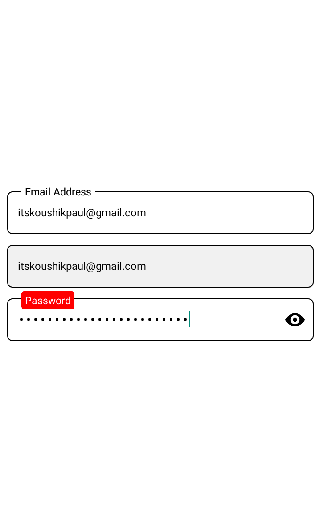
Getting started
Install the library using either Yarn:
npm i @iamkoushik/kp-textinputor yarn:
js
yarn add @iamkoushik/kp-textinput
Usage
import KPTextInput from '@iamkoushik/kp-textinput';

const App = () => {

const [value, setValue] = useState('');

  return (
    <View>
      <KPTextInput
            textboxStyle={{ height: 48, fontSize: 14, marginTop: 12 }}
            placeholder="Email Address"
            textboxvalue={value}
            type={"email-address"}
            isPassword={false}
            onChangeText={(value) => setValue(value)}
            keyboardType={"default"}
            labelplaceholder="Email Address"
          />

          <KPTextInput
            textboxStyle={{ height: 48, fontSize: 14, marginTop: 12 }}
            placeholder="Email Address"
            textboxvalue={value}
            type={"email-address"}
            isPassword={false}
            onChangeText={(value) => setValue(value)}
            keyboardType={"default"}
            editable={false} // Can't edit now
            isShowLabel={false} // Not to show the label text
          />

          <KPTextInput
            labelBackgroundColor="red"
            customlabelStyle={{ borderRadius: 3, padding: 2 }}
            labelTextColor="#fff"
            textboxStyle={{ height: 48, fontSize: 15, marginTop: 12, fontWeight: 'bold' }}
            placeholder="Password"
            textboxvalue={value}
            type={"email-address"}
            isPassword={true} // To show the TextInput as Password field
            onChangeText={(value) => setValue(value)}
            keyboardType={"default"}
            showPassword={true}
            labelplaceholder="Password"
      />
    </View>
  )
}
Properties
| Name | Type | Description | Default
| ------------ | ------------- | ------------ |------------ |
| textboxStyle | Object | Custom styling | {}
| textboxvalue | String | value of the textinput | ''
| isPassword | Boolean | To show as Password | false
| isShowLabel | Boolean | To show the label | false
| showPassword | Boolean | To show the eye-icon | false
| editable | Boolean | To restrict the edit mode | false
| onChangeText | Function (value: String) | Function called when user start typing | null
| labelBackgroundColor | String | Background color of the Label text | "#fff"
| labelTextColor | String | Text color of the Label | "#000"
Contributing
If you'd like to see something added or changed to this module please open a new GitHub issue. Pull requests are always welcome.
License
© Koushik Paul