
@ice/form
v0.1.7
Published
ICE 表单组件


Readme
title: IceForm category: Components chinese: 表单组件
表单组件
参数(Props)
| 参数名 | 说明 | 必填 | 类型 | 默认值 | 备注 | | ------ | ---- | ---- | ---- | ------ | ---- | | initialValues | 表单初始值 | N | object | {} | - | | onSubmit | submit函数 | Y | function | - | - | | onChange | 表单变化回调 | N | function | - | function(values: object, item: object) => void 参数: values: {object} 表单数据 item: {object} 详细 item.name: {string} 变化的组件名 item.value: {string} 变化的数据 | | rules | 校验规则 | N | object | {} | - | | effects | 联动规则 | N | array | [] | - | | layout | 表单布局 | N | object | | - | | renderField | 自定义 Field 布局 | N | function | - | function({label, component, error}) => dom 参数: label: {string/element} Field 的 label component: {string/function} 待渲染的控件 error: {string/element} Field 错误提示信息 |
其他属性比如 style、className 等均会传递到 form 标签上。
layout 是个对象,包含 4 个属性:
{
  labelAlign: 'left',       // label 的位置,'left'、'top',默认 'left'
  labelTextAlign: 'right',  // label 文字对齐方式,'left'、'right',默认 'right'
  labelCol: 1,             // label 占的栅格宽度,共 12 等分,默认 2
  wrapperCol: 3,           // 控件占的栅格宽度,共 12 等分,默认 6
}
rules 是一个 Object,key 是 <Field> 的 name 属性值,value 是个数组,数组里面的每一项是一个校验规则,参考 async-validator。
<Form
  onSubmit={this.onSubmit}
  style={{color: '#ee7893'}}
  rules={{
    username: [{
      required: true,
      min: 5,
      message: '姓名至少5个字符'
    }],
    age:  [{
      required: true,
      message: '年龄必填'
    }]
  }}
>
  <Field label="姓名:" name="username" component="input" type="text" />
  <Field label="年龄:" name="age" component='input' type="number" />
</Form>
effects 是个数组,写法如下:
<Form
  onSubmit={this.onSubmit}
  effects={[
    {
      field: 'username',
      handler: formCore => {
        if (formCore.getFieldValue('username') === 'ice') {
          formCore.setFieldValue('age', 2)
        }
      }
    }
  ]}
>
  <div>Hello Form</div>
  <Field label="姓名:" name="username" component="input" type="text" />
  <Field label="年龄:" name="age" component='input' type="number" />
  <button type="submit">Submit</button>
</Form>
监听该 field 的 onChange 事件,然后设置其他表单项的数据,从而达到联动效果。handler 的参数是 formCore 对象,该对象暴露一些 api 可以设置 value、error、show/hide 等。
Field 组件
| 参数名 | 说明 | 必填 | 类型 | 默认值 | 备注 |
| ------ | ---- | ---- | ---- | ------ | ---- |
| label | 表单项的 label | N | string/element | - | - |
| name | 表单项的 name | Y | string | - | - |
| component | 表单类型,原生 html 标签或者三方组件 | N | string/function | - | 'input' 'textarea' Input Radio |
| value | 表单项的值 | N | - | '' | - |
| rules | 校验规则 | N | object or array | - | - |
| effects | 联动规则 | N | object | - | - |
| visible | 显示隐藏当前 Field | N | boolean | true | true/false |
| setValueFormatter | 格式化控件渲染值 | N | function | | function(savedValue) => renderValue |
| getValueFormatter | 格式化控件提交值 | N | function | | function(renderValue) => savedValue |
| layout | 设置当前 Field 的布局 | N | object | 同 Form layout | 当前 Field 的 layout 会覆盖 Form 的 layout |
| tips | 提示信息 | N | string | | |
| valueName | 控件值的名称,比如,radio 的 valueName 为 'checked',value 为 true/false | N | string | | 比如 Fusion 的 Switch 组件 |
| errorRender | 自定义 error 渲染 | N | function(error) {} | | |
| onChange | 自定义 onChange 函数 | N | function() {} | | 默认情况下已处理表单的 onChange(eventOrValue) 事件,如果接入的三方控件 onChange 的第一个参数不是 event 或者 value,可以主动设置对应的值。比如,接入控件的 onChange(xxx, value) 第二个参数才是 value,则可以手动设置 formCore.setValue(fieldname, value) |
style、className 属性会传递到 Field 最外层 dom 上,其他属性会传递到 component 上,如果没有 component 但有 children,则属性传递到 children 上。
Field 的 rules 和 effects 不需要 name 作为 key 了,写法如下:
<Form onSubmit={this.onSubmit}>
  <Field label="姓名:" name="username" component="input" type="text" />
  <Field label="昵称:" name="nickname" component="input" type="text" effects={{
    handler: formCore => {
      if (formCore.getFieldValue('nickname') === 'snow') {
        formCore.setFieldProps('age', {
          visible: true,
        });
      } else {
        formCore.setFieldProps('age', {
          visible: false,
        });
      }
    }
  }} />
  <Field label="年龄:" name="age" component='input' type="number" rules={[{
    required: true,
    message: '年龄必填'
  }]} />
  <button type="submit">Submit</button>
</Form>
FieldArray 组件
FieldArray 表示渲染数组类型的数据,属性同 Field:
<Form
  onSubmit={this.onSubmit}
>
  <FieldArray label="新增顾客:" name="customers">
    <Field name="customer0" component={Input} placeholder="customer name" />
    <Field name="customer1" component={Input} placeholder="customer name" />
    <Field name="customer2" component={Input} placeholder="customer name" />
  </FieldArray>
  <Field label="日期:" name="date" component={DatePicker} />
  <Field label="">
    <Button htmlType="submit">Submit</Button>
  </Field>
</Form>
formCore API
formCore 会暴露一些 API,使用这些 API 可以获取、设置表单的数据、状态等。
getFieldValue(name):获取某一Field的值setFieldValue(name, value):设置某一Field的值getValues():获取表单的 valuessetValues(values, runEffects):设置表单的 values,runEffects 为 Boolean,表示设置 values 之后是否需要执行表单的 effects,默认 falsegetFieldError(name):获取某一Field的 error 信息setFieldError(name, errMsg):设置某一Field的 error 信息getErrors():获取所有Field的 error 信息setErrors(errors):设置某些Field的 error 信息getFieldProps(name):获取某一Field的属性值setFieldProps(name, prop):设置某一Field的属性值submit():提交表单reset(initialValues):重置表单值为表单初始化时的默认值,如果表单初始化时没有默认值,则清空表单;如果传了参数 initialValues,则 initialValues 会成为新的表单默认值
也可以通过属性的方式获取到一些数据:
formCore.values:获取表单的所有值formCore.errors:获取表单校验的错误信息formCore.pristine:表单当前的values是否与initialValues相等
延伸阅读
开发 @ice/form 表单背景
对于前端,表单开发是一件特别繁琐的事情,尤其在中后台业务中,大家常常会被各种五花八门的表单折磨,又不得不面对现实地去寻找最佳方案,但最终都会发现过度设计的表单组件性能不好,使用简单的表单组件还是需要写大量的业务代码。经过长期的积累以及在社区的调研,我们开发了一个表单组件帮助大家快速地创建一个高性能表单。
组件特性
- 内部几乎无依赖,体积小
- 内部管理表单状态,提升开发效率
- 使用观察者模式提升表单性能
- 强大的校验以及声明式联动
- 可结合第三方组件库(Next、Antd)
- 可自定义 Field
架构方案
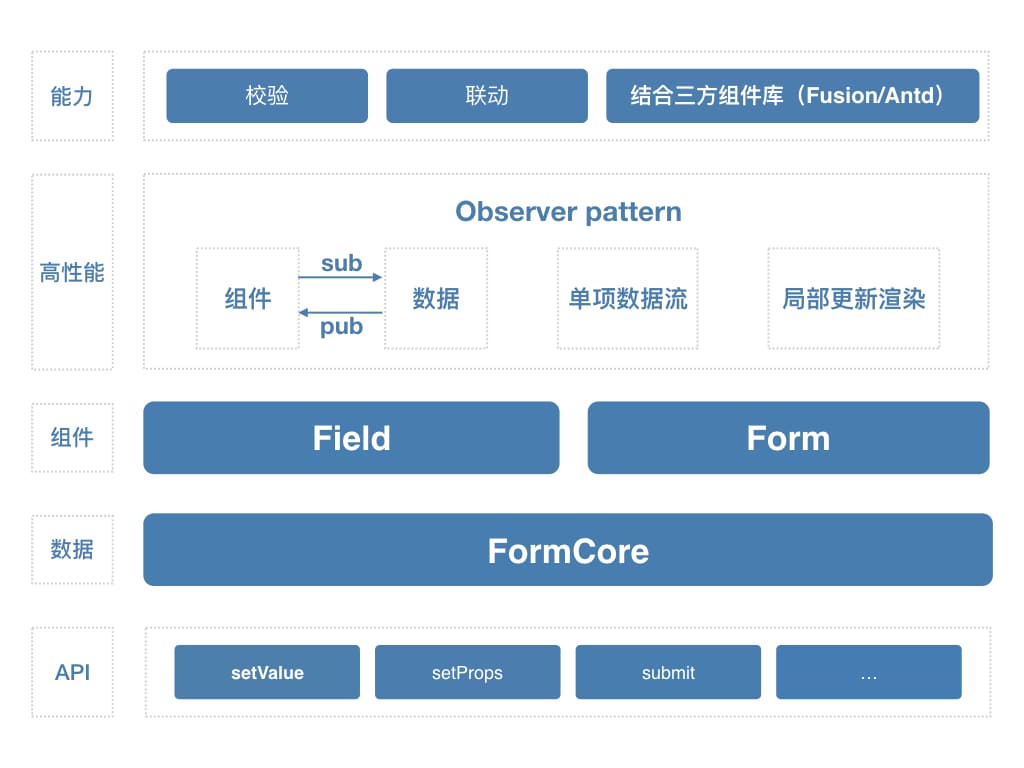
如上图所示,整个表单的数据都放在 FormCore 这一层,同时 FormCore 会暴露一些 API,以便获取、设置、处理数据。Form、Field 组件通过 Sub/Pub 模式与 FormCore 通信,FormCore 通知组件何时重新渲染。表单提供了校验、联动以及结合 Fusion、Antd 三方组件库使用等能力。
竞品对比
NoForm 是一个表单操作(比如说校验、提交、联动等)抽象到上层,下层又包装了 Next、Antd 等组件,UI 上的能力较强,也封装了一些常用的布局,但功能能力较弱,用户实现复杂逻辑还是需要写很多代码。
这两个组件有一些共性,都是通过 render props 的方式实现了复杂的状态管理,在性能上也非常地卓越,在社区得到了大量的好评,但在联动上的能力较弱(目前只能更新 value),而且如果要集成 Next 或者 Antd 需要将库的表单组件都封装成 Field,成本较高。