
@idosal/agentcraft
v0.5.1
Published
RTS agent orchestrator

Maintainers
 idosal
Readme
AgentCraft


The agent orchestrator you've trained for.
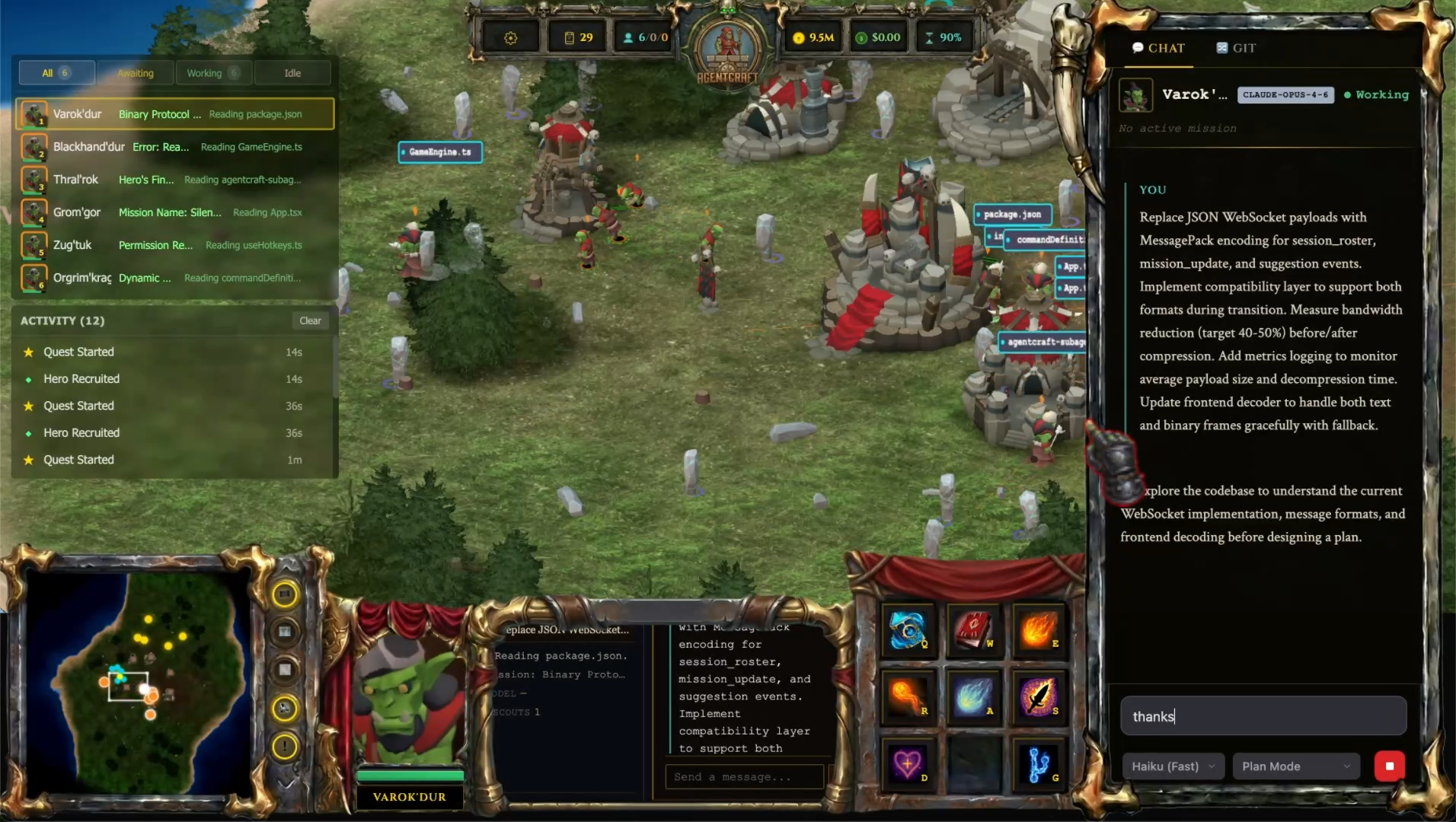
Watch your agents come alive in an RTS game interface. Track and summon agents, command them, and manage their lifecycle with the intuitive interface you know and love.
Click to watch the demo:
Quick Start
npx @idosal/agentcraftThis opens AgentCraft in your browser. From there you can:
- Summon AI agents as heroes
- Command them with missions and watch them execute
- See real-time progress, file operations, and results
- Manage multiple agents working in parallel
- Turn a feature spec into a reviewed, verified multi-agent Campaign
How It Works
All your agents in one place. See them work, launch new agents, and manage their lifecycle with the RTS muscle memory you already have.
In addition to summoning agents internally, AgentCraft also visualizes external sessions from your terminal.
┌─────────────────┐                    ┌─────────────────┐
│   AgentCraft    │ ───── summons ────▶ │   AI Agents     │
│   (Browser)     │ ◀──── reports ──── │   (Heroes)      │
└─────────────────┘                    └─────────────────┘
Commands
npx @idosal/agentcraft              # Launch AgentCraft
npx @idosal/agentcraft start -d     # Start in background (daemon mode)
npx @idosal/agentcraft stop         # Stop the server
npx @idosal/agentcraft status       # Check server status
npx @idosal/agentcraft logs -f      # Follow retained server output
npx @idosal/agentcraft open         # Open browser to running server
npx @idosal/agentcraft doctor       # Diagnose issues
Running in Your Project
Start AgentCraft from your project folder:
cd ~/my-project
npx @idosal/agentcraft
Agents you summon will work in that directory - reading files, making changes, running commands.
You can also launch AgentCraft from a parent directory that contains multiple Git repositories:
cd ~/projects
npx @idosal/agentcraft
AgentCraft discovers nested repositories up to three levels deep. Spawn Options then lets you choose the repository or worktree for each hero.
Features
Single Pane of Glass
All your agents in one place. See your agents work, launch new agents, and manage their lifecycle.
Total Control
The interface that made managing 200 units possible is now ready for AI. Quickly react to events that require your attention.
Mission System
Assign tasks to your agents. Watch missions unfold in real-time with auto-generated quest names. Tasks running a bit long? Explore the map!
Multi-Agent Coordination
Run multiple agents in parallel. Each hero operates independently - have one agent refactoring code while another writes tests.
Campaigns
Submit a feature spec from the Quest Board's Campaign tab. AgentCraft creates a plan for review, dispatches dependent tasks into isolated worktrees, integrates them on a campaign branch, runs final verification with persistent evidence, and waits for you to review and merge. Read the Campaign guide.
Multi-Repository Workspaces
Launch from a parent folder to discover nested Git repositories, then choose the right repository or worktree when spawning each hero.
Alliance Hall
Federate multiple AgentCraft instances into a shared battlefield. Each developer runs their own server and a lightweight relay connects them so remote agents appear on every participant's map. All users and agents can communicate with a shared chat.
Requirements
- Node.js 18+
Documentation
Supported Agents
- Claude Code — full support (spawn, monitor, command)
- Codex — full support (spawn, monitor, command; reasoning-effort control)
- OpenCode — experimental (monitor and spawn)
- Cursor — experimental (monitor and spawn)
- OpenClaw — experimental (gateway-backed chat)
Troubleshooting
npx @idosal/agentcraft doctorThis checks your setup and reports any issues.
Common Issues
"Port 2468 in use"
npx @idosal/agentcraft stop
# or use a different port
npx @idosal/agentcraft start --port 3002
Linux terminal/Codex prerequisites
# Debian/Ubuntu native module prerequisites for node-pty
sudo apt install -y build-essential python3-dev

# Reinstall/rebuild in the AgentCraft install context
npx @idosal/agentcraft@latest doctor        # npx users
npm install -g @idosal/agentcraft@latest    # global npm users
npm rebuild node-pty                        # source checkout/package directory only

# Codex write sandbox prerequisite
sudo apt install -y bubblewrap
AgentCraft does not auto-install OS packages that require sudo. Run npx @idosal/agentcraft doctor to check for missing Linux prerequisites.
Uninstalling
npx @idosal/agentcraft uninstall              # current project, preserve user data
npx @idosal/agentcraft uninstall --dry-run    # preview without changing anything
npx @idosal/agentcraft uninstall --purge      # also wipe ~/.agentcraft and signed-in state
npx @idosal/agentcraft uninstall --yes        # non-interactive (CI-friendly)

npx @idosal/agentcraft restore                # roll back the most recent uninstall
npx @idosal/agentcraft restore --list         # show available backup sessions
npx @idosal/agentcraft restore --from <path>  # roll back a specific session
Removes hooks, plugin assets, the ## AgentCraft Collaboration block in CLAUDE.md / AGENTS.md, the agentcraft-managed .gitignore entries, per-repo .campaign/ and .agentcraft/ directories, the OpenClaw skill, and the settings backup. With --purge, also removes ~/.agentcraft and the cloudflared binary if AgentCraft installed it. Every uninstall writes a backup manifest that agentcraft restore can replay end-to-end.
Privacy
AgentCraft runs 100% locally by default. Your code and agent interactions (e.g., prompts) never leave your machine. Optional features like War Room and Remote Access use encrypted tunnels — no data is stored on relay servers.
Links
- Website: getagentcraft.com