
@ies-tools/viewer
v3.1.0
Published
IES and EULUMDAT lighting previews and photometric charts for Three.js, React and web components.

Maintainers
 ben3d
Readme
@ies-tools/viewer



Documentation · npm · Issues
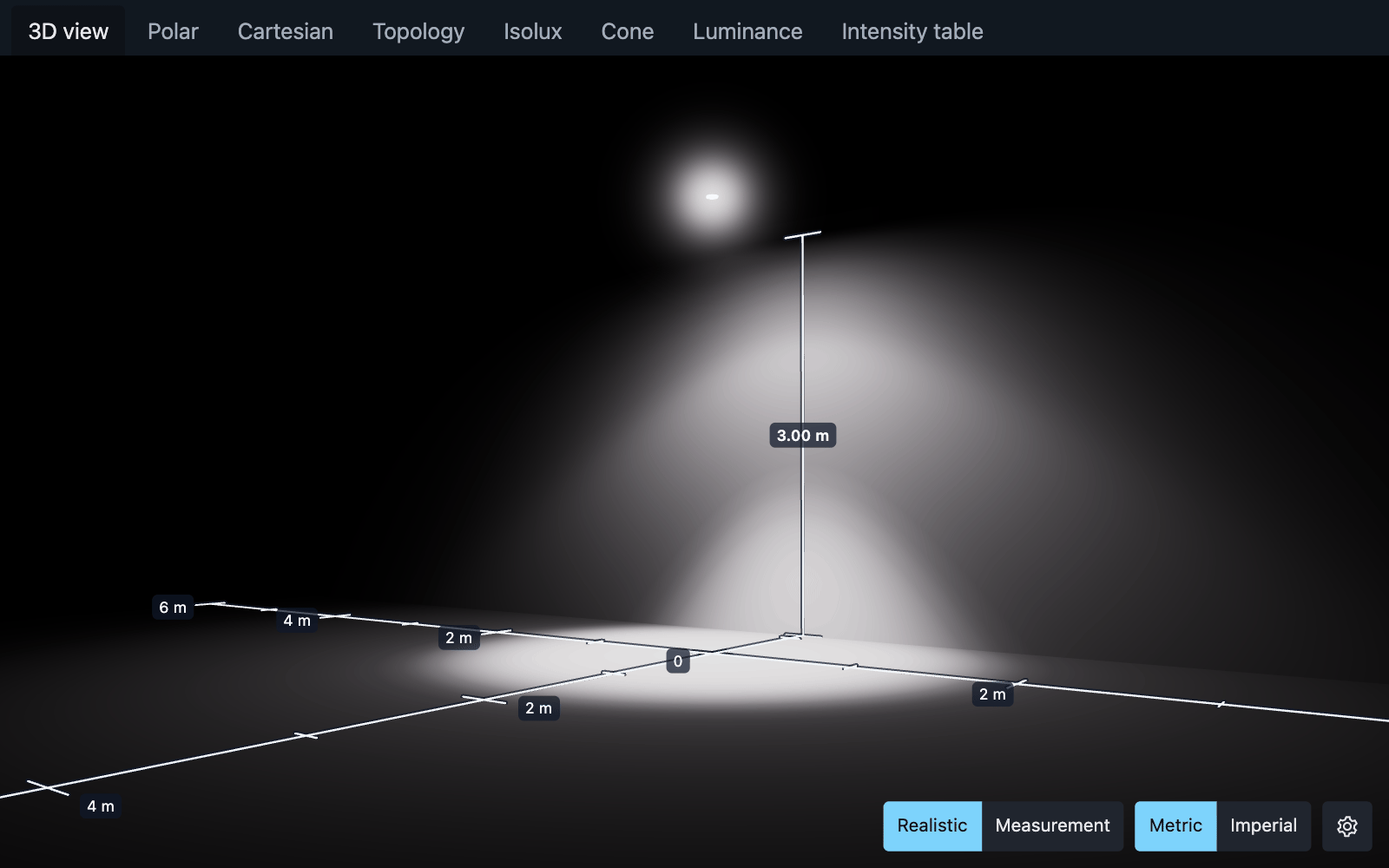
Shared Three.js viewer, React components, and <light-viewer> for IES and EULUMDAT Type C photometry. The scene has a black background, a ground plane, and a wall. A fixture two metres above the floor faces down. Receiver shaders use the measured IES candela distribution, incidence cosine, and inverse square distance on both surfaces. Values use metres. The realistic view is exposed like a camera: luminance L (cd/m²) displays as L / (1.2 · 2^EV100) before ACES tone mapping. Auto exposure (default) meters EV100 from the peak floor/wall luminance (peakReceiverLuminance and autoExposureValue from @ies-tools/core); autoExposure: false uses the exposure EV100 (default 6). This is a direct diffuse light preview without indirect light or occlusion simulation. The fixture uses the file's luminous-opening shape (luminousShape from @ies-tools/core; 1 cm minimum per axis, 5 cm minimum overall, points as 5 cm spheres). Its shader samples a second 361×181 map of average luminance, I / projected area of the displayed shape, toward the camera, shown with the receivers' exposure and tone mapping, over a dark-grey housing with lighter grazing edges. A camera-facing additive glare halo, sized in screen pixels, scatters a fixed share of the fixture's exposed image energy (luminance toward the camera times its image area) into a soft lobe drawn behind the fixture body, so the body stays visible inside it; it is skipped by hit-testing and hidden in measurement mode. The optional photometric solid is the core intensity topology normalized to a peak radius of half the floor distance.
The preview uses one uniform color temperature from IES metadata or the selected native LDT lamp configuration, falling back to 6500 K when missing, invalid, or ambiguous. A linear RGB tint preserves photometric luminance; candela, lux, and charts are unchanged. This approximates warm/cool white appearance without spectral or CRI simulation. See light color for recognized fields and limits.
npm install @ies-tools/viewer @ies-tools/core threeimport { createLightViewer } from '@ies-tools/viewer';
const viewer = createLightViewer(document.querySelector('#preview'));
viewer.load(iesText);
// viewer.setProfile(parsedProfile); viewer.setExposure(7);
// Call viewer.dispose() when unmounting.import '@ies-tools/viewer/styles.css';
import { LightViewer, IntensityGraph, IsoluxGraph } from '@ies-tools/viewer/react';
<LightViewer src="/fixture.ies" onLoad={setProfile} />;
<IntensityGraph profile={profile} axis="vertical" angle={90} projection="polar" />;
<IntensityGraph profile={profile} projection="topology" upAxis="z" surface="both" />;
<IntensityGraph profile={profile} principalPlanes />;
<IsoluxGraph profile={profile} mountingHeight={3} extent={10} aimAngle={30} />;React accepts document, profile, text, iesText, or src in that precedence order and emits onLoad(profile, { document, sourceFormat }) / onError(error). Existing one-argument load callbacks remain compatible. style and className control the container; default height is 480 pixels. Graph axis is vertical (complete opposed-plane −180–180° cut at a fixed azimuth) or horizontal (sweep 0–360°, fixed vertical angle). angle is the fixed angle in degrees. projection is polar, cartesian, or topology; topology shows the full candela surface with upAxis x, y, or z.
<script type="module" src="https://cdn.jsdelivr.net/npm/@ies-tools/viewer/dist/light-viewer.js"></script>
<light-viewer src="/fixture.ies" style="height: 600px"></light-viewer>
For bundlers, import '@ies-tools/viewer/element'. Set the element's iesText (or data) property to raw file text instead of fetching src. load events contain event.detail.profile; error events contain event.detail.message and .error. Cross-origin source URLs require CORS. Removed elements abort fetches and release their GPU resources; reconnecting restores the current document. WebGL2 on a real GPU is required for rendering. Types A and B are explicitly rejected by the 3D viewer.
The dist/light-viewer.js bundle includes Three.js and the parser for standalone scripts, CLI previews, and VS Code webviews. React and React DOM are optional peers for headless APIs; install them when using the React entry point or importing the custom element with a bundler. The standalone bundle includes them. SVG graphs also work without WebGL.
IESLoader is also re-exported from Three.js for applications using Three.js native IES lighting. Its normalized map is intended for Three.js IESSpotLight; it has the loader's own texture layout. createCandelaTexture(profile) instead creates this viewer's 361×181 float receiver map with absolute candela, U = horizontal 0–360°, V = vertical 0–180°, sampled at pixel centers. These maps are not interchangeable. The calibrated map is tested against every repository IES fixture without creating a GPU context. Native-loader compatibility is tested on the original examples and can be diagnosed across the expanded fixture set with node scripts/compare-ies-loaders.mjs; consumers dispose returned textures.
Installed Three.js 0.186.1 native-loader limitation: its symmetry expansion leaves holes/nonfinite float values in the maps for the 02a… (90–270° azimuth) and 06b… (0–345°) example fixtures. Compatibility tests record this explicitly. Use this package's createCandelaTexture and createLightViewer for those distributions; both preserve finite, absolute photometry across all bundled examples. The native loader also fails to parse the dense Preliminar fixture because of line-boundary assumptions. The re-export is the upstream loader unchanged, so applications choosing native IESSpotLight maps must check their inputs and Three.js version.
Raw IES and LDT sources are detected automatically; optional format: 'ies' | 'ldt' hints force a parser. React lampSetIndex, custom-element lamp-set-index, and imperative load options select a zero-based LDT alternative configuration. Multiple sets require an explicit choice and are never added together. The demo and VS Code preview provide selectors.
Set the custom element's photometryText (data/iesText aliases) for raw text, or photometry for a native-source PhotometricDocument. Its load event preserves profile and additionally carries document and sourceFormat. The imperative viewer adds loadDocument, setDocument, and a readonly document while keeping load's compatible-profile return value. Both source formats share the same absolute-candela renderer without serializing/reparsing an IES intermediary. Source changes cancel stale requests and disposal releases the GPU boundary.
planes overlays selected cuts; principalPlanes shows C0–C180 and C90–C270. Topology supports filled/wireframe rendering and orthographic/perspective projection with configurable view angles. IsoluxGraph computes actual ground lux using the measured distribution, inverse-square falloff and receiver cosine, with height, fixture aim/azimuth and contours. Fixture aiming and the optional lampTilt correction are separate. Pure calculation/geometry helpers are exported from @ies-tools/viewer/graphs without React or Three.js dependencies. See the graph documentation for defaults, bounds and coordinates.
The custom element includes a gear-button options panel for back-wall visibility, the beam helper lines, the photometric solid, the distance rulers, wall/floor distance in meters, tone mapping, auto exposure and EV100 exposure, view mode and units, plus viewport buttons for the realistic/measurement view and metric/imperial units. Measurement mode shows false-color illuminance with isolux lines and a legend in lux or footcandles. Use settings-panel="open|closed|hidden" (default closed). The attributes show-wall="false", helper="false", photometric-solid="true", rulers="false", wall-distance, floor-distance, light-offset (deprecated, removed in the next major version), tone-mapping, auto-exposure, exposure, view-mode="realistic|measurement" and units="metric|imperial" reflect the typed settings property. Click and drag the light to change its height and wall distance; drags update floor-distance and wall-distance. settingschange events contain { settings, previousSettings }. await element.whenReady() waits for the current source to load and render, and element.toBlob({ type, quality, width, height }) returns a PNG, JPEG or WebP of the opaque 3D scene (controllers expose the same as capture()). Imperative controllers expose getSettings() / setSettings(patch) and the same event; React exposes corresponding scene props and onSettingsChange, and a ref handle (LightViewerHandle) with the same whenReady() and toBlob(). Source changes and custom-element reconnections preserve scene settings. See the custom-element documentation for ranges and tone-mapping choices. Add charts="true" for tabs with the 3D view followed by polar, Cartesian, topology and isolux charts.
The custom element and React viewer share ViewerSettingsPanel, built with React and Tailwind v4. React hosts import @ies-tools/viewer/styles.css (compiled CSS), or import @ies-tools/viewer/styles/viewer.css from a Tailwind entry. The custom-element bundle inlines the same stylesheet and its bundler entry uses an SSR-safe stylesheet string, with no runtime CSS loader. Theme custom properties inherit across the shadow boundary; the extension maps them to VS Code colors. Standalone controls use dark fallback colors while the Three.js background stays black. settingsPanel controls the React overlay (closed, open, or hidden).
Requirements and help
Use React 19 and Three.js 0.186.x with the bundler entry points. The standalone CDN bundle includes its dependencies. See a complete React example and compatibility and troubleshooting for hardware WebGL2, CORS and server rendering guidance.