
@iflow-mcp/chntif-mcp-gitlab-workflow
v0.1.2
Published
GitLab MCP: supports creating issues from requirements or modifying code and submitting merge requests from existing issues, while also providing a set of atomic GitLab API tools for issue-driven development.
Downloads
29


Readme
mcp-gitlab-workflow
mcp-gitlab-workflow 是一个面向 GitLab Issue 开发的 MCP Server。
它可以基于一段需求或一个现有 Issue,自动串起一条规范化开发链路:需求解析、创建 Issue、拉取分支、修改代码、创建 MR、回填 Issue。同时也提供一组 GitLab API 原子化工具,用于自定义编排和精细控制。
1. 核心能力
workflow_*:将常见的需求到交付流程整合为单个工具调用gitlab_*:GitLab 原子 API 工具,适合自定义编排与精细控制
Issue 目标项目和代码交付目标项目通过 WORKFLOW_ISSUE_PROJECT_ID 与 WORKFLOW_CODE_PROJECT_ID 配置。完整配置见下方环境变量章节。
Workflow 工具
workflow_requirement_to_issue:分析需求并创建 Issueworkflow_review_mr_post_comment:审查指定 MR 并发布评论workflow_issue_to_delivery:基于已有 Issue 完成分支 -> 代码修改 -> MR -> Issue 评论 -> Issue Logworkflow_requirement_to_delivery:从需求开始完成完整交付流程
GitLab 原子工具
Issue 类工具默认回落到 WORKFLOW_ISSUE_PROJECT_ID,代码和 MR 类工具默认回落到 WORKFLOW_CODE_PROJECT_ID。
- 用户与标签:
gitlab_get_current_user、gitlab_list_labels、gitlab_create_label、gitlab_update_label、gitlab_delete_label - Issue:
gitlab_create_issue、gitlab_get_issue、gitlab_get_issue_notes、gitlab_add_issue_comment、gitlab_get_issue_images - 仓库:
gitlab_create_branch、gitlab_get_file、gitlab_commit_files、gitlab_upload_project_file - MR:
gitlab_get_merge_request、gitlab_get_mr_notes、gitlab_create_merge_request、gitlab_create_mr_note、gitlab_get_mr_changes、gitlab_approve_mr、gitlab_unapprove_mr
2. 使用示例
以 workflow_requirement_to_delivery 为例。为了让 LLM 更稳定地选择目标 workflow,建议在提示词中显式写出 tool 名称,或者封装为自定义指令 / skill。
输入
使用 workflow_requirement_to_delivery 添加论坛互动功能
效果
该流程可以自动完成:
需求解析 -> 创建 Issue -> 拉取分支 -> 修改代码 -> MR -> 回填 Issue
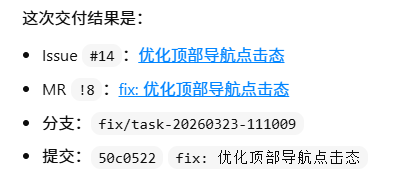
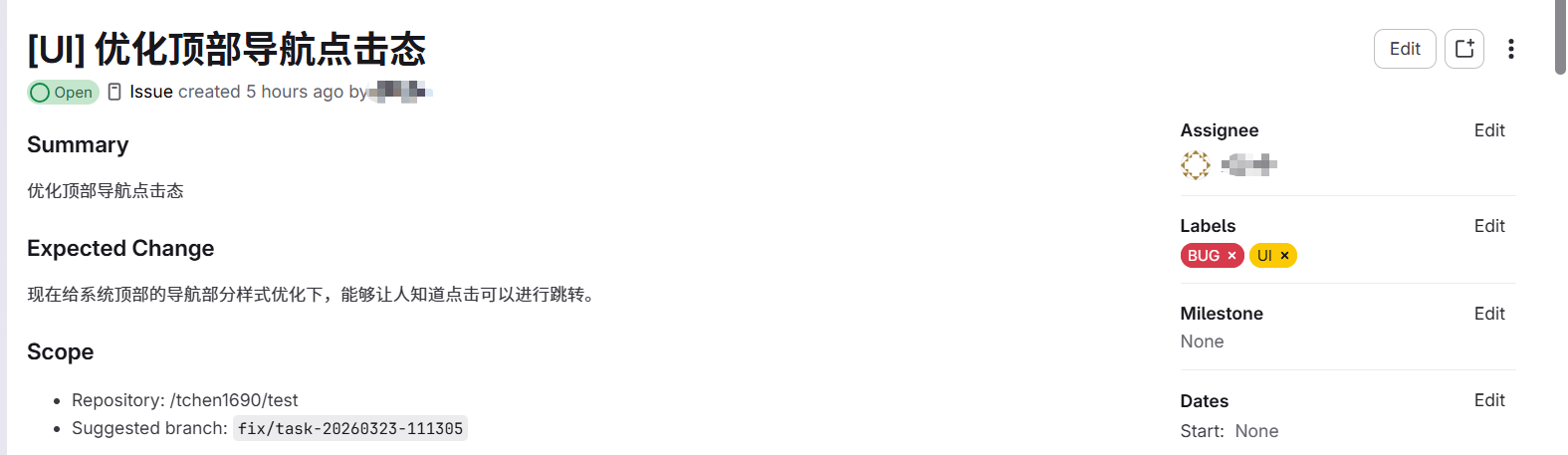
(1) Issue 创建
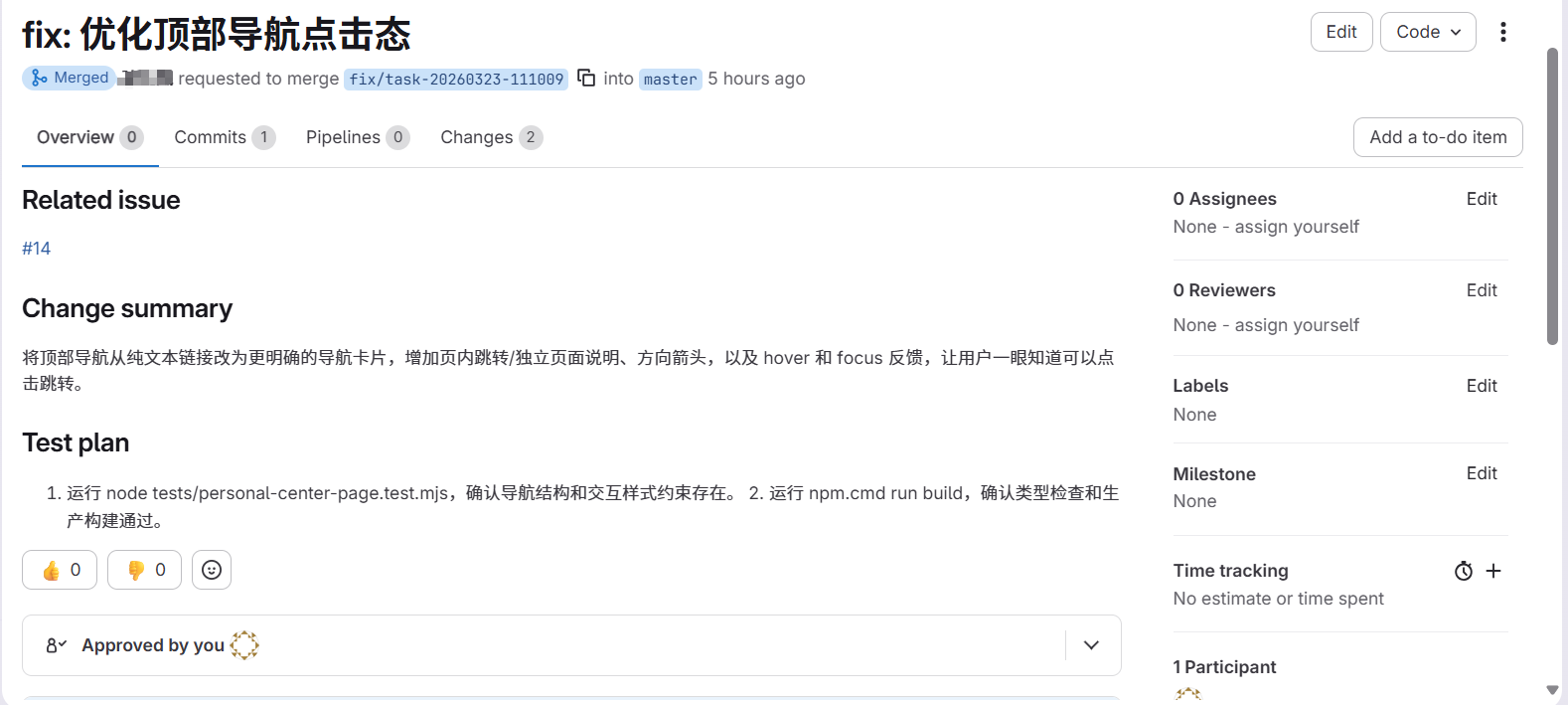
(2) 基于 issue 修改代码并提交 MR
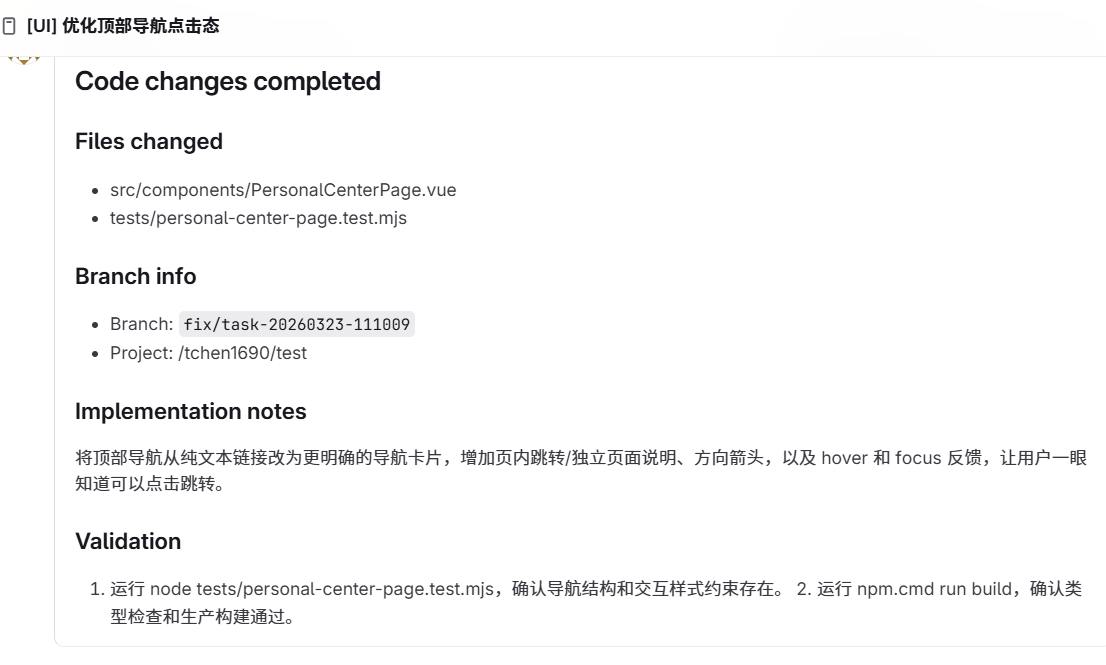
(3) Issue 评论
(4) 本地 issue-log.md
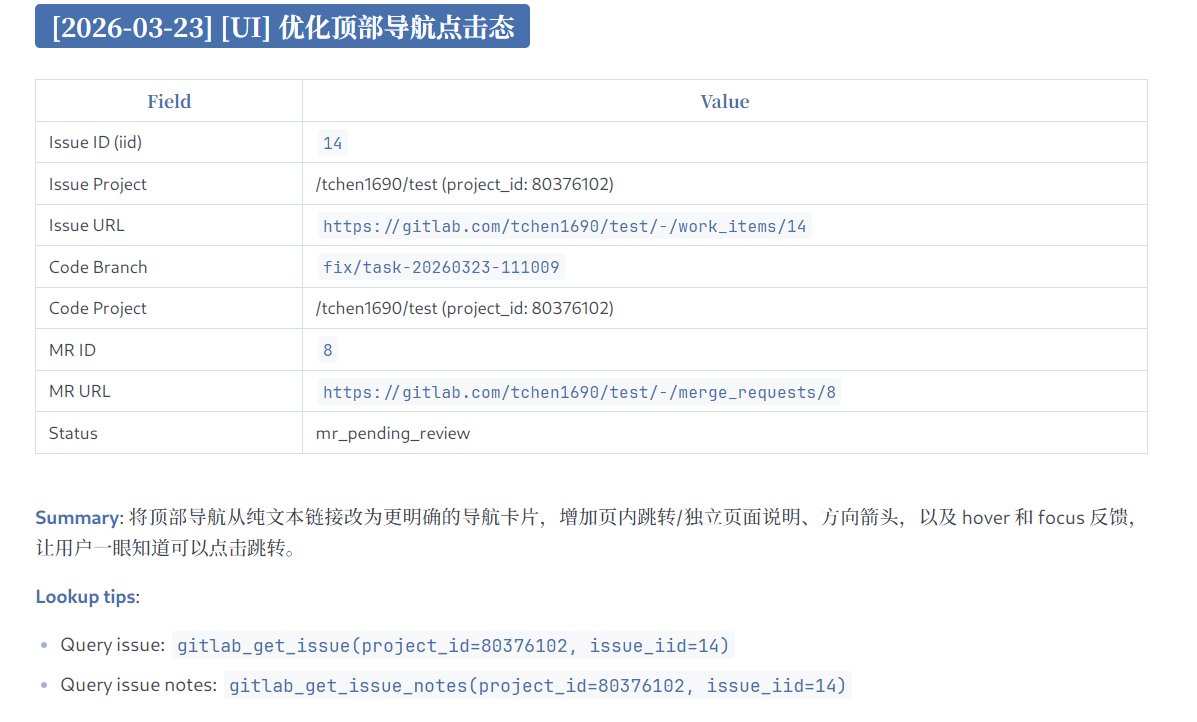
通过这条流程,开发者可以将一个需求或分配给自己的 Issue 直接交给 agent,自动完成面向 Issue 的开发交付。
3. 配置
3.1 使用 NPX
{
  "mcpServers": {
    "gitlab-workflow": {
      "command": "npx",
      "args": ["-y", "@chntif/mcp-gitlab-workflow"],
      "env": {
        "GITLAB_TOKEN": "YOUR_TOKEN",
        "GITLAB_API_BASE_URL": "https://gitlab.com/api/v4",
        "WORKFLOW_ISSUE_PROJECT_ID": "82346102",
        "WORKFLOW_ISSUE_PROJECT_PATH": "tchen1690/test",
        "WORKFLOW_CODE_PROJECT_ID": "82346102",
        "WORKFLOW_CODE_PROJECT_PATH": "tchen1690/test",
        "WORKFLOW_BASE_BRANCH": "develop",
        "WORKFLOW_TARGET_BRANCH": "develop",
        "WORKFLOW_LOCAL_REMOTE_NAME": "origin"
      }
    }
  }
}
3.2 Codex
(1) 在终端中添加
codex mcp add gitlab-workflow \
  --env GITLAB_TOKEN=YOUR_TOKEN \
  --env GITLAB_API_BASE_URL=https://gitlab.com/api/v4 \
  --env WORKFLOW_ISSUE_PROJECT_ID=80376102 \
  --env WORKFLOW_ISSUE_PROJECT_PATH=tchen1690/test \
  --env WORKFLOW_CODE_PROJECT_ID=80376102 \
  --env WORKFLOW_CODE_PROJECT_PATH=tchen1690/test \
  --env WORKFLOW_BASE_BRANCH=develop \
  --env WORKFLOW_TARGET_BRANCH=develop \
  --env WORKFLOW_LOCAL_REMOTE_NAME=origin \
  -- npx -y @chntif/mcp-gitlab-workflow
(2) 或直接写入 config.toml
[mcp_servers.gitlab-workflow]
command = "npx"
args = ["-y", "@chntif/mcp-gitlab-workflow"]

[mcp_servers.gitlab-workflow.env]
GITLAB_TOKEN = "YOUR_TOKEN"
GITLAB_API_BASE_URL = "https://gitlab.com/api/v4"
WORKFLOW_ISSUE_PROJECT_ID = "80376102"
WORKFLOW_ISSUE_PROJECT_PATH = "tchen1690/test"
WORKFLOW_CODE_PROJECT_ID = "80376102"
WORKFLOW_CODE_PROJECT_PATH = "tchen1690/test"
WORKFLOW_BASE_BRANCH = "develop"
WORKFLOW_TARGET_BRANCH = "develop"
WORKFLOW_LOCAL_REMOTE_NAME = "origin"
3.3 Claude Code
claude mcp add gitlab-workflow \
  -e GITLAB_TOKEN=YOUR_TOKEN \
  -e GITLAB_API_BASE_URL=https://gitlab.com/api/v4 \
  -e WORKFLOW_ISSUE_PROJECT_ID=80376102 \
  -e WORKFLOW_ISSUE_PROJECT_PATH=tchen1690/test \
  -e WORKFLOW_CODE_PROJECT_ID=80376102 \
  -e WORKFLOW_CODE_PROJECT_PATH=tchen1690/test \
  -e WORKFLOW_BASE_BRANCH=develop \
  -e WORKFLOW_TARGET_BRANCH=develop \
  -e WORKFLOW_LOCAL_REMOTE_NAME=origin \
  -- npx -y @chntif/mcp-gitlab-workflow
也可以直接将3.1中配置写入 Claude Code 的配置文件。
3.4 本地启动
{
  "mcpServers": {
    "gitlab-workflow": {
      "command": "node",
      "args": ["/gitlab-workflow-server/dist/src/server.js"],
      "env": {
        "GITLAB_TOKEN": "YOUR_TOKEN",
        "GITLAB_API_BASE_URL": "https://gitlab.com/api/v4",
        "WORKFLOW_ISSUE_PROJECT_ID": "82346102",
        "WORKFLOW_ISSUE_PROJECT_PATH": "tchen1690/test",
        "WORKFLOW_CODE_PROJECT_ID": "82346102",
        "WORKFLOW_CODE_PROJECT_PATH": "tchen1690/test",
        "WORKFLOW_BASE_BRANCH": "develop",
        "WORKFLOW_TARGET_BRANCH": "develop",
        "WORKFLOW_LOCAL_REMOTE_NAME": "origin"
      }
    }
  }
}
3.5 关于 uv/uvx
本项目是 Node.js 包,推荐使用 npx 运行。
4. 环境变量
参数优先级:
tool 参数 -> 用户配置的环境变量 -> 代码内默认值
如果用户没有显式传入 project_id 等参数,tool 会回落到运行时环境变量配置;部分变量同时带有代码内默认值。
| 环境变量 | 作用 | 默认值 | 必需 |
| -------------------------------- | ---------------------------------------------------------------- | --------------------------- | ---- |
| GITLAB_TOKEN | GitLab API 访问令牌,服务启动和所有 GitLab 操作都依赖它 | 无 | 是 |
| GITLAB_API_BASE_URL | GitLab API 基础地址 | https://gitlab.com/api/v4 | 否 |
| WORKFLOW_ISSUE_PROJECT_ID | Issue 类工具默认使用的目标项目 ID | 无 | 否 |
| WORKFLOW_ISSUE_PROJECT_PATH | Issue 项目路径,用于模板渲染和引用展示 | 无 | 否 |
| WORKFLOW_CODE_PROJECT_ID | 仓库、分支、提交、MR 类工具默认使用的目标项目 ID | 无 | 否 |
| WORKFLOW_CODE_PROJECT_PATH | 代码项目路径,用于模板、日志和输出展示 | 无 | 否 |
| WORKFLOW_BASE_BRANCH | 创建交付分支前默认同步的基线分支 | develop | 否 |
| WORKFLOW_TARGET_BRANCH | MR 默认目标分支 | develop | 否 |
| WORKFLOW_LOCAL_REMOTE_NAME | 本地 git workflow 默认 remote 名称 | origin | 否 |
| WORKFLOW_LABEL | 默认 Issue 标题前缀与兜底标签 | 无 | 否 |
| WORKFLOW_ASSIGNEE_USERNAME | Issue / MR 默认指派用户名 | 无 | 否 |
| WORKFLOW_ISSUE_LOG_PATH | 本地 issue log 文件路径 | issue-log.md | 否 |
| WORKFLOW_UPDATE_ISSUE_LOG | delivery workflow 完成后是否默认更新本地 issue log | true | 否 |
| WORKFLOW_DELIVERY_METHOD | delivery workflow 默认执行方式,支持 local_git 和 remote_api | local_git | 否 |
| WORKFLOW_CHECKOUT_LOCAL_BRANCH | remote_api 交付后是否自动同步并切换到目标分支 | false | 否 |
| WORKFLOW_LOCK_ISSUE_PROJECT_ID | 锁定允许访问的 Issue 项目 ID,防止误操作其他仓库 | 无 | 否 |
| WORKFLOW_LOCK_CODE_PROJECT_ID | 锁定允许访问的代码项目 ID,防止误操作其他仓库 | 无 | 否 |
推荐配置
GITLAB_TOKEN、GITLAB_API_BASE_URL:连接 GitLab 的必需配置WORKFLOW_ISSUE_PROJECT_ID、WORKFLOW_CODE_PROJECT_ID:定义 issue 项目和代码项目,可以是同一个WORKFLOW_ISSUE_PROJECT_PATH、WORKFLOW_CODE_PROJECT_PATH:提升引用展示效果,但不是必需WORKFLOW_BASE_BRANCH、WORKFLOW_TARGET_BRANCH:应与团队分支规范保持一致WORKFLOW_LOCAL_REMOTE_NAME:通常为origin
如果某次操作的目标与默认环境变量不同,显式传入 tool 参数会覆盖环境变量配置。
5. License
MIT