
@iiatlas/hledger-fmt
v2.0.2
Published
Format and sort hledger journal files

Maintainers
 iiatlas-dev
Readme

hledger-fmt
A CLI formatter for your hledger journals.
hledger-fmt keeps journal files consistent by formatting postings, normalizing transaction headers, and sorting transactions by date when needed.



Features
- Format hledger journal files with consistent spacing and alignment
- Sort transactions chronologically by transaction date
- Read input from a file or stdin
- Write changes in place with
--in-place - Configure formatting via CLI flags, environment variables, or JSON config
- Generate a starter config file with
hledger-fmt init
Looking for a VSCode extension to do this automatically? Check out hledger-formatter.
Demo
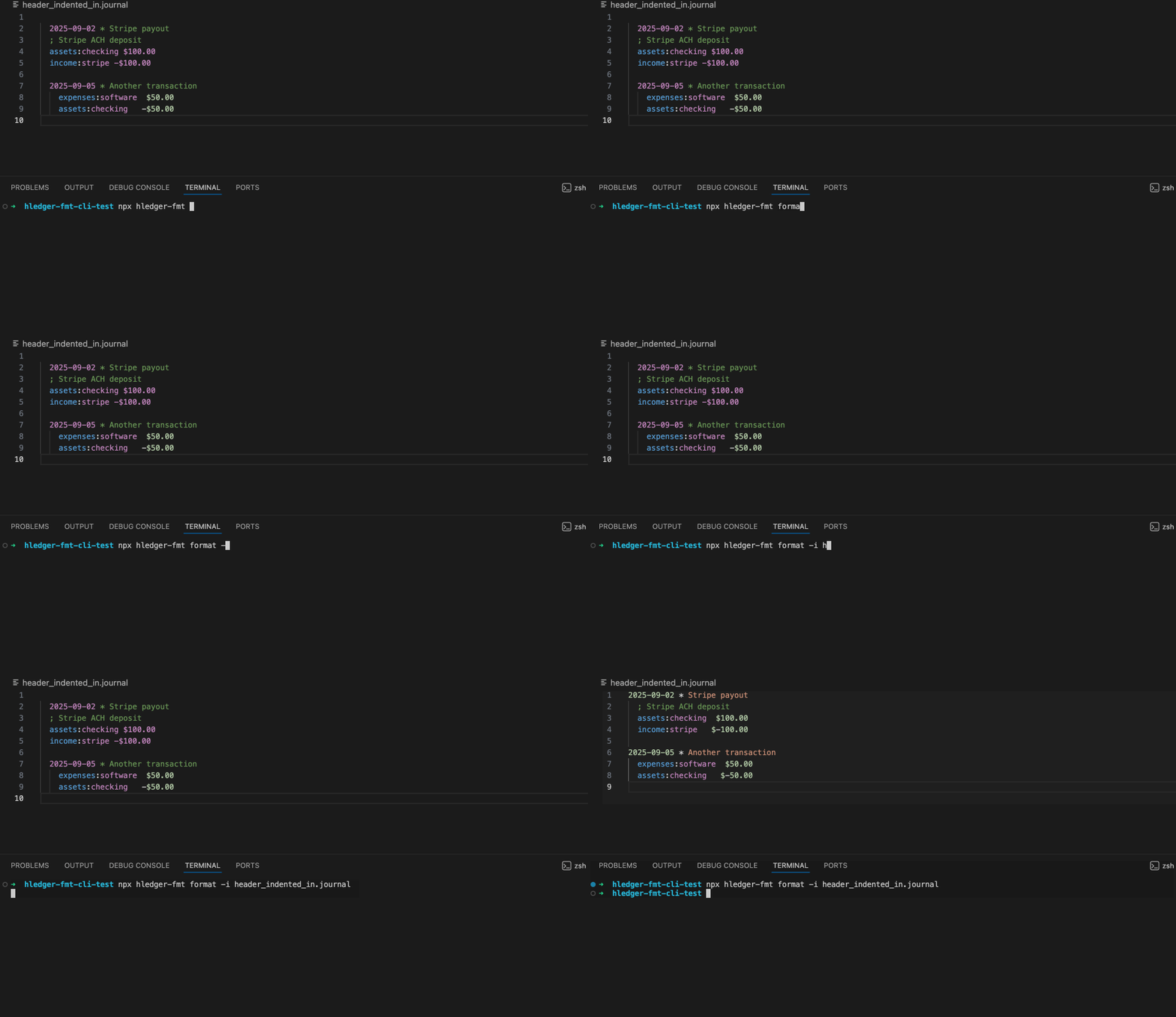
Format
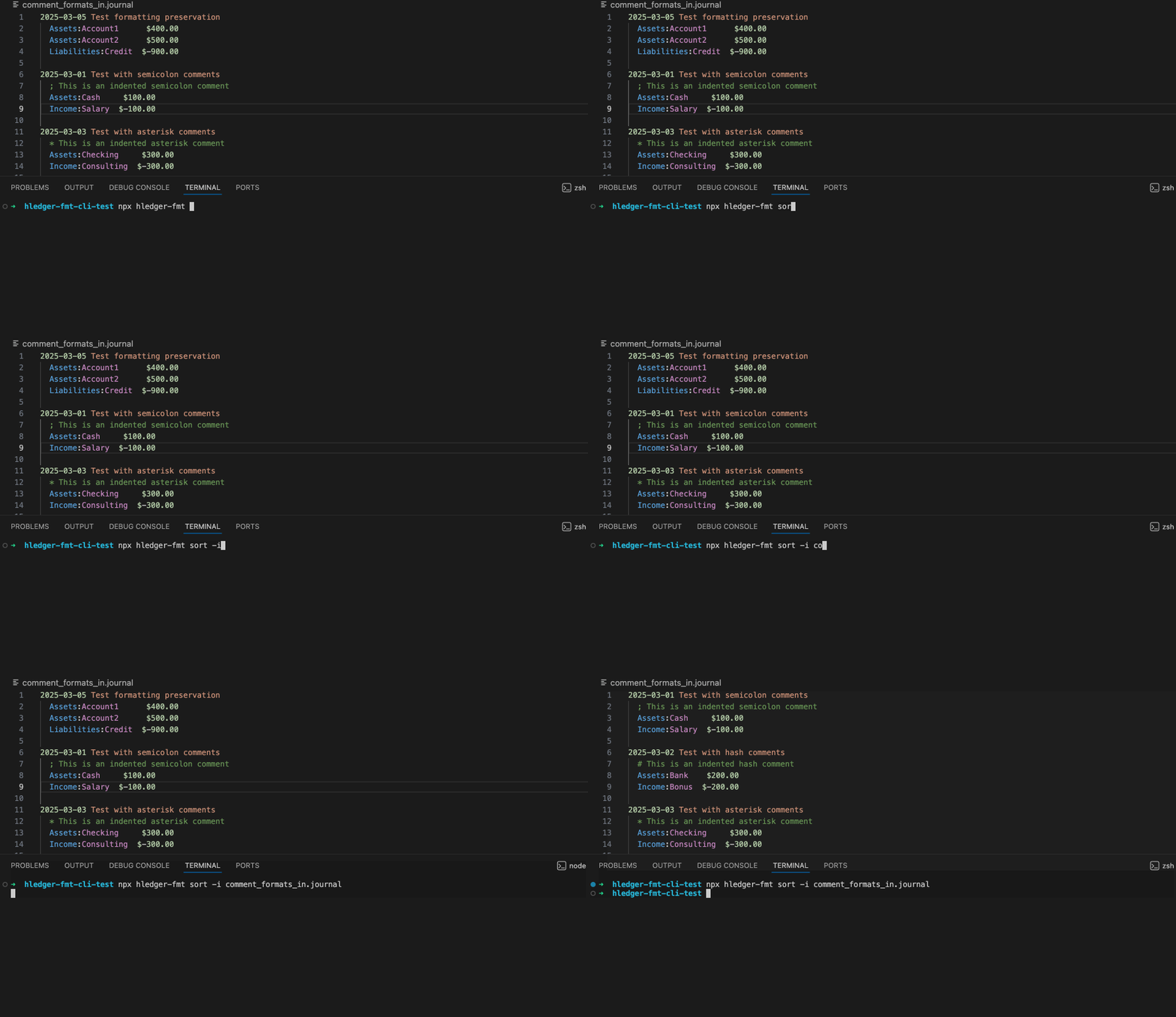
Sort
Install
View on NPM: https://www.npmjs.com/package/@iiatlas/hledger-fmt
npm install -g @iiatlas/hledger-fmtQuick Start
(Optional) Create a default config file:
hledger-fmt initFormat a file:
hledger-fmt format ledger.journalFormat stdin:
cat ledger.journal | hledger-fmt formatSort a file:
hledger-fmt sort ledger.journalSupported File Types
.journal.hledger.ledger
Commands
format [file]
Format a journal file. If file is omitted, reads from stdin.
hledger-fmt format [file]Options:
--config <path>: path to JSON config file (default discovery:.hledger-fmt.jsonin current directory)--alignment <mode>:fixedColumnorwidest--column <n>: column position for fixed alignment (non-negative integer)--indent <width>: indentation width (non-negative integer)--negative-style <style>:signBeforeSymbolorsymbolBeforeSign--date-format <fmt>:YYYY-MM-DD,YYYY/MM/DD, orYYYY.MM.DD--comment-char <char>:;,#, or*-i, --in-place: modify file in place (requiresfileargument)
sort [file]
Sort journal entries by date. If file is omitted, reads from stdin.
hledger-fmt sort [file]Options:
-i, --in-place: modify file in place (requiresfileargument)
init
Create a default config file.
hledger-fmt initOptions:
--path <path>: custom output path (default:.hledger-fmt.json)-f, --force: overwrite an existing config file
Format Configuration
Formatting options can come from the following locations (in order of precedence):
- CLI flags (like
--alignmentor--column) - Environment variables (
HLEDGER_FMT_*) - JSON config file (
--config <path>or auto-discovered.hledger-fmt.json) - Or, the built-in defaults which align with the hledger manual
Config File Shape
.hledger-fmt.json:
{
  "format": {
    "alignment": "widest",
    "column": 42,
    "indent": 4,
    "negativeStyle": "symbolBeforeSign",
    "dateFormat": "YYYY-MM-DD",
    "commentChar": ";"
  }
}
Config Options Reference
format.alignment- Valid values:
fixedColumn,widest - Default:
widest - Env var:
HLEDGER_FMT_ALIGNMENT - CLI flag:
--alignment
- Valid values:
format.column- Valid values: non-negative integer
- Default:
42 - Env var:
HLEDGER_FMT_COLUMN - CLI flag:
--column
format.indent- Valid values: non-negative integer
- Default:
4 - Env var:
HLEDGER_FMT_INDENT - CLI flag:
--indent
format.negativeStyle- Valid values:
signBeforeSymbol,symbolBeforeSign - Default:
symbolBeforeSign - Env var:
HLEDGER_FMT_NEGATIVE_STYLE - CLI flag:
--negative-style
- Valid values:
format.dateFormat- Valid values:
YYYY-MM-DD,YYYY/MM/DD,YYYY.MM.DD - Default:
YYYY-MM-DD - Env var:
HLEDGER_FMT_DATE_FORMAT - CLI flag:
--date-format
- Valid values:
format.commentChar- Valid values:
;,#,* - Default:
; - Env var:
HLEDGER_FMT_COMMENT_CHAR - CLI flag:
--comment-char
- Valid values:
If the config file exists but contains invalid JSON, unknown keys, or invalid values, the CLI prints a warning and ignores that config file.
Example
Before:
2023-01-05   Grocery Store
  expenses:food      $85.50
    assets:bank:checking    $-85.50

2023-01-10 Coffee Shop
 expenses:dining:coffee  $4.75
   assets:cash  $-4.75
After:
2023-01-05 Grocery Store
    expenses:food             $85.50
    assets:bank:checking     $-85.50

2023-01-10 Coffee Shop
    expenses:dining:coffee     $4.75
    assets:cash               $-4.75
Related
Looking to automatically format and sort your HLedger Journals in VSCode? (Along with syntax highlighting and more...)
Check out my VSCode extension hledger-formatter which does exactly that!
Release Notes
See CHANGELOG.md for CLI release history.
Contributing
See CONTRIBUTING.md.
Support
See SUPPORT.md.
License
MIT - see LICENSE.