
@inbiz/graph
v1.0.0-beta.0
Published


Keywords
Readme
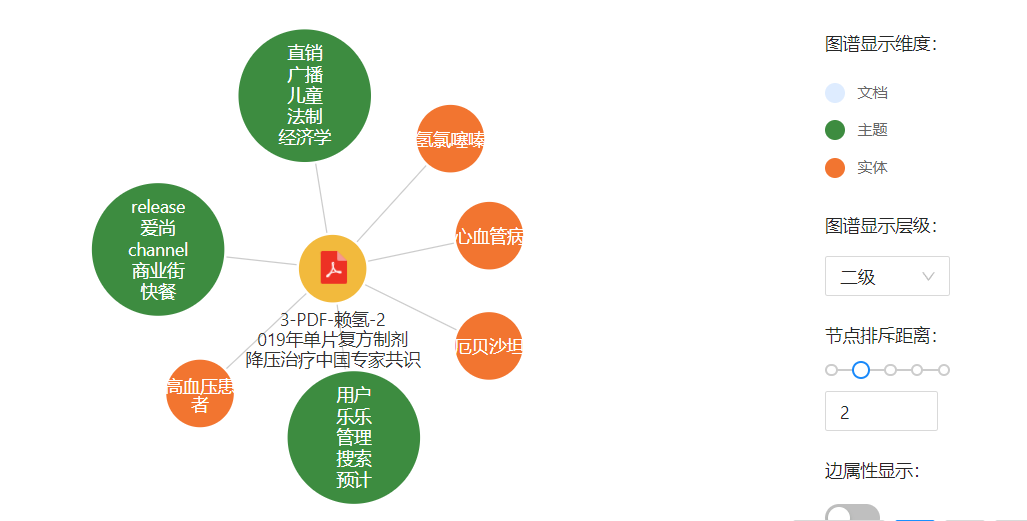
组件使用tsdx框架开发的npm包。

安装依赖
npm install inbiz-graph --save页面引入
import { InbizGraph } from 'inbiz-graph';// 示例1 使用inwise的服务。
<InbizGraph
graphUrl={`http://172.16.2.39:1532/inwise/graph2.jsp`}
params={{
type: 'file',
anchor: "'16847','17288','17294'",
searchVal: "文档",
showMarker: true,
markerColor: 'red',
}}
showRightMenu={true}
tooltipsRender={true}
/>```bash
// 示例2 使用自定义逻辑。
<InbizGraph
params={{
showMarker: true,
markerColor: 'red',
}}
GraphData={{
"nodes": {
"7766065713332071222": {
"conceptId": -1298275357,
"attributes": {
"_id": "背景",
"type": "baidu",
"ref_count": 41
},
"title": "背景",
"type": "entity"
},
"1328350470430427987": {
"anchor": true,
"conceptId": -1298275357,
"attributes": {
"_id": "蓝色背景",
"type": "baidu",
"ref_count": 4
},
"title": "蓝色背景",
"type": "entity"
}
},
"edges": {
"3364276357013955879": {
"from": "7766065713332071222",
"attributes": {
"rank": 6,
"weight": 0.609552
},
"to": "1328350470430427987",
"type": "相关"
}
},
}}
showRightMenu={true}
tooltipsRender={true}
/>参数描述
interface propsType {
  //不重要的控制
  className?: string;//控制图谱样式
  loading?: boolean;//控制加载
  visible?: boolean;//手动控制暂无数据(visible)
  checkedClick?: boolean;//手动控制暂边属性显现
  checked?: boolean;//手动控制暂边属性状态
  noData?: boolean;//手动控制组件是否显现
  //比较重要
  width?: number;//图谱宽度
  height?: number;//图谱高度
  lineDistance?: number;//线的距离
  nodeSizeTopic?: number;//主题圆半径
  nodeSize?: number;//节点半径
  children?: any;//传入自定义元素。
  showRightMenu?: boolean;//显示右侧菜单
  noShowDimension?: boolean;//控制图谱显示维度是否显现
  tooltipsRender?: boolean;//控制图谱操作幕布是否显现
  GraphData?: {
    noce: boolean; //第一次不加载
    nodes: any; //节点数据
    edges: any; //线的数据
    forceData: any; //自定义力的作用
  };
  optEvent?: {
    dimension?: Function;//菜单点击维度
    hierarchyClick?: Function;//菜单点击层级
    checkedClick?: any;//菜单点击边属性

    loadMore?: Function;//双击元素加载更多
    openFile?: Function;//弹窗打开文件
    searchDoc?: Function;//弹窗搜索文档
    setCore?: Function;//弹窗设为中心
    openMoreNode?: Function;//弹窗展开更多节点
  }
  color?: any;//节点颜色
  //重要
  graphUrl: string;//图谱请求url。
  EDOC2_URL?: string;//跳转ecm预览文件地址。
  params?: {
    type?: string;//查询类型******
    searchVal?: any;//文件名称*****
    anchor?: string | number;//关键字 | 文件id。******
    //按需求修改
    checked?: boolean; //节点关系
    markerColor?: string; //箭头颜色
    showMarker?: boolean; //是否显示箭头
    onDeleteRelNode?: Function; //节点关系删除回调
    onNodeClick?: Function; //点击节点回调
    onLineClick?: Function; //点击线
  };
};