
@inso_web/els-vue
v0.5.2
Published
Vue 3 plugin for the Error Logs Service (ELS): a global errorHandler, the useELS composable and automatic component error reporting.
Downloads
37

Maintainers
 insoweb
Readme
@inso_web/els-vue




Vue 3 plugin for the Inso Error Logs Service (ELS) — a managed SaaS for centralised event logging (debug → fatal) with AI-assisted error triage. Global client registration via app.use(ELSPlugin), useELS() composable, and an optional app.config.errorHandler hook that auto-captures render-phase errors.
Table of contents
- What you get
- Install
- Quick Start
- When to use what
- Core concepts
- Configuration
- Migration
- Versioning
- Quick reference
- Why ELS
- API
- FAQ
- Other ELS SDKs
- Pricing
- License
What you get
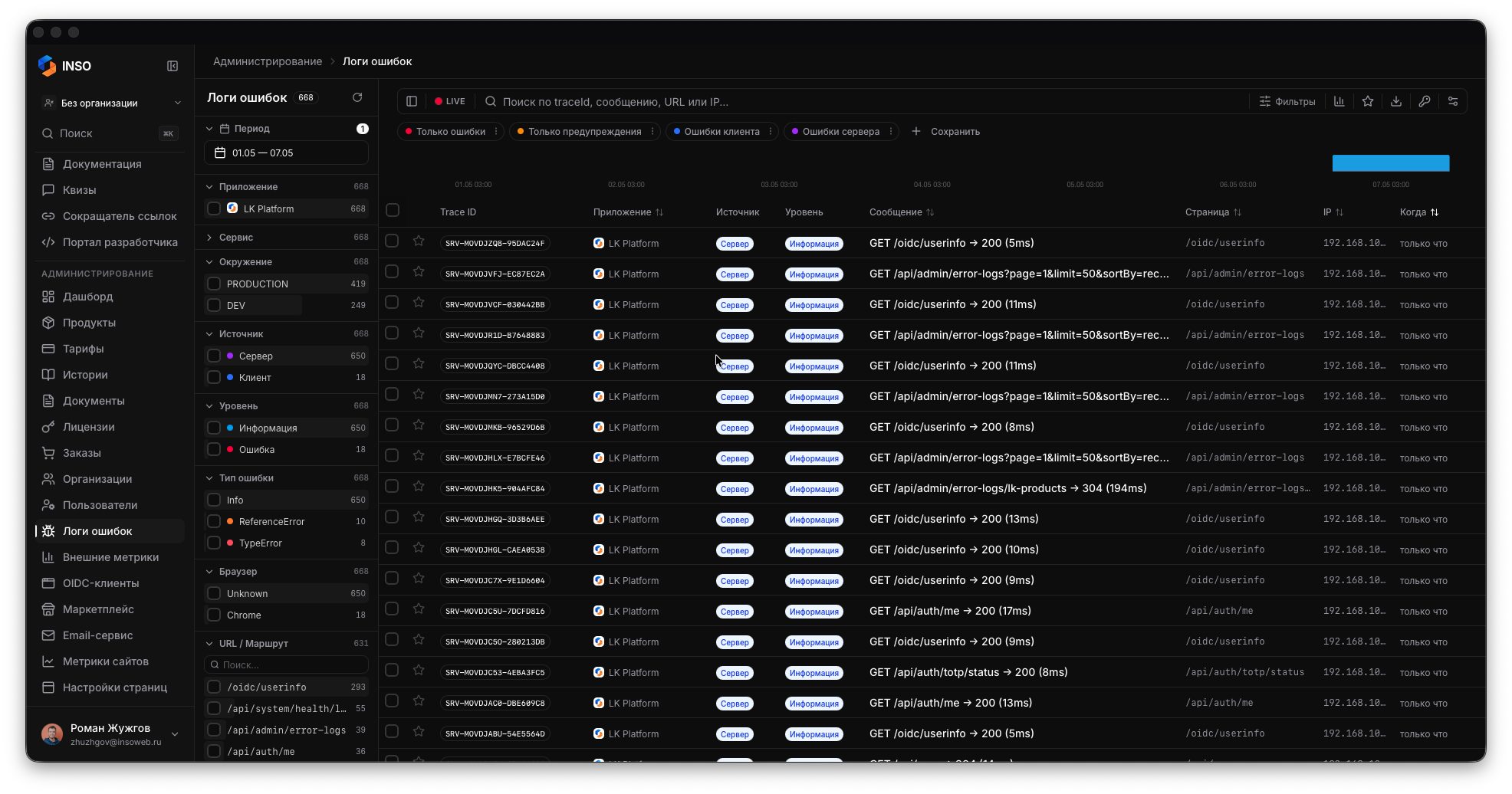
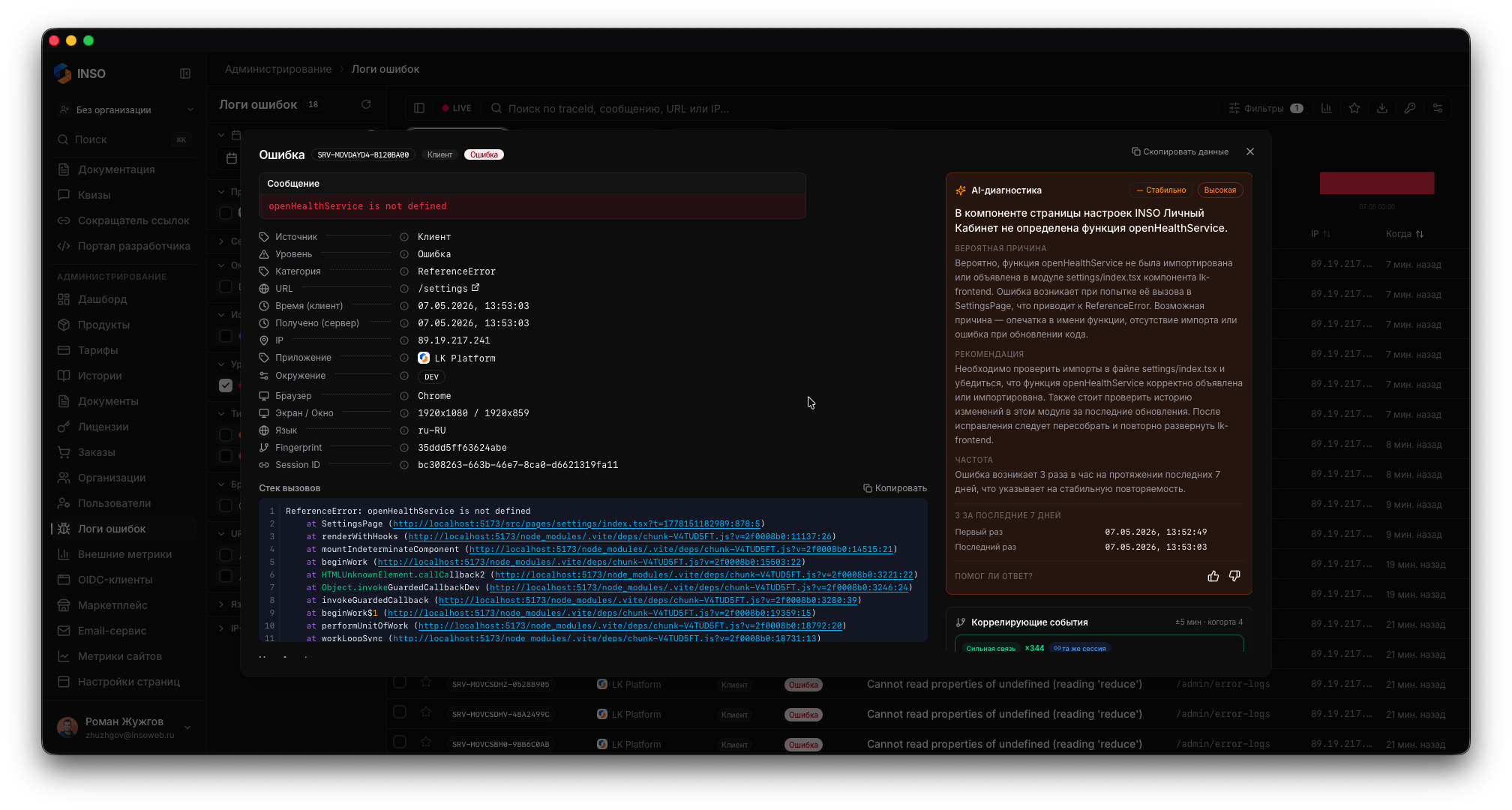
ELS ships with a built-in admin dashboard. Every event captured by this SDK lands there with full-text search, faceted filtering, AI-assisted diagnosis, and version-aware regression detection.
| | |
|---|---|
|  |
| 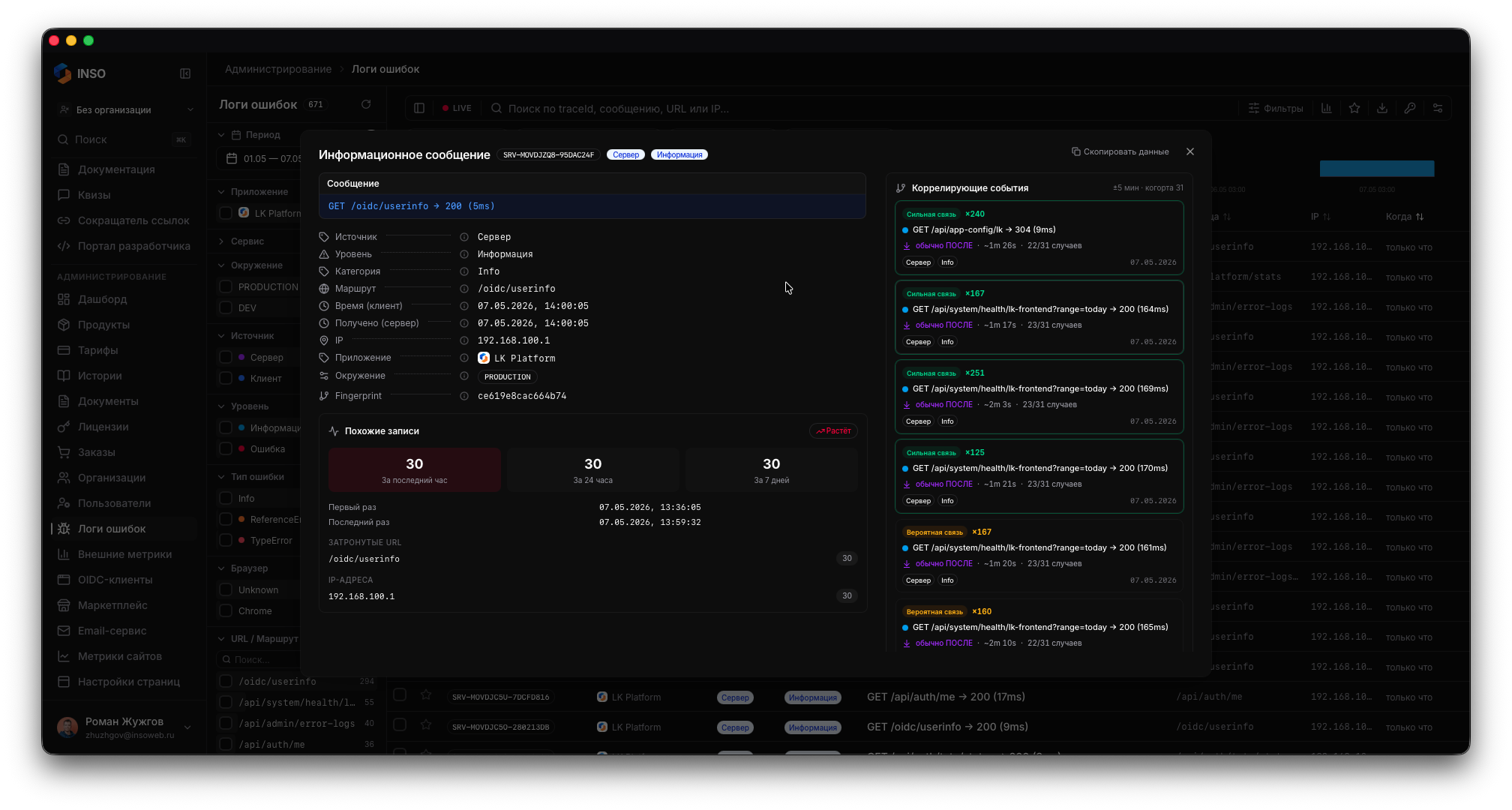 |
| Virtual table with facet sidebar (app, env, version, source, level, browser, IP, category). Live mode auto-refreshes every 5s. | Full event metadata: timestamps, geo, env, app version, fingerprint, session, repetition cards, in-session correlation. |
|
|
| Virtual table with facet sidebar (app, env, version, source, level, browser, IP, category). Live mode auto-refreshes every 5s. | Full event metadata: timestamps, geo, env, app version, fingerprint, session, repetition cards, in-session correlation. |
|  |
| 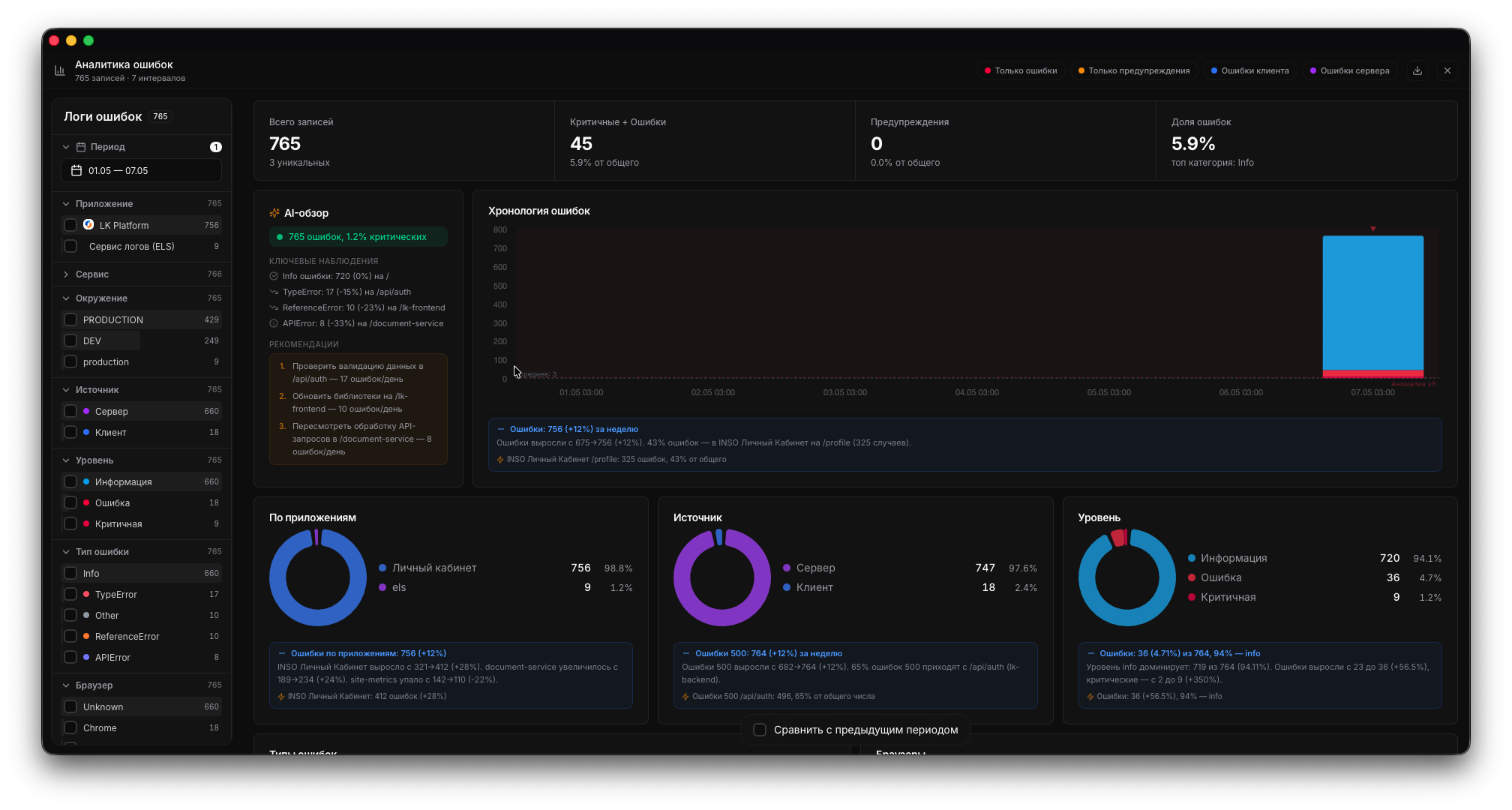 |
| Parsed stack trace + AI-assisted diagnosis: what broke, where, how to fix. | Timeline, donuts, top URLs/IPs, hourly heatmap, version-regression widget. |
|
| Parsed stack trace + AI-assisted diagnosis: what broke, where, how to fix. | Timeline, donuts, top URLs/IPs, hourly heatmap, version-regression widget. |
Install
npm install @inso_web/els-client @inso_web/els-vueRequirements: Vue 3, Node.js 18+ at build time. Works with Vite, Quasar, Nuxt 3.
Quick Start
1. Register the plugin
main.ts:
import { createApp } from 'vue';
import { ELSClient } from '@inso_web/els-client';
import { ELSPlugin } from '@inso_web/els-vue';
import App from './App.vue';

const client = new ELSClient({
  apiKey: import.meta.env.VITE_ELS_API_KEY,
  appSlug: 'my-vue-app',
  serviceName: 'web',
  deploymentEnv: import.meta.env.PROD ? 'PRODUCTION' : 'DEV',
  appVersion: import.meta.env.VITE_BUILD_VERSION,
  minLevel: 'info',
});

const app = createApp(App);
app.use(ELSPlugin, { client, attachVueErrorHandler: true });
app.mount('#app');
attachVueErrorHandler: true installs app.config.errorHandler — render-phase errors land in ELS automatically.
Don't have an API key yet? Sign up at lk.insoweb.ru — takes under a minute.
2. Log via useELS()
<script setup lang="ts">
import { useELS } from '@inso_web/els-vue';

const log = useELS();

async function checkout() {
  log.info('Checkout started');
  try {
    await fetch('/api/checkout', { method: 'POST' });
  } catch (err) {
    log.error(err as Error, 'Checkout failed');
  }
}
</script>

<template>
  <button @click="checkout">Pay</button>
</template>
3. Global handlers (optional)
window.addEventListener('error', (e) => client.error(e.error ?? e.message));
window.addEventListener('unhandledrejection', (e) => client.error(e.reason));
4. Nuxt 3
// plugins/els.client.ts
import { ELSClient } from '@inso_web/els-client';
import { ELSPlugin } from '@inso_web/els-vue';

export default defineNuxtPlugin((nuxtApp) => {
  const client = new ELSClient({
    apiKey: useRuntimeConfig().public.elsApiKey,
    appSlug: 'my-nuxt-app',
  });
  nuxtApp.vueApp.use(ELSPlugin, { client, attachVueErrorHandler: true });
});
When to use what
| Scenario | Use |
|---|---|
| Auto-capture render-phase errors | app.use(ELSPlugin, { client, attachVueErrorHandler: true }) |
| Manual logging in components | const log = useELS() |
| Manual logging in Pinia store | Import the client directly, or read from injection |
| Suspense / async errors | try/catch around the awaited call + log.error(...) |
| Window-level errors | Add window.addEventListener('error', ...) once |
| Custom errorHandler already wired | Pass attachVueErrorHandler: false, call the SDK from your existing handler |
Core concepts
app.config.errorHandler integration
When attachVueErrorHandler: true, the plugin installs:
app.config.errorHandler = (err, instance, info) => {
  client.error(err as Error, info, { meta: { componentName: instance?.$options.name } });
};
Render-phase errors flow to ELS without manual capture. If you already have an errorHandler, pass false and call client.error(...) from yours.
useELS() composable
Returns the Logger interface (info, warn, error, debug, fatal, child, flush). Use inside <script setup> or composables. Outside Vue context — read from app.provide-injected key or import the client directly.
Bindings & child loggers
const log = useELS();
const tenantLog = log.child({ tenant: 'acme' });
tenantLog.info('viewed dashboard');
Configuration
ELSConfig matches the base client — see @inso_web/els-client. Key fields:
| Option | Description |
|---|---|
| apiKey | API key (required) |
| appSlug | App slug (required) |
| serviceName | Service / module name |
| deploymentEnv | DEV / STAGING / PRODUCTION |
| appVersion | Version (≤128 chars) |
| minLevel | Minimum level to send |
Plugin options:
| Option | Default | Description |
|---|---|---|
| client | — | ELSClient instance (required) |
| attachVueErrorHandler | true | Install app.config.errorHandler |
Migration
From @sentry/vue
Before:
import { createApp } from 'vue';
import * as Sentry from '@sentry/vue';
import App from './App.vue';
import router from './router';

const app = createApp(App);

Sentry.init({
  app,
  dsn: 'https://[email protected]/1',
  environment: process.env.NODE_ENV,
  release: import.meta.env.VITE_BUILD_VERSION,
  integrations: [new Sentry.BrowserTracing({ router })],
});

app.use(router).mount('#app');
<script setup lang="ts">
import * as Sentry from '@sentry/vue';
function onClick() {
Sentry.captureMessage('clicked');
doStuff().catch(Sentry.captureException);
}
</script>After:
import { createApp } from 'vue';
import { ELSClient } from '@inso_web/els-client';
import { ELSPlugin } from '@inso_web/els-vue';
import App from './App.vue';
import router from './router';

const client = new ELSClient({
  apiKey: import.meta.env.VITE_ELS_API_KEY,
  appSlug: 'my-vue-app',
  deploymentEnv: import.meta.env.PROD ? 'PRODUCTION' : 'DEV',
  appVersion: import.meta.env.VITE_BUILD_VERSION,
});

const app = createApp(App);
app.use(ELSPlugin, { client, attachVueErrorHandler: true });
app.use(router).mount('#app');
<script setup lang="ts">
import { useELS } from '@inso_web/els-vue';
const log = useELS();
function onClick() {
log.info('clicked');
doStuff().catch((err) => log.error(err, 'click failed'));
}
</script>| Sentry | ELS | Notes |
|---|---|---|
| Sentry.init({ app, dsn }) | app.use(ELSPlugin, { client }) | One Vue-plugin call |
| Sentry.captureException(err) | log.error(err) | Via useELS() |
| Sentry.captureMessage(msg, level) | log.<level>(msg) | |
| Sentry.setUser({ id, email }) | log.child({ user: { id, email } }) | Or via loggerDefaults |
| release | appVersion | Any string ≤128 chars |
| environment | deploymentEnv | Fixed enum |
| BrowserTracing / router instrumentation | Not provided | Keep Sentry alongside if needed |
| Sentry.attachErrorHandler: true | attachVueErrorHandler: true | Same effect on app.config.errorHandler |
| Source maps upload | Not provided | Pair with another tool if critical |
Gotchas:
- Sentry's
vue-routerinstrumentation captures route navigations. ELS does not — if you rely on it, keep Sentry Performance. - Sentry breadcrumbs auto-capture clicks and fetch calls. ELS only captures what you log — use
log.child({ route })per page if you need navigation context. - For Pinia, add a plugin: log
action.typeinside a Pinia subscribe hook.
Versioning
Vite inlines import.meta.env.VITE_* at build. Pass through Dockerfile:
ARG VITE_BUILD_VERSION=dev
ENV VITE_BUILD_VERSION=$VITE_BUILD_VERSION
RUN npm run build
# .gitlab-ci.yml
- export BUILD_VERSION=$(date -u +%Y%m%d%H%M%S)
- docker build --build-arg VITE_BUILD_VERSION="$BUILD_VERSION" ...new ELSClient({ ..., appVersion: import.meta.env.VITE_BUILD_VERSION });ELS accepts any format ≤128 chars: semver, CalVer, date-compact, git SHA, opaque. The server auto-detects.
Quick reference
| Need | Use |
|---|---|
| Auto-capture render errors | attachVueErrorHandler: true |
| Logger in <script setup> | const log = useELS() |
| Logger in Pinia / utility | Import client directly |
| Global window errors | window.addEventListener('error', ...) |
| Per-route context | log.child({ route: route.name }) in a layout |
| Identify user | log.child({ user: { id, email } }) |
| Suppress noisy levels | minLevel: 'warn' |
Why ELS
ELS for Node.js is a focused logging SaaS, not a full observability suite. It optimises for capture speed, AI-driven triage, and a low integration cost.
- Lower weight. ~3 KB gzip in the browser, no transitive deps.
- Zero external API calls. Only
POST /errors[/batch]andGET /health. - AI-assisted diagnosis on every stack trace.
- 5-minute integration.
app.use(ELSPlugin)+useELS(), done. - Predictable price. Tariffs in the dashboard.
Detailed comparison
| Category | ELS | Sentry | Datadog / New Relic | Grafana Loki | LogRocket / Logtail / BetterStack | |---|---|---|---|---|---| | Hosting model | Managed SaaS | SaaS or self-hosted | SaaS only | Self-hosted / Grafana Cloud | SaaS | | SDK runtime deps | Zero | Medium (sub-SDKs, integrations) | Heavy (agent + tracing) | Promtail / agent | Medium | | Typical integration time | ~5 min | 10–20 min | 30–60 min | Hours to days | 10–20 min | | AI-assisted triage | Built-in | Paid add-on | Paid add-on | None | None | | Error grouping / fingerprint | Yes | Yes | Yes | Manual via LogQL | Partial | | Source-map upload | No | Yes | Yes | n/a | Partial | | Session replay (frontend) | No | Paid | Paid | n/a | Yes (core) | | Distributed tracing / APM | No | Partial | Yes (core) | Yes with Tempo | No | | Infrastructure metrics | No | No | Yes (core) | Yes with Mimir | No | | Free tier log retention | 24 hours | 30 days (limited volume) | Trial only | Self-cost | 3–30 days | | Russian-language support / docs | Native | Community | Limited | Community | None |
When ELS is the wrong choice
- You need a single vendor for APM + logs + metrics under one bill — go Datadog or New Relic.
- Your frontend bug triage relies on DOM session replay — go LogRocket or Sentry Replay.
- You ship a public mobile app and need crash symbolication + ANR detection — Firebase Crashlytics or Sentry Mobile.
For everything else — backend errors, frontend JS errors, request logs, structured app events with version-aware analytics — ELS is built to be the cheapest path to a working dashboard.
→ Sign up at lk.insoweb.ru to grab an API key.
API
const ELSPlugin: Plugin<{ client: ELSClient; attachVueErrorHandler?: boolean }>;

function useELS(): Logger;
Full ELSConfig reference — see @inso_web/els-client.
FAQ
Vue 2? Not supported — Vue 3 only. For Vue 2 fall back to the base @inso_web/els-client and call client.error(...) manually.
Nuxt 3? Yes, register through defineNuxtPlugin (see Quick Start).
Is the API key safe in the client bundle? Yes. ELS keys are scoped — a write key only writes. Same model as Sentry public DSN.
Other ELS SDKs
Same wire format, same dashboard — pick by stack.
Node.js family
@inso_web/els-client— base TS / Node / browser client@inso_web/els-express— Express middleware@inso_web/els-next— Next.js helpers (App + Pages router)@inso_web/els-nest— NestJS module@inso_web/els-react— React Provider, hooks, ErrorBoundary@inso_web/els-vue— Vue 3 plugin (this repo)
Other stacks
Inso.Els— .NET (Core + ASP.NET Core + ILogger)io.github.official-inso:els-core— Java + Spring Boot starter + SLF4Jgithub.com/official-inso/els-go— Go
Pricing
Free tier — 24-hour log retention. See lk.insoweb.ru for the full tariff matrix.
License
MIT © INSOWEB