
@iris-code/cli
v1.28.1
Published
Iris Code CLI - enforce quality gates in CI and pre-push hooks

Maintainers
 daiveed
Readme
@iris-code/cli
Code health enforcement for JS/TS, Vue, Svelte, Go, Python, Ruby, Rails, ERB, C#/.NET, Java, and Rust - in your terminal, CI pipelines, and git hooks.
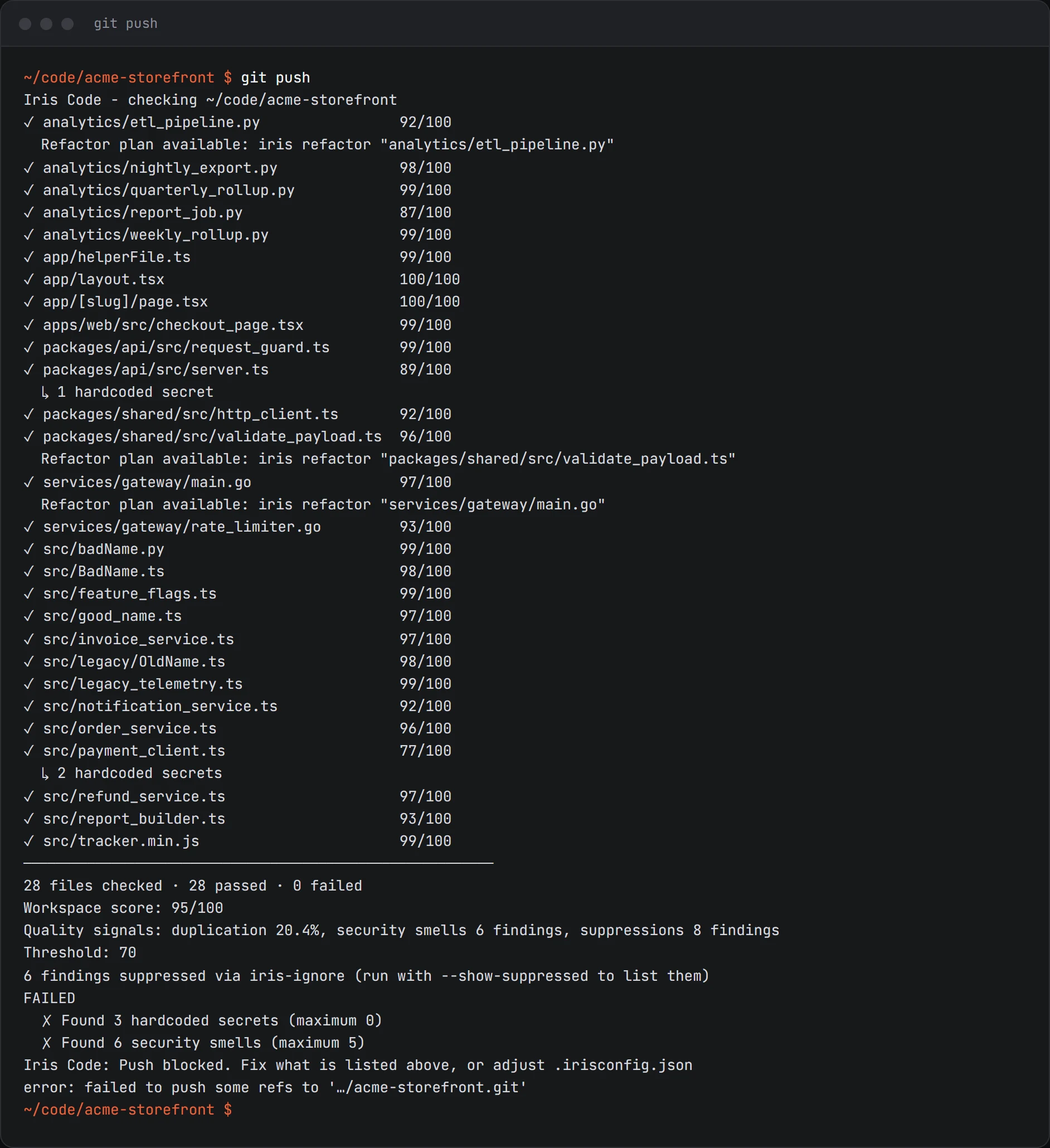
Refactor commands
iris refactor <file> prints a refactor plan for one file: detected project conventions, safe mechanical fixes and ranked structural suggestions. --format json prints the full plan. iris refactor <file> --verify compares the file with git HEAD, so the comparison includes your uncommitted changes, and reports an advisory verdict that never changes the exit code. A comparison against the snapshot taken at planning time belongs to the MCP server (iris_refactor_plan and iris_verify_refactor) or the editor, which keep that snapshot for their session.
iris hook agent install --verify-on-finish adds optional finish verification for Claude Code, Codex, GitHub Copilot, Gemini CLI and Cursor. It verifies a refactor against a plan the agent requested from a running Iris Code MCP server, and asks for at most refactor.maxCorrections corrections. Windsurf has no finish hook.
Install
npm install -g @iris-code/cliOr download a self-contained binary from iriscode.co/download - no Node.js required.
Updating
npm install -g does not auto-update - if a command is missing (unknown command: sbom) or the CLI crashes on exit, you're on an old global install:
npm install -g @iris-code/cli@latest
iris --version
Authentication
iris auth login     # sign in via browser or paste your licence token
iris auth status    # check what's stored
iris auth logout    # clear credentials
Credentials are stored in ~/.iris/credentials. The CLI also reads:
IRIS_LICENCE_TOKENenv var - licence key (takes priority over credentials file)
Commands
| Command | Free/Pro | What it does |
|---|---|---|
| iris init [path] | Free | Set the project up: preset, config, agent rules, and the pre-push hook where the licence allows it |
| iris check <file> | Free | Health score for a single file |
| iris check <directory> | Pro | Health score across all files |
| iris check --staged | Pro | Check only git-staged files |
| iris check --changed | Pro | Check staged, unstaged, and untracked files, and list which files import each one |
| iris fix --safe <file> | Free | Preview and remove only the findings that are provably safe to remove |
| iris graph --focus <file> | Free | One file's imports and importers, including files that reach it through its package (Go, C# using, Java wildcards), from the same resolver as the Code Map Graph |
| iris graph | Pro | The whole import graph: files, packages, cycles and every unresolved import, as text or --format json |
| iris secrets [path] | Free | Scan for hardcoded API keys, tokens, passwords |
| iris secrets --history | Pro | Scan the git commit history for secrets, including removed ones |
| iris security [path] | Free | Scan for security smells (eval usage, SQL injection, weak hashing, etc.) |
| iris install [package...] | Free | Check packages before they install; with none, check the whole project (lockfile and install scripts) first |
| iris remove <package...> | Free | Remove packages with the project's package manager (also uninstall, rm) |
| iris deps [path] | Pro | Dependency versions + CVE vulnerabilities |
| iris cve [path] | Pro | Fail only on CVEs at or above a severity threshold |
| iris sbom [path] | Pro | Export a CycloneDX 1.5 SBOM (offline) |
| iris todos [path] | Pro | List all TODO / FIXME / HACK comments |
| iris gate [path] | Pro | Run enforcement gate, show pass/fail per rule |
| iris slack <setup\|test\|manifest> | Free | Post gate and check results to a Slack channel |
| iris rules [path] | Free | Write this project's rules into the files your coding agents read |
| iris mcp | Free + Pro | Run Iris Code as an MCP server so AI agents can query your real rules |
| iris report [path] | Free | An HTML report, or a shareable PNG/SVG card or PDF (see Share your code health) |
| iris hook agent install | Free | Check packages before a coding agent installs them (Claude Code, Cursor, Codex, GitHub Copilot, Gemini CLI, Windsurf) |
| iris hook agent uninstall | Free | Remove the package guard's agent hooks |
| iris hook git install | Pro | Install pre-push git hook |
| iris hook git uninstall | Pro | Remove pre-push git hook |
| iris hook git status | Free | Check if git hook is installed |
| iris hook build install | Pro | Install pre-build hook |
| iris hook build uninstall | Pro | Remove pre-build hook |
| iris hook build status | Free | Check if build hook is installed |
| iris hook verify | Pro | In CI, warn when a pushed commit has no Team pre-push hook receipt. Always exits 0 |
| iris config init | Free | Generate .irisconfig.json with a preset |
| iris config validate | Free | Validate an existing .irisconfig.json |
iris auth login/status/logout (all Free) are covered in Authentication above.
MCP - give your AI agent your real rules
npx -y @iris-code/mcpRegister that as an MCP server in Claude Code, Cursor, Windsurf or Copilot agent mode and your agent can ask Iris Code what your project actually enforces, instead of guessing:
{
  "command": "npx",
  "args": ["-y", "@iris-code/mcp"]
}
Naming no folder is deliberate: Iris Code asks your editor which project is open, so one user-level
entry covers every workspace. --root <directory> pins the boundary instead, which skips that
question - pin per project, or every workspace is answered about the one folder you named.
| Tool | Tier | What the agent gets |
|---|---|---|
| iris_check | Free (one file) | Findings with rule ids, lines and severities |
| iris_config | Free | The project's resolved thresholds and gate limits |
| iris_fix_safe | Free (one file) | Preview and apply only provably safe fixes |
| iris_explain | Pro | Findings plus the rule detail behind them |
| iris_gate | Pro | Would this push pass, and which files fail which rule |
| iris_check_dependency | Pro | OSV advisories with severity and fix version |
Folder and workspace scope are Pro on iris_check and iris_fix_safe. Pro tools stay listed and
describe themselves as Pro rather than hiding.
iris_fix_safe previews by default and applies only the change set a previous preview returned a
token for, refusing per finding anything it cannot prove safe. Paths are confined to --root
including symlinks, secret values are always masked, and there is no shell-execution tool.
Editors that bundle the Iris Code language-server binary can use iris-lsp --mcp instead, with no Node
install.
iris check
iris check app/server.ts          # single file (Free)
iris check .                      # full directory scan (Pro)
iris check . --min-score 80       # custom threshold
iris check . --format json        # machine-readable output
iris check . --format json --output iris-report.json
iris check . --verbose            # show individual warnings per file
iris check --staged               # check staged files only (Pro)
iris check --changed              # check staged, unstaged, and untracked files (Pro)
iris check . --show-suppressed    # list findings hidden by iris-ignore comments
With --changed or --staged, each file also says how many files import it (for example 3 files import this (1 through its package)), so you know what else a change can reach. It is information only and never changes the exit code; the same field is in --format json.
Findings suppressed inline with // iris-ignore: <rule> -- <reason> comments are excluded from scores and output; suppressed counts always appear in the summary, and --show-suppressed lists each suppressed finding with its reason.
iris secrets
Scans JS, TS, Vue, Svelte, Go, Python, Ruby, Rails, executable ERB tags, C# source and project files, Java source and .properties files, and Rust for hardcoded secrets - API keys, tokens, passwords. Free, no licence required.
iris secrets .
iris secrets src/ --format json
iris secrets --history (Pro)
The working tree can be clean while a secret still sits in an old commit. --history walks the git commit history and runs every file version introduced by each commit - committed .env files included - through the same detection.
iris secrets --history              # scan the last 50 commits
iris secrets --history --depth 500  # scan the last 500 commits
iris secrets --history --depth 0    # scan the full history
Findings are deduplicated per distinct secret, values are always masked, and each shows its first and last sighting, the commits and files involved, and whether it is still in HEAD or historical-only. Content introduced by merge commits is included. Coverage limits are always disclosed: a depth cap, a size cap ("depth reduced"), or a shallow clone (run git fetch --unshallow for full coverage) each produce an explicit note instead of implying a clean full history. Exits 1 if any secret is found in the scanned range. Everything runs against local git - nothing leaves the machine.
iris security
Scans JS, TS, Vue, Svelte, Go, and Python for 9 security smell categories: eval/exec usage, SQL built by string concatenation, insecure RNG, ReDoS-prone regex, hardcoded localhost URLs, disabled TLS verification, debug flags, weak hashing (MD5/SHA1), and open redirects. Free, no licence required.
iris security .
iris security src/ --format json
iris deps
Checks all dependencies against current registry versions and the OSV.dev vulnerability database for CVEs. Installed versions are resolved from your lockfile (package-lock.json, pnpm-lock.yaml, yarn.lock, poetry.lock, Pipfile.lock, Gemfile.lock, packages.lock.json) when present, and advisories are filtered to the version you actually have. Monorepo workspace members are scanned and deduplicated; internal workspace: deps are excluded. RubyGems and Cargo lockfiles include transitive dependencies; NuGet projects without packages.lock.json, and Maven or Gradle projects, scan declared dependencies only.
iris deps .
iris deps . --no-cache     # bypass the 24-hour local cache
iris deps . --verbose      # show individual CVE titles and URLs
The first run asks consent before contacting registries - only package names and versions are sent, never your code. The answer persists in ~/.iris/preferences.json; use --revoke-network to disable lookups and --allow-network to re-enable.
Advisory lookups need no token or rate-limit setup. Each advisory shows a confidence label (fix-available, direct, transitive, manual-review) and the fixed-in version; records without a verifiable id or severity are skipped and the skip count is disclosed. Dependencies whose lookup errored are marked "not checked", never assumed clean.
iris cve
Same scan and cache as iris deps, but fails only on CVEs at or above a severity threshold - built for CI gates that should block on serious findings without going red over low-severity noise.
iris cve .                        # fail on high or critical (default)
iris cve . --severity critical    # fail only on critical
iris cve . --severity low         # fail on any known CVE
iris cve . --format json --output cve-report.json
iris sbom
Exports a CycloneDX 1.5 SBOM (Software Bill of Materials) covering npm, Go, Python, RubyGems, NuGet, Cargo, and Maven/Gradle dependencies. Fully offline - no network calls, no consent needed.
iris sbom .                       # writes iris-sbom.json
iris sbom . --output sbom.json
iris sbom . --stdout
Each component carries its name, exact installed version, package URL (purl), and direct/dev scope. If a cached iris deps scan exists, known vulnerabilities are folded in as CycloneDX vulnerabilities entries cross-referenced by purl.
iris gate
Runs the full enforcement gate and shows each configured rule's threshold vs actual value:
iris gate .
iris gate . --format json
iris gate . --show-suppressed     # list findings hidden by iris-ignore comments
Gate rules are read from .irisconfig.json: minHealthScore, gateMaxSecrets, gateMaxComplexity, gateMaxFileLength, gateMaxSmellsPerFile, gateMaxSecuritySmells, gateMaxSuppressions (per-file cap on iris-ignore suppressions). Setting ignoreSuppressions: true makes all iris-ignore comments inert so suppressed findings count as live.
Slack notifications
Set one environment variable and the commands you already run post their results to a Slack channel:
export IRIS_SLACK_WEBHOOK="https://hooks.slack.com/services/..."
iris gate .        # posts when the gate fails; silent when it passes
That is the whole integration - no flag, no pipeline change. The message is built and sent from the machine running the command, so it never passes through Iris Code servers.
iris slack setup      # guided: validates the URL, sends a test message, prints the CI secret to add
iris slack test       # send a test message using IRIS_SLACK_WEBHOOK
iris slack manifest   # one-click link to create a pre-configured Slack app

iris gate . --slack-on always   # also report passing runs
iris gate . --slack-dry-run     # print the payload, post nothing
IRIS_SLACK_WEBHOOK="https://hooks.slack.com/services/..." iris gate .- The payload contains file paths, scores, rule names and counts. Never source, finding text, or secret values (masked or otherwise).
- Only
https://hooks.slack.com/...URLs are accepted. The webhook is environment-only: it is never read from.irisconfig.jsonor accepted as a command-line argument, because both can expose a posting credential. - A failed post writes one warning to stderr and never changes the exit code.
iris rules
Writes this project's enforcement rules into the file your coding agent reads, generated from .irisconfig.json. Free. Nothing is analysed, nothing is sent anywhere, and no AI model is involved.
iris rules                                   # AGENTS.md
iris rules --target claude                   # CLAUDE.md
iris rules --target agents --target claude   # both, for a team running two agents
iris rules --all                             # all four files
iris rules --refresh                         # update the ones this repo already has
iris rules --dry-run                         # print it instead of writing
| Flag | Description |
|---|---|
| --target <name> | agents (default), claude, cursor, copilot. Repeatable |
| --all | Write all four target files |
| --refresh | Update only the files that already exist; create none |
| --dry-run | Print what would be written |
| --yes, -y | Do not ask before updating an existing file |
Claude Code reads only CLAUDE.md, while AGENTS.md is the file Codex, Cursor and Copilot read, so a project running two agents needs both. The block sits between iris-rules markers, so regenerating updates only Iris Code's own section and never your text. Exit code 0 on success, 2 if a file was refused.
iris report
Generates a dark-themed standalone HTML report by default. --format png|svg|pdf exports the shareable card or PDF instead; see Share your code health.
iris report .
iris report . --output reports/iris-$(date +%Y%m%d).html
iris hook
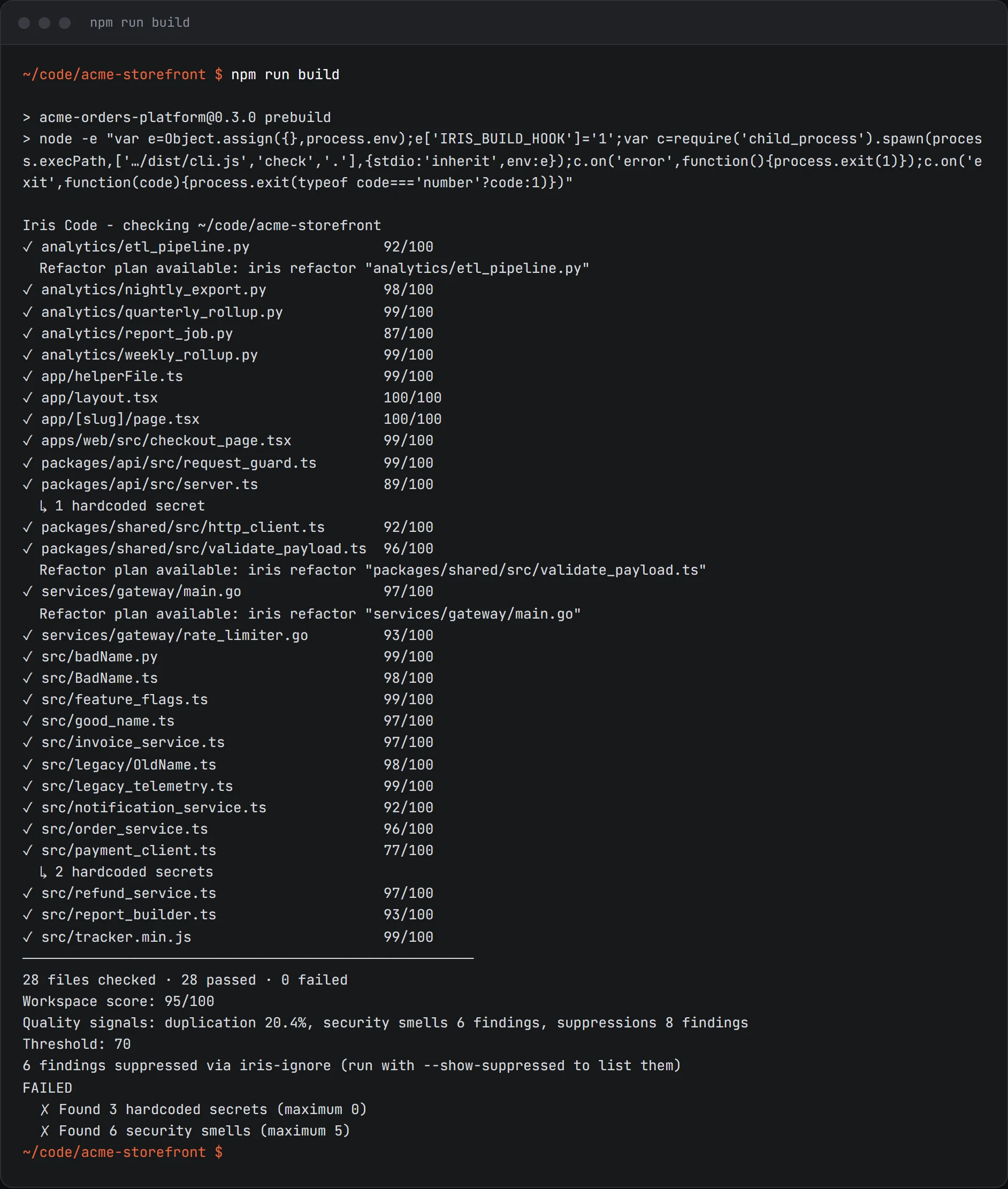
Manages pre-push and pre-build hooks - same as the VS Code commands but scriptable.
iris hook git install              # install pre-push hook
iris hook git status               # check status (Free)
iris hook build install            # install pre-build hook (Node: package.json prebuild; Go/Python: Makefile)
iris hook build status             # check status (Free)
iris hook verify --format github    # CI: warn on a pushed commit with no Team hook receipt (Pro, always exits 0)
After installing a hook, Iris Code needs your licence token at push/build time. Set IRIS_LICENCE_TOKEN in your shell profile or run iris auth login once to store it in ~/.iris/credentials.
iris config
iris config init        # interactive preset selection, writes .irisconfig.json
iris config validate    # validate an existing .irisconfig.json
Configuration
Iris Code reads .irisconfig.json from the target directory upwards. Preset configs are free; custom thresholds and gate limits require Pro. iris config init interactively offers legacy, balanced, or strict - security and typescript are also valid presetId values but must be set by hand.
{
  "presetId": "balanced",         // free - "legacy" | "balanced" | "strict" | "security" | "typescript"
  "minHealthScore": 75,           // pro - gate threshold
  "gateMaxSecrets": 0,            // pro - fail if any secrets found
  "gateMaxComplexity": 15,        // pro - fail if any file exceeds this
  "gateMaxFileLength": 400,       // pro - fail if any file exceeds this line count
  "gateMaxSmellsPerFile": 10,     // pro - fail if any file exceeds this total smell count
  "gateMaxSecuritySmells": 0,     // pro - fail if any security smells found
  "ignoreFiles": ["**/*.test.ts", "**/generated/**"]
}
Exit codes
check, secrets, security, deps, cve, and gate fail the run when they find something (cve only at or above its --severity threshold):
| Code | Meaning |
|------|---------|
| 0 | Pass / no findings |
| 1 | Fail / findings found |
| 2 | Invalid arguments or config error |
| 3 | Your Iris Code licence could not be verified, so a Pro command did not run |
Exit 3 means the command did not run, not that it found something. A Pro command whose
licence cannot be checked - the licence server unreachable, or rate limiting a repeated caller -
fails closed rather than reporting success it has not earned, because a gate that silently
skips lets a build through that should have been blocked. A user with no Pro licence at all is a
different case: that is known, so those commands skip and exit 0 and your build stays green.
config validate exits 1 only on schema/value errors (warnings still exit 0). todos, report, sbom, hook, and config init are informational or one-shot - they exit 0 on success and 2 on bad arguments or an unwritable path; they never exit 1 based on what they find.
--output must resolve inside the current working directory on every command that writes a file (check, deps, cve, report, sbom). A path that escapes it - ../report.html, or an absolute path elsewhere - exits 2 and writes nothing, so a templated path in CI cannot drop files outside the project being scanned.
GitHub Actions
- uses: actions/setup-node@v4
  with:
    node-version: '20'

- run: npm install -g @iris-code/cli

- name: Iris Code enforcement gate
  run: iris gate . --format github
  env:
    IRIS_LICENCE_TOKEN: ${{ secrets.IRIS_LICENCE_TOKEN }}
--format github emits inline PR annotations on failing lines and a pass/fail summary table, and exits 1 to block the merge when a rule fails. Requires Pro.
To keep a machine-readable report as a build artifact regardless of pass/fail, add:
- name: Save JSON report
  if: always()
  run: iris gate . --format json --output iris-report.json
  env:
    IRIS_LICENCE_TOKEN: ${{ secrets.IRIS_LICENCE_TOKEN }}

- uses: actions/upload-artifact@v4
  if: always()
  with:
    name: iris-report
    path: iris-report.json
Full documentation and workflow variants at iriscode.co/docs/enforcement/github-actions.
VS Code extension
The Iris Code VS Code extension provides the same analysis interactively in your editor - sidebar UI, inline diagnostics, hook management, and a dependency audit panel. Install it from the VS Code Marketplace.
Share your code health
iris report exports the same shareable report as the editors: a portrait or landscape card (--format png or svg, --size portrait|landscape) or a PDF (--format pdf). HTML stays the default format. A fresh whole-directory report requires Pro; Free exports its saved first project review.
iris report --format pdf                         # every page this scan supports
iris report --format pdf --pages summary         # a one-page overview
iris report --format pdf --pages standard,trend  # Summary plus the pages you list
Page ids: summary,findings,areas,standard,trend,dependencies. Summary is always included. A page you list that the scan cannot provide is left out with a one-line note on stderr, and the exit code is unchanged. --pages applies to PDF only. Cards never include file paths, source code, secret values or package names; --include-paths adds relative file names to the PDF.