
@isaacchacko/basalt
v0.1.19
Published
Markdown in, a website that reads like a good math textbook out: remarks in the margin, one viewer for every picture, saves that land in place.

Maintainers
 isaacchacko
Readme

TL;DR: Basalt turns markdown into a website that reads like a good math textbook. Think Quartz, with remarks in the margin, better media, and hot reloading that keeps your place.
It's set the way Edward Tufte sets his books, with each remark beside the line it's about. See it at basalt.isaacchacko.com, which is built with it.
What's different
- Remarks in the margin: sidenotes, margin notes and previews of linked notes, each beside its line
- One viewer for every picture: images, diagrams and pages open full screen, to zoom, pan and swipe through
- Its own PDF reader, with selectable text and the browser's viewer a click away
- Screenshots that follow the theme: save
shot.dark.pngbesideshot.png, and the page shows whichever matches its theme - Pictures written as text: graphs, flowcharts, sequences and math
- Live components in a still page, swapped in as you edit them
- Live from Neovim:
<leader>Bserves the site, and the page shows what you type before you save (the plugin) - Saves that land in place, in under a second, keeping your scroll
- Built for agents: the dev server says when a change is live, and what broke
- Cards for where it's shared: each note's own picture for links to it, in the site's colours
- Light pages, about a third of Quartz's weight, and measured against it on a real site
In Neovim
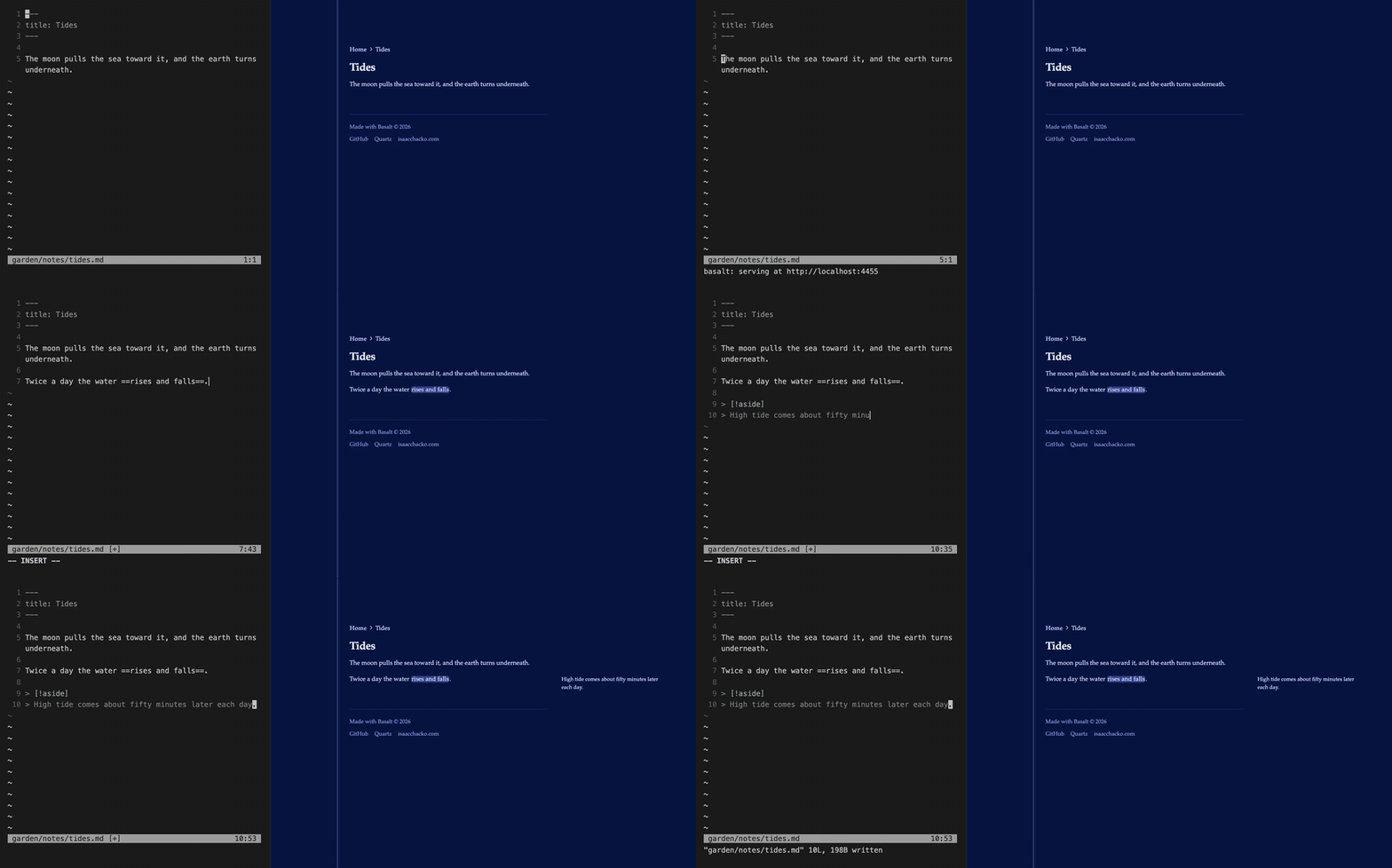
{ "isaacchacko/basalt", ft = "markdown", keys = { "<leader>B" }, cmd = { "BasaltToggle", "BasaltOpen" }, opts = {} } -- lazy.nvim<leader>B serves the garden the note is in, and the page shows what you type as you type it; :w still writes the file, and nothing else does. See In Neovim.
Start
Basalt needs Node 22.18 or later.
npm install --global @isaacchacko/basalt
basalt new my-garden --title "My garden"
basalt dev my-garden        # http://localhost:4321
basalt build my-garden      # the site, in my-garden/.basalt/astro/dist
Your notes go in my-garden/notes/. BASALT.md (or basalt help) covers the site's files, the CLI, what you can write, and the edit loop for agents.
To work on Basalt itself, clone it, npm install, and run node bin/basalt.mjs in place of basalt.
To release it, run npm version patch (or minor), then git push --follow-tags. The tag publishes it to npm from GitHub Actions (publish.yml), through npm's trusted publishing, with no token and no passkey.
Made from
Astro, with markdown from Quartz's plugins and margins after Tufte CSS. Set in Palatino, or any font a site chooses. Graphs by graph, PDFs by pdf.js, math by KaTeX. MIT licensed.