npm package discovery and stats viewer.

Discover Tips

  • General search

    [free text search, go nuts!]

  • Package details

    pkg:[package-name]

  • User packages

    @[username]

Sponsor

Optimize Toolset

I’ve always been into building performant and accessible sites, but lately I’ve been taking it extremely seriously. So much so that I’ve been building a tool to help me optimize and monitor the sites that I build to make sure that I’m making an attempt to offer the best experience to those who visit them. If you’re into performant, accessible and SEO friendly sites, you might like it too! You can check it out at Optimize Toolset.

About

Hi, 👋, I’m Ryan Hefner  and I built this site for me, and you! The goal of this site was to provide an easy way for me to check the stats on my npm packages, both for prioritizing issues and updates, and to give me a little kick in the pants to keep up on stuff.

As I was building it, I realized that I was actually using the tool to build the tool, and figured I might as well put this out there and hopefully others will find it to be a fast and useful way to search and browse npm packages as I have.

If you’re interested in other things I’m working on, follow me on Twitter or check out the open source projects I’ve been publishing on GitHub.

I am also working on a Twitter bot for this site to tweet the most popular, newest, random packages from npm. Please follow that account now and it will start sending out packages soon–ish.

Open Software & Tools

This site wouldn’t be possible without the immense generosity and tireless efforts from the people who make contributions to the world and share their work via open source initiatives. Thank you 🙏

© 2025 – Pkg Stats / Ryan Hefner

@itchenliang/picture-rollup-bilibili-plugin

v1.0.11

Published

轻快图片管理系统的插件:使用rollup开发的哔哩哔哩图片上传插件

Readme

使用rollup打包的轻快图片管理系统的七牛云对象存储桶插件

注意: bilibili图片上传插件目前只支持jpg,png格式图片。

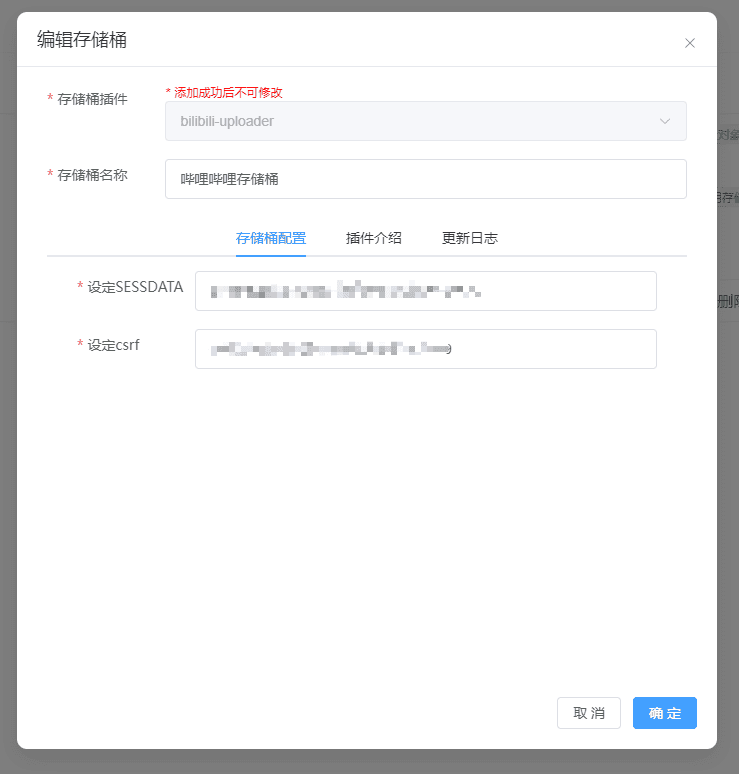
字段说明

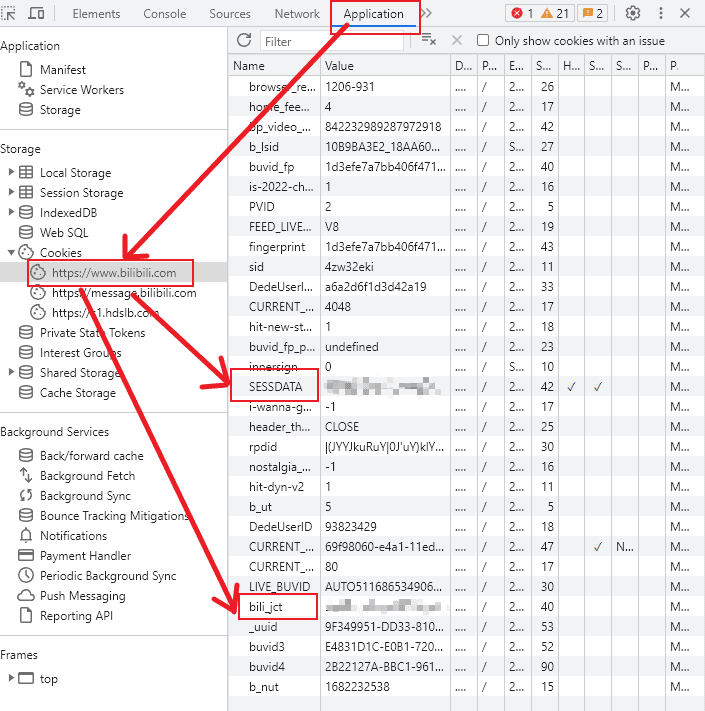
设定SESSDATA: 此字段必填,为哔哩哔哩的网站中Cookie中的SESSDATA
设定csrf: 此字段必填,,为哔哩哔哩的网站中Cookie中的bli_jct

配置说明

  1. 注册并登录到哔哩哔哩
  2. F12打开控制台,并找到Application -> Cookies
  3. 找到SESSDATAbli_jct
  • SESSDATA: 即上面配置项中的SESSDATA
  • bli_jct: 即上面配置项中的csrf

配置预览

配置预览

解决B站防盗链(403)

B站开启了防盗链,利用的是HTTP的Referer属性做判断。如果Referer是他白名单之外的网站,就会返回403

  • 全站图片使用: 在html的head标签中设置如下标志,那么全站资源引用都不会携带referrer
    <meta name="referrer" content="no-referrer">
  • 新窗口打开: 主要设置rel="noreferrer",使用window.open打开的话是会默认携带referrer的,第一次还是会403
    <a rel="noreferrer" target="_blank"></a>

图片样式

例如原图:

https://i0.hdslb.com/bfs/album/a18a3f8d666dc19c3216bef39a092e0e60c90eb4.png

规定高宽,质量压缩:

https://i0.hdslb.com/bfs/album/a18a3f8d666dc19c3216bef39a092e0e60c90eb4.png@14w_14h_1e_1c

| Type | Url | | :-- | :-- | | 原图 | baseURL/1.jpg | | 原分辨率,质量压缩 | baseURL/1.jpg@1e_1c.jpg | | 规定宽,高度自适应,质量压缩 | baseURL/1.jpg@104w_1e_1c.jpg | | 规定高,宽度自适应,质量压缩 | baseURL/1.jpg@104h_1e_1c.jpg | | 规定高宽,质量压缩 | baseURL/1.jpg@104w_104h_1e_1c.jpg | | 原分辨率,webp格式(占用最小) | baseURL/1.jpg@104w_104h_1e_1c.webp | | 规定高度,webp格式(占用最小) | baseURL/1.jpg@104w_104h_1e_1c.webp |

格式:(图像原链接)@(\d+[whsepqoc]_?)*(.(|webp|gif|png|jpg|jpeg))?$

  • w:[1, 9223372036854775807] (width,图像宽度)
  • h:[1, 9223372036854775807] (height,图像高度)
  • s:[1, 9223372036854775807] (作用未知)
  • e:[0,2] (resize,0:保留比例取其小,1:保留比例取其大,2:不保留原比例,不与c混用)
  • p:[1,1000] (默认100,放大倍数,不与c混用)
  • q:[1,100] (quality,默认75,图像质量)
  • o:[0,1] (作用未知)
  • c:[0,1] (clip,0:默认,1:裁剪)
  • webp,png,jpeg,gif(不加则保留原格式)
  • 不区分大小写,相同的参数后面覆盖前面
  • 计算后的实际wh不能大于原wh,否则wh参数失效