
@jamolpe88/dsh-stickynotes
v0.1.1
Published
Local-first sticky notes for DeepSeek Harness Desktop: focus-mode WYSIWYG HTML, images, audio, YouTube/X/Vimeo/Spotify/TikTok/Instagram embeds, pinning, drag reordering and an opt-in agent tool. No AI, no transcription, no model downloads.

Maintainers
 jamolpe88
Readme
Sticky Notes for DeepSeek Harness Desktop






Local-first sticky notes inside DeepSeek Harness Desktop: a sidebar panel, a full board, a focus-mode editor that is the note itself, rich HTML, images, audio, files and inline social embeds. No AI, no transcription, no model downloads, no cloud account.
Español → README.es.md
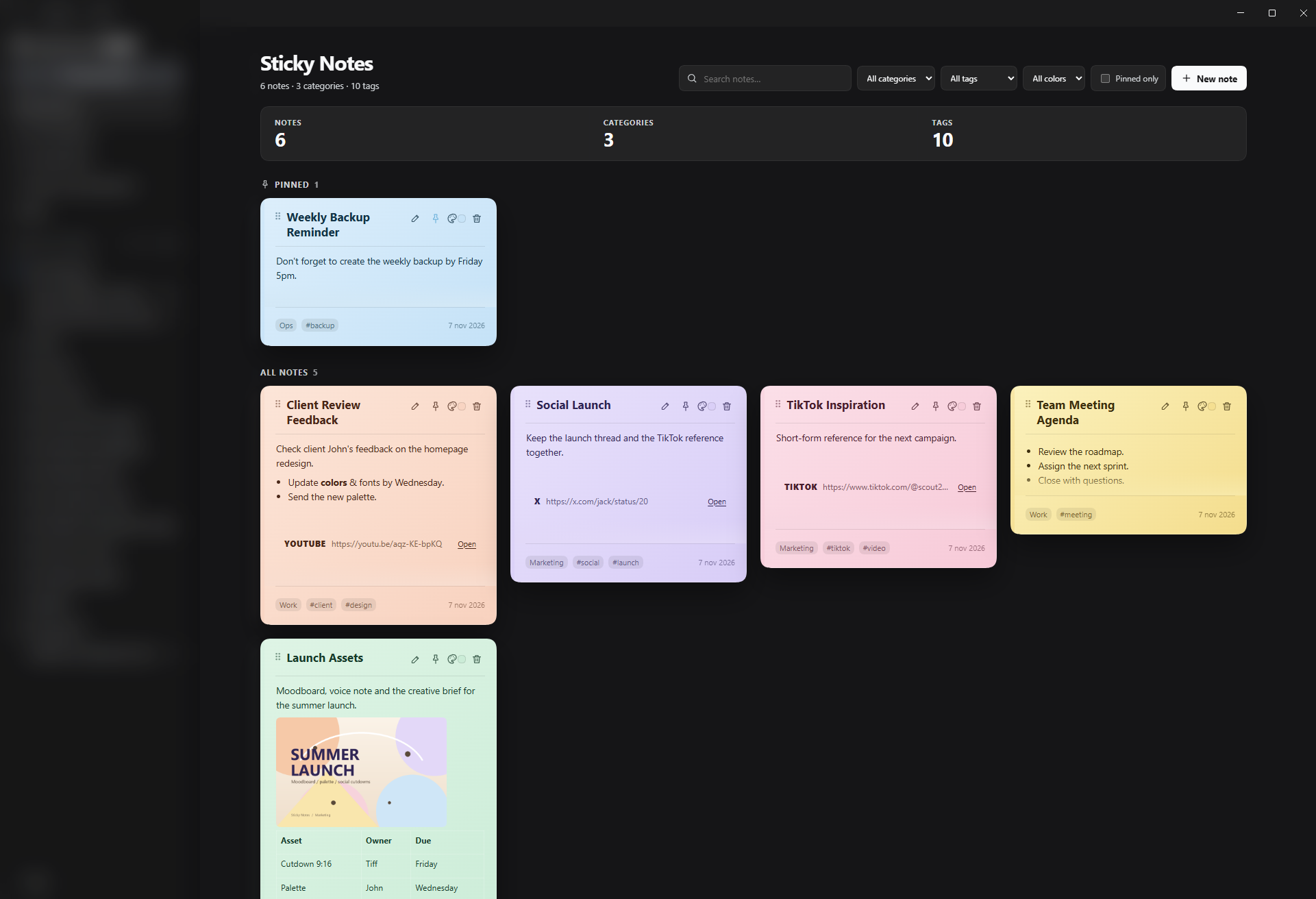
The board is a real DSH panel: cards are previews, the sidebar entry belongs to the shell and every note lives under your DSH home.
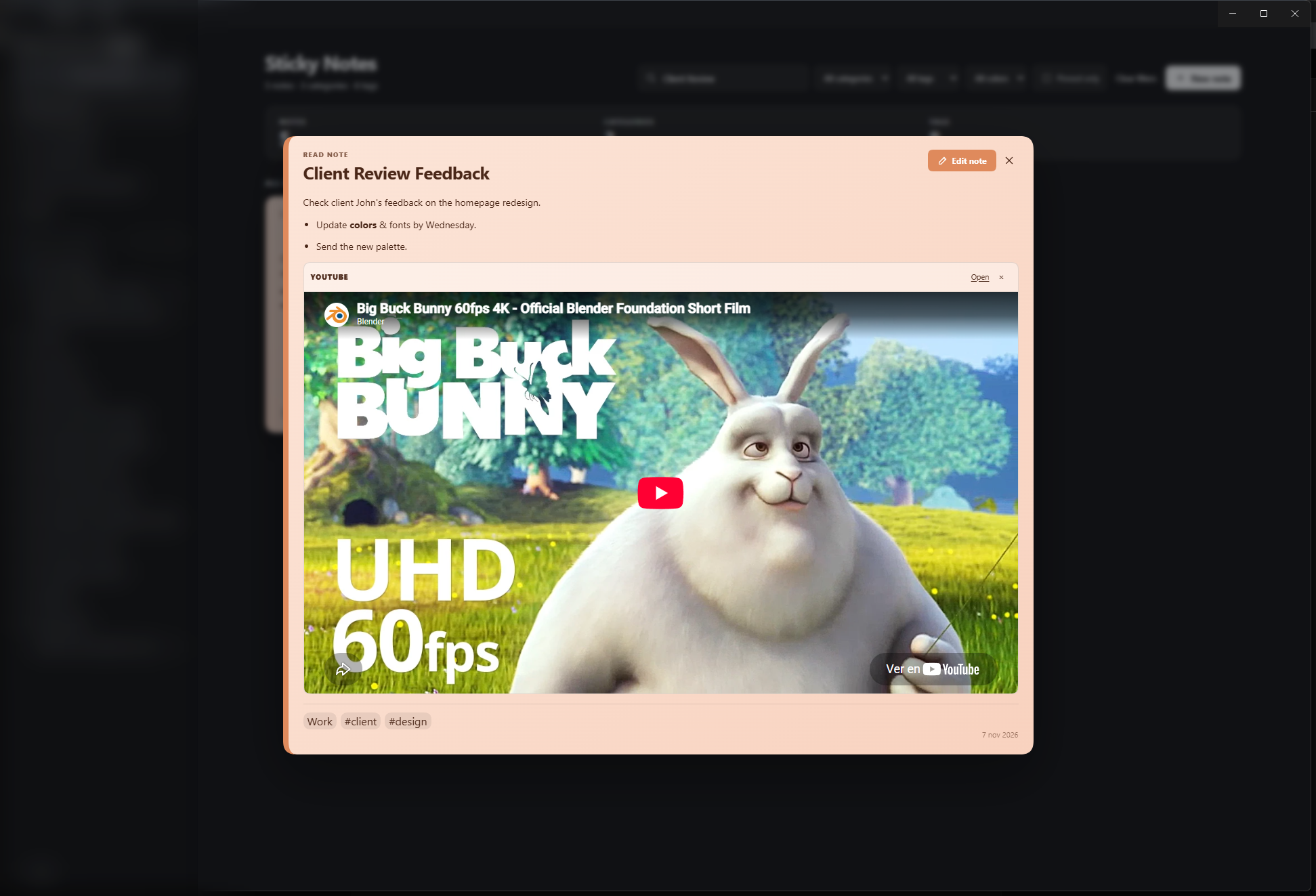
Clicking a card opens read mode by default. The YouTube player is embedded through a local HTTP wrapper, so the player receives a valid referrer and plays inside the note. Cards with media open wide enough to watch it — no scrollbar inside the video.
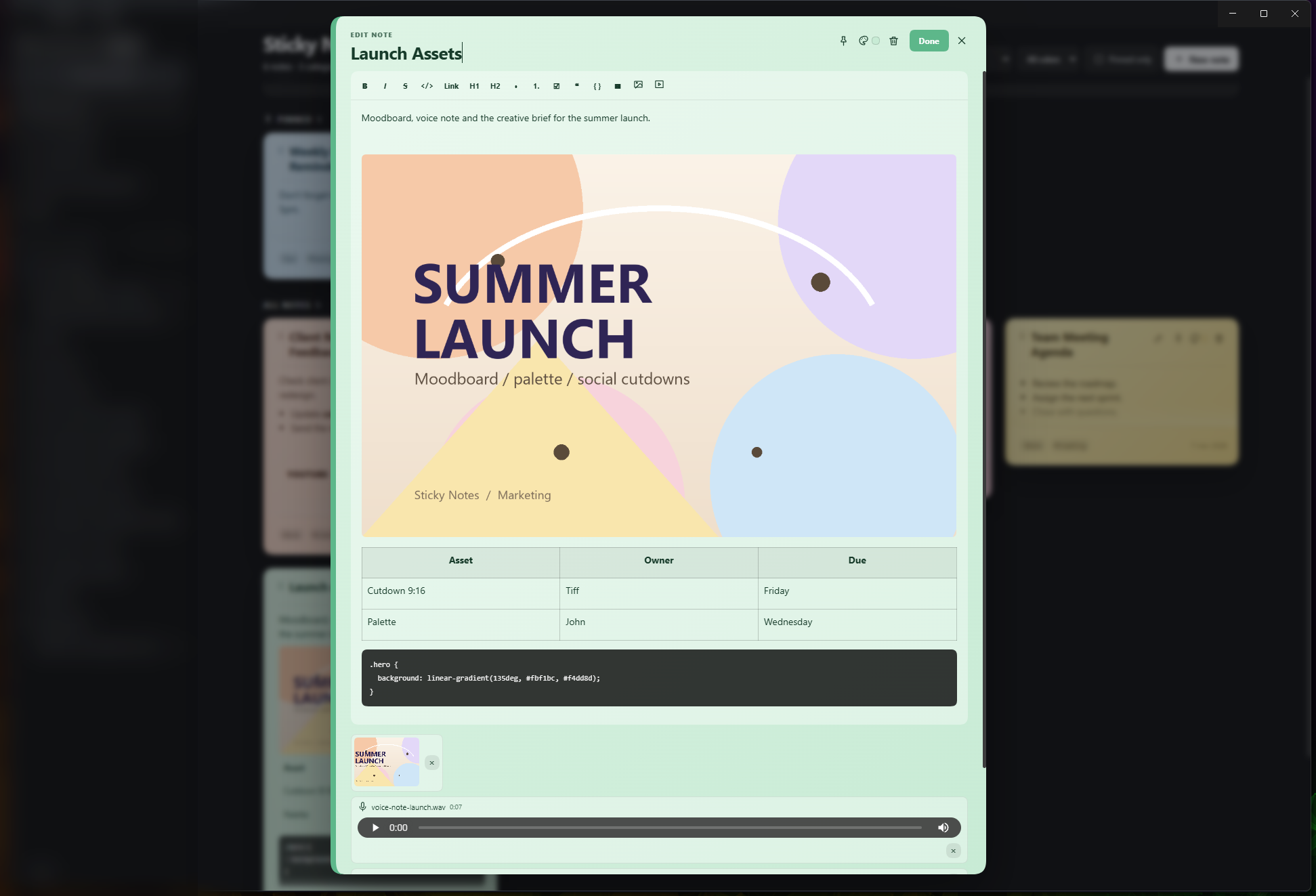
Creating a note or pressing the pencil opens that same card in edit mode: toolbar, inline images, tables, code blocks, category and tags, all inside the note. There is no separate form or modal with fields.
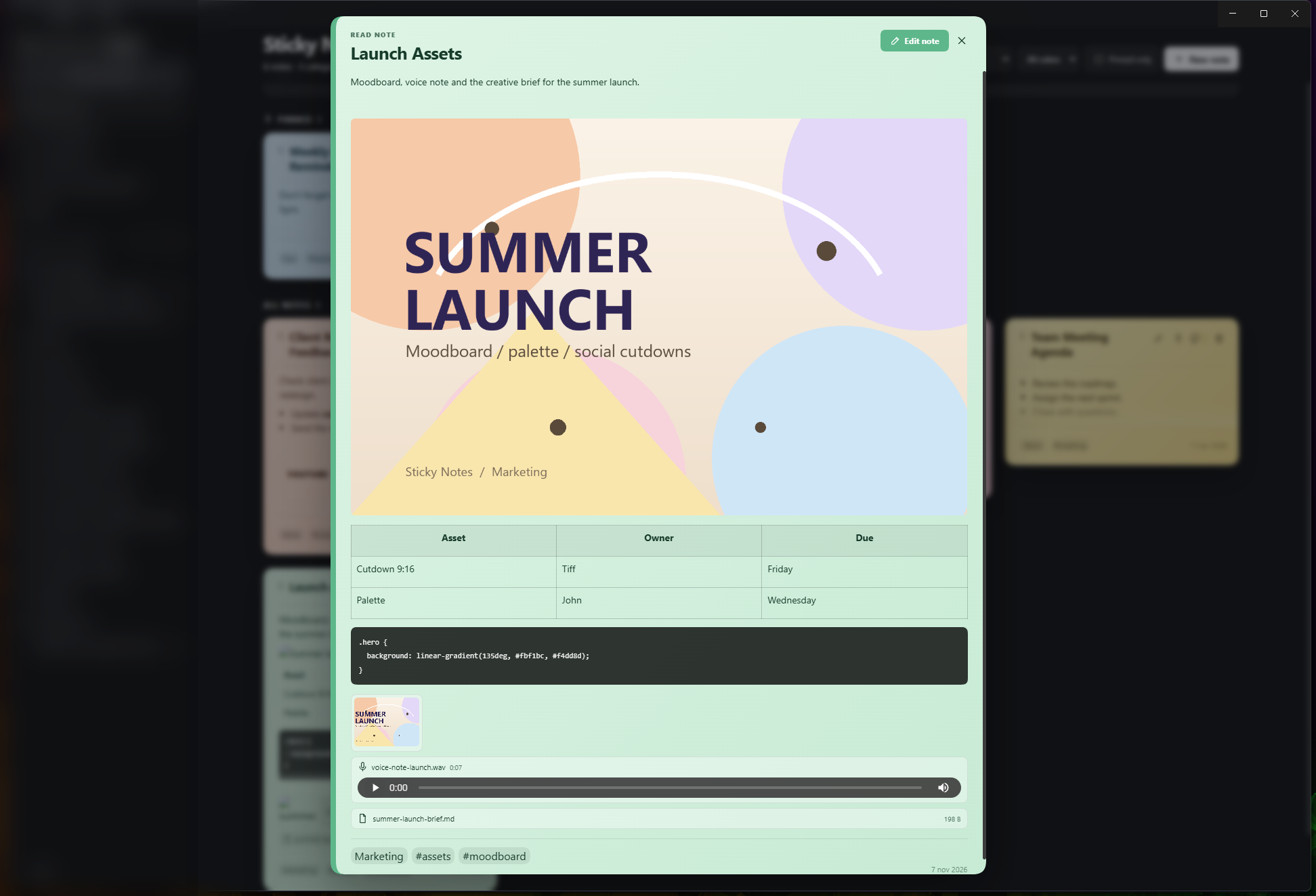
Attachments live in a rail at the bottom of the card: image thumbnails, an audio player and file chips. Content-heavy notes open proportionally taller so everything fits without nested scrolling.
Why Sticky Notes
- One place for the small things you need while editing or reviewing a session: reminders, client feedback, snippets, links, screenshots, voice notes.
- Inline editing without a form. The grid card is a preview; clicking it expands the card into focus mode. The title, body, toolbar, attachments and metadata all stay inside the note.
- Rich content that survives. HTML is the canonical format, so tables, task lists, code blocks, links and images are not flattened by a Markdown round-trip.
- Local by default. Notes and attachments are files under your DSH home; no account, no telemetry, no sync, no AI.
Features
| Area | What you get |
|---|---|
| Board | Sidebar entry, full central panel, pinned section, stats, search, category/tag/color filters |
| Notes | Inline title and body, 8 pastel colors, pin/unpin, delete with undo |
| Drag | Live “Moving …” banner, subtle target outline, a highlighted drop side and an orientation-aware insertion bar: top/bottom for vertical moves, left/right for horizontal moves |
| Editor | TipTap WYSIWYG: bold, italic, strike, inline code, links, headings, lists, task lists, quotes, tables, images and code blocks with a language picker and syntax colors (highlight.js, PowerShell included) |
| Focus mode | Click a card to read it; press the pencil to edit. The card opens sized to its content — compact for text, wide for video, tall for image/table/code notes — with a toolbar, attachments and metadata; Esc, Done or backdrop close it |
| Card height | Cards grow up to ~640 px so most notes are readable without opening; only very long content needs focus mode |
| Attachments | Images, audio recorded with the microphone or uploaded, and generic files; served from local disk |
| Embeds | YouTube, X, Vimeo, Spotify, TikTok, Instagram and generic link cards, inline in the note |
| Organization | One category and up to 12 tags per note; search across title, text, tags, category and attachments |
| Storage | notes.json, atomic writes, .bak, daily backups, attachment files |
| Agent | Optional sticky_notes tool, disabled by default; Markdown in and out |
| UI | English interface, light and dark themes, keyboard focus handling, reduced motion |
No AI, no transcription
The plugin does not ship or call a speech-to-text model. Audio is recorded, stored and played back;
there is no transcript, no SenseVoice, no Whisper, no model download and no per-use AI cost. The optional
sticky_notes agent tool only exposes notes to the DSH agent you already use; it does not call a model by
itself and is disabled by default.
Embeds are the only third-party surface
Notes and attachments are local. A YouTube/X/Vimeo/Spotify/TikTok/Instagram embed loads content from that
provider when you open the note in focus mode; the board itself only shows static cards. This means network
requests and whatever tracking the provider performs. Set embedMode to click to require a click, or
off to keep only the link card. The provider may also block its player (CSP, embedding disabled, removed
post); the card with Open remains usable.
Requirements
- DSH Desktop
>= 0.2.1-rc.3, profiledesktop; tested on0.2.2-rc.1, Windows 11. - Node
>= 22. - Microphone permission only if you record audio.
- Internet only for social embeds and for opening external links.
Install
From npm (desktop profile):
dsh plugin --profile desktop add @jamolpe88/dsh-stickynotesDSH Web uses the same package and the web profile:
dsh plugin --profile web add @jamolpe88/dsh-stickynotesFrom GitHub:
dsh plugin --profile desktop add github:JaMoLpE88/dsh-stickynotesFrom a local checkout while developing:
dsh plugin --profile desktop add C:\path\to\dsh-stickynotesRestart DSH Desktop after installing. The entry appears in the sidebar as Sticky Notes / Notas adhesivas.
Quick start
- Open Sticky Notes in the sidebar.
- Click New note. The card opens directly in edit mode with the title focused.
- Type a title, then
Enterto move to the body. Use the toolbar for formatting, tables, code and images. - Add a category, tags, an image, an audio note or a file from the card.
- Paste a YouTube, X, Vimeo, Spotify, TikTok or Instagram URL with Insert video or post to add an inline embed.
- Click Done to return to read mode, then close with
Escor the close button. - On the board, click a card to read it; press its pencil to edit directly.
- Drag cards by their grip to reorder; use the pin to keep one at the top; use the palette to change its color.
Keyboard
| Key | Action |
|---|---|
| Enter in the title | Move focus to the body |
| Esc in focus mode | Close the note and save |
| Tab / Shift+Tab | Move through focus-mode controls; focus is trapped while open |
| Ctrl/Cmd+V in the editor | Paste text, HTML or an image from the clipboard |
| Backspace on an empty tag input | Remove the last tag |
Data and privacy
Default data directory:
%USERPROFILE%\.dsh\stickynotes\        (Windows)
$DSH_HOME/stickynotes/                 (when DSH_HOME is set)
| Path | Contents |
|---|---|
| notes.json | Notes, HTML content, metadata, revisions and settings |
| notes.json.bak | Previous version before the last write |
| backups/notes-YYYY-MM-DD.json | Daily backups, rotated |
| attachments/<uuid>.<ext> | Images, audio and files |
- Writes are atomic (temp file + rename) and permissions are restricted to your user.
- Attachment URLs include an unguessable token; they are served by the local DSH server.
- No account, cloud sync, telemetry or AI service is used.
- The optional agent tool can put note content into the session log when enabled. Leave
agentTools:
false
if you do not want that. - To remove everything, close DSH and delete the
stickynotesfolder.
Agent tool
agentTools is false by default. When enabled, the agent gets a sticky_notes tool with list,
search, get, create, update, append, delete and restore. get returns Markdown derived from
the stored HTML; create/update/append accept Markdown and the Host converts and sanitizes it.
- id: stickynotes
  name: '@jamolpe88/dsh-stickynotes'
  config:
    agentTools: true
Configuration
| Key | Default | Meaning |
|---|---|---|
| agentTools | false | Register the sticky_notes agent tool |
| embedMode | full | full loads the embed on focus, click waits for a click, off shows only the card |
| storageDir | '' | Absolute alternate data directory; empty uses $DSH_HOME/stickynotes |
| maxAttachmentMb | 25 | Maximum size per attachment |
| maxTotalMb | 1024 | Maximum total attachment storage |
| maxNotes | 2000 | Maximum number of live notes |
| backupCount | 7 | Daily backups to keep |
Architecture
- Host half (
lib/index.js,lib/host/*): HTTP routes under/api/dsh-stickynotes,NoteStore, attachment storage, HTML sanitization, Markdown derivation, optional agent tool. - Client half (
src/client/*, built intolib/client.js): awindow.__ModuleLoader__bundle that registerssidebar.panellistandmain, renders React from the DSH module table, and mounts TipTap only in focus mode. - Storage is local JSON plus attachment files; see docs/architecture.md.
Compatibility and limitations
- Windows 11 tested; macOS/Linux not verified.
- Embeds depend on the provider, network and the shell CSP. A blocked embed leaves the link card.
- The board shows static embed cards; full iframes/scripts load only in focus mode.
- No full trash view (delete has undo), no export/import yet, no priority, no free canvas.
- No AI, transcription, speech-to-text, model download or cloud speech provider.
- The current version is a first release; back up
stickynotesif you keep important notes.
Development
npm install
npm run build      # builds lib/client.js with esbuild
npm test           # node --test
npm run check      # build + tests
Install the local checkout with dsh plugin --profile desktop add C:\path\to\dsh-stickynotes or
plugin_manager install_bundle.
Troubleshooting
- The panel says “Could not load notes”: check
GET /api/dsh-stickynotes/healthfrom the same authenticated DSH page, and confirm the plugin row is active. - An embed is blank or says configuration error: the provider refused its player; use Open or
change
embedMode. - Microphone does not record: grant microphone permission to DSH; uploading an audio file still works.
- A note seems missing: check the category/tag/color/pinned filters, then
notes.json.bakor the daily backups. - Corrupt
notes.json: the Host preserves it asnotes.corrupt-<timestamp>.jsonand starts empty; restore a backup if needed.
Roadmap
- Full trash view with restore and purge.
- Export/import ZIP with attachments.
- Priority, reminders and due dates.
- Compact right-sidebar tab and/or free corkboard mode.
- Markdown import/paste and HTML/Markdown export from the UI.
- Custom visual blocks (callouts, columns).
License
Apache-2.0. See LICENSE and NOTICE. TipTap/ProseMirror, sanitize-html,
turndown, marked, DOMPurify and lowlight retain their own licenses.