
@jasoftware/jas-context-menu
v3.1.2
Published
Polymer element to replace right click functionality based on code developed by Andrew Bone <[email protected]>

Maintainers
 jasoftware
Readme
< l2t-context-menu >
Have a quick look at the Component page
Here is a demo where l2t-context-menu is used with the Polymer Starter Kit to use right hand click anywhere within the purple/blue header.
What is it?
"l2t-context-menu" is a polymer element to replace the standard right click 'context menu'.
Here's a sneak peak of the demo page

Getting started
Install with bower
First you need bower, see their site for details
bower install --save l2t-context-menuAttributes
| Attribute Name | Functionality | Default | |----------------|-------------|-------------| | parentclass* | Sting for storing class name of which classes should be listened too | "default" |
required*
Styling
Custom property | Description | Default
----------------|-------------|----------
--context-background-color | Background color of the menu. | #fff
--context-text-color | Text color within the menu. | #333
--context-link-text-color | Text color and on hover background color for linksFor text within 'A' tags. | #0066aa
--context-horizontal-rule-color | Color of 'HR' tags. | #bcbcbc
How to use
If you are looking at useing other peoples custom polymer elements I am going to guess you have some idea what's going on already. If not have a look at the polymer site.
Put a link to l2t-context-menu in your header, it should look something like.
<link rel="import" href="bower_components/l2t-context-menu/l2t-context-menu.html">Now that you have imported it you can get to using it on your page
<body>
<div class="specialcase">
Text with a special context menu
</div>
Text with a standard context menu
<l2t-context-menu parentclass="specialcase" class="orange">
  <li><b>First List Items:</b></li>
  <paper-item><a href="#">Item 1</a></paper-item>
  <paper-item><a href="#">Item 2</a></paper-item>
  <hr>
  <li><b>More Items:</b></li>
  <paper-item><a href="#">Item 3</a></paper-item>
</l2t-context-menu>
</body>
And just like that you have a custom menu, right click within the div and the custom menu opens right click anywhere else and you get the standard one.
To theme the menu from above we would have added a little something into our head tags
<style is="custom-style">
  .orange {
    --context-background-color: #F57C00;
    --context-text-color: #FFF;
    --context-link-text-color: #FFE0B2;
  }
</style>
Let's have a little look at what we just made:
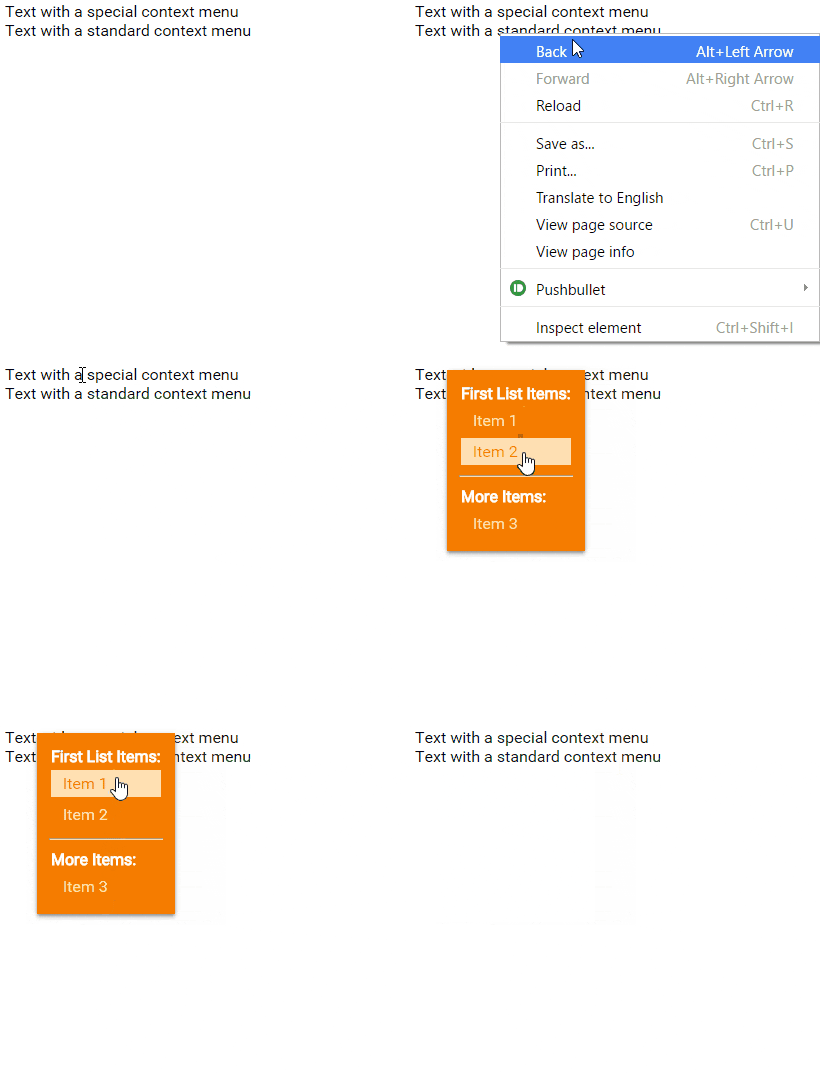
These are, of course, optional extras to make the menu match your own app a little better.
Long press
On mobile you can simulate a right click by long pressing, which is great and means this menu is inherently compatible. Unfortunately if you long press text the select box takes president over the right click functionality, meaning the menu does not appear.
The easy way around this is to have some CSS to dissable text select such as
  .nonselectable{
    -webkit-touch-callout: none;
    -webkit-user-select: none;
    -khtml-user-select: none;
    -moz-user-select: none;
    -ms-user-select: none;
    user-select: none;
  }